<?xml version="1.0" encoding="utf-8"?>
<feed xmlns="http://www.w3.org/2005/Atom">
  <title>XLCS Real Estate Full Cost Calculation Template</title>
  <icon>https://www.gravatar.com/avatar/d7b14b3af874854d6559154660d45610</icon>
  <subtitle>XLCS Full Cost Calculation Template v9 Update</subtitle>
  <link href="https://cskits.com/atom.xml" rel="self"/>
  
  <link href="https://cskits.com/"/>
  <updated>2026-08-14T08:24:04.977Z</updated>
  <id>https://cskits.com/</id>
  
  <author>
    <name>CsKits.Com</name>
    <email>admin@fdc.sd</email>
  </author>
  
  <generator uri="https://hexo.io/">Hexo</generator>
  
  <entry>
    <title>XLCS Core Edition V10 Download</title>
    <link href="https://cskits.com/posts/e79f33ad.html"/>
    <id>https://cskits.com/posts/e79f33ad.html</id>
    <published>2026-07-18T00:08:08.000Z</published>
    <updated>2026-08-14T08:24:04.977Z</updated>
    
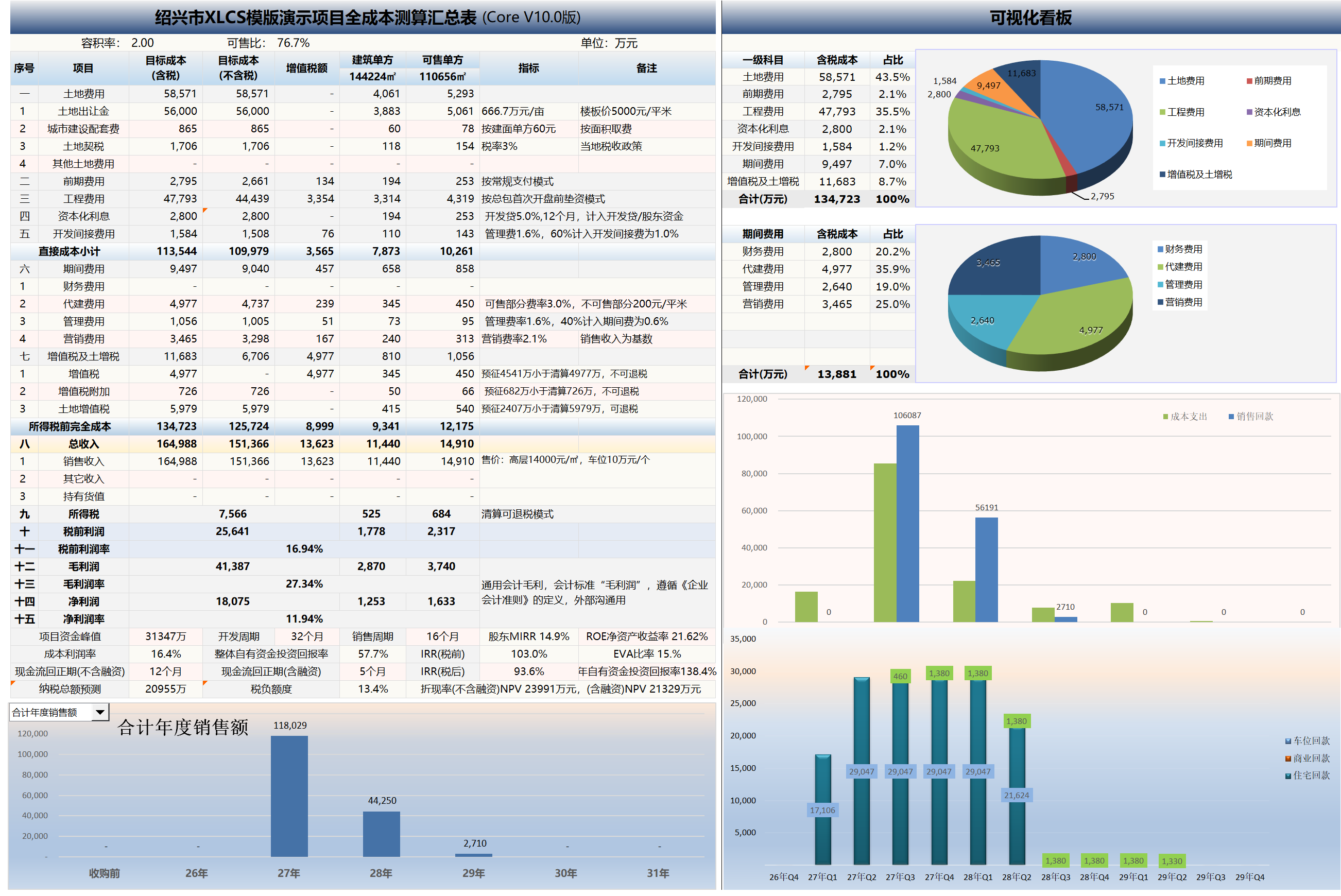
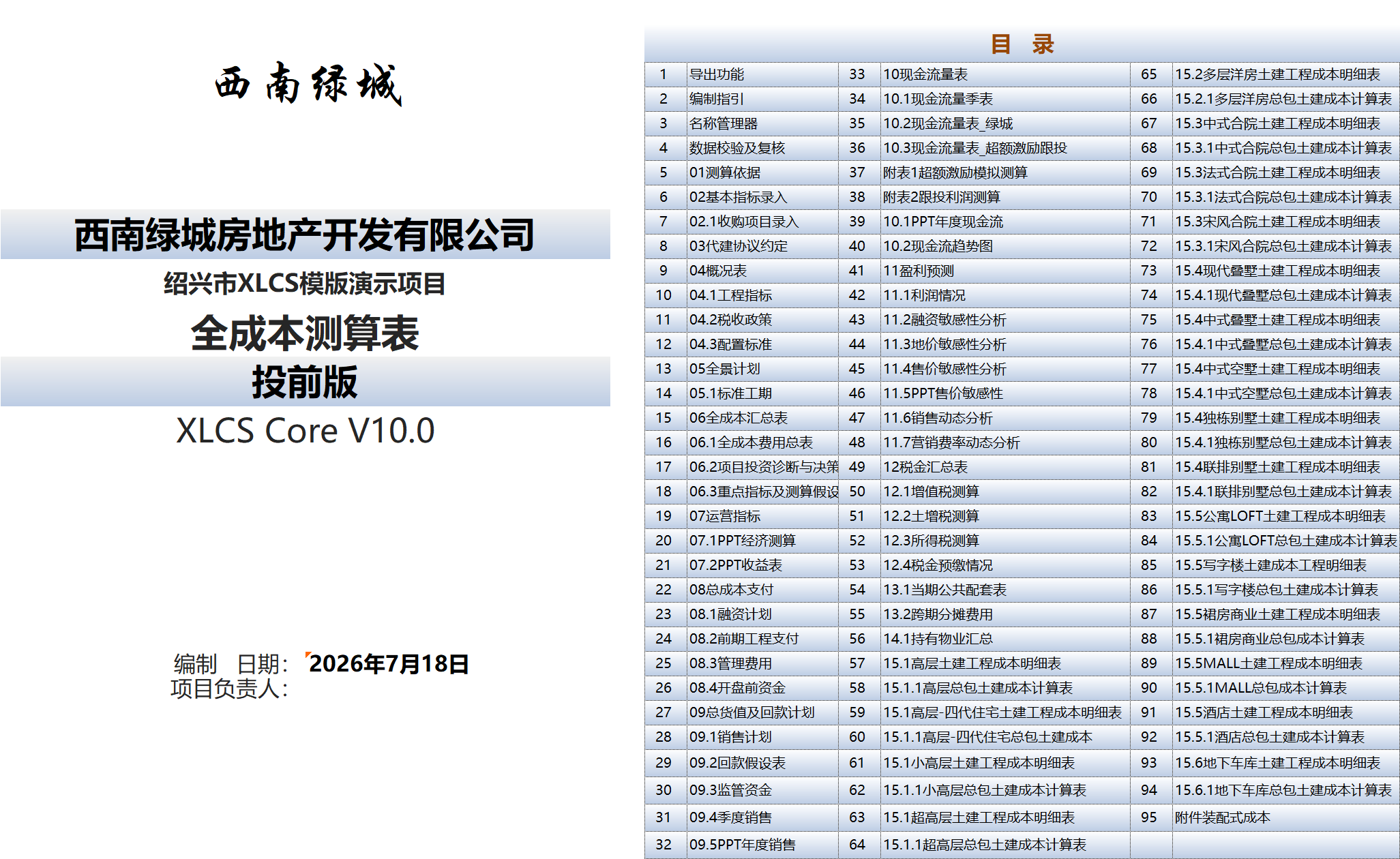
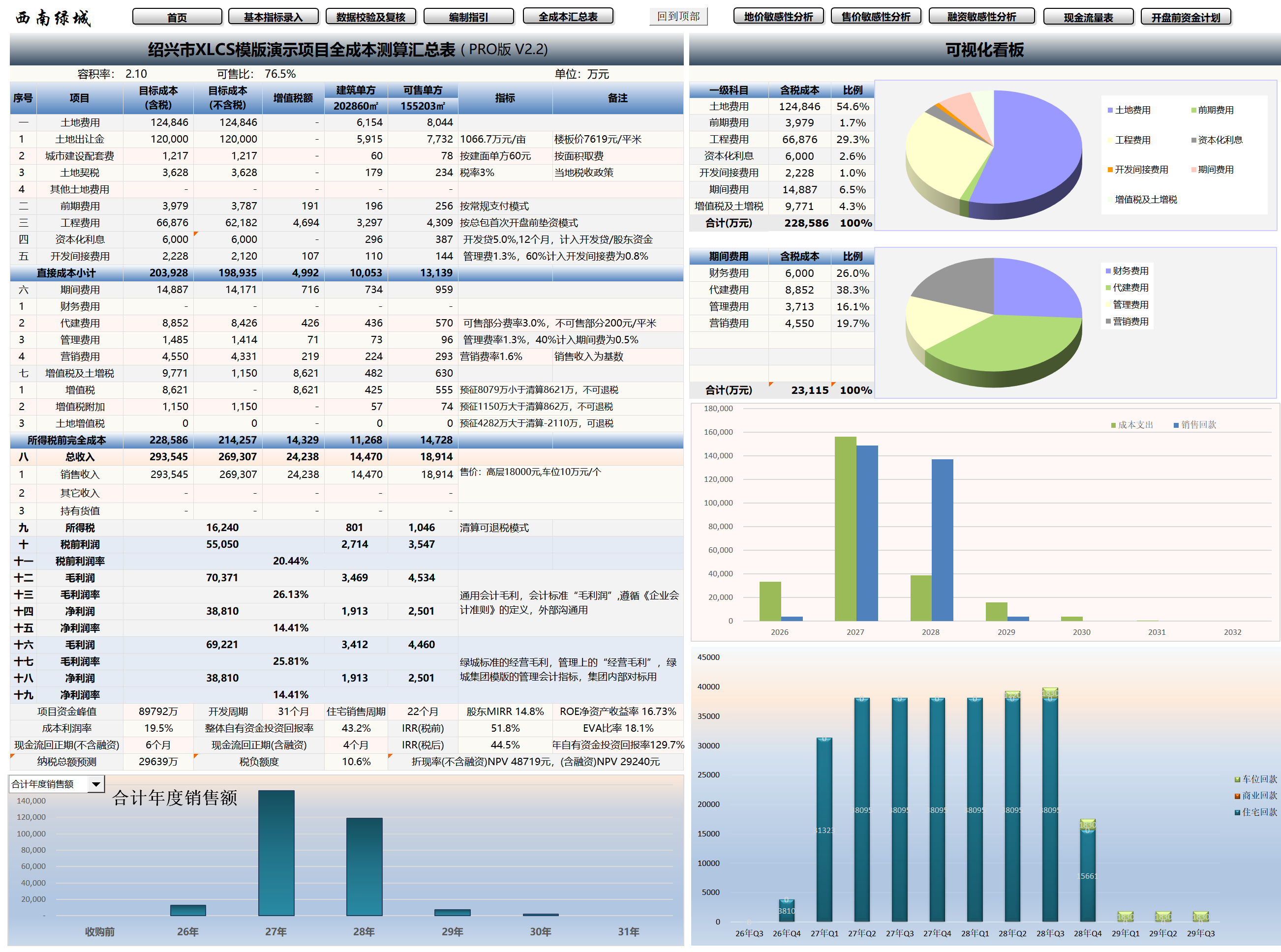
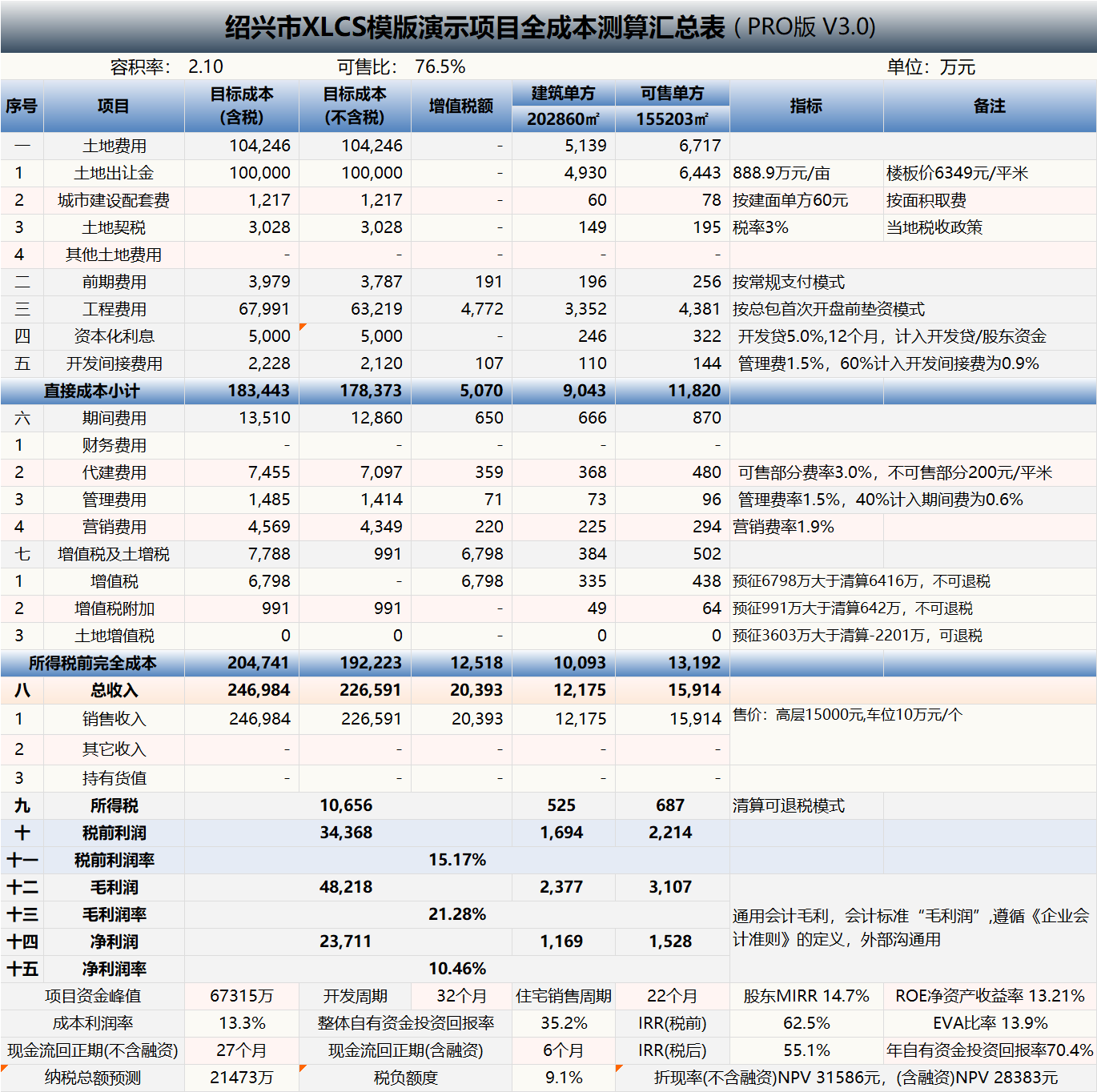
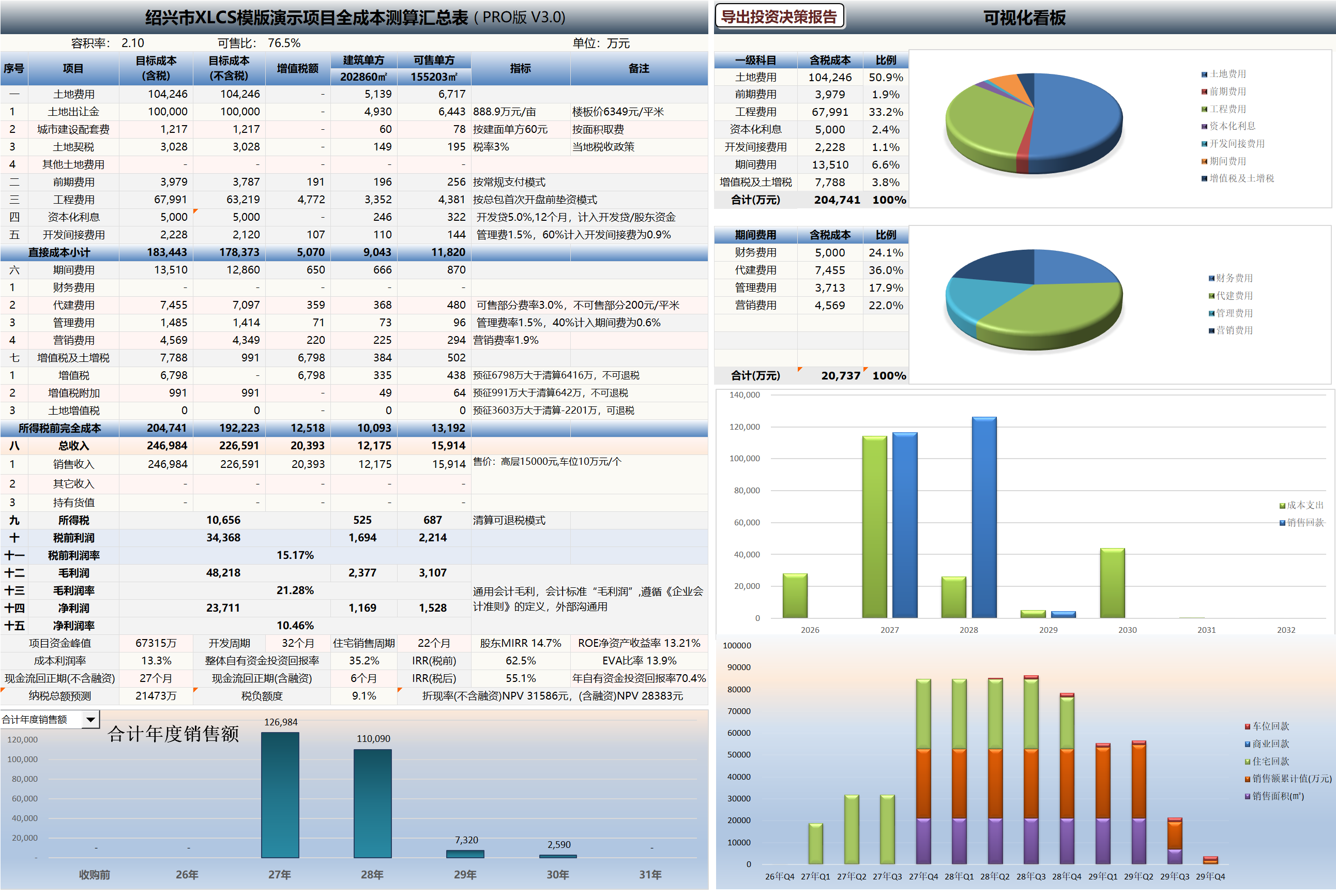
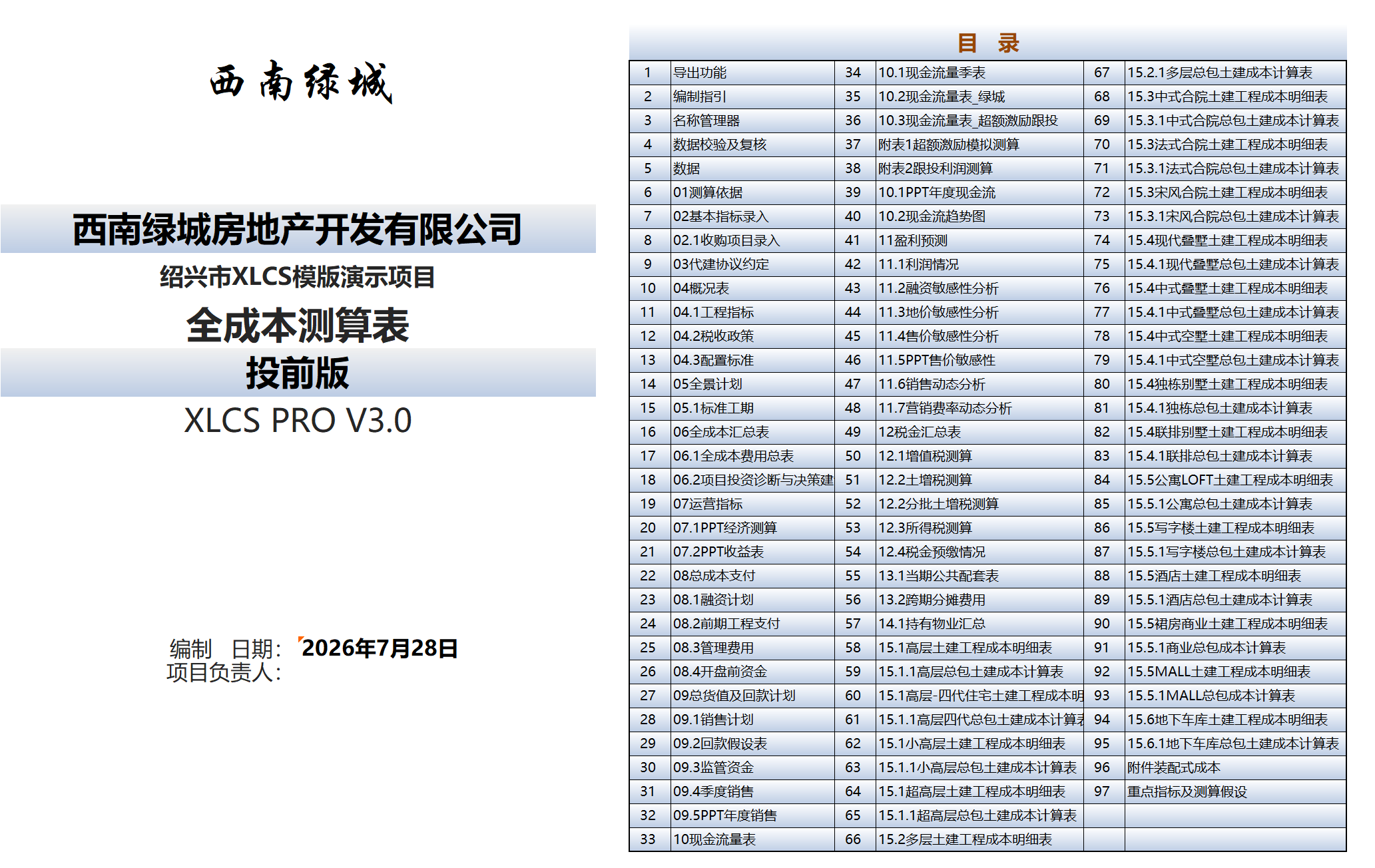
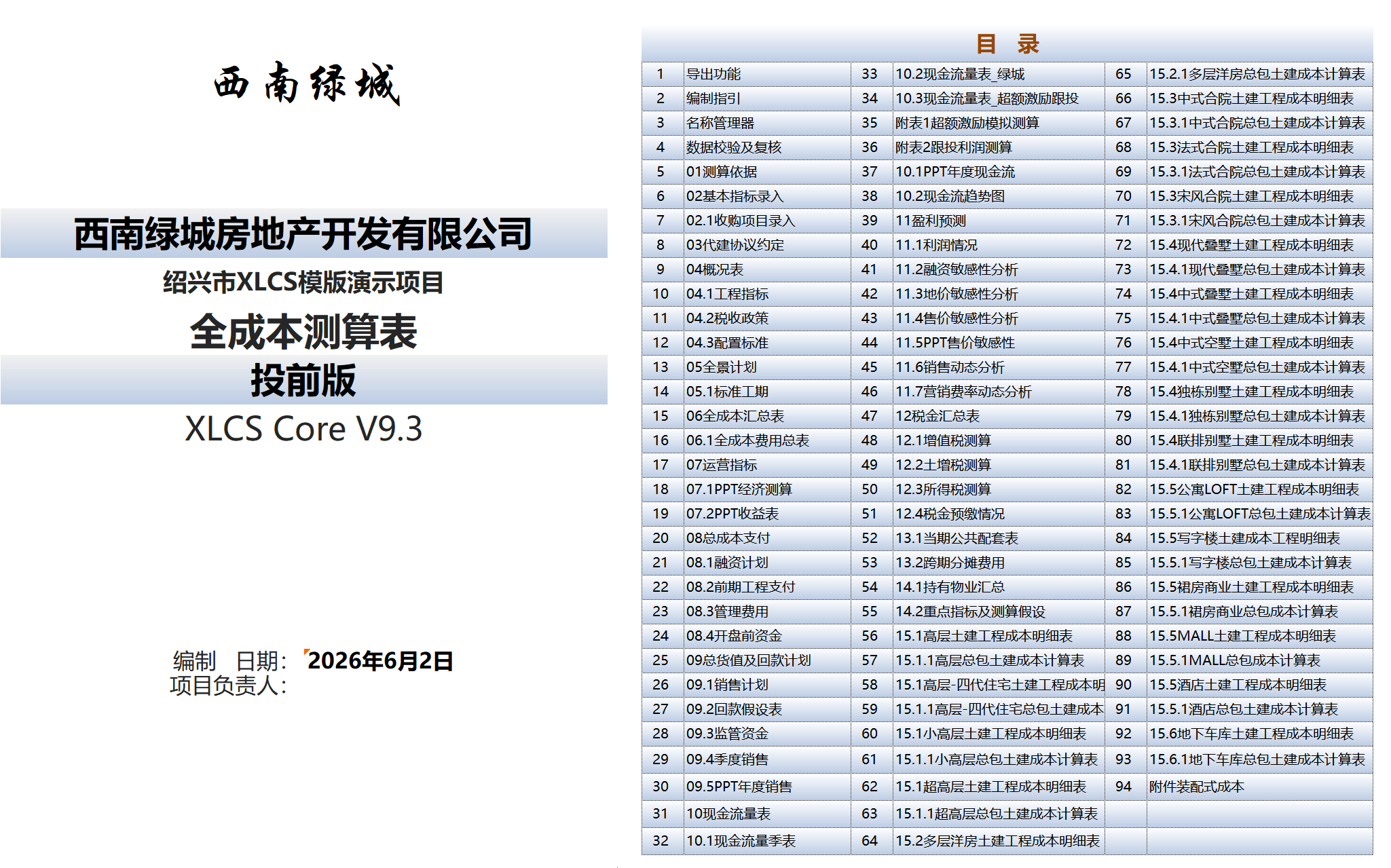
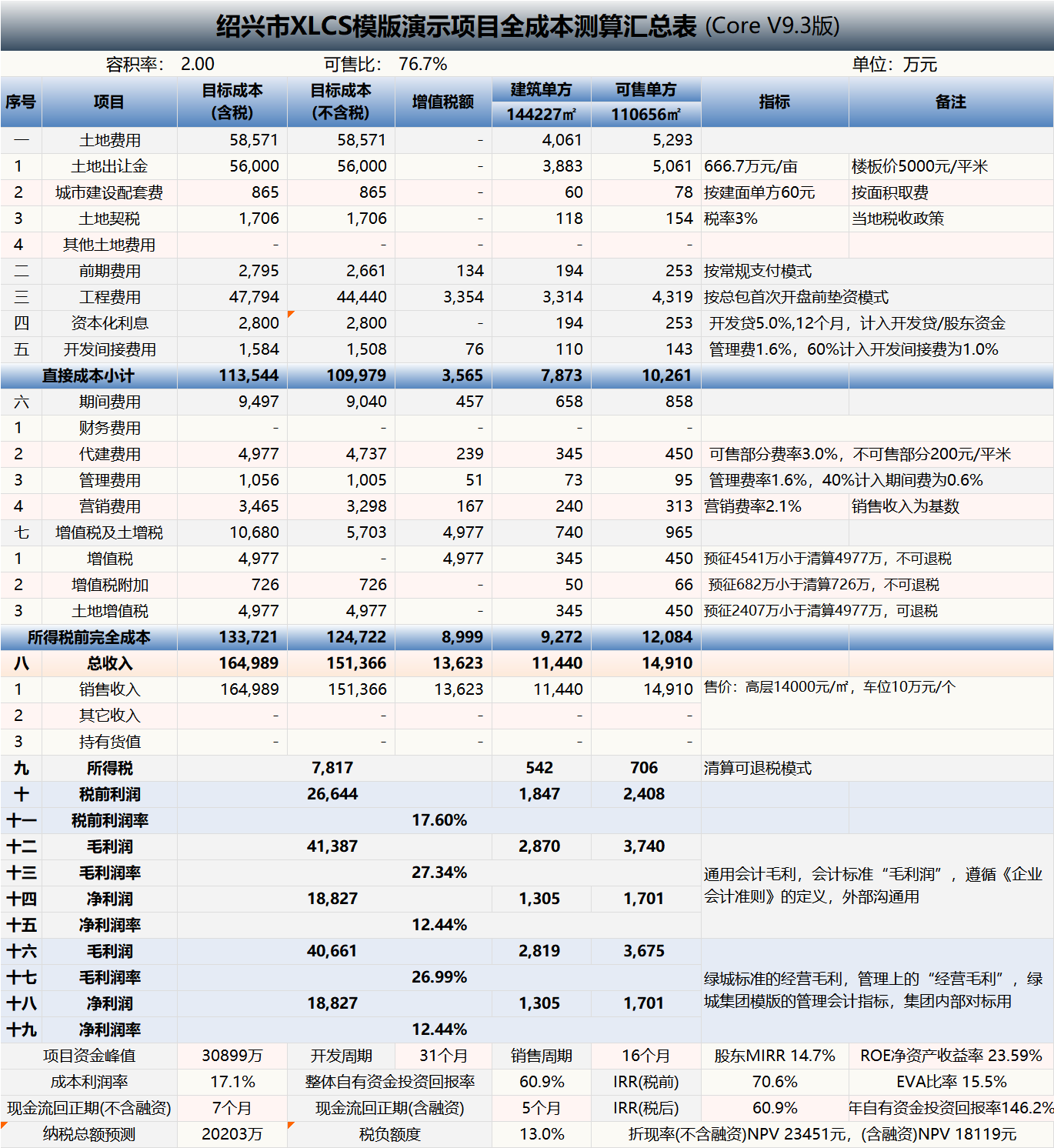
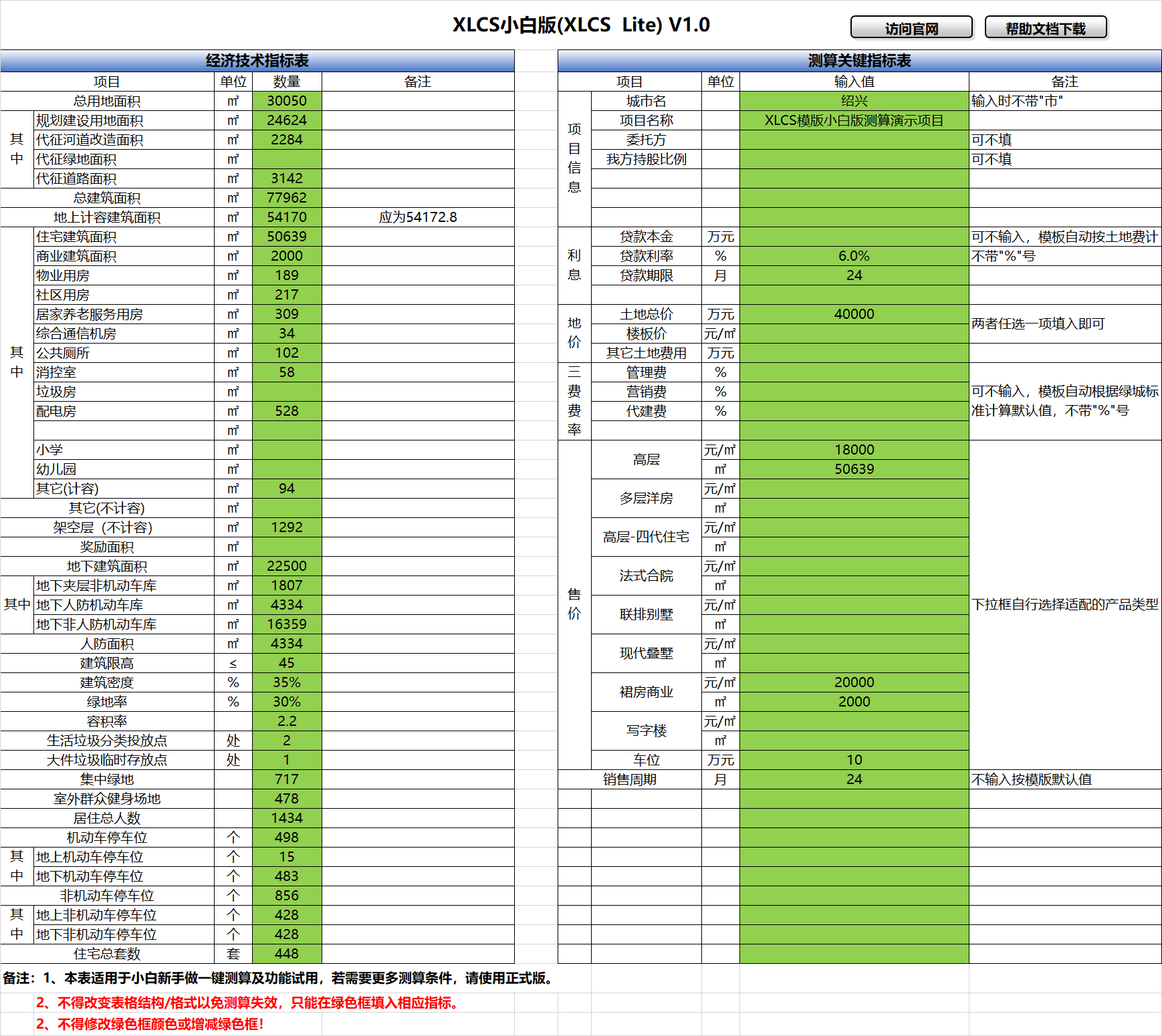
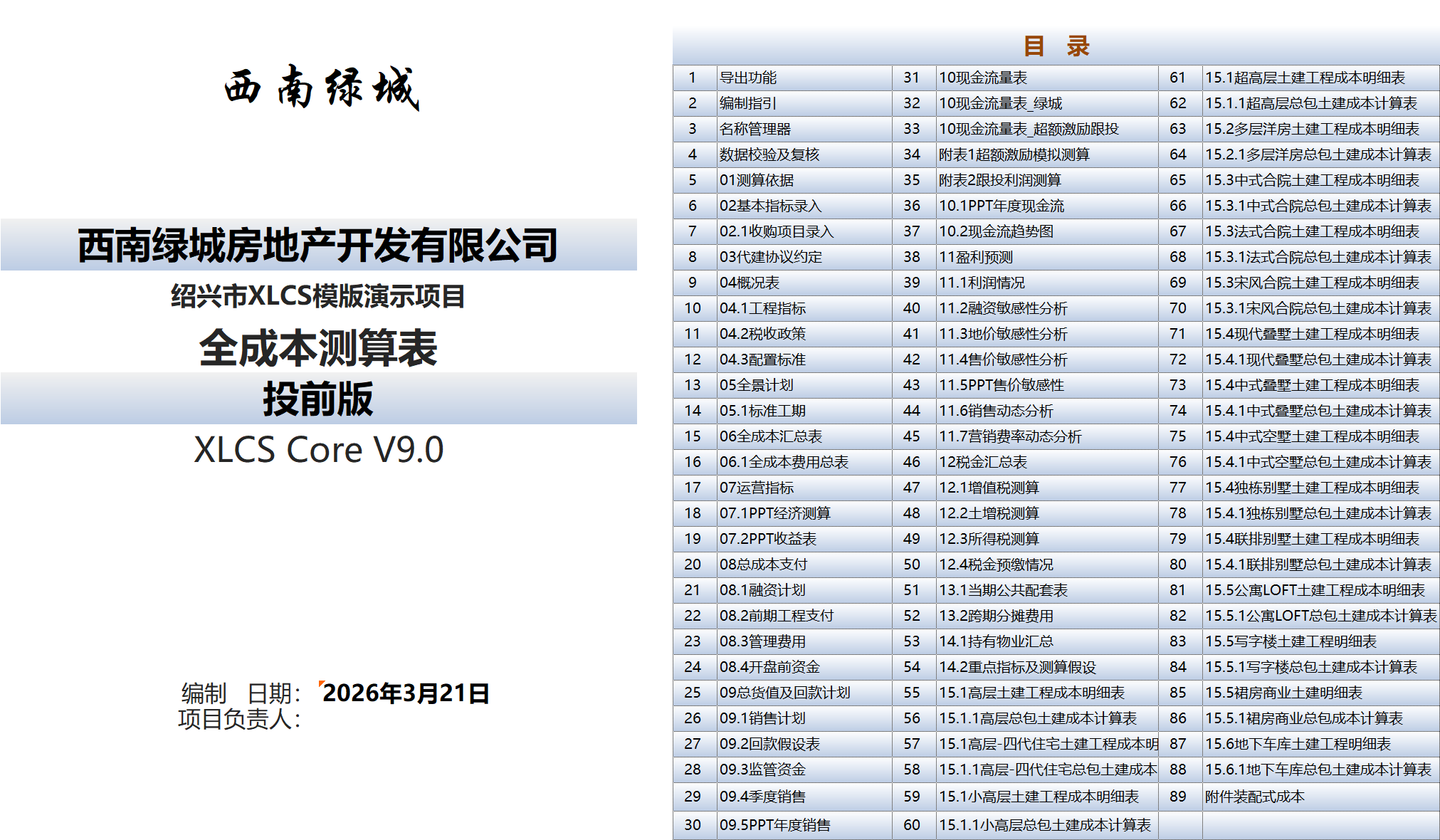
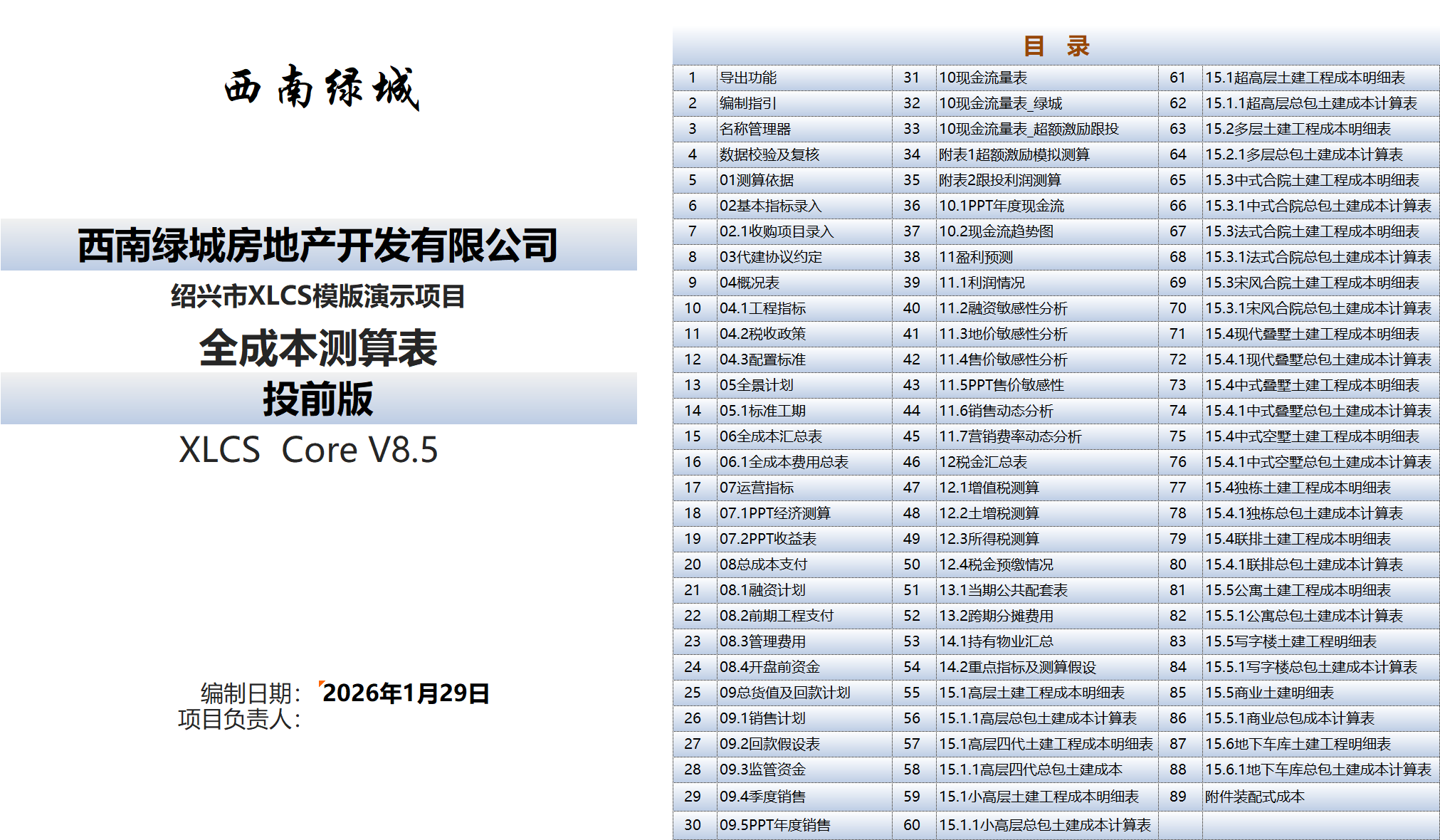
    <content type="html"><![CDATA[<h1 id="XLCS-Real-Estate-Project-Full-Cost-Estimation-Template-–-Core-Edition-XLCS-Core-V10"><a href="#XLCS-Real-Estate-Project-Full-Cost-Estimation-Template-–-Core-Edition-XLCS-Core-V10" class="headerlink" title="XLCS Real Estate Project Full-Cost Estimation Template – Core Edition (XLCS Core) V10"></a>XLCS Real Estate Project Full-Cost Estimation Template – Core Edition (XLCS Core) V10</h1><hr><h2 id="📌-Quick-Navigation"><a href="#📌-Quick-Navigation" class="headerlink" title="📌 Quick Navigation"></a>📌 Quick Navigation</h2><table><thead><tr><th>Navigation</th><th>Link</th></tr></thead><tbody><tr><td>⚡️ Template Download</td><td><a href="/categories/Template-Download/">&#x2F;categories&#x2F;Template-Download&#x2F;</a></td></tr><tr><td>📑 Version Matrix</td><td><a href="/categories/Version-Matrix/">&#x2F;categories&#x2F;Version-Matrix&#x2F;</a></td></tr><tr><td>🚀 Quick Start Guide</td><td><a href="/categories/Getting-Started/">&#x2F;categories&#x2F;Getting-Started&#x2F;</a></td></tr><tr><td>❓ Changelog</td><td><a href="/categories/Changelog/">&#x2F;categories&#x2F;Changelog&#x2F;</a></td></tr><tr><td>🛠 Discussion &amp; Help</td><td><a href="https://xlcs.de/">https://xlcs.de/</a></td></tr></tbody></table><hr><h2 id="📖-Product-Description"><a href="#📖-Product-Description" class="headerlink" title="📖 Product Description"></a>📖 Product Description</h2><p><strong>XLCS Core Edition (XLCS Core V10)</strong> is officially released!</p><p>Building upon the core functionalities of XLCS Core V9—including product type architecture, automated estimation capabilities, cash flow forecasting, sensitivity analysis, financing calculations, and cost configuration standards—this V10 release introduces a major new feature: the <strong>“<a href="/posts/933aca03.html">Project Investment Diagnostics &amp; Decision Recommendations</a>“</strong> module.</p><p>Designed for project investment decision-making scenarios, this module provides an integrated output covering project baseline information, core estimation results, indicator compliance status, risk identification, comprehensive scoring, and optimization recommendations. This enables the template not only to “calculate costs” but also to “diagnose projects, assess risks, and provide recommendations.”</p><blockquote><p><strong>Core upgrade direction of V10:</strong><br>Evolves from a full-cost estimation tool into a <strong>project investment analysis tool capable of investment rating, risk warning, diagnostic analysis, and decision recommendation</strong>.</p></blockquote><blockquote><p>Starting from <strong>XLCS Core V8.2</strong>, to reduce version complexity and lower maintenance effort, we no longer distinguish between EXCEL and WPS versions—full compatibility is now provided.</p></blockquote><hr><h2 id="📥-Latest-Template-Download-Links"><a href="#📥-Latest-Template-Download-Links" class="headerlink" title="📥 Latest Template Download Links"></a>📥 Latest Template Download Links</h2><blockquote><p>Select any download link below and click to enter the access password. Once the download page opens, click the <strong>Download</strong> button in the upper-right corner (refresh the page if the button does not appear).</p></blockquote><iframe height="270" width="100%" src="https://fckcs.cn/xlcs.htm" frameborder="0" allowfullscreen="" style="border: none; margin: 10px 0; border-radius: 12px;"></iframe><hr><h2 id="📁-Template-Directory"><a href="#📁-Template-Directory" class="headerlink" title="📁 Template Directory"></a>📁 Template Directory</h2><h3 id="Complete-Archive-Contents-–-XLCS-Real-Estate-Project-Full-Cost-Estimation-Template-Latest-Version"><a href="#Complete-Archive-Contents-–-XLCS-Real-Estate-Project-Full-Cost-Estimation-Template-Latest-Version" class="headerlink" title="Complete Archive Contents – XLCS Real Estate Project Full-Cost Estimation Template (Latest Version)"></a>Complete Archive Contents – <em>XLCS Real Estate Project Full-Cost Estimation Template</em> (Latest Version)</h3><table><thead><tr><th align="center">No.</th><th>File Name</th></tr></thead><tbody><tr><td align="center">1</td><td>XLCS Full-Cost Estimation Template_Core V10.xlsm</td></tr><tr><td align="center">2</td><td>XLCS PRO V3 Full-Cost Estimation Template_Multi-Plot.xlsm (for multi-plot projects)</td></tr><tr><td align="center">3</td><td>Single-Page Simple Estimation Template simple-template.xlsm</td></tr><tr><td align="center">4</td><td>XLCS Lite-to-Core V1 Full-Cost Estimation Starter Edition</td></tr><tr><td align="center">5</td><td>XLCS Template Upgrade Tool V1.xlsm</td></tr><tr><td align="center">6</td><td>XLCS Real Estate Project Full-Cost Estimation Template User Manual.docx</td></tr><tr><td align="center">7</td><td>XLCS Real Estate Project Full-Cost Estimation Template Quick Start.txt</td></tr><tr><td align="center">8</td><td>Version Update Notes.txt</td></tr><tr><td align="center">9</td><td>City Database User Guide.txt</td></tr><tr><td align="center">10</td><td>Edition Selection Guide.txt</td></tr><tr><td align="center">11</td><td>wps.vba.rar (Required VBA plugin for WPS free personal edition)</td></tr></tbody></table><hr><h2 id="🌐-Official-Website-Support"><a href="#🌐-Official-Website-Support" class="headerlink" title="🌐 Official Website &amp; Support"></a>🌐 Official Website &amp; Support</h2><table><thead><tr><th>Type</th><th>Link</th></tr></thead><tbody><tr><td>Official Website</td><td><a href="http://fccs.cc/">http://fccs.cc</a></td></tr><tr><td>Official Website</td><td><a href="http://fckcs.cn/">http://fckcs.cn</a></td></tr><tr><td>Official Website</td><td><a href="http://fckcs.com/">http://fckcs.com</a></td></tr><tr><td>Official Website</td><td><a href="http://fdc.sd/">http://fdc.sd</a></td></tr><tr><td>Official Website</td><td><a href="http://fccsz.com/">http://fccsz.com</a></td></tr><tr><td>Official Website</td><td><a href="http://cskits.com/">http://cskits.com</a></td></tr><tr><td>Support &amp; Suggestions</td><td><a href="http://xlcs.de/">http://xlcs.de/</a></td></tr><tr><td>Email Contact</td><td><a href="mailto:admin@fdc.sd">admin@fdc.sd</a></td></tr></tbody></table><hr><h2 id="📊-Data-Services"><a href="#📊-Data-Services" class="headerlink" title="📊 Data Services"></a>📊 Data Services</h2><table><thead><tr><th>Item</th><th>Description</th></tr></thead><tbody><tr><td>Latest Template File Update Time</td><td><iframe height=40 width=200 src="https://fckcs.cn/date.php" frameborder=0 allowfullscreen></iframe></td></tr><tr><td>City Database Update Time</td><td>The cloud city database uses online updates via cloud connection; offline download is not available.<br><iframe height=40 width=200 src="https://fckcs.cn/cskdate.php" frameborder=0 allowfullscreen></iframe></td></tr></tbody></table><hr><h2 id="⚠️-Important-Notes"><a href="#⚠️-Important-Notes" class="headerlink" title="⚠️ Important Notes"></a>⚠️ Important Notes</h2><blockquote><p><strong>Ensure a stable network connection before refreshing the template file; otherwise, full functionality may not be available, and estimation results may be inaccurate.</strong></p></blockquote><blockquote><p><strong>The newly added “Project Investment Diagnostics &amp; Decision Recommendations” module in V10 is automatically generated based on the current input data, data validation results, and estimation outputs. It is recommended to complete data entry, cloud database refresh, and data validation&#x2F;review before use.</strong></p></blockquote><blockquote><p><strong>Before running VBA features such as sensitivity analysis, investment diagnostics, and one-click export, it is advisable to save the file first and wait for the status bar completion prompt to avoid repeated clicks that may cause data conflicts.</strong></p></blockquote><hr><h2 id="📷-Template-Preview"><a href="#📷-Template-Preview" class="headerlink" title="📷 Template Preview"></a>📷 Template Preview</h2><p><img src="/img/mulu_v10.png" alt="XLCS Core – Full-Cost Estimation Core Edition Directory" title="XLCS Core – Full-Cost Estimation Core Edition Directory"><br><img src="/img/v10.png" alt="XLCS Core – Full-Cost Estimation Core Edition Directory" title="XLCS Core – Full-Cost Estimation Core Edition Directory"></p><hr><p><em>XLCS — Making full-cost estimation smarter</em></p>]]></content>


    <summary type="html">&lt;h1 id=&quot;XLCS-Real-Estate-Project-Full-Cost-Estimation-Template-–-Core-Edition-XLCS-Core-V10&quot;&gt;&lt;a href=&quot;#XLCS-Real-Estate-Project-Full-Cost-Es</summary>


    <category term="Template-Download" scheme="https://cskits.com/categories/Template-Download/"/>
    
    
    <category term="XLCS" scheme="https://cskits.com/tags/XLCS/"/>
    
    <category term="Update" scheme="https://cskits.com/tags/Update/"/>
    
    <category term="Core" scheme="https://cskits.com/tags/Core/"/>
    
    <category term="Core Edition" scheme="https://cskits.com/tags/Core-Edition/"/>
    
    <category term="V10" scheme="https://cskits.com/tags/V10/"/>
    
  </entry>
  
  <entry>
    <title>XLCS Estimation Template – Comprehensive Feature Overview</title>
    <link href="https://cskits.com/posts/d0a1fbca.html"/>
    <id>https://cskits.com/posts/d0a1fbca.html</id>
    <published>2026-07-18T00:08:08.000Z</published>
    <updated>2026-07-20T05:14:57.003Z</updated>
    
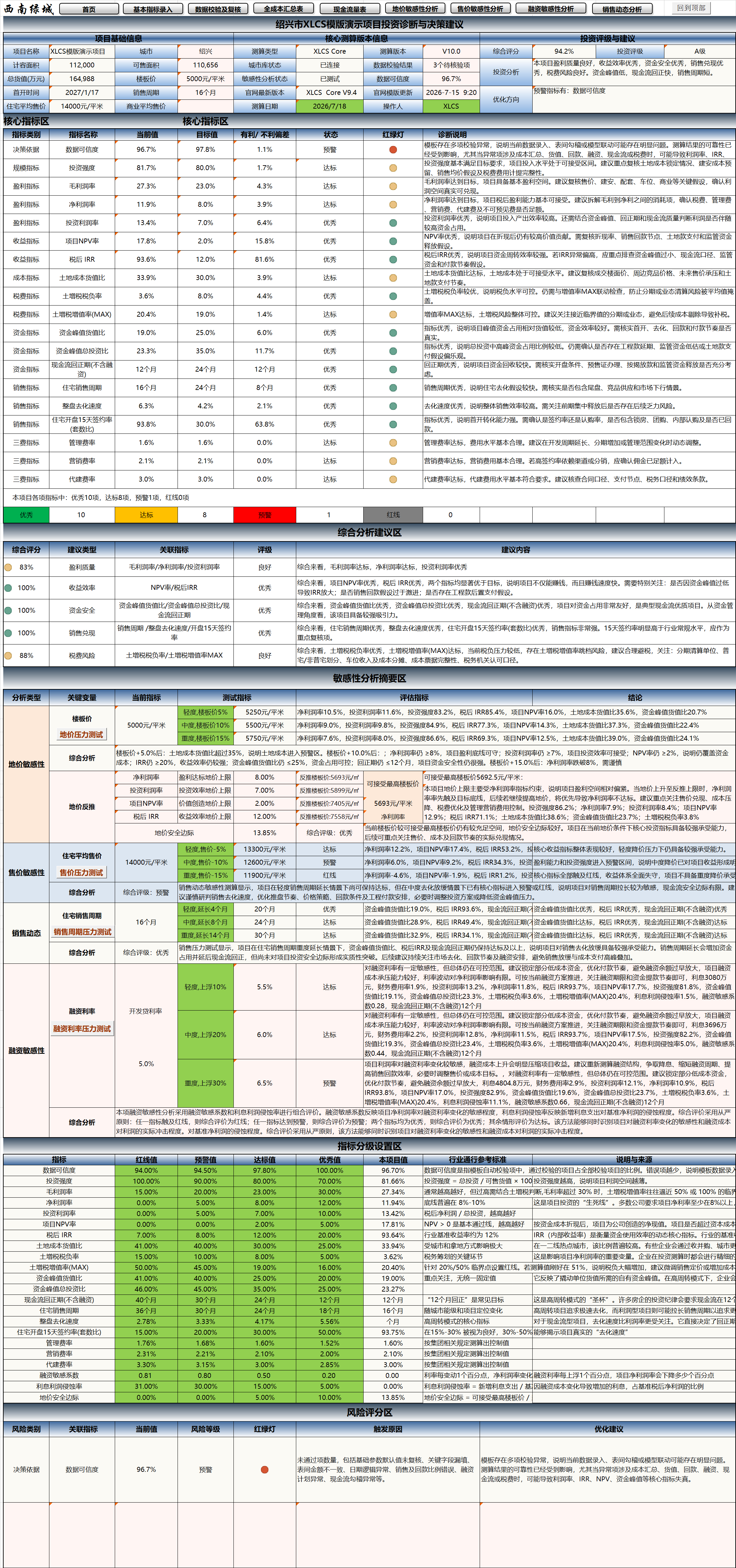
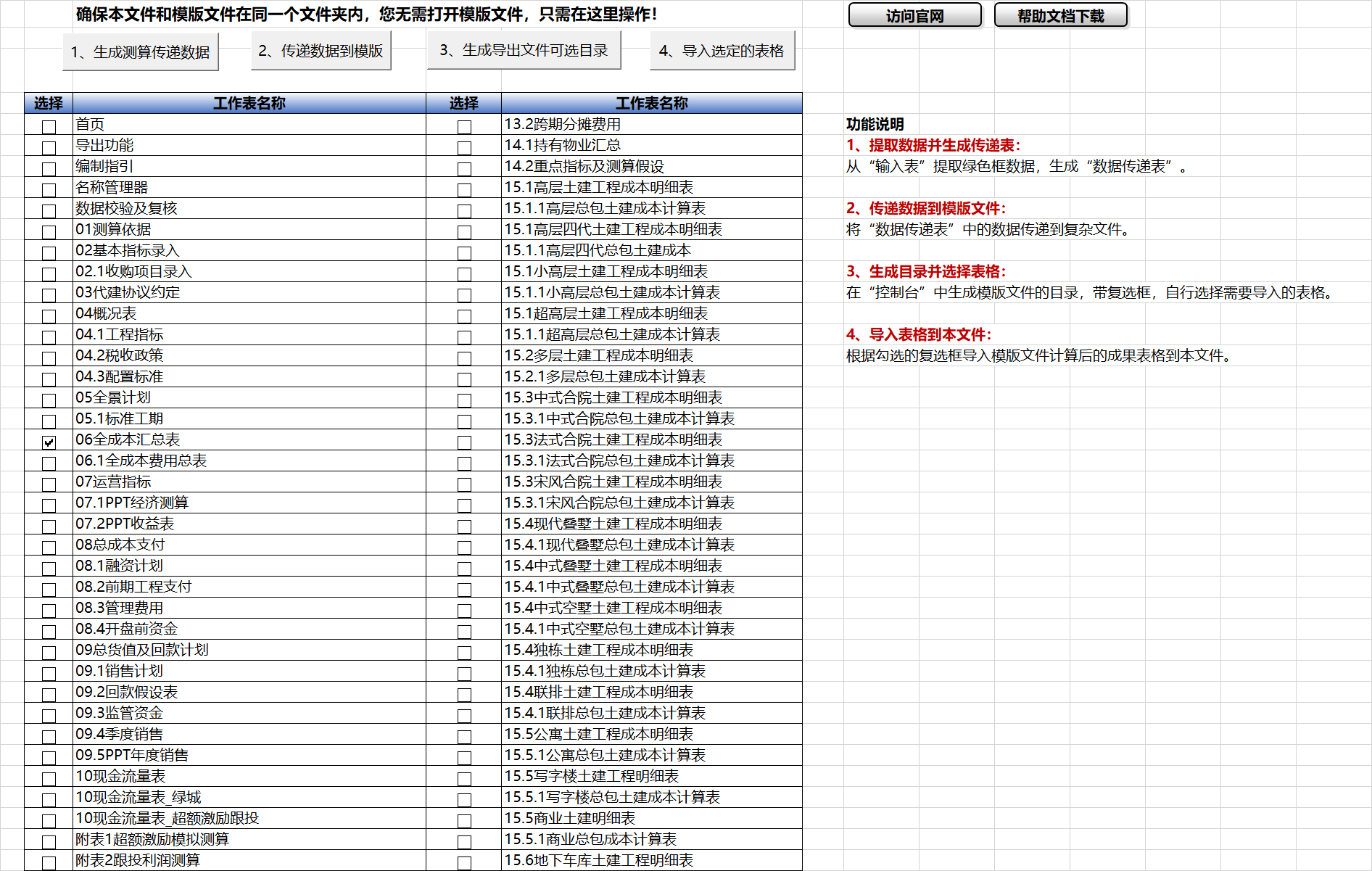
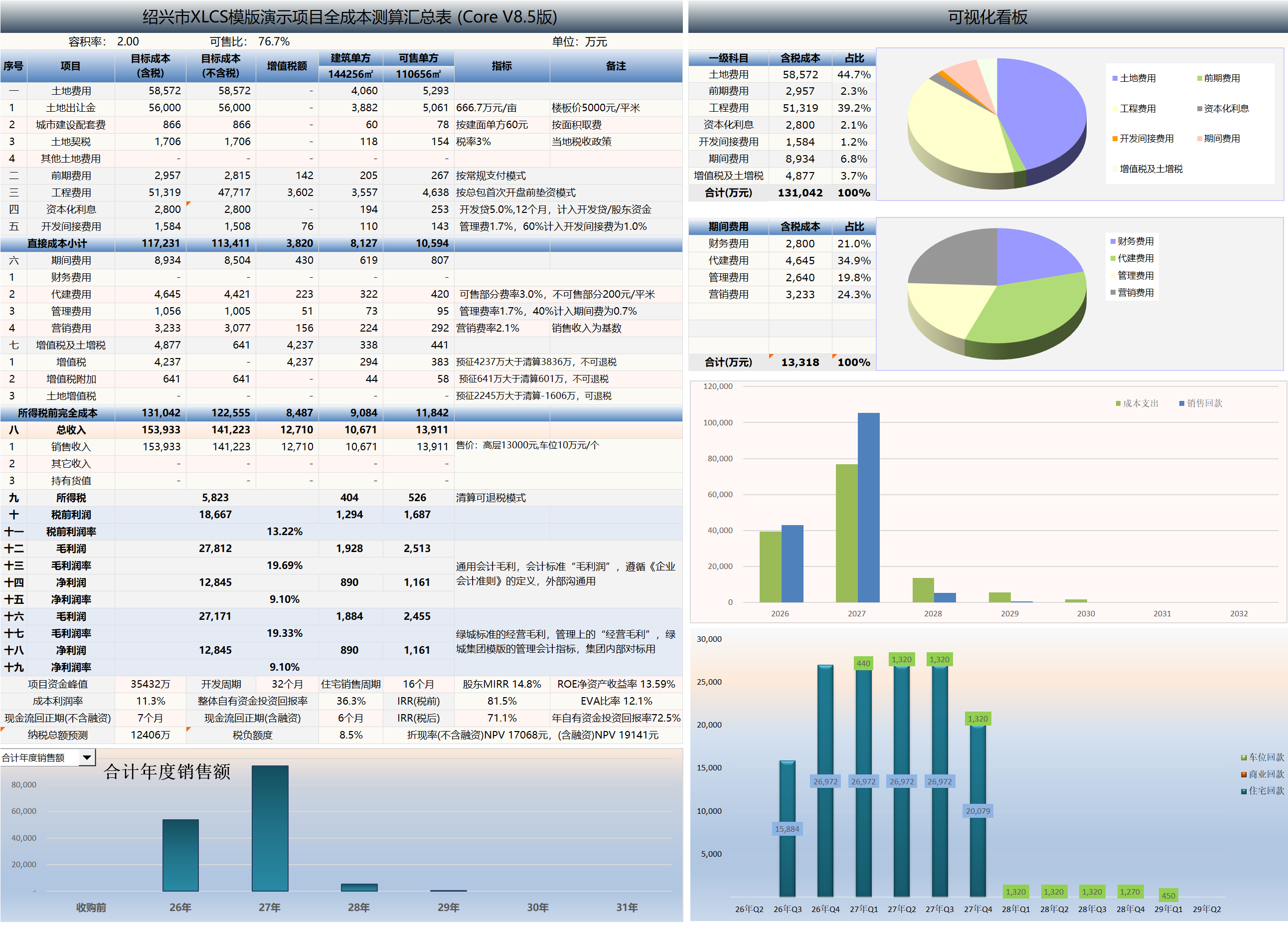
    <content type="html"><![CDATA[<p>XLCS Estimation Template – Comprehensive Feature Overview</p><h2 id="📌-Quick-Navigation"><a href="#📌-Quick-Navigation" class="headerlink" title="📌 Quick Navigation"></a>📌 Quick Navigation</h2><table><thead><tr><th>Navigation</th><th>Link</th></tr></thead><tbody><tr><td>⚡️ Template Download</td><td><a href="/categories/Template-Download/">&#x2F;categories&#x2F;Template-Download&#x2F;</a></td></tr><tr><td>📑 Version Matrix</td><td><a href="/categories/Version-Matrix/">&#x2F;categories&#x2F;Version-Matrix&#x2F;</a></td></tr><tr><td>🚀 Quick Start Guide</td><td><a href="/categories/Getting-Started/">&#x2F;categories&#x2F;Getting-Started&#x2F;</a></td></tr><tr><td>❓ Changelog</td><td><a href="/categories/Changelog/">&#x2F;categories&#x2F;Changelog&#x2F;</a></td></tr><tr><td>🛠 Discussion &amp; Help</td><td><a href="https://xlcs.de/">https://xlcs.de/</a></td></tr></tbody></table><hr><h2 id="📖-Template-Overview"><a href="#📖-Template-Overview" class="headerlink" title="📖 Template Overview"></a>📖 Template Overview</h2><p>The <em>XLCS Real Estate Project Full-Cost Estimation Template</em> is developed by integrating best practices from full-cost estimation templates used by major developers such as Greentown, Sunac, Country Garden, Jinke, Zhongliang, Zontai, and others, while also incorporating Greentown’s product configuration standards, typical project assumptions, and practical investment estimation requirements.</p><p>With just key project parameters and location-specific inputs, the template automatically generates a complete set of outputs including:</p><ul><li>Engineering cost statements</li><li>Sales GDV statements</li><li>Sales sell-through plans</li><li>Collection schedules</li><li>Financing plans</li><li>Tax calculation sheets</li><li>Restricted fund schedules</li><li>Cash flow statements</li><li>Operating metrics</li><li>Sensitivity analysis tables</li><li>Data validation sheets</li><li>Project investment diagnostics &amp; decision recommendations</li><li>Comprehensive scoring &amp; investment ratings</li><li>Core indicator traffic-light diagnostics</li><li>Risk scoring &amp; optimization recommendations</li><li>PPT-ready summary sheets</li></ul><p>Under normal circumstances, what would require several days or even weeks of collaboration across cost, sales, finance, and operations departments for full-cost dynamic estimation can be completed in significantly less time with XLCS. For standard projects, experienced users can produce a relatively complete estimation output within a short timeframe.</p><p>Starting from V10, the template introduces the <strong>“Project Investment Diagnostics &amp; Decision Recommendations”</strong> module, which automatically generates comprehensive project scoring, investment ratings, core indicator diagnostics, risk identification, sensitivity analysis summaries, and optimization recommendations based on current estimation results—elevating the template from a traditional full-cost estimation tool to a comprehensive estimation system with investment diagnostics, risk warning, and decision support capabilities.</p><p>The complete template suite contains over 90 worksheets, covering the full spectrum of real estate project static estimation, dynamic estimation, cash flow analysis, tax calculations, financing analysis, sensitivity analysis, investment diagnostics, and results reporting.</p><hr><h2 id="⚙️-Feature-Highlights"><a href="#⚙️-Feature-Highlights" class="headerlink" title="⚙️ Feature Highlights"></a>⚙️ Feature Highlights</h2><h3 id="1-Project-Investment-Diagnostics-Decision-Recommendations"><a href="#1-Project-Investment-Diagnostics-Decision-Recommendations" class="headerlink" title="1. Project Investment Diagnostics &amp; Decision Recommendations"></a>1. Project Investment Diagnostics &amp; Decision Recommendations</h3><p>The <strong>“Project Investment Diagnostics &amp; Decision Recommendations”</strong> module, new in V10, is one of the core signature features of XLCS Core V10.</p><p>Designed for project investment decision-making, investment committee reporting, post-investment review, and risk identification scenarios, this module consolidates key results scattered across full-cost, cash flow, operating metrics, tax calculations, sensitivity analysis, and data validation sheets into management-readable investment diagnostic conclusions.</p><p>Key features include:</p><ul><li>Project baseline information display</li><li>Core estimation version information display</li><li>Comprehensive scoring</li><li>Investment rating</li><li>Investment analysis conclusions</li><li>Optimization recommendations</li><li>Core indicator diagnostics</li><li>Comprehensive analysis and recommendations</li><li>Sensitivity analysis summary</li><li>Indicator grading configuration</li><li>Risk scoring</li></ul><p>The system automatically evaluates critical dimensions including profitability quality, return efficiency, funding safety, sales realization, tax risk, financing sensitivity, and data credibility—helping users evolve from “reading spreadsheets” to “reading conclusions, risks, and recommendations.”</p><hr><h3 id="2-Core-Indicator-Traffic-Light-Diagnostics"><a href="#2-Core-Indicator-Traffic-Light-Diagnostics" class="headerlink" title="2. Core Indicator Traffic-Light Diagnostics"></a>2. Core Indicator Traffic-Light Diagnostics</h3><p>The V10 investment diagnostics module includes a core indicator dashboard that performs unified diagnostics on key project operating metrics, including:</p><ul><li>Data Credibility</li><li>Investment Intensity</li><li>Gross Profit Margin</li><li>Net Profit Margin</li><li>Return on Investment (ROI)</li><li>Project NPV Rate</li><li>After-Tax IRR</li><li>Land Cost-to-GDV Ratio</li><li>Land Appreciation Tax Burden Rate</li><li>Land Appreciation Tax Appreciation Rate (MAX)</li><li>Peak Funding-to-GDV Ratio</li><li>Peak Funding-to-Total Investment Ratio</li><li>Cash Flow Payback Period</li><li>Residential Sales Cycle</li><li>Overall Project Sell-Through Rate</li><li>Residential 15-Day Post-Launch Contract Signing Rate</li><li>Management Expense Ratio</li><li>Marketing Expense Ratio</li><li>Development Management Fee Ratio</li><li>Financing Sensitivity Coefficient</li><li>Interest Profit Erosion Rate</li><li>Land Price Safety Margin</li></ul><p>Each indicator displays:</p><ul><li>Current value</li><li>Target value</li><li>Favorable &#x2F; unfavorable variance</li><li>Status assessment</li><li>Traffic-light indicator</li><li>Diagnostic description</li></ul><p>Through the traffic-light system, users can quickly determine whether each indicator is in Excellent, Compliant, Warning, or Red-Line status.</p><hr><h3 id="3-Comprehensive-Analysis-Risk-Scoring"><a href="#3-Comprehensive-Analysis-Risk-Scoring" class="headerlink" title="3. Comprehensive Analysis &amp; Risk Scoring"></a>3. Comprehensive Analysis &amp; Risk Scoring</h3><p>V10 introduces a comprehensive analysis section and a risk scoring section that transform estimation results into structured management recommendations.</p><p>The comprehensive analysis section outputs conclusions across the following dimensions:</p><ul><li>Profitability Quality</li><li>Return Efficiency</li><li>Funding Safety</li><li>Sales Realization</li><li>Tax Risk</li><li>Financing Sensitivity</li><li>Data Credibility</li></ul><p>The risk scoring section further displays:</p><ul><li>Risk category</li><li>Associated indicators</li><li>Current value</li><li>Risk level</li><li>Traffic-light status</li><li>Triggering reasons</li><li>Optimization recommendations</li></ul><p>This functionality is suitable for preliminary investment assessment, project review meetings, rapid executive review, and post-investment review.</p><hr><h3 id="4-Sensitivity-Analysis-Summary-Stress-Test-Integration"><a href="#4-Sensitivity-Analysis-Summary-Stress-Test-Integration" class="headerlink" title="4. Sensitivity Analysis Summary &amp; Stress Test Integration"></a>4. Sensitivity Analysis Summary &amp; Stress Test Integration</h3><p>V10 integrates sensitivity analysis results with the investment diagnostics module, automatically summarizing key stress test results for land price, selling price, sales cycle, and financing rates.</p><p>Linked analysis covers:</p><ul><li>Land price sensitivity</li><li>Selling price sensitivity</li><li>Sales cycle stress testing</li><li>Financing rate stress testing</li></ul><p>Through the sensitivity analysis summary, users can quickly assess project resilience under adverse scenarios:</p><ul><li>Rising land unit prices</li><li>Declining selling prices</li><li>Extended sales cycles</li><li>Increasing financing rates</li><li>Expanding peak funding</li><li>Delayed payback periods</li><li>Declining IRR &#x2F; NPV</li></ul><p>This feature helps users understand “under what conditions the project deteriorates, to what extent, and where the primary risks lie.”</p><hr><h3 id="5-Indicator-Grading-Configuration-Section"><a href="#5-Indicator-Grading-Configuration-Section" class="headerlink" title="5. Indicator Grading Configuration Section"></a>5. Indicator Grading Configuration Section</h3><p>V10 adds an indicator grading configuration section that establishes unified judgment criteria for key indicators used in investment diagnostics.</p><p>The grading section displays:</p><ul><li>Red-Line Value</li><li>Warning Value</li><li>Compliant Value</li><li>Excellent Value</li><li>Project Current Value</li><li>Industry Benchmark Reference</li><li>Description and Source</li></ul><p>This section helps users understand the system’s judgment logic and facilitates future customization based on city tier, project type, and corporate investment standards.</p><hr><h3 id="6-Cloud-Database"><a href="#6-Cloud-Database" class="headerlink" title="6. Cloud Database"></a>6. Cloud Database</h3><p>The template includes a built-in cloud database function that collects and organizes information on regulatory fees, tax parameters, green building policies, and city tiers for major cities across China, providing reference data for estimation.</p><p>Using an external linked cloud database enables real-time data updates.</p><p>The template automatically extracts corresponding city database information based on the entered city name and populates key estimation fields with default values. Users may also manually adjust values based on local real-time policies.</p><hr><h3 id="7-Intelligent-Website-Node-Speed-Testing-Cloud-Link-Repair"><a href="#7-Intelligent-Website-Node-Speed-Testing-Cloud-Link-Repair" class="headerlink" title="7. Intelligent Website Node Speed Testing &amp; Cloud Link Repair"></a>7. Intelligent Website Node Speed Testing &amp; Cloud Link Repair</h3><p>The template includes an intelligent speed testing system for XLCS official website cloud service nodes. On file open or manual button click, the system automatically tests access speeds across multiple XLCS official nodes, selects the fastest available node for local access, and updates the cloud database connection URL.</p><p>Supported features:</p><ul><li>Automatic detection of domestic core nodes</li><li>One-click testing of all official nodes</li><li>Display of node response times</li><li>Automatic selection of the fastest node</li><li>Update of <code>CloudDB_URL</code></li><li>Replacement of old cloud links in Name Manager</li><li>Refresh of external links</li><li>One-click repair of cloud link anomalies</li></ul><p>When a domain is inaccessible or slow, users can click “One-Click Repair Cloud Link Anomaly” or “One-Click All-Node Speed Test” to automatically switch to a better node.</p><hr><h3 id="8-Product-Configuration-Standards-Cost-Metrics"><a href="#8-Product-Configuration-Standards-Cost-Metrics" class="headerlink" title="8. Product Configuration Standards &amp; Cost Metrics"></a>8. Product Configuration Standards &amp; Cost Metrics</h3><p>The template adopts Greentown’s new five-tier product configuration classification:</p><ul><li>Collection (T-Class)</li><li>Premium (S-Class)</li><li>Select (W-Class)</li><li>YUE (J-Class)</li><li>AN (C-Class)</li></ul><p>Combined with product type, the system automatically matches corresponding configuration standards and cost limit databases.</p><p>If configuration standards or city tiers are raised, the template automatically adjusts related coefficients and unit cost benchmarks in Sheet 04.3 Configuration Standards, and updates calculations in the corresponding product’s structural&#x2F;MEP cost detail sheets.</p><hr><h3 id="9-Automatic-Detection-of-Duplicate-Engineering-Metrics-Multi-Tier-Configuration-Adaptation"><a href="#9-Automatic-Detection-of-Duplicate-Engineering-Metrics-Multi-Tier-Configuration-Adaptation" class="headerlink" title="9. Automatic Detection of Duplicate Engineering Metrics &amp; Multi-Tier Configuration Adaptation"></a>9. Automatic Detection of Duplicate Engineering Metrics &amp; Multi-Tier Configuration Adaptation</h3><p>From V9 onward, the template supports multiple configuration standards for the same product type. Based on product names and tiers entered in Sheet 04 Overview, the system automatically identifies duplicate entries where the “same product name has different configurations” and generates corresponding configuration columns in Sheet 04.3 Configuration Standards.</p><p>For duplicate products, the system also aggregates and sums parameters from the same group in columns T:AB of the structural detail sheet, and returns the calculated results to Sheet 04.1 Engineering Metrics.</p><p>This feature resolves the previous limitation where each product type could only have one set of engineering unit cost benchmarks, and is particularly suitable for multi-product, multi-tier, multi-phase projects.</p><hr><h3 id="10-One-Click-Unit-Area-Fine-Tuning"><a href="#10-One-Click-Unit-Area-Fine-Tuning" class="headerlink" title="10. One-Click Unit Area Fine-Tuning"></a>10. One-Click Unit Area Fine-Tuning</h3><p>Sheet 02 Basic Indicator Entry supports automatic unit area adjustment. After users enter total design area and unit counts, the system automatically adjusts individual unit areas to align the aggregated area with the total design area.</p><p>Supported rules include:</p><ul><li>When total design area is 0, automatically zero out corresponding unit counts</li><li>When total design area is non-zero but unit counts are zero, automatically initialize with a mid-range unit</li><li>Default initial area of 100㎡ for back-calculating unit counts</li><li>For single-unit-type products, precise back-calculation based on “total design area ÷ unit count”</li><li>For multi-unit-type products, even distribution of area differences across total unit counts</li></ul><hr><h3 id="11-Construction-Schedule-Templates"><a href="#11-Construction-Schedule-Templates" class="headerlink" title="11. Construction Schedule Templates"></a>11. Construction Schedule Templates</h3><p>The template includes multiple pre-sale construction schedule templates spanning 5 to 12 months to launch. The system can automatically select based on city tier, or users may manually select or customize.</p><p>The template automatically calculates the first-launch date and enters it into the schedule plan based on the highest floor count in the first-launch zone and local pre-sale image milestone requirements.</p><hr><h3 id="12-Construction-Payment-Templates"><a href="#12-Construction-Payment-Templates" class="headerlink" title="12. Construction Payment Templates"></a>12. Construction Payment Templates</h3><p>The template includes multiple construction payment templates:</p><ul><li>Monthly progress payments for standard projects</li><li>Annual lump-sum progress payments</li><li>Contractor funding advance before launch, normal monthly payments after launch</li><li>Contractor funding advance until structural topping, normal monthly payments thereafter</li></ul><p>After selecting the corresponding payment template, the system automatically recalculates the monthly construction payment schedule and enters it into the cash flow statement.</p><hr><h3 id="13-Pre-Development-Payment-Templates"><a href="#13-Pre-Development-Payment-Templates" class="headerlink" title="13. Pre-Development Payment Templates"></a>13. Pre-Development Payment Templates</h3><p>The template includes multiple pre-development fee payment templates:</p><ul><li>Monthly progress payments for standard pre-development costs</li><li>For challenging projects: discounted pre-development engineering costs (excluding regulatory fees and some design fees) before launch, normal payments after launch</li></ul><p>Users can freely set different payment percentages for design fees, regulatory fees, and pre-development engineering costs.</p><hr><h3 id="14-Sales-Collection-Templates"><a href="#14-Sales-Collection-Templates" class="headerlink" title="14. Sales Collection Templates"></a>14. Sales Collection Templates</h3><p>Based on city-level purchase restrictions and structural-topping loan disbursement requirements, the template automatically selects different sales collection templates.</p><p>Users may also manually adjust collection milestones and ratios in the Collection Assumptions sheet. The system automatically generates the sales collection plan and enters it into the Total GDV &amp; Collection Plan sheet.</p><hr><h3 id="15-Four-Mode-Sales-Sell-Through-Generation"><a href="#15-Four-Mode-Sales-Sell-Through-Generation" class="headerlink" title="15. Four-Mode Sales Sell-Through Generation"></a>15. Four-Mode Sales Sell-Through Generation</h3><p>The sales sell-through module supports four modes:</p><ul><li>Default</li><li>By sell-through rate</li><li>By months</li><li>By unit count</li></ul><p>Unlike traditional templates that only support a single sell-through rhythm, XLCS allows each product to have its own sell-through mode. Residential and commercial products can be configured with different monthly sell-through unit counts, and the system automatically generates monthly sell-through rates based on each product’s launch timing, total units, and product type.</p><p>When selling by unit count, the system intelligently allocates monthly sales volumes among available products, automatically removing sold-out products from subsequent allocation—making the sales plan more realistic.</p><hr><h3 id="16-Sales-Restricted-Fund-Templates"><a href="#16-Sales-Restricted-Fund-Templates" class="headerlink" title="16. Sales Restricted Fund Templates"></a>16. Sales Restricted Fund Templates</h3><p>The restricted fund module supports multiple regulatory logic types:</p><ul><li>No restriction</li><li>Period-end balance-based restriction</li><li>Total restricted amount &#x2F; milestone-based release</li><li>Locally-calculated construction cost-based restricted amount</li></ul><p>The system automatically generates monthly restricted fund release plans based on phase-based restriction milestones and release ratios, and enters them into the cash flow statement.</p><p>Special rules for parking&#x2F;storage restricted funds:</p><ul><li>Release cannot precede the sale start date</li><li>Cumulative release cannot exceed cumulative collections</li></ul><p>This logic more accurately reflects the impact of restricted funds on project available funds, peak funding, and financing requirements.</p><hr><h3 id="17-Financing-Interest-Payment-Templates"><a href="#17-Financing-Interest-Payment-Templates" class="headerlink" title="17. Financing Interest Payment Templates"></a>17. Financing Interest Payment Templates</h3><p>Both development loans and pre-financing support the following interest payment modes:</p><ul><li>Quarterly interest payments</li><li>Semi-annual interest payments</li><li>Annual interest payments</li><li>Bullet repayment (principal and interest at maturity)</li></ul><p>Each financing type supports up to 5 installment drawdowns and repayments. The system automatically generates monthly financing interest plans based on each loan’s principal, drawdown month, repayment month, annual rate, and payment mode. Multiple interest payments in the same month are automatically aggregated.</p><hr><h3 id="18-Non-Standard-Financing-Module"><a href="#18-Non-Standard-Financing-Module" class="headerlink" title="18. Non-Standard Financing Module"></a>18. Non-Standard Financing Module</h3><p>Non-standard financing refers to non-standardized funding beyond pre-financing and development loans to cover project cash flow gaps.</p><p>Based on monthly cash flow gaps, user-defined annual interest rates, and trigger thresholds, the template automatically calculates non-standard financing drawdown and repayment schedules and amounts. The default single loan term is 12 months, with mandatory early repayment when cash flow turns positive, and early repayment triggers when no funding gaps are detected in the next 6 months.</p><p>Repayment follows FIFO order. Users can choose whether non-standard financing enters the financing plan and cash flow statement.</p><hr><h3 id="19-Development-Management-Fee-Payment-Templates"><a href="#19-Development-Management-Fee-Payment-Templates" class="headerlink" title="19. Development Management Fee Payment Templates"></a>19. Development Management Fee Payment Templates</h3><p>After entering key management agreement terms and payment milestones, the template automatically calculates:</p><ul><li>Saleable property management fees</li><li>Non-saleable property management fees</li><li>Incentive fees</li><li>Off-site property management fees</li><li>Sales incentive management fees</li></ul><p>And generates monthly payment schedules that enter the cash flow statement.</p><hr><h3 id="20-City-Facility-Fee-Calculation-Templates"><a href="#20-City-Facility-Fee-Calculation-Templates" class="headerlink" title="20. City Facility Fee Calculation Templates"></a>20. City Facility Fee Calculation Templates</h3><p>After entering local regulatory fee indicators and calculation methods, the template can calculate city facility fees across multiple modes:</p><ul><li>By GFA-based calculation</li><li>By total investment-based calculation</li><li>Unified standard calculation</li><li>Differentiated rates by product type &#x2F; floor count</li><li>Whether basement areas are included</li><li>Whether government-mandated affordable housing pays facility fees</li></ul><hr><h3 id="21-Management-Marketing-Fee-Calculation-Templates"><a href="#21-Management-Marketing-Fee-Calculation-Templates" class="headerlink" title="21. Management &#x2F; Marketing Fee Calculation Templates"></a>21. Management &#x2F; Marketing Fee Calculation Templates</h3><p>Based on project key information and Greentown standards, the template automatically generates recommended management and marketing fee rates. Users may manually override default rates, and the system automatically updates the full-cost estimation sheets.</p><hr><h3 id="22-Non-Standard-Residential-LVT-Template"><a href="#22-Non-Standard-Residential-LVT-Template" class="headerlink" title="22. Non-Standard Residential LVT Template"></a>22. Non-Standard Residential LVT Template</h3><p>After entering local non-standard residential classification criteria, the template automatically distinguishes standard vs. non-standard residential properties based on FAR, unit area, selling price, and other criteria, and calculates LVT separately for each category.</p><hr><h3 id="23-Fitted-Delivery-Schedule-Templates"><a href="#23-Fitted-Delivery-Schedule-Templates" class="headerlink" title="23. Fitted Delivery Schedule Templates"></a>23. Fitted Delivery Schedule Templates</h3><p>When the template detects fitted units, it automatically enables fitted delivery &#x2F; fitted handover options and adjusts the corresponding fitted construction schedule templates.</p><hr><h3 id="24-Prefabrication-Rate-Templates"><a href="#24-Prefabrication-Rate-Templates" class="headerlink" title="24. Prefabrication Rate Templates"></a>24. Prefabrication Rate Templates</h3><p>Based on the project’s PC prefabrication rate requirements, the template automatically adds structural cost increments associated with different prefabrication rates in the engineering cost calculation sheets.</p><hr><h3 id="25-Pre-Sale-Image-Milestone-Templates"><a href="#25-Pre-Sale-Image-Milestone-Templates" class="headerlink" title="25. Pre-Sale Image Milestone Templates"></a>25. Pre-Sale Image Milestone Templates</h3><p>Based on plot height restrictions in planning conditions, the template automatically calculates the highest floor count in the first-launch zone and, based on local pre-sale image milestone requirements, calculates the corresponding construction timeline and recommended first-launch date.</p><hr><h3 id="26-PPT-Ready-Results-Pages"><a href="#26-PPT-Ready-Results-Pages" class="headerlink" title="26. PPT-Ready Results Pages"></a>26. PPT-Ready Results Pages</h3><p>The template includes multiple pre-configured results output pages that automatically extract key result data for presentation purposes, including:</p><ul><li>Economic estimation tables</li><li>Income statements</li><li>Annual cash flow statements</li><li>Annual sales tables</li><li>Selling price sensitivity analysis tables</li><li>Key indicator summary tables</li></ul><hr><h3 id="27-Multi-Dimensional-Sensitivity-Analysis-Reports"><a href="#27-Multi-Dimensional-Sensitivity-Analysis-Reports" class="headerlink" title="27. Multi-Dimensional Sensitivity Analysis Reports"></a>27. Multi-Dimensional Sensitivity Analysis Reports</h3><p>The template includes multiple sensitivity analysis tools:</p><ul><li>Selling price sensitivity analysis</li><li>Land price sensitivity analysis</li><li>Financing structure sensitivity analysis</li><li>Sales dynamics analysis</li><li>Marketing fee ratio dynamics analysis</li></ul><p>These cover the primary sensitivity analysis needs in real estate project estimation—price, cost, financing, sales cadence, and marketing expenses.<br>In V10, sensitivity analysis results can further feed into the Project Investment Diagnostics &amp; Decision Recommendations module to form a sensitivity analysis summary. The system links land price, selling price, sales cycle, and financing rate stress test results with comprehensive scoring, investment rating, and risk scoring—helping users assess project resilience under adverse scenarios.</p><hr><h3 id="28-Selling-Price-Sensitivity-Analysis"><a href="#28-Selling-Price-Sensitivity-Analysis" class="headerlink" title="28. Selling Price Sensitivity Analysis"></a>28. Selling Price Sensitivity Analysis</h3><p>Sheet 11.4 Selling Price Sensitivity Analysis supports custom benchmark selling prices with precise product-code matching to corresponding products in Sheet 02 Basic Indicator Entry.</p><p>Supports:</p><ul><li>Residential price adjustments</li><li>Commercial price adjustments</li><li>Separate writing of rough &#x2F; fitted prices</li><li>Automatic backup and restoration of original prices</li><li>Batch generation of price scenario results</li></ul><hr><h3 id="29-Land-Price-Sensitivity-Analysis"><a href="#29-Land-Price-Sensitivity-Analysis" class="headerlink" title="29. Land Price Sensitivity Analysis"></a>29. Land Price Sensitivity Analysis</h3><p>Sheet 11.3 Land Price Sensitivity Analysis supports automatic generation of up to 50 land price scenarios based on starting land unit price, increment value, and run count.</p><p>This feature is suitable for:</p><ul><li>Land acquisition bid calculations</li><li>Land cost tolerance analysis</li><li>Auction bidding strategy simulation</li><li>Comparison of profit margin, IRR, NPV, and peak funding under different land unit prices</li></ul><p>The system automatically restores the original land unit price formula after execution.<br>In the V10 investment diagnostics module, land price sensitivity results can be further used to assess land price safety margins, helping users identify headroom for profit margins, IRR, NPV, and peak funding under current land cost conditions.</p><hr><h3 id="30-Financing-Structure-Sensitivity-Analysis"><a href="#30-Financing-Structure-Sensitivity-Analysis" class="headerlink" title="30. Financing Structure Sensitivity Analysis"></a>30. Financing Structure Sensitivity Analysis</h3><p>Sheet 11.2 Financing Sensitivity Analysis supports variation analysis of development loan and pre-financing amounts, rates, and terms.</p><p>The system automatically modifies model input parameters, calls the financing interest calculation module to regenerate interest plans, and reads net profit, net margin, IRR, equity ROI, ROE, and other metrics.</p><hr><h3 id="31-Sales-Dynamics-Analysis"><a href="#31-Sales-Dynamics-Analysis" class="headerlink" title="31. Sales Dynamics Analysis"></a>31. Sales Dynamics Analysis</h3><p>Sheet 11.6 Sales Dynamics Analysis analyzes the impact of the following variables on core financial metrics:</p><ul><li>Launch timing (advance or delay)</li><li>Monthly sell-through rate changes</li><li>Residential monthly sell-through unit changes</li><li>Commercial monthly sell-through unit changes</li><li>Sell-through period (months) changes</li></ul><p>Output metrics include:</p><ul><li>Peak funding</li><li>Peak timing</li><li>IRR</li><li>NPV</li><li>Cash flow payback period</li><li>Annual equity ROI</li></ul><hr><h3 id="32-Marketing-Fee-Ratio-Dynamics-Analysis"><a href="#32-Marketing-Fee-Ratio-Dynamics-Analysis" class="headerlink" title="32. Marketing Fee Ratio Dynamics Analysis"></a>32. Marketing Fee Ratio Dynamics Analysis</h3><p>Sheet 11.7 Marketing Fee Ratio Dynamics Analysis supports linked analysis of residential selling prices and marketing fee rates.</p><p>Users can configure multiple residential price points with corresponding marketing fee rates. The system automatically writes prices and rates into the model and reads:</p><ul><li>Project net profit</li><li>Project net margin</li><li>IRR (pre-tax)</li><li>IRR (after-tax)</li></ul><p>This is suitable for evaluating reasonable marketing investment at different price levels and the impact of increased marketing expenses on project returns.</p><hr><h3 id="33-Automatic-Adaptation-of-Engineering-Metrics-from-Major-Developers"><a href="#33-Automatic-Adaptation-of-Engineering-Metrics-from-Major-Developers" class="headerlink" title="33. Automatic Adaptation of Engineering Metrics from Major Developers"></a>33. Automatic Adaptation of Engineering Metrics from Major Developers</h3><p>In addition to automatically selecting Greentown product line engineering cost limits, the template also adjusts for city tier differences based on cloud data and displays reference engineering metrics from developers such as Country Garden for comparison.</p><hr><h3 id="34-Data-Validation-Review-Functionality"><a href="#34-Data-Validation-Review-Functionality" class="headerlink" title="34. Data Validation &amp; Review Functionality"></a>34. Data Validation &amp; Review Functionality</h3><p>The template automatically checks cross-sheet relationships and common errors, tracing data sources and providing root cause analysis and modification recommendations.</p><p>Validation includes:</p><ul><li>Workbook link errors</li><li>Cross-sheet reference errors</li><li>Abnormal sales cycles</li><li>Rough&#x2F;fitted price input anomalies</li><li>Invalid plot names</li><li>Area allocation anomalies</li><li>Financing parameter anomalies</li><li>Engineering metric reference anomalies</li><li>Tax logic anomalies</li></ul><p>The V10 investment diagnostics module references data validation results to form the “Data Credibility” assessment. If base data, formula links, sales cycles, price inputs, financing parameters, or tax logic contain anomalies, the comprehensive score, investment rating, and risk scoring may be affected. Therefore, it is recommended to complete data validation and review before viewing investment diagnostic conclusions.</p><hr><h3 id="35-VBA-Automatic-Workbook-Error-Checking"><a href="#35-VBA-Automatic-Workbook-Error-Checking" class="headerlink" title="35. VBA Automatic Workbook Error Checking"></a>35. VBA Automatic Workbook Error Checking</h3><p>In the Data Validation &amp; Review sheet, the template provides one-click VBA functionality to check workbook link errors, cross-sheet reference errors, and other common errors. Results are displayed in designated cells for quick issue identification.</p><hr><h3 id="36-Pre-Launch-Funding-Payment-Plan"><a href="#36-Pre-Launch-Funding-Payment-Plan" class="headerlink" title="36. Pre-Launch Funding Payment Plan"></a>36. Pre-Launch Funding Payment Plan</h3><p>Based on the selected construction payment template, the template aggregates and schedules monthly payments and collections for land, pre-development, construction, period costs, and taxes.</p><p>Supports selection based on first-launch scenario:</p><ul><li>Phase 1</li><li>Phase 1, Batch 1 (First Launch Zone)</li></ul><p>Provides aggregated totals for pre-launch, Year 1, Year N, and other periods.</p><hr><h3 id="37-Dual-Directory-System-Home-Page-Export-Directory"><a href="#37-Dual-Directory-System-Home-Page-Export-Directory" class="headerlink" title="37. Dual Directory System: Home Page &amp; Export Directory"></a>37. Dual Directory System: Home Page &amp; Export Directory</h3><p>The template includes two directory types:</p><table><thead><tr><th>Directory Type</th><th>Worksheet</th><th>Purpose</th></tr></thead><tbody><tr><td>Home Page Directory</td><td>Home</td><td>Quick navigation to worksheets</td></tr><tr><td>Export Directory</td><td>Export</td><td>Selection of worksheets for export</td></tr></tbody></table><p>The Home Page Directory is used for internal template navigation; the Export Directory is used for results file export.</p><hr><h3 id="38-One-Click-Results-File-Export"><a href="#38-One-Click-Results-File-Export" class="headerlink" title="38. One-Click Results File Export"></a>38. One-Click Results File Export</h3><p>To meet confidentiality and external reporting requirements, the template supports selective worksheet export.</p><p>During export, the system:</p><ul><li>Automatically copies user-selected worksheets</li><li>Generates a standalone <code>.xlsx</code> file</li><li>Converts formulas to static values</li><li>Preserves formatting, column widths, row heights, and page styles</li><li>Removes macros and VBA code</li><li>Does not affect the original template</li></ul><p>Suitable for providing estimation results to clients, leadership, partners, and financial institutions.</p><ul><li>Supports export of the Project Investment Diagnostics &amp; Decision Recommendations page</li><li>Preserves static results including comprehensive scoring, investment rating, risk scoring, and optimization recommendations</li></ul><hr><h3 id="39-One-Click-Multi-Mode-LVT-Liquidation-Value-Generation"><a href="#39-One-Click-Multi-Mode-LVT-Liquidation-Value-Generation" class="headerlink" title="39. One-Click Multi-Mode LVT Liquidation Value Generation"></a>39. One-Click Multi-Mode LVT Liquidation Value Generation</h3><p>XLCS PRO supports one-click generation of LVT liquidation values across multiple modes: consolidated liquidation, by-plot liquidation, and by-phase liquidation. Users can configure different phase&#x2F;plot combinations to view corresponding LVT liquidation values in real time, facilitating identification of optimal tax planning structures.</p><hr><h3 id="40-WPS-Excel-Dual-Platform-Compatibility-Global-Task-Lock"><a href="#40-WPS-Excel-Dual-Platform-Compatibility-Global-Task-Lock" class="headerlink" title="40. WPS&#x2F;Excel Dual-Platform Compatibility &amp; Global Task Lock"></a>40. WPS&#x2F;Excel Dual-Platform Compatibility &amp; Global Task Lock</h3><p>Since V8.2, the template’s core functionality has been fully compatible with both Excel and WPS.</p><p>Multiple core VBA modules incorporate a global task lock mechanism to prevent data conflicts from repeated button clicks or concurrent macro execution. Affected modules include:</p><ul><li>Sales sell-through plan</li><li>Construction payment plan</li><li>Restricted fund calculation</li><li>Financing interest calculation</li><li>Engineering metric auto-configuration</li><li>File export</li><li>Sensitivity analysis modules</li></ul><hr><h2 id="VBA-Automation-Capabilities-Overview"><a href="#VBA-Automation-Capabilities-Overview" class="headerlink" title="VBA Automation Capabilities Overview"></a>VBA Automation Capabilities Overview</h2><p>Starting from XLCS Core V9, significant core logic has been refactored with VBA modules. Compared to traditional complex formulas, VBA offers advantages in execution efficiency, complex logic handling, batch calculation, data recovery, cross-sheet integration, and WPS&#x2F;Excel compatibility.</p><table><thead><tr><th>Module</th><th>Worksheet</th><th>Primary Function</th></tr></thead><tbody><tr><td>Sales Sell-Through</td><td>02 Basic Indicator Entry &#x2F; 09.1 Sales Plan</td><td>Generates monthly product sell-through plans</td></tr><tr><td>Construction Payment Plan</td><td>08.2 Pre-Construction Payment</td><td>Generates monthly payment plans for Phases 1–5</td></tr><tr><td>Restricted Fund</td><td>09.3 Restricted Funds</td><td>Generates monthly restricted fund release plans</td></tr><tr><td>Financing Interest</td><td>08.1 Financing Plan</td><td>Calculates monthly interest for development loans and pre-financing</td></tr><tr><td>Selling Price Sensitivity</td><td>11.4 Selling Price Sensitivity Analysis</td><td>Analyzes impact of price changes on metrics</td></tr><tr><td>Land Price Sensitivity</td><td>11.3 Land Price Sensitivity Analysis</td><td>Analyzes impact of land unit price changes on metrics</td></tr><tr><td>Financing Structure Sensitivity</td><td>11.2 Financing Sensitivity Analysis</td><td>Analyzes changes in loan amount, rate, and term</td></tr><tr><td>Sales Dynamics</td><td>11.6 Sales Dynamics Analysis</td><td>Analyzes impact of sales cadence changes</td></tr><tr><td>Marketing Fee Dynamics</td><td>11.7 Marketing Fee Ratio Dynamics Analysis</td><td>Analyzes price-fee combinations</td></tr><tr><td>Engineering Metric Auto-Config</td><td>04.1 Engineering Metrics &#x2F; 04.3 Configuration Standards</td><td>Automatically configures engineering unit cost benchmarks</td></tr><tr><td>Unit Area Adjustment</td><td>02 Basic Indicator Entry</td><td>Automatically calibrates unit areas</td></tr><tr><td>Website Node Speed Test</td><td>02 Basic Indicator Entry</td><td>Automatically selects fastest cloud service node</td></tr><tr><td>Home Page Directory</td><td>Home</td><td>Automatically generates worksheet navigation</td></tr><tr><td>Export Function</td><td>Export</td><td>Selective worksheet export</td></tr><tr><td>Project Investment Diagnostics</td><td>Project Investment Diagnostics &amp; Decision Recommendations</td><td>Generates comprehensive scoring, investment rating, core indicator diagnostics, risk scoring, and optimization recommendations</td></tr><tr><td>Sensitivity Analysis Summary</td><td>Project Investment Diagnostics &amp; Decision Recommendations &#x2F; Sensitivity Analysis Sheets</td><td>Consolidates land price, selling price, sales cycle, and financing rate stress test results</td></tr><tr><td>Risk Scoring</td><td>Project Investment Diagnostics &amp; Decision Recommendations</td><td>Identifies data credibility, funding safety, sales realization, tax, and financing sensitivity risks</td></tr><tr><td>Indicator Grading Configuration</td><td>Project Investment Diagnostics &amp; Decision Recommendations</td><td>Displays red-line, warning, compliant, and excellent values with industry benchmarks</td></tr></tbody></table><p>Through these VBA automation modules, XLCS is not merely a set of estimation spreadsheets, but a comprehensive real estate estimation system with automatic calculation, validation, analysis, diagnosis, export, and repair capabilities. With the addition of the Project Investment Diagnostics &amp; Decision Recommendations module in V10, the template further incorporates investment rating, risk warning, and decision support capabilities.</p><hr><h2 id="🌐-Official-Website-Support"><a href="#🌐-Official-Website-Support" class="headerlink" title="🌐 Official Website &amp; Support"></a>🌐 Official Website &amp; Support</h2><table><thead><tr><th>Type</th><th>Link</th></tr></thead><tbody><tr><td>Official Website</td><td><a href="http://fccs.cc/">http://fccs.cc</a></td></tr><tr><td>Official Website</td><td><a href="http://fckcs.cn/">http://fckcs.cn</a></td></tr><tr><td>Official Website</td><td><a href="http://fckcs.com/">http://fckcs.com</a></td></tr><tr><td>Official Website</td><td><a href="http://fdc.sd/">http://fdc.sd</a></td></tr><tr><td>Official Website</td><td><a href="http://fccsz.com/">http://fccsz.com</a></td></tr><tr><td>Official Website</td><td><a href="http://cskits.com/">http://cskits.com</a></td></tr><tr><td>Support &amp; Suggestions</td><td><a href="http://xlcs.de/">http://xlcs.de/</a></td></tr><tr><td>Email Contact</td><td><a href="mailto:admin@fdc.sd">admin@fdc.sd</a></td></tr></tbody></table><hr><h2 id="📷-Template-Preview"><a href="#📷-Template-Preview" class="headerlink" title="📷 Template Preview"></a>📷 Template Preview</h2><p><img src="/img/v10.png" alt="XLCS Core – Full-Cost Estimation Core Edition Preview" title="XLCS Core – Full-Cost Estimation Core Edition Preview"><br><img src="/img/juece.png" alt="XLCS Core – Project Investment Diagnostics &amp; Decision Recommendations" title="XLCS Core – Project Investment Diagnostics &amp; Decision Recommendations"><br><img src="/img/mulu_v10.png" alt="XLCS Core – Full-Cost Estimation Core Edition Directory" title="XLCS Core – Full-Cost Estimation Core Edition Directory"></p><hr><p><em>XLCS — Making full-cost estimation smarter</em></p>]]></content>


    <summary type="html">&lt;p&gt;XLCS Estimation Template – Comprehensive Feature Overview&lt;/p&gt;
&lt;h2 id=&quot;📌-Quick-Navigation&quot;&gt;&lt;a href=&quot;#📌-Quick-Navigation&quot; class=&quot;headerli</summary>


    <category term="Getting-Started" scheme="https://cskits.com/categories/Getting-Started/"/>
    
    
    <category term="XLCS" scheme="https://cskits.com/tags/XLCS/"/>
    
    <category term="Core" scheme="https://cskits.com/tags/Core/"/>
    
    <category term="V10" scheme="https://cskits.com/tags/V10/"/>
    
    <category term="Feature Overview" scheme="https://cskits.com/tags/Feature-Overview/"/>
    
    <category term="Automation" scheme="https://cskits.com/tags/Automation/"/>
    
    <category term="Investment Diagnostics" scheme="https://cskits.com/tags/Investment-Diagnostics/"/>
    
    <category term="PRO" scheme="https://cskits.com/tags/PRO/"/>
    
    <category term="VBA" scheme="https://cskits.com/tags/VBA/"/>
    
  </entry>
  
  <entry>
    <title>XLCS Core Edition V10 Update</title>
    <link href="https://cskits.com/posts/5a1220c8.html"/>
    <id>https://cskits.com/posts/5a1220c8.html</id>
    <published>2026-07-18T00:08:08.000Z</published>
    <updated>2026-08-14T08:28:56.077Z</updated>
    
    <content type="html"><![CDATA[<h1 id="XLCS-Real-Estate-Project-Full-Cost-Estimation-Template-–-Core-Edition-XLCS-Core-V10-Update"><a href="#XLCS-Real-Estate-Project-Full-Cost-Estimation-Template-–-Core-Edition-XLCS-Core-V10-Update" class="headerlink" title="XLCS Real Estate Project Full-Cost Estimation Template – Core Edition (XLCS Core) V10 Update"></a>XLCS Real Estate Project Full-Cost Estimation Template – Core Edition (XLCS Core) V10 Update</h1><hr><h2 id="📌-Quick-Navigation"><a href="#📌-Quick-Navigation" class="headerlink" title="📌 Quick Navigation"></a>📌 Quick Navigation</h2><table><thead><tr><th>Navigation</th><th>Link</th></tr></thead><tbody><tr><td>⚡️ Template Download</td><td><a href="/categories/Template-Download/">&#x2F;categories&#x2F;Template-Download&#x2F;</a></td></tr><tr><td>📑 Version Matrix</td><td><a href="/categories/Version-Matrix/">&#x2F;categories&#x2F;Version-Matrix&#x2F;</a></td></tr><tr><td>🚀 Quick Start Guide</td><td><a href="/categories/Getting-Started/">&#x2F;categories&#x2F;Getting-Started&#x2F;</a></td></tr><tr><td>❓ Changelog</td><td><a href="/categories/Changelog/">&#x2F;categories&#x2F;Changelog&#x2F;</a></td></tr><tr><td>🛠 Discussion &amp; Help</td><td><a href="https://xlcs.de/">https://xlcs.de/</a></td></tr></tbody></table><hr><h2 id="📖-Product-Description"><a href="#📖-Product-Description" class="headerlink" title="📖 Product Description"></a>📖 Product Description</h2><p><strong>XLCS Core Edition (XLCS Core V10)</strong> is officially released!</p><p>Building upon the core functionalities of XLCS Core V9—including product type architecture, automated estimation capabilities, cash flow forecasting, sensitivity analysis, financing calculations, and cost configuration standards—this V10 release introduces a major new feature: the <strong>“<a href="/posts/933aca03.html">Project Investment Diagnostics &amp; Decision Recommendations</a>“</strong> module.</p><p>Designed for project investment decision-making scenarios, this module provides an integrated output covering project baseline information, core estimation results, indicator compliance status, risk identification, comprehensive scoring, and optimization recommendations. This enables the template not only to “calculate costs” but also to “diagnose projects, assess risks, and provide recommendations.”</p><blockquote><p><strong>Core upgrade direction of V10:</strong><br>Evolves from a full-cost estimation tool into a <strong>project investment analysis tool capable of investment rating, risk warning, diagnostic analysis, and decision recommendation</strong>.</p></blockquote><blockquote><p>Starting from <strong>XLCS Core V8.2</strong>, to reduce version complexity and lower maintenance effort, we no longer distinguish between EXCEL and WPS versions—full compatibility is now provided.</p></blockquote><hr><h2 id="🆕-V10-Core-New-Feature-Project-Investment-Diagnostics-Decision-Recommendations"><a href="#🆕-V10-Core-New-Feature-Project-Investment-Diagnostics-Decision-Recommendations" class="headerlink" title="🆕 V10 Core New Feature: Project Investment Diagnostics &amp; Decision Recommendations"></a>🆕 V10 Core New Feature: Project Investment Diagnostics &amp; Decision Recommendations</h2><h3 id="1-Automated-Generation-of-Project-Investment-Diagnostic-Results"><a href="#1-Automated-Generation-of-Project-Investment-Diagnostic-Results" class="headerlink" title="1. Automated Generation of Project Investment Diagnostic Results"></a>1. Automated Generation of Project Investment Diagnostic Results</h3><p>The new investment diagnostics module in V10 automatically generates a complete investment analysis report based on the project’s underlying estimation data, including:</p><ul><li>Comprehensive project scoring</li><li>Investment rating</li><li>Core indicator compliance status</li><li>Risk level identification</li><li>Optimization recommendations</li><li>Comprehensive analytical conclusions</li></ul><p>The template automatically consolidates key project metrics—covering operations, profitability, funding, sales, and taxes—and produces readable conclusions tailored for decision-makers.</p><h3 id="2-Comprehensive-Upgrade-of-the-Core-Indicator-Dashboard"><a href="#2-Comprehensive-Upgrade-of-the-Core-Indicator-Dashboard" class="headerlink" title="2. Comprehensive Upgrade of the Core Indicator Dashboard"></a>2. Comprehensive Upgrade of the Core Indicator Dashboard</h3><p>A new <strong>Core Indicator Dashboard</strong> has been added to conduct item-by-item diagnostics on key project indicators, supporting:</p><ul><li>Automatic comparison of current values, target values, and variances</li><li>Status identification: Compliant &#x2F; Non-Compliant &#x2F; Warning &#x2F; Red-Line</li><li>Traffic-light status indicators</li><li>Auto-generated diagnostic descriptions for each indicator</li></ul><p>Key indicators covered include:</p><ul><li>Data Credibility</li><li>Investment Intensity</li><li>Gross Profit Margin</li><li>Net Profit Margin</li><li>Return on Investment (ROI)</li><li>Project NPV Rate</li><li>After-Tax IRR</li><li>Land Cost-to-GDV Ratio</li><li>Land Appreciation Tax Burden Rate</li><li>Land Appreciation Tax Appreciation Rate (MAX)</li><li>Peak Funding-to-GDV Ratio</li><li>Peak Funding-to-Total Investment Ratio</li><li>Cash Flow Payback Period</li><li>Residential Sales Cycle</li><li>Overall Project Sell-Through Rate</li><li>Residential 15-Day Post-Launch Contract Signing Rate</li><li>Management Expense Ratio</li><li>Marketing Expense Ratio</li><li>Development Management Fee Ratio</li><li>Financing Sensitivity Coefficient</li><li>Interest Profit Erosion Rate</li><li>Land Price Safety Margin</li></ul><h3 id="3-Comprehensive-Analysis-Recommendation-Section"><a href="#3-Comprehensive-Analysis-Recommendation-Section" class="headerlink" title="3. Comprehensive Analysis &amp; Recommendation Section"></a>3. Comprehensive Analysis &amp; Recommendation Section</h3><p>A new <strong>Comprehensive Analysis &amp; Recommendation Section</strong> provides an integrated assessment across multiple dimensions including investment, profitability, funding safety, sales realization, and tax risk, featuring:</p><ul><li>Comprehensive score display</li><li>Recommendation type classification</li><li>Associated indicator explanations</li><li>Rating result presentation</li><li>Auto-generated recommendation content</li></ul><p>This section transforms discrete indicators into structured conclusions, helping users quickly grasp the project’s overall performance.</p><h3 id="4-Indicator-Grading-Configuration-Section"><a href="#4-Indicator-Grading-Configuration-Section" class="headerlink" title="4. Indicator Grading Configuration Section"></a>4. Indicator Grading Configuration Section</h3><p>V10 introduces an <strong>Indicator Grading Configuration Section</strong> that uniformly displays for each indicator:</p><ul><li>Red-Line Value</li><li>Warning Value</li><li>Compliant Value</li><li>Excellent Value</li><li>Project Current Value</li><li>Industry Benchmark Reference</li><li>Description and Source</li></ul><p>This enables users to understand the rationale behind each indicator’s evaluation and facilitates future extensibility based on project type, city tier, and management style.</p><h3 id="5-Risk-Scoring-Section"><a href="#5-Risk-Scoring-Section" class="headerlink" title="5. Risk Scoring Section"></a>5. Risk Scoring Section</h3><p>A new <strong>Risk Scoring Section</strong> provides itemized risk diagnostics, supporting:</p><ul><li>Decision basis risk identification</li><li>Funding safety risk identification</li><li>Sales realization risk identification</li><li>Tax risk identification</li><li>Financing sensitivity risk identification</li></ul><p>For each risk category, the system outputs:</p><ul><li>Current value</li><li>Risk level</li><li>Traffic-light status</li><li>Triggering reasons</li><li>Optimization recommendations</li></ul><p>This elevates the template from mere “result presentation” to proactive “risk warning.”</p><h3 id="6-Sensitivity-Analysis-Investment-Diagnostics-Integration"><a href="#6-Sensitivity-Analysis-Investment-Diagnostics-Integration" class="headerlink" title="6. Sensitivity Analysis &amp; Investment Diagnostics Integration"></a>6. Sensitivity Analysis &amp; Investment Diagnostics Integration</h3><p>V10 deeply integrates sensitivity analysis results with the investment diagnostics module, covering:</p><ul><li>Land price sensitivity</li><li>Selling price sensitivity</li><li>Sales cycle stress testing</li><li>Financing rate sensitivity</li></ul><p>Through stress testing, the system automatically assesses how the project performs under various adverse scenarios across:</p><ul><li>Gross profit margin changes</li><li>Net profit margin changes</li><li>ROI changes</li><li>IRR changes</li><li>NPV changes</li><li>Peak funding changes</li><li>Payback period changes</li></ul><p>This makes it clear at a glance “under what conditions the project deteriorates, to what extent, and which metrics are hit first.”</p><h3 id="7-Diagnostic-Output-Optimized-for-Management-Decision-Making"><a href="#7-Diagnostic-Output-Optimized-for-Management-Decision-Making" class="headerlink" title="7. Diagnostic Output Optimized for Management Decision-Making"></a>7. Diagnostic Output Optimized for Management Decision-Making</h3><p>V10’s output has been further refined from a traditional spreadsheet style to a structured presentation better suited for reporting and decision-making, emphasizing:</p><ul><li>Conclusion-first approach</li><li>Clear risk communication</li><li>Actionable recommendations</li><li>Traceable indicator interpretations</li><li>Diagnostic results that are report-ready, reviewable, and archivable</li></ul><hr><h2 id="📅-Version-Update-History"><a href="#📅-Version-Update-History" class="headerlink" title="📅 Version Update History"></a>📅 Version Update History</h2><h3 id="XLCS-Core-V10-Update-Log"><a href="#XLCS-Core-V10-Update-Log" class="headerlink" title="XLCS Core V10 Update Log"></a>XLCS Core V10 Update Log</h3><p><strong>1. V10.0 Update</strong> – 2026-07-18</p><p>① Added the “Project Investment Diagnostics &amp; Decision Recommendations” module, enabling automated diagnostic output, comprehensive scoring, investment rating, and decision recommendations.<br>② Added a project baseline information and core estimation version display area, centrally showcasing key details such as project name, city, floor area ratio (FAR) capacity, saleable area, total GDV, land unit price, first launch date, sales cycle, estimation version, city database status, data validation results, and data credibility.<br>③ Added an investment rating and recommendation section that automatically outputs comprehensive scores, investment ratings, investment analysis conclusions, and optimization directions, facilitating rapid executive review and investment committee reporting.<br>④ Added a core indicator dashboard that performs unified diagnostics on key metrics including data credibility, investment intensity, gross margin, net margin, ROI, project NPV rate, after-tax IRR, land cost-to-GDV ratio, land appreciation tax burden rate, peak funding, cash flow payback period, residential sales cycle, overall project sell-through rate, 15-day post-launch signing rate, and the three major expense ratios.<br>⑤ The core indicator dashboard now displays current values, target values, favorable&#x2F;unfavorable variances, status, traffic lights, and diagnostic descriptions, allowing for intuitive identification of whether each indicator is in Excellent, Compliant, Warning, or Red-Line status.<br>⑥ Added a comprehensive analysis and recommendation section that automatically generates integrated scores, associated indicators, ratings, and recommendations across dimensions such as profitability quality, return efficiency, funding safety, sales realization, and tax risk.<br>⑦ Added a sensitivity analysis summary area that links land price sensitivity, selling price sensitivity, sales cycle stress testing, and financing rate stress testing results with the investment diagnostics module, supporting assessment of project resilience under adverse scenarios.<br>⑧ Added an indicator grading configuration section that uniformly displays red-line values, warning values, compliant values, excellent values, current project values, industry benchmark references, and source descriptions, enabling users to understand the evaluation logic and facilitate future custom adjustments.<br>⑨ Added a risk scoring section that performs itemized identification and early warning for decision basis, data credibility, funding safety, sales realization, tax risk, and financing sensitivity, automatically generating trigger reasons and optimization recommendations.<br>⑩ Added investment judgment metrics such as land price safety margin to help users assess the headroom of core investment indicators under current land cost conditions.<br>⑪ Optimized the diagnostic conclusion presentation to make estimation outputs more accessible for rapid review by investment, cost, finance, marketing, and management teams, enhancing the template’s evolution from a “full-cost estimation tool” to an “investment diagnostic and decision-making tool.”<br>⑫ Refined the V10 version directory, feature entry points, and related output display pages to facilitate quick access to core functions such as investment diagnostics, sensitivity analysis, and risk scoring.</p><p><strong>2. V10.1 Update</strong> (2026-07-24)</p><p>① Added the “Project Investment Assessment Report” export feature, which integrates the automated diagnostics, comprehensive scoring, investment rating, and decision-making recommendations from the “Project Investment Diagnosis and Decision-Making Suggestions” module, along with various data from the calculation template, to generate a consolidated PPT report.</p><hr><h2 id="📥-Latest-Template-Download-Links"><a href="#📥-Latest-Template-Download-Links" class="headerlink" title="📥 Latest Template Download Links"></a>📥 Latest Template Download Links</h2><blockquote><p>Select any download link below and click to enter the access password. Once the download page opens, click the <strong>Download</strong> button in the upper-right corner (refresh the page if the button does not appear).</p></blockquote><iframe height="270" width="100%" src="https://fckcs.cn/xlcs.htm" frameborder="0" allowfullscreen="" style="border: none; margin: 10px 0; border-radius: 12px;"></iframe><hr><h2 id="📊-Data-Services"><a href="#📊-Data-Services" class="headerlink" title="📊 Data Services"></a>📊 Data Services</h2><table><thead><tr><th>Item</th><th>Description</th></tr></thead><tbody><tr><td>Latest Template File Update Time</td><td><iframe height=40 width=200 src="https://fckcs.cn/date.php" frameborder=0 allowfullscreen></iframe></td></tr><tr><td>City Database Update Time</td><td>The cloud city database uses online updates via cloud connection; offline download is not available.<br><iframe height=40 width=200 src="https://fckcs.cn/cskdate.php" frameborder=0 allowfullscreen></iframe></td></tr></tbody></table><hr><h2 id="📁-Template-Directory"><a href="#📁-Template-Directory" class="headerlink" title="📁 Template Directory"></a>📁 Template Directory</h2><h3 id="Complete-Archive-Contents-–-XLCS-Real-Estate-Project-Full-Cost-Estimation-Template-Latest-Version"><a href="#Complete-Archive-Contents-–-XLCS-Real-Estate-Project-Full-Cost-Estimation-Template-Latest-Version" class="headerlink" title="Complete Archive Contents – XLCS Real Estate Project Full-Cost Estimation Template (Latest Version)"></a>Complete Archive Contents – <em>XLCS Real Estate Project Full-Cost Estimation Template</em> (Latest Version)</h3><table><thead><tr><th align="center">No.</th><th>File Name</th></tr></thead><tbody><tr><td align="center">1</td><td>XLCS Full-Cost Estimation Template_Core V10.xlsm</td></tr><tr><td align="center">2</td><td>XLCS PRO V3 Full-Cost Estimation Template_Multi-Plot.xlsm (for multi-plot projects)</td></tr><tr><td align="center">3</td><td>Single-Page Simple Estimation Template simple-template.xlsm</td></tr><tr><td align="center">4</td><td>XLCS Lite-to-Core V1 Full-Cost Estimation Starter Edition</td></tr><tr><td align="center">5</td><td>XLCS Template Upgrade Tool V1.xlsm</td></tr><tr><td align="center">6</td><td>XLCS Real Estate Project Full-Cost Estimation Template User Manual.docx</td></tr><tr><td align="center">7</td><td>XLCS Real Estate Project Full-Cost Estimation Template Quick Start.txt</td></tr><tr><td align="center">8</td><td>Version Update Notes.txt</td></tr><tr><td align="center">9</td><td>City Database User Guide.txt</td></tr><tr><td align="center">10</td><td>Edition Selection Guide.txt</td></tr><tr><td align="center">11</td><td>wps.vba.rar (Required VBA plugin for WPS free personal edition)</td></tr></tbody></table><hr><h2 id="🌐-Official-Website-Support"><a href="#🌐-Official-Website-Support" class="headerlink" title="🌐 Official Website &amp; Support"></a>🌐 Official Website &amp; Support</h2><table><thead><tr><th>Type</th><th>Link</th></tr></thead><tbody><tr><td>Official Website</td><td><a href="http://fccs.cc/">http://fccs.cc</a></td></tr><tr><td>Official Website</td><td><a href="http://fckcs.cn/">http://fckcs.cn</a></td></tr><tr><td>Official Website</td><td><a href="http://fckcs.com/">http://fckcs.com</a></td></tr><tr><td>Official Website</td><td><a href="http://fdc.sd/">http://fdc.sd</a></td></tr><tr><td>Official Website</td><td><a href="http://fccsz.com/">http://fccsz.com</a></td></tr><tr><td>Official Website</td><td><a href="http://cskits.com/">http://cskits.com</a></td></tr><tr><td>Support &amp; Suggestions</td><td><a href="http://xlcs.de/">http://xlcs.de/</a></td></tr><tr><td>Email Contact</td><td><a href="mailto:admin@fdc.sd">admin@fdc.sd</a></td></tr></tbody></table><hr><h2 id="⚠️-Important-Notes"><a href="#⚠️-Important-Notes" class="headerlink" title="⚠️ Important Notes"></a>⚠️ Important Notes</h2><blockquote><p><strong>Ensure a stable network connection before refreshing the template file; otherwise, full functionality may not be available, and estimation results may be inaccurate.</strong></p></blockquote><blockquote><p><strong>The newly added “Project Investment Diagnostics &amp; Decision Recommendations” module in V10 is automatically generated based on current input data, data validation results, and estimation outputs. It is recommended to complete data entry, cloud database refresh, and data validation&#x2F;review before use.</strong></p></blockquote><blockquote><p><strong>Before running VBA features such as sensitivity analysis, investment diagnostics, and one-click export, it is advisable to save the file first and wait for the status bar completion prompt to avoid repeated clicks that may cause data conflicts.</strong></p></blockquote><hr><h2 id="📷-Template-Preview"><a href="#📷-Template-Preview" class="headerlink" title="📷 Template Preview"></a>📷 Template Preview</h2><p><img src="/img/v10.png" alt="XLCS Core – Full-Cost Estimation Core Edition Directory" title="XLCS Core – Full-Cost Estimation Core Edition Directory"><br><img src="/img/juece.png" alt="XLCS Core – Full-Cost Estimation Core Edition Directory" title="XLCS Core – Full-Cost Estimation Core Edition Directory"></p><hr><p><em>XLCS — Making full-cost estimation smarter</em></p><hr>]]></content>


    <summary type="html">&lt;h1 id=&quot;XLCS-Real-Estate-Project-Full-Cost-Estimation-Template-–-Core-Edition-XLCS-Core-V10-Update&quot;&gt;&lt;a href=&quot;#XLCS-Real-Estate-Project-Full-</summary>


    <category term="Changelog" scheme="https://cskits.com/categories/Changelog/"/>
    
    
    <category term="XLCS" scheme="https://cskits.com/tags/XLCS/"/>
    
    <category term="Update" scheme="https://cskits.com/tags/Update/"/>
    
    <category term="Core" scheme="https://cskits.com/tags/Core/"/>
    
    <category term="Core Edition" scheme="https://cskits.com/tags/Core-Edition/"/>
    
    <category term="V10" scheme="https://cskits.com/tags/V10/"/>
    
  </entry>
  
  <entry>
    <title>XLCS Project Investment Diagnostics &amp; Decision Recommendations Module Overview</title>
    <link href="https://cskits.com/posts/8edb525a.html"/>
    <id>https://cskits.com/posts/8edb525a.html</id>
    <published>2026-07-18T00:08:08.000Z</published>
    <updated>2026-07-20T05:17:39.203Z</updated>
    
    <content type="html"><![CDATA[<h1 id="XLCS-Project-Investment-Diagnostics-Decision-Recommendations-Module-Overview"><a href="#XLCS-Project-Investment-Diagnostics-Decision-Recommendations-Module-Overview" class="headerlink" title="XLCS Project Investment Diagnostics &amp; Decision Recommendations Module Overview"></a>XLCS Project Investment Diagnostics &amp; Decision Recommendations Module Overview</h1><hr><h2 id="📌-Quick-Navigation"><a href="#📌-Quick-Navigation" class="headerlink" title="📌 Quick Navigation"></a>📌 Quick Navigation</h2><table><thead><tr><th>Navigation</th><th>Link</th></tr></thead><tbody><tr><td>⚡️ Template Download</td><td><a href="/categories/Template-Download/">&#x2F;categories&#x2F;Template-Download&#x2F;</a></td></tr><tr><td>📑 Version Matrix</td><td><a href="/categories/Version-Matrix/">&#x2F;categories&#x2F;Version-Matrix&#x2F;</a></td></tr><tr><td>🚀 Quick Start Guide</td><td><a href="/categories/Getting-Started/">&#x2F;categories&#x2F;Getting-Started&#x2F;</a></td></tr><tr><td>❓ Changelog</td><td><a href="/categories/Changelog/">&#x2F;categories&#x2F;Changelog&#x2F;</a></td></tr><tr><td>🛠 Discussion &amp; Help</td><td><a href="https://xlcs.de/">https://xlcs.de/</a></td></tr></tbody></table><hr><h2 id="I-Module-Overview"><a href="#I-Module-Overview" class="headerlink" title="I. Module Overview"></a>I. Module Overview</h2><p>The <strong>“Project Investment Diagnostics &amp; Decision Recommendations”</strong> module is a core new feature introduced in <strong>XLCS Core V10</strong>.</p><p>Built upon the project’s full-cost estimation results, this module automatically consolidates project baseline information, core operating metrics, profitability, funding safety, sales realization, tax risks, financing sensitivity, data credibility, and sensitivity analysis outputs, and further generates:</p><ul><li>Comprehensive project scoring</li><li>Investment rating</li><li>Investment analysis conclusions</li><li>Core indicator traffic-light diagnostics</li><li>Comprehensive analysis and recommendations</li><li>Sensitivity analysis summary</li><li>Indicator grading configuration</li><li>Risk scoring</li><li>Optimization recommendations</li></ul><p>With this module, XLCS evolves beyond a mere “cost, profit, and cash flow” calculation spreadsheet into a <strong>project investment analysis tool with investment diagnostics, risk warning, and decision support capabilities</strong>.</p><blockquote><p>In short:<br><strong>Previously, it was about “calculating results.” Starting with V10, it now further “diagnoses projects, assesses risks, and provides recommendations.”</strong></p></blockquote><hr><h2 id="II-Applicable-Scenarios"><a href="#II-Applicable-Scenarios" class="headerlink" title="II. Applicable Scenarios"></a>II. Applicable Scenarios</h2><p>The “Project Investment Diagnostics &amp; Decision Recommendations” module is suitable for the following scenarios:</p><ul><li>Preliminary investment assessment prior to land acquisition</li><li>Auction bid price decision support</li><li>Project feasibility study estimation</li><li>Investment committee estimation reporting</li><li>Project cash flow and funding safety review</li><li>Diagnostics of project profit margin, IRR, and NPV indicators</li><li>Stress testing on land price, selling price, financing, and sales cycle</li><li>Project investment risk identification</li><li>Comparative analysis of project optimization plans</li><li>Rapid executive review of estimation results</li><li>Post-investment review and indicator attribution analysis</li></ul><p>For professionals in investment, cost, finance, marketing, operations, and management, this module helps users quickly extract conclusions from large volumes of estimation tables, reducing the cost of purely manual analysis.</p><hr><h2 id="III-Core-Value-of-the-Module"><a href="#III-Core-Value-of-the-Module" class="headerlink" title="III. Core Value of the Module"></a>III. Core Value of the Module</h2><h3 id="1-From-“Viewing-Data”-to-“Viewing-Conclusions”"><a href="#1-From-“Viewing-Data”-to-“Viewing-Conclusions”" class="headerlink" title="1. From “Viewing Data” to “Viewing Conclusions”"></a>1. From “Viewing Data” to “Viewing Conclusions”</h3><p>Traditional estimation templates typically output numerous spreadsheets—full costs, profit statements, cash flow, sales plans, tax calculations, and more.<br>However, for management or investment committees, the priority is to quickly determine:</p><ul><li>Is the overall project worth investing in?</li><li>Do the return metrics meet the targets?</li><li>Is the cash flow safe?</li><li>Is there still room to absorb higher land costs?</li><li>Is the sales cycle too long?</li><li>Is the tax burden excessive?</li><li>Is the data quality reliable?</li><li>Which indicators have already triggered warnings?</li><li>In which directions should optimization be pursued?</li></ul><p>The V10 investment diagnostics module is designed specifically to address these questions.</p><hr><h3 id="2-From-“Single-Indicator-Judgment”-to-“Comprehensive-Scoring”"><a href="#2-From-“Single-Indicator-Judgment”-to-“Comprehensive-Scoring”" class="headerlink" title="2. From “Single-Indicator Judgment” to “Comprehensive Scoring”"></a>2. From “Single-Indicator Judgment” to “Comprehensive Scoring”</h3><p>A single indicator often cannot fully reflect project quality.</p><p>For example:</p><ul><li>High net profit margin, but excessively high peak funding;</li><li>Good IRR, but an overly long sales cycle;</li><li>Manageable land cost ratio, but high land appreciation tax burden;</li><li>Acceptable total profit, but low data credibility;</li><li>High selling price sensitivity—once prices drop, key metrics deteriorate significantly.</li></ul><p>Therefore, the V10 module evaluates project quality across multiple dimensions, generating a comprehensive score and investment rating to help users more holistically assess the project’s investment value.</p><hr><h3 id="3-From-“Reliance-on-Individual-Experience”-to-“Systematic-Diagnostics”"><a href="#3-From-“Reliance-on-Individual-Experience”-to-“Systematic-Diagnostics”" class="headerlink" title="3. From “Reliance on Individual Experience” to “Systematic Diagnostics”"></a>3. From “Reliance on Individual Experience” to “Systematic Diagnostics”</h3><p>Previously, project risk assessment depended heavily on personal experience, with different individuals potentially reaching different conclusions.</p><p>The V10 module structures, standardizes, and makes traceable the diagnostic logic through indicator grading, traffic-light status, risk scoring, and trigger reason analysis, resulting in clearer and more intuitive diagnostic outcomes.</p><hr><h2 id="IV-Key-Module-Functions"><a href="#IV-Key-Module-Functions" class="headerlink" title="IV. Key Module Functions"></a>IV. Key Module Functions</h2><h3 id="1-Project-Baseline-Information-Display"><a href="#1-Project-Baseline-Information-Display" class="headerlink" title="1. Project Baseline Information Display"></a>1. Project Baseline Information Display</h3><p>The top section of the module centrally displays project baseline information and core estimation version details, facilitating quick confirmation of the current diagnostic context.</p><p>Typically includes:</p><ul><li>Project name</li><li>City</li><li>FAR capacity area</li><li>Saleable area</li><li>Total GDV</li><li>Land unit price</li><li>First launch date</li><li>Sales cycle</li><li>Estimation version</li><li>City database status</li><li>Data validation status</li><li>Data credibility</li></ul><p>This section is useful for quickly verifying the project scope, ensuring consistency between diagnostic results and the actual estimation version.</p><hr><h3 id="2-Comprehensive-Scoring-Investment-Rating"><a href="#2-Comprehensive-Scoring-Investment-Rating" class="headerlink" title="2. Comprehensive Scoring &amp; Investment Rating"></a>2. Comprehensive Scoring &amp; Investment Rating</h3><p>Based on the project’s core indicator performance, the module automatically generates:</p><ul><li>Comprehensive project score</li><li>Investment rating</li><li>Investment analysis conclusions</li><li>Optimization recommendations</li></ul><p>The comprehensive score is not a simple readout of any single indicator, but rather a holistic consideration of profitability, return efficiency, funding safety, sales realization, tax risk, financing sensitivity, data credibility, and other factors.</p><p>The investment rating helps users quickly gauge overall project quality, for example:</p><table><thead><tr><th>Rating Level</th><th>Meaning</th></tr></thead><tbody><tr><td>Excellent</td><td>Most core indicators perform well, with strong investment appeal</td></tr><tr><td>Compliant</td><td>Core indicators generally meet investment requirements; further validation recommended</td></tr><tr><td>Warning</td><td>Some key indicators show pressure; optimization is needed</td></tr><tr><td>Cautious</td><td>Notable risks exist; prudent decision-making required</td></tr><tr><td>Red-Line</td><td>Critical indicators trigger severe risks; direct advancement is not recommended</td></tr></tbody></table><blockquote><p>Specific rating results are subject to the template’s calculation logic and user-defined standards.</p></blockquote><hr><h3 id="3-Core-Indicator-Traffic-Light-Diagnostics"><a href="#3-Core-Indicator-Traffic-Light-Diagnostics" class="headerlink" title="3. Core Indicator Traffic-Light Diagnostics"></a>3. Core Indicator Traffic-Light Diagnostics</h3><p>The core indicator diagnostic section is one of the most important components of this module.</p><p>The system conducts uniform diagnostics on key project indicators and displays status via traffic-light signals.</p><h4 id="Primary-Diagnostic-Indicators-Include"><a href="#Primary-Diagnostic-Indicators-Include" class="headerlink" title="Primary Diagnostic Indicators Include:"></a>Primary Diagnostic Indicators Include:</h4><ul><li>Data Credibility</li><li>Investment Intensity</li><li>Gross Profit Margin</li><li>Net Profit Margin</li><li>Return on Investment (ROI)</li><li>Project NPV Rate</li><li>After-Tax IRR</li><li>Land Cost-to-GDV Ratio</li><li>Land Appreciation Tax Burden Rate</li><li>Land Appreciation Tax Appreciation Rate (MAX)</li><li>Peak Funding-to-GDV Ratio</li><li>Peak Funding-to-Total Investment Ratio</li><li>Cash Flow Payback Period</li><li>Residential Sales Cycle</li><li>Overall Project Sell-Through Rate</li><li>Residential 15-Day Post-Launch Contract Signing Rate</li><li>Management Expense Ratio</li><li>Marketing Expense Ratio</li><li>Development Management Fee Ratio</li><li>Financing Sensitivity Coefficient</li><li>Interest Profit Erosion Rate</li><li>Land Price Safety Margin</li></ul><h4 id="Each-Indicator-Typically-Displays"><a href="#Each-Indicator-Typically-Displays" class="headerlink" title="Each Indicator Typically Displays:"></a>Each Indicator Typically Displays:</h4><ul><li>Current value</li><li>Target value</li><li>Favorable &#x2F; unfavorable variance</li><li>Status assessment</li><li>Traffic-light indicator</li><li>Diagnostic description</li></ul><h4 id="Traffic-Light-Legend"><a href="#Traffic-Light-Legend" class="headerlink" title="Traffic-Light Legend:"></a>Traffic-Light Legend:</h4><table><thead><tr><th>Status</th><th>Meaning</th></tr></thead><tbody><tr><td>Green</td><td>Indicator performs well, meeting or exceeding targets</td></tr><tr><td>Yellow</td><td>Indicator shows some pressure, requiring attention</td></tr><tr><td>Orange</td><td>Indicator approaching risk zone; optimization recommended</td></tr><tr><td>Red</td><td>Indicator triggers red-line or severe risk; requires priority review</td></tr></tbody></table><p>Through traffic-light diagnostics, users can quickly identify the most critical issues requiring attention.</p><hr><h3 id="4-Comprehensive-Analysis-Recommendations"><a href="#4-Comprehensive-Analysis-Recommendations" class="headerlink" title="4. Comprehensive Analysis &amp; Recommendations"></a>4. Comprehensive Analysis &amp; Recommendations</h3><p>The comprehensive analysis section further consolidates individual indicators into broader investment decision dimensions.</p><p>Common analytical dimensions include:</p><ul><li>Profitability Quality</li><li>Return Efficiency</li><li>Funding Safety</li><li>Sales Realization</li><li>Tax Risk</li><li>Financing Sensitivity</li><li>Data Credibility</li></ul><p>The system automatically outputs scores, ratings, and recommendations for each dimension based on related indicators.</p><p>For example:</p><table><thead><tr><th>Analytical Dimension</th><th>Potentially Related Indicators</th></tr></thead><tbody><tr><td>Profitability Quality</td><td>Gross margin, net margin, ROI, land appreciation tax burden rate</td></tr><tr><td>Return Efficiency</td><td>IRR, NPV, cash flow payback period</td></tr><tr><td>Funding Safety</td><td>Peak funding, peak funding-to-GDV ratio, financing amount, restricted funds</td></tr><tr><td>Sales Realization</td><td>Sales cycle, sell-through rate, first-launch signing rate</td></tr><tr><td>Tax Risk</td><td>Land appreciation tax burden rate, appreciation rate, corporate income tax, non-deductible costs</td></tr><tr><td>Financing Sensitivity</td><td>Financing rate changes, interest erosion rate, reliance on non-standard financing</td></tr><tr><td>Data Credibility</td><td>Data validation results, formula links, abnormal inputs, model completeness</td></tr></tbody></table><p>This section is suitable for rapid executive review and can be directly extracted into investment committee presentation materials.</p><hr><h3 id="5-Sensitivity-Analysis-Summary"><a href="#5-Sensitivity-Analysis-Summary" class="headerlink" title="5. Sensitivity Analysis Summary"></a>5. Sensitivity Analysis Summary</h3><p>The V10 investment diagnostics module links sensitivity analysis results to form a Sensitivity Analysis Summary.</p><p>Key stress-testing scenarios include:</p><ul><li>Land price sensitivity</li><li>Selling price sensitivity</li><li>Sales cycle stress testing</li><li>Financing rate stress testing</li></ul><h4 id="Questions-It-Helps-Answer"><a href="#Questions-It-Helps-Answer" class="headerlink" title="Questions It Helps Answer:"></a>Questions It Helps Answer:</h4><ul><li>If land unit price rises, can the project’s profit margin still meet targets?</li><li>If selling price declines, how severely will IRR and NPV deteriorate?</li><li>If the sales cycle extends, does the peak funding expand significantly?</li><li>If financing rates increase, does interest noticeably erode profits?</li><li>Does the current land price still have a safety margin?</li><li>Does the project’s primary risk come from price, land cost, sales, or financing?</li></ul><p>The sensitivity analysis summary helps users extend beyond a single baseline scenario to assess resilience under adverse conditions.</p><hr><h3 id="6-Indicator-Grading-Configuration"><a href="#6-Indicator-Grading-Configuration" class="headerlink" title="6. Indicator Grading Configuration"></a>6. Indicator Grading Configuration</h3><p>The indicator grading section displays the benchmark values used in diagnostic assessments.</p><p>Typically includes:</p><ul><li>Red-Line Value</li><li>Warning Value</li><li>Compliant Value</li><li>Excellent Value</li><li>Project Current Value</li><li>Industry Benchmark Reference</li><li>Description and Source</li></ul><p>Through this section, users can clearly understand why the system assigned a particular status to an indicator.</p><p>For example:</p><table><thead><tr><th>Indicator</th><th>Red-Line</th><th>Warning</th><th>Compliant</th><th>Excellent</th><th>Project Value</th></tr></thead><tbody><tr><td>Net Profit Margin</td><td>Lower range</td><td>Low range</td><td>Target range</td><td>Excellent range</td><td>Auto-read</td></tr><tr><td>After-Tax IRR</td><td>Lower range</td><td>Low range</td><td>Target range</td><td>Excellent range</td><td>Auto-read</td></tr><tr><td>Cash Flow Payback Period</td><td>Long range</td><td>Extended range</td><td>Reasonable range</td><td>Favorable range</td><td>Auto-read</td></tr><tr><td>Land Cost-to-GDV Ratio</td><td>High range</td><td>Elevated range</td><td>Reasonable range</td><td>Favorable range</td><td>Auto-read</td></tr></tbody></table><blockquote><p>Users may calibrate these criteria further based on internal investment standards, city tiers, project types, and operational strategies.</p></blockquote><hr><h3 id="7-Risk-Scoring"><a href="#7-Risk-Scoring" class="headerlink" title="7. Risk Scoring"></a>7. Risk Scoring</h3><p>The risk scoring section provides structured identification of project risks.</p><p>Common risk categories include:</p><ul><li>Decision Basis Risk</li><li>Data Credibility Risk</li><li>Funding Safety Risk</li><li>Sales Realization Risk</li><li>Tax Risk</li><li>Financing Sensitivity Risk</li></ul><p>Each risk category typically displays:</p><ul><li>Risk category</li><li>Associated indicators</li><li>Current value</li><li>Risk level</li><li>Traffic-light status</li><li>Triggering reasons</li><li>Optimization recommendations</li></ul><h4 id="Example"><a href="#Example" class="headerlink" title="Example:"></a>Example:</h4><table><thead><tr><th>Risk Category</th><th>Focus Areas</th></tr></thead><tbody><tr><td>Data Credibility Risk</td><td>Completeness of base data, formula link integrity, abnormal key inputs</td></tr><tr><td>Funding Safety Risk</td><td>Peak funding level, payback period length, financing dependency</td></tr><tr><td>Sales Realization Risk</td><td>Sales cycle length, sell-through speed, first-launch signing rate</td></tr><tr><td>Tax Risk</td><td>Land appreciation tax burden, appreciation rate entering high tax bracket</td></tr><tr><td>Financing Sensitivity Risk</td><td>Impact of rate increases on profit, IRR, and cash flow</td></tr><tr><td>Decision Basis Risk</td><td>Adequacy of assumptions, significant uncertainty in key indicators</td></tr></tbody></table><p>The risk scoring section helps users quickly identify project weaknesses and formulate targeted optimization recommendations.</p><hr><h2 id="V-Recommended-Workflow"><a href="#V-Recommended-Workflow" class="headerlink" title="V. Recommended Workflow"></a>V. Recommended Workflow</h2><p>To ensure more reliable diagnostic conclusions, the following workflow is recommended:</p><figure class="highlight text"><table><tr><td class="gutter"><pre><span class="line">1</span><br><span class="line">2</span><br><span class="line">3</span><br><span class="line">4</span><br><span class="line">5</span><br><span class="line">6</span><br><span class="line">7</span><br><span class="line">8</span><br><span class="line">9</span><br><span class="line">10</span><br><span class="line">11</span><br><span class="line">12</span><br><span class="line">13</span><br><span class="line">14</span><br><span class="line">15</span><br><span class="line">16</span><br><span class="line">17</span><br><span class="line">18</span><br><span class="line">19</span><br><span class="line">20</span><br><span class="line">21</span><br><span class="line">22</span><br><span class="line">23</span><br><span class="line">24</span><br><span class="line">25</span><br><span class="line">26</span><br><span class="line">27</span><br></pre></td><td class="code"><pre><span class="line">Enter base data</span><br><span class="line">↓</span><br><span class="line">Refresh city cloud database</span><br><span class="line">↓</span><br><span class="line">Complete key parameters: product mix, pricing, costs, construction timeline, taxes, financing</span><br><span class="line">↓</span><br><span class="line">Run automatic engineering metric configuration</span><br><span class="line">↓</span><br><span class="line">Generate sales sell-through plan</span><br><span class="line">↓</span><br><span class="line">Generate construction payment schedule</span><br><span class="line">↓</span><br><span class="line">Calculate restricted funds</span><br><span class="line">↓</span><br><span class="line">Calculate financing interest</span><br><span class="line">↓</span><br><span class="line">Review full costs, profit, and cash flow</span><br><span class="line">↓</span><br><span class="line">Perform data validation and review</span><br><span class="line">↓</span><br><span class="line">Run sensitivity analysis on land price, selling price, financing, and sales</span><br><span class="line">↓</span><br><span class="line">View Project Investment Diagnostics &amp; Decision Recommendations</span><br><span class="line">↓</span><br><span class="line">Optimize estimation scenario based on diagnostic conclusions</span><br><span class="line">↓</span><br><span class="line">Export results or present to investment committee</span><br></pre></td></tr></table></figure><hr><h2 id="VI-Pre-Diagnostic-Review-Checklist"><a href="#VI-Pre-Diagnostic-Review-Checklist" class="headerlink" title="VI. Pre-Diagnostic Review Checklist"></a>VI. Pre-Diagnostic Review Checklist</h2><p>Before reviewing the “Project Investment Diagnostics &amp; Decision Recommendations,” it is recommended to complete at least the following checks:</p><h3 id="1-Base-Data-Review"><a href="#1-Base-Data-Review" class="headerlink" title="1. Base Data Review"></a>1. Base Data Review</h3><ul><li>Is the project name, city, and land parcel name correct?</li><li>Are the FAR capacity area, saleable area, and total GFA accurate?</li><li>Are product types, product grade, and finishing standards properly entered?</li><li>Are land cost, land unit price, and land payment milestones correct?</li><li>Are phase, batch, and first-launch timelines reasonable?</li></ul><hr><h3 id="2-Revenue-Sales-Review"><a href="#2-Revenue-Sales-Review" class="headerlink" title="2. Revenue &amp; Sales Review"></a>2. Revenue &amp; Sales Review</h3><ul><li>Are product selling prices fully entered?</li><li>Are the pricing bases (unfurnished &#x2F; furnished) correctly specified?</li><li>Is the sales sell-through model reasonable?</li><li>Does the sales cycle align with project reality?</li><li>Are the payment collection ratios and timelines reasonable?</li><li>Does restricted fund configuration affect cash flow?</li></ul><hr><h3 id="3-Costs-Taxes-Review"><a href="#3-Costs-Taxes-Review" class="headerlink" title="3. Costs &amp; Taxes Review"></a>3. Costs &amp; Taxes Review</h3><ul><li>Have engineering metrics been updated?</li><li>Does the configuration standard match the product grade?</li><li>Are pre-development, construction, and supporting costs abnormal?</li><li>Are VAT, land appreciation tax, and corporate income tax parameters correct?</li><li>Are tax logic for non-standard residential, held properties, and ancillary properties accurate?</li></ul><hr><h3 id="4-Financing-Cash-Flow-Review"><a href="#4-Financing-Cash-Flow-Review" class="headerlink" title="4. Financing &amp; Cash Flow Review"></a>4. Financing &amp; Cash Flow Review</h3><ul><li>Are development loan, pre-financing, and non-standard financing parameters correct?</li><li>Has financing interest been recalculated?</li><li>Does peak funding align with expectations?</li><li>Is the cash flow payback period reasonable?</li><li>Are shareholder fund occupancy and return interest correct?</li></ul><hr><h3 id="5-Data-Validation-Review"><a href="#5-Data-Validation-Review" class="headerlink" title="5. Data Validation Review"></a>5. Data Validation Review</h3><ul><li>Are there any error messages in the Data Validation &amp; Review sheet?</li><li>Are there cross-sheet reference errors?</li><li>Are there workbook link anomalies?</li><li>Are there missing critical inputs?</li><li>Have formulas been accidentally deleted or overwritten?</li><li>Are there any obviously unreasonable indicators?</li></ul><blockquote><p>The investment diagnostics module references data validation results to form the “Data Credibility” assessment.<br>If base data contains significant anomalies, the comprehensive score, investment rating, and risk scoring may also be affected.</p></blockquote><hr><h2 id="VII-Typical-Application-Examples"><a href="#VII-Typical-Application-Examples" class="headerlink" title="VII. Typical Application Examples"></a>VII. Typical Application Examples</h2><h3 id="1-Land-Acquisition-Estimation"><a href="#1-Land-Acquisition-Estimation" class="headerlink" title="1. Land Acquisition Estimation"></a>1. Land Acquisition Estimation</h3><p>During the land acquisition phase, users can complete the base estimation and then quickly use the diagnostics module to determine:</p><ul><li>Is the current land price acceptable?</li><li>Do gross margin, net margin, and IRR meet targets?</li><li>Is the land cost-to-GDV ratio too high?</li><li>Is the land price safety margin sufficient?</li><li>Should the bid price be lowered or the product plan optimized?</li></ul><hr><h3 id="2-Investment-Committee-Reporting"><a href="#2-Investment-Committee-Reporting" class="headerlink" title="2. Investment Committee Reporting"></a>2. Investment Committee Reporting</h3><p>For investment committee presentations, users can directly extract:</p><ul><li>Comprehensive project score</li><li>Investment rating</li><li>Core indicator traffic lights</li><li>Key risk points</li><li>Sensitivity analysis summary</li><li>Investment conclusions</li><li>Optimization recommendations</li></ul><p>Compared to traditional presentations with extensive spreadsheets, the diagnostics page is more suitable for rapid executive review.</p><hr><h3 id="3-Sales-Stress-Testing"><a href="#3-Sales-Stress-Testing" class="headerlink" title="3. Sales Stress Testing"></a>3. Sales Stress Testing</h3><p>If the project has a long sales cycle or high sell-through pressure, focus on:</p><ul><li>Residential sales cycle</li><li>Overall project sell-through rate</li><li>15-day post-launch signing rate</li><li>Sales cycle stress test results</li><li>Peak funding changes</li><li>Cash flow payback period changes</li></ul><p>This helps determine whether to adjust pricing, launch cadence, marketing investment, or financing arrangements.</p><hr><h3 id="4-Financing-Structure-Optimization"><a href="#4-Financing-Structure-Optimization" class="headerlink" title="4. Financing Structure Optimization"></a>4. Financing Structure Optimization</h3><p>For projects with high peak funding or heavy financing dependency, focus on:</p><ul><li>Peak funding-to-GDV ratio</li><li>Peak funding-to-total investment ratio</li><li>Financing sensitivity coefficient</li><li>Interest profit erosion rate</li><li>Financing rate stress test results</li><li>Impact of non-standard financing on cash flow</li></ul><p>This helps determine whether the financing structure is reasonable.</p><hr><h3 id="5-Tax-Risk-Identification"><a href="#5-Tax-Risk-Identification" class="headerlink" title="5. Tax Risk Identification"></a>5. Tax Risk Identification</h3><p>For projects with high land appreciation tax pressure, focus on:</p><ul><li>Land appreciation tax burden rate</li><li>Land appreciation tax appreciation rate (MAX)</li><li>Standard &#x2F; non-standard residential classification</li><li>Deductible project amounts</li><li>Impact of deemed sales of held properties</li><li>Possibility of phase-based or plot-based liquidation</li></ul><p>For complex multi-plot or multi-phase projects, XLCS PRO can further support multi-scenario land appreciation tax liquidation comparisons.</p><hr><h2 id="VIII-Reporting-Recommendations"><a href="#VIII-Reporting-Recommendations" class="headerlink" title="VIII. Reporting Recommendations"></a>VIII. Reporting Recommendations</h2><p>When presenting to investment committees or management, consider the following structure for diagnostic results:</p><ol><li><p><strong>Project Baseline</strong><br>Project name, city, area, GDV, land cost, first-launch date, sales cycle.</p></li><li><p><strong>Core Financial Metrics</strong><br>Total investment, sales revenue, net profit, net margin, IRR, NPV, peak funding, cash flow payback period.</p></li><li><p><strong>Comprehensive Score &amp; Investment Rating</strong><br>Display system-generated score, rating, and investment conclusions.</p></li><li><p><strong>Core Indicator Traffic Lights</strong><br>Show status of profitability, funding, sales, tax, and other core indicators.</p></li><li><p><strong>Sensitivity Analysis Summary</strong><br>Display impact of land price, selling price, sales cycle, and financing rate changes on the project.</p></li><li><p><strong>Risk Scoring</strong><br>Show primary risk categories, risk levels, and trigger reasons.</p></li><li><p><strong>Optimization Recommendations</strong><br>Provide recommendations on land price, pricing, product mix, cost control, sales cadence, financing structure, and tax planning.</p></li></ol><hr><h2 id="IX-Important-Usage-Notes"><a href="#IX-Important-Usage-Notes" class="headerlink" title="IX. Important Usage Notes"></a>IX. Important Usage Notes</h2><ol><li><p><strong>Diagnostic conclusions depend on base estimation data.</strong><br>If inputs are incomplete or formulas have been altered, diagnostic results may be inaccurate.</p></li><li><p><strong>Complete data validation first.</strong><br>It is recommended to run the relevant checks in the Data Validation &amp; Review sheet before reviewing diagnostics.</p></li><li><p><strong>Run relevant VBA functions first.</strong><br>If sales sell-through, construction payment, restricted funds, financing interest, or sensitivity analysis results have not been updated, the diagnostics module may read outdated data.</p></li><li><p><strong>Sensitivity analysis results should be generated first.</strong><br>To view the sensitivity analysis summary, run the corresponding land price, selling price, financing, and sales sensitivity modules first.</p></li><li><p><strong>Diagnostic results do not replace professional judgment.</strong><br>The module’s scoring, ratings, and recommendations are based on built-in logic and current estimation results. Actual investment decisions should still incorporate market conditions, policy, legal, tax, financing, and corporate strategy considerations.</p></li><li><p><strong>Indicator grading can be adjusted to enterprise standards.</strong><br>Different cities, project types, and companies may have different investment criteria. Users can customize indicator grading based on their own standards.</p></li></ol><hr><h2 id="X-Module-Preview"><a href="#X-Module-Preview" class="headerlink" title="X. Module Preview"></a>X. Module Preview</h2><p><img src="/img/juece.png" alt="XLCS Core – Project Investment Diagnostics &amp; Decision Recommendations" title="XLCS Core – Project Investment Diagnostics &amp; Decision Recommendations"></p><hr><h2 id="XI-Summary"><a href="#XI-Summary" class="headerlink" title="XI. Summary"></a>XI. Summary</h2><p>The “Project Investment Diagnostics &amp; Decision Recommendations” module is a major upgrade in XLCS Core V10.</p><p>It further integrates full-cost estimation, cash flow forecasting, operational metrics, tax calculations, sensitivity analysis, and data validation results into a structured diagnostic page tailored for investment decision-making.</p><p>This module helps users:</p><ul><li>Extract estimation conclusions more efficiently</li><li>Assess project quality more intuitively</li><li>Identify key risks earlier</li><li>Present investment decisions more clearly</li><li>Formulate more targeted optimization recommendations</li></ul><p>For real estate project investment estimation, the V10 diagnostics module elevates XLCS from a “calculation tool” to an “investment diagnostics and decision-support tool.”</p><hr><p><em>XLCS — Making full-cost estimation smarter</em></p><hr>]]></content>


    <summary type="html">&lt;h1 id=&quot;XLCS-Project-Investment-Diagnostics-Decision-Recommendations-Module-Overview&quot;&gt;&lt;a href=&quot;#XLCS-Project-Investment-Diagnostics-Decision</summary>


    <category term="Getting Started Guide" scheme="https://cskits.com/categories/Getting-Started-Guide/"/>
    
    
    <category term="XLCS" scheme="https://cskits.com/tags/XLCS/"/>
    
    <category term="V10" scheme="https://cskits.com/tags/V10/"/>
    
    <category term="Investment Diagnostics" scheme="https://cskits.com/tags/Investment-Diagnostics/"/>
    
    <category term="Decision Recommendations" scheme="https://cskits.com/tags/Decision-Recommendations/"/>
    
    <category term="Risk Scoring" scheme="https://cskits.com/tags/Risk-Scoring/"/>
    
    <category term="Sensitivity Analysis" scheme="https://cskits.com/tags/Sensitivity-Analysis/"/>
    
  </entry>
  
  <entry>
    <title>XLCS Real Estate Project Full-Cost Calculation Template — Version Update History</title>
    <link href="https://cskits.com/posts/323dac25.html"/>
    <id>https://cskits.com/posts/323dac25.html</id>
    <published>2026-06-11T00:08:08.000Z</published>
    <updated>2026-08-14T08:48:08.314Z</updated>
    
    <content type="html"><![CDATA[<h1 id="XLCS-Real-Estate-Project-Full-Cost-Calculation-Template-—-Version-Update-History"><a href="#XLCS-Real-Estate-Project-Full-Cost-Calculation-Template-—-Version-Update-History" class="headerlink" title="XLCS Real Estate Project Full-Cost Calculation Template — Version Update History"></a>XLCS Real Estate Project Full-Cost Calculation Template — Version Update History</h1><hr><h2 id="📌-Quick-Navigation"><a href="#📌-Quick-Navigation" class="headerlink" title="📌 Quick Navigation"></a>📌 Quick Navigation</h2><table><thead><tr><th>Navigation</th><th>Link</th></tr></thead><tbody><tr><td>⚡️ Template Download</td><td><a href="/categories/Template-Download/">&#x2F;categories&#x2F;Template-Download&#x2F;</a></td></tr><tr><td>📑 Version Matrix</td><td><a href="/categories/Version-Matrix/">&#x2F;categories&#x2F;Version-Matrix&#x2F;</a></td></tr><tr><td>🚀 Quick Start Guide</td><td><a href="/categories/Getting-Started/">&#x2F;categories&#x2F;Getting-Started&#x2F;</a></td></tr><tr><td>❓ Changelog</td><td><a href="/categories/Changelog/">&#x2F;categories&#x2F;Changelog&#x2F;</a></td></tr><tr><td>🛠 Discussion &amp; Help</td><td><a href="https://xlcs.de/">https://xlcs.de/</a></td></tr></tbody></table><hr><h2 id="📖-Product-Description"><a href="#📖-Product-Description" class="headerlink" title="📖 Product Description"></a>📖 Product Description</h2><p><strong>XLCS</strong> is a powerful and intelligent full-cost calculation tool for real estate projects, specifically designed for dynamic full-cost calculation, investment estimation, land acquisition analysis, cash flow analysis, tax calculation, and investment decision support for real estate development projects.</p><p>The template incorporates the strengths of calculation templates from multiple major developers (such as Greentown, Sunac, Country Garden, etc.) and has been continuously optimized for the actual needs of investment, cost, finance, marketing, and operations management, making it suitable for everyone from beginners to professionals.</p><blockquote><p><strong>V10.0</strong> introduces the重磅 new <strong>“Project Investment Diagnosis and Decision-Making Suggestions”</strong> module, which automatically generates comprehensive scores, investment ratings, core indicator diagnostics, traffic light status, risk scores, sensitivity analysis summaries, and optimization recommendations based on project calculation results. The template has evolved from a traditional “full-cost calculation tool” into a comprehensive calculation system with investment diagnosis, risk warning, and decision support capabilities.</p></blockquote><blockquote><p>Starting from <strong>V9.0</strong>, a major upgrade was made to the product type architecture, addressing the previous limitation where the same product type could not support multiple configuration standards (i.e., only one construction unit cost indicator per product type). After the upgrade, for example, high-rise products can simultaneously support multiple tiers such as Yueju (J-tier), Anju (C-tier), etc. The template automatically adapts corresponding configuration standards and preliminary&#x2F;construction unit cost standards based on each product’s name and tier.</p></blockquote><blockquote><p>Starting from <strong>XLCS Core V8.2</strong>, to reduce version complexity and maintenance workload, separate EXCEL and WPS versions are no longer distinguished — full compatibility is achieved.</p></blockquote><hr><h2 id="🆕-Current-Latest-Version-Summary"><a href="#🆕-Current-Latest-Version-Summary" class="headerlink" title="🆕 Current Latest Version Summary"></a>🆕 Current Latest Version Summary</h2><table><thead><tr><th>Product</th><th>Latest Version</th><th>Update Date</th><th>Core Updates</th></tr></thead><tbody><tr><td>XLCS Core</td><td>V10.0</td><td>2026-07-18</td><td>New Project Investment Diagnosis and Decision-Making Suggestions module, supporting comprehensive scoring, investment rating, core indicator diagnostics, risk scoring, and stress testing summary.</td></tr><tr><td>XLCS PRO</td><td>V2.3</td><td>2026-06-04</td><td>Optimized Thisworkbook, non-standard financing, official website node speed testing, city name logic, and feature entry points.</td></tr><tr><td>Simple-template</td><td>V2</td><td>2026-06-17</td><td>Included in the latest XLCS package.</td></tr><tr><td>XLCS Lite</td><td>V2</td><td>2026-06-10</td><td>Included in the latest XLCS package.</td></tr></tbody></table><hr><h2 id="📅-Version-Update-History"><a href="#📅-Version-Update-History" class="headerlink" title="📅 Version Update History"></a>📅 Version Update History</h2><h3 id="XLCS-Core-Version-Update-History"><a href="#XLCS-Core-Version-Update-History" class="headerlink" title="XLCS Core Version Update History"></a>XLCS Core Version Update History</h3><p><strong>1. V1 Update</strong> 2022-11-01</p><p><strong>2. V2 Update</strong> 2023-02-06</p><p><strong>3. V3 Update</strong> 2023-03-19</p><p><strong>4. V4 Update</strong> 2023-08-29<br>① Added one-click WORD report generation feature.<br>② Added “Pre-Opening Funding Plan” for projects with pre-opening funding difficulties, automatically calculating the minimum capital required before opening.</p><p><strong>5. V5.1 Update</strong> 2024-01-12<br>① Added sheet “11.2 Front-End Financing Drawdown Sensitivity Analysis.”<br>② Added sheet “11.3 Land Price Sensitivity Analysis.”<br>③ Added sheet “11.4 Selling Price Sensitivity Analysis.”</p><p><strong>6. V5.2 Update</strong> 2024-03-18<br>① Refined LAT template: parking spaces and storage rooms now calculate LAT based on corresponding product types.</p><p><strong>7. V5.3 Update</strong> 2024-07-12<br>① Fixed multiple bugs.</p><p><strong>8. V6.0 Update</strong> 2024-07-27<br>① Expanded acquisition-related content for second-hand projects, adding data entry for pre-acquisition capital expenditures and pre-sold unit revenue, automatically incorporated into model calculations.<br>② Added co-investment, incentive, and related tables.</p><p><strong>9. V6.1 Update</strong> 2024-08-03<br>① Updated product types, adding stacked villas (Chinese, French), courtyard villas (Chinese, French), Chinese sky villas, Song-style courtyard villas, etc.<br>② Updated product configuration standards, from the traditional A-D four-tier system to a new five-tier system: Collection (T-tier), Premium (S-tier), Preferred (W-tier), Yueju (J-tier), Anju (C-tier). Established Greentown product configuration standards and cost databases. Default construction cost indicators are based on the new J-tier (Yueju) standard for lower construction costs; upgrading configuration tiers or city tiers automatically adjusts cost coefficients and unit prices in the Configuration Standards sheet and flows into corresponding product construction cost breakdowns.<br>③ Added multiple interest payment templates, supporting three modes: quarterly interest payment, annual interest payment, and bullet repayment at maturity, with one-click switching to automatically generate different interest payment cash flow patterns.<br>④ Optimized pre-opening funding table with full automatic data aggregation; users can select “Phase 1” or “Phase 1 Batch 1 (First Opening Zone)” mode based on project conditions to generate pre-opening payment cash flow.</p><p><strong>10. V6.2 Update</strong> 2024-10-08<br>① Adjusted deemed sales value of held properties and related tax settings; adjusted LAT-related settings.<br>② Adjusted standard residential classification criteria settings; refined non-standard residential LAT template.<br>③ Adjusted other income&#x2F;other expenditure related settings.<br>④ Adjusted sales plan module related settings.</p><p><strong>11. V6.3 Update</strong> 2024-12-01<br>① Added prefabricated structure bonus area settings, with corresponding adjustments to FAR area formulas.<br>② Added automatic land cost allocation by plot for multi-plot projects — the template automatically aggregates land areas by product type per plot and calculates allocated land costs.<br>③ Fixed cash flow statement issues where liquidation timing&#x2F;amounts were inaccurate under certain conditions.<br>④ Fixed area reference errors in the current-period public facility cost sheet.<br>⑤ Fixed issues in the full-cost summary table where preliminary costs&#x2F;construction costs&#x2F;municipal infrastructure fees for current-period public facilities were not broken down.<br>⑥ Fixed errors in the preliminary engineering payment sheet regarding pre-structural-topping construction payment schedules.<br>⑦ Fixed average selling price formula errors in the summary sheet.<br>⑧ Added townhouse villas and related calculation tables; fixed contingency fee formula errors.<br>⑨ Added plot-level preliminary&#x2F;construction cost statistics in the summary sheet.</p><p><strong>12. V6.4 Update</strong> 2025-02-15<br>① Fixed contingency fee calculation errors for finished products.<br>② Fixed cash flow errors where costs prior to the table’s start date were not included; added start date error detection in the validation sheet.<br>③ Fixed operational indicator sheet errors that referenced engineering and sales data under certain conditions.<br>④ Fixed potential errors in the preliminary engineering payment sheet when manually adjusting milestone payment ratios.<br>⑤ Fixed potential ambiguity in cumulative collection naming in the regulated fund sheet.<br>⑥ Adjusted project close-out timing to 12 months post-delivery, configurable in Sheet 02.<br>⑦ Added validation checks for land cost payment plan accuracy.<br>⑧ Added NPV indicator calculation to the cash flow statement and related data to the operational summary sheet.<br>⑨ Fixed net cash flow formula errors in the cash flow statement; fixed income tax allocation formula errors in the full-cost summary sheet.<br>⑩ Fixed IRR formula validation issues in the cash flow statement.<br>⑪ Enhanced regulated fund milestone settings with user-selectable key milestones and automatic timeline adaptation; added phased&#x2F;plot-level regulated fund functionality for more accurate monthly dynamic data.<br>⑫ Added toggle for whether regulated funds affect cash flow collection data, allowing users to choose between dynamic monthly regulated funds or standard collection plans in Sheet 02.<br>⑬ Fixed monthly allocation errors for contingency fees in the preliminary engineering plan sheet.<br>⑭ Fixed VAT, VAT surcharge, and LAT allocation errors under specific phase conditions.<br>⑮ Fixed key milestone notation errors in the monthly sheet; added key milestones for five phases.<br>⑯ Improved reference accuracy for construction schedule, summary sheet, and panorama plan phase milestones.<br>⑰ Fixed multiple reference errors in the data validation and review sheet for sales cycle validation, collection assumptions, and management expense progress tracking; added additional validation items.<br>⑱ Added multiple helpful hints in the basic indicators entry sheet; added display of current cloud database URL and connection status.<br>⑲ Hid non-project preliminary cost indicators in the engineering indicators sheet, showing only automatically calculated project-specific preliminary costs to prevent misinterpretation.</p><p><strong>13. V6.5 Update</strong> 2025-02-16<br>① Added VBA code for automatic workbook link error checking, cross-sheet reference error checking, and other common errors in the data validation and review sheet, with one-click execution (results displayed in cells C89, C91).<br>② Added one-click export directory generation to address confidentiality needs; users can select worksheets to export and generate a macro-free <code>.xlsx</code> file containing data only (formulas, macros, and VBA code removed). Usage: In the Export sheet, click “Generate Directory” then “One-Click Export.”<br>③ Added VBA code for automatic version number and update date checking against the official website, with prominent upgrade recommendations displayed in Sheet 02.<br>④ Added VBA code in the data validation and review sheet that automatically traces error sources back to origin, analyzes root causes, and provides modification recommendations (double-click error prompt cells for pop-up details).<br>⑤ Fixed product type area ratio display issues in the summary sheet.<br>⑥ Fixed multiple default date setting issues in the financing plan sheet; added interest rate input validation for all financing types in Sheet 02, requiring unused financing types to have zero interest rates to ensure data accuracy.</p><p><strong>14. V7.0 Update</strong> 2025-02-26<br>① Automatic detection and connection to the fastest cloud server; if the default cloud database URL fails, network connection will be checked. Upon file opening, the system automatically tests all official servers and selects the fastest for your local access, connecting and updating cloud data. Network status and current server URL are displayed at the top of Sheet 02.<br>② Optimized worksheet validation and repair VBA code during file opening, with improved speed and robustness.<br>③ Optimized selling price sensitivity analysis VBA code, adding custom selling price functionality for quick on-page sensitivity analysis.<br>④ Added PPT-format sensitivity analysis sheets for presentation preparation.<br>⑤ Replaced homepage directory generation with VBA code, offering greater flexibility, stability, and automation compared to the GET.WORKBOOK macro function. Added one-click directory regeneration button on the homepage.<br>⑥ Added quick sales absorption template presets: default average absorption over sales period, custom monthly residential absorption units, custom absorption period (months). Users can switch between absorption modes with one click in Sheet 02, with VBA code automatically regenerating monthly absorption rates; individual products can also use different absorption modes.<br>⑦ Fixed issue where above-ground other non-FAR areas were not included in current-period public facility cost allocation.<br>⑧ Fixed formula issues for regular monthly preliminary costs in the preliminary engineering payment sheet.<br>⑨ Fully integrated XLCS Lite V1 — a lightweight version for beginners and trial users. For more advanced features, use XLCS Core. Many newcomers find Core overwhelming, so Lite is recommended as a starting point — requiring only basic economic indicators and key inputs (land cost, three-expense ratios, etc.) to produce identical reports to Core.<br>⑩ Optimized cloud database lookup logic after city entry: previously, county&#x2F;district names not in the database would show “Not Found”; now the system automatically matches the parent city and outputs corresponding data, improving cloud data usability.</p><p><strong>15. V7.1 Update</strong> 2025-03-03<br>① Completely rewrote engineering monthly payment plan using VBA, eliminating prior issues with complex formula-based milestone timing&#x2F;proportion allocation. Auto-refresh on file open and every 3 minutes; manual update button also available in the preliminary engineering payment sheet.<br>② Optimized official website URL detection during file opening with three-tier detection: domestic core nodes, domestic edge nodes, international nodes. Only when core nodes are unreachable does the system fall back to lower tiers, ensuring server availability while significantly improving file opening speed.<br>③ Added Non-Standard Financing module for non-standardized financing beyond front-end financing and development loans, to address funding gaps. The module triggers based on monthly cash flow gaps, user-defined annual interest rates, and thresholds (trigger when cumulative net cash flow shortfall exceeds the threshold). Single loan term of 12 months; early repayment triggered when cash flow turns positive, following FIFO order. VBA code automatically calculates optimal drawdown&#x2F;repayment timing and amounts, generating monthly interest. Users can choose whether to include in financing plan and cash flow, with one-click trial calculations and adjustable rates&#x2F;thresholds.<br>④ Renamed front-end financing sensitivity analysis to Financing Method Sensitivity Analysis, with completely rewritten VBA code supporting custom financing amounts, rates, and terms for both development loans and front-end financing, providing investment analysis and forecasting.<br>⑤ Non-standard financing drawdown dates, repayment dates, and amounts are automatically populated in the financing plan sheet at L35:P44.</p><p><strong>16. V7.2 Update</strong> 2025-03-07<br>① To meet WPS user demand, fully optimized for WPS features and JS code with the new XLCS Core V7.2 WPS Edition (also fully compatible with EXCEL); Office users may use XLCS Core V7.2 Excel Edition.<br>② Fixed product reading errors in the summary sheet; fixed land cost reading errors in the full-cost summary sheet.</p><p><strong>17. V7.3 Update</strong> 2025-03-16<br>① Completely rewrote regulated fund monthly plan with VBA, fixing prior logic errors and ensuring normal cash flow data. One-click toggle in Sheet 02 for inclusion in cash flow.<br>② Added “One-Click Fix Cloud Link Anomalies” button at the top of the basic indicators entry and data validation sheets for users experiencing name manager reference errors due to network issues.<br>③ Fixed land cost reference errors in the LAT calculation sheet; fixed land cost allocation errors in the summary sheet, plus multiple minor bug fixes.<br>④ Refined non-sellable property development management fee calculations per management agreement.<br>⑤ Refined non-standard financing logic, adding mandatory zeroing of principal and interest for loans in the liquidation month.</p><p><strong>18. V7.4 Update</strong> 2025-03-21<br>① Added automatic validation of key name manager names on file open and close to ensure cloud service functionality.<br>② Fixed management expense allocation errors in the VAT calculation sheet; fixed storage room preliminary engineering cost allocation errors in the LAT calculation sheet.<br>③ Fixed non-standard residential and non-residential LAT reduction logic.<br>④ Fixed profit margin allocation and phase profit allocation errors in the full-cost summary sheet.<br>⑤ Fixed missing storage room sales revenue in the regulated fund sheet.<br>⑥ Refined cross-phase cost allocation logic for various engineering costs.<br>⑦ Rewrote selling price sensitivity analysis code to directly modify prices at the data source, ensuring analytical accuracy.<br>⑧ Added a standard construction schedule template: 12-month pre-sale template.</p><p><strong>19. V7.5 Update</strong> 2025-04-01<br>① Fixed development management fee calculation logic errors; added multiple custom settings for management fee calculation.<br>② Refined non-standard financing early repayment logic, adding a 6-month no-shortfall early repayment trigger when no funding gaps are projected for the next 6 months.</p><p><strong>20. V7.6 Update</strong> 2025-05-02<br>① Expanded commercial property product inputs to 10, facilitating multi-commercial property project entry.<br>② Fixed land price sensitivity analysis bugs.<br>③ Refined land transfer fee cell settings for output VAT calculation in the VAT calculation sheet.<br>④ Fixed selling price reference bugs in the LAT sheet; optimized selling price sensitivity analysis logic.<br>⑤ Fixed deed tax calculation logic, adding other land costs as calculation base.<br>⑥ Fixed VAT and LAT calculation logic for built-for-transfer product types.</p><p><strong>21. V8.0 Update</strong> 2025-06-27<br>① Optimized VBA code for city name cleanup.<br>② Optimized validation and review sheet settings.<br>③ Added payment months option after reaching funding advance milestones in Sheet 02, defaulting to one month after milestone.<br>④ Fixed construction schedule template definition range bugs.</p><p><strong>22. V8.1 Update</strong> 2025-08-01<br>① Optimized regulated fund VBA code, increasing regulated milestones to 10 for more complex regulatory requirements. Regulatory tiers adjusted to: total pre-sale proceeds, construction cost standard, period-end fund balance, and none — adding locally measured construction cost-based regulation as a standard.<br>② Optimized standard construction schedule sheet, adding custom schedule settings for PC prefabricated structure standard floor cycle, non-prefabricated structure standard floor cycle, structure topping-out to rough-fit completion cycle, additional cycle for finished vs. rough-fit completion, rough-fit completion to rough-fit delivery, rough-fit completion to finished delivery, etc.<br>③ Added display of automatically detected official website server response time in Sheet 02.<br>④ Added two custom payment milestones in the progress payment milestone table of Sheet 08.2, with user-configurable milestone timing and payment ratios.<br>⑤ Fixed LAT calculation logic and formulas for government-mandated built-for-transfer properties.<br>⑥ Fixed bug where VAT amounts for preliminary and construction costs in the LAT and full-cost sheets did not account for invoice receipt rates and conversion rates, aligning with the VAT calculation sheet.<br>⑦ Optimized monthly progress payment allocation VBA code in the preliminary engineering payment sheet for faster, more accurate allocation.</p><p><strong>23. V8.2 Update</strong> 2025-08-11<br>① Eliminated separate EXCEL and WPS versions to reduce complexity and maintenance burden; full compatibility starting from V8.2.<br>② Added custom land area allocation per product in the summary sheet, with error detection and prompts in the validation sheet.<br>③ Added time logic validation for the two custom payment milestones in Sheet 08.2, preventing later milestone payment ratios from being less than earlier ones.<br>④ Fixed VAT and deemed sales value calculation logic for held properties.<br>⑤ Added optional indicator for whether commercial ancillary properties are allocated parking spaces, with one-click toggle affecting parking count formulas.<br>⑥ Optimized VBA code monitoring key indicators that trigger automatic monthly progress payment recalculation to prevent excessive automatic recalculations.<br>⑦ Fixed formula errors in the pre-opening funding plan sheet.<br>⑧ Refined above-ground&#x2F;below-ground FAR&#x2F;non-FAR and GFA columns to accommodate the complexity of building areas, FAR areas, and bonus areas across various localities.</p><p><strong>24. V8.3 Update</strong> 2025-09-01<br>① Refined profit-related cell logic in the 06 full-cost summary table, categorized into general accounting gross profit and Greentown-standard operating gross profit for clarity.<br>② Optimized sales absorption VBA code in Sheet 02 — monthly unit absorption logic better aligned with real-world practice, with separate monthly absorption units for residential and commercial products. Optimized parking absorption logic with default Greentown-standard monthly absorption rates.<br>③ Optimized financing sensitivity analysis VBA code for faster execution.<br>④ Optimized sales cycle and first opening validation formulas in the validation sheet for more intuitive results.<br>⑤ Optimized management expense standard calculation logic with multiple personalized inputs and output displays in Sheet 02.<br>⑥ Revised non-motorized parking unit calculation logic with separate ratio settings for residential, commercial, and ancillary uses.<br>⑦ Fixed product unit mix area verification formula errors.<br>⑧ Fixed secondary pop-up bug in VBA code for cell link error checking in the validation sheet.</p><p><strong>25. V8.4 Update</strong> 2025-12-26<br>① Optimized key indicator cells in Sheet 02’s sales absorption plan to switch between green&#x2F;gray based on absorption mode, indicating input availability.<br>② Fixed invoice receipt rate bugs in Sheet 12.2.<br>③ Optimized sellable property management fee calculation methods in Sheet 02, supporting two modes: percentage-based management fee or per-area unit fee.<br>④ Fixed city infrastructure fee calculation bugs where the system failed to auto-determine fee mode based on the selected city database.<br>⑤ Fixed row 3 quick external link URL in Sheet 02 to automatically fetch the locally fastest server URL.<br>⑥ Fixed formula errors in the “Summary Data” section of Sheet 09.1 sales plan.</p><p><strong>26. V8.5 Update</strong> 2026-01-26<br>① Added out-of-red-line property management fee options in Sheet 02, plus sales incentive management fee options.<br>② Added 11.6 Sales Dynamics Analysis sheet for dynamic analysis of opening timing adjustments, absorption rate&#x2F;monthly absorption units&#x2F;absorption cycle changes on key economic indicators (peak funding, peak timing, cash flow payback period, annual return on self-owned capital, IRR, NPV, etc.).<br>③ Added 11.7 Marketing Expense Ratio Dynamics Analysis sheet for dynamic analysis of different marketing expense ratios corresponding to different residential selling prices and their impact on key economic indicators (net profit, net profit margin, IRR, etc.).<br>④ Optimized file opening VBA code for faster execution, changing to single-prompt display of detection results to reduce tedious operations.<br>⑤ Multiple display improvements: manually modified cells in Sheet 02 automatically highlight in blue; product type cells adapted in Sheets 04.1&#x2F;04.3 automatically highlight in orange.<br>⑥ Added logic validation in the data validation and review sheet for correct rough-fit&#x2F;finished selling price entry for corresponding products, with error prompts.<br>⑦ In Sheet 04.2 Tax Policy, the toggle for whether government-mandated built-for-transfer properties pay municipal infrastructure fees&#x2F;land deed tax affects the full-cost summary table.</p><p><strong>27. V9.0 Update</strong> 2026-03-21<br>① Major product type architecture upgrade, addressing the previous limitation where the same product could not support multiple configuration standards. After the upgrade, high-rise products can simultaneously support multiple tiers (e.g., Yueju J-tier, Anju C-tier, etc.), with the template automatically adapting configuration standards and preliminary&#x2F;construction unit costs based on each product’s name and tier.<br>② Added illegal plot name detection and error prompts in the data validation sheet.<br>③ Refined sales cycle, residential sales cycle, and other indicator definitions and source consistency.<br>④ Fixed Sheet 02 version check bug; fixed product tier auto-selection bug when entering the first product.<br>⑤ Added quarterly cash flow statement.<br>⑥ Fixed configuration standards bug where missing townhouse products caused construction indicator errors.<br>⑦ Fixed bugs in the file export function code.<br>⑧ Optimized parking sales absorption formula in Sheet 02 and added error validation.</p><p><strong>28. V9.1 Update</strong> 2026-04-08<br>① Optimized and rewrote multiple VBA code modules, fixing bugs and improving speed, including: unified financing loan interest calculation module, workbook external link check module, cross-sheet reference check module, Sheet 02 sales absorption module, sales dynamics analysis module, selling price sensitivity analysis module, land price sensitivity analysis module, template version&#x2F;official website data update module, file export module, preliminary engineering payment plan module, regulated fund calculation module, and optimal network detection module.<br>② Added configuration for sellable above-ground ancillary properties.</p><p><strong>29. V9.2 Update</strong> 2026-04-23<br>① Completely rewrote product type&#x2F;indicator VBA code, fixed major bugs; upgrade recommended.<br>② Fixed multiple bugs in the civil works&#x2F;general contractor cost breakdown sheets.<br>③ Fixed multiple bugs in the configuration standards sheet.<br>④ Fixed bug where above-ground non-FAR area did not count toward development management fees and municipal infrastructure fees.<br>⑤ Fixed non-standard financing module freeze bug.</p><p><strong>30. V9.3 Update</strong> 2026-05-12<br>① Added hotel and MALL civil&#x2F;general contractor cost breakdown sheets; added hotel and MALL configuration coefficients to the configuration standards sheet.<br>② Fixed product rough-fit&#x2F;finished selling price validation bug in the data validation and review sheet (where held products were not considered).<br>③ Fixed preliminary&#x2F;construction cost calculation bugs for products with below-ground FAR area.<br>④ Optimized unit mix verification and unit count statistics formulas in Sheet 02.<br>⑤ Optimized and improved VBA code for automatic homepage generation, directory generation, and worksheet export.<br>⑥ Added one-click unit mix area fine-tuning button in Sheet 02 — VBA code automatically adjusts individual unit areas based on input unit mix areas and total product design area.<br>⑦ Completely rewrote Thisworkbook and non-standard financing VBA code, fixing bugs and improving execution speed.<br>⑧ Completely rewrote official website node speed testing and city name validation VBA code, fixing bugs and adding one-click all-node speed testing and node switching shortcut buttons.</p><p><strong>31. V9.4 Update</strong> 2026-06-15<br>① Integrated feature buttons with official website documentation, adding one-click access to official website pages and operation guides for related features within the template.<br>② Adapted and optimized code for compatibility with XLCS Template Upgrade Tool.</p><p><strong>32. V10.0 Update</strong> 2026-07-18<br>① Added “Project Investment Diagnosis and Decision-Making Suggestions” module, enabling automatic diagnosis, comprehensive scoring, investment rating, and decision-making recommendations for project investment outcomes.<br>② Added project basic information and core calculation version display area, centrally displaying key information including project name, city, FAR area, sellable area, total GTV, land price per floor area, first opening date, sales cycle, calculation version, city database status, data validation results, data credibility, etc.<br>③ Added investment rating and recommendations area, automatically outputting comprehensive score, investment rating, investment analysis conclusions, and optimization directions for quick management review and investment committee presentations.<br>④ Added core indicators area, providing unified diagnosis of key indicators including data credibility, investment intensity, gross profit margin, net profit margin, return on investment, project NPV rate, after-tax IRR, land cost-to-GTV ratio, LAT burden rate, peak funding, cash flow payback period, residential sales cycle, overall sell-through velocity, 15-day post-opening contract signing rate, and three-expense ratios.<br>⑤ Core indicators area now displays current value, target value, favorable&#x2F;unfavorable deviation, status, traffic light, and diagnostic explanation for intuitive judgment of whether each indicator is at excellent, compliant, warning, or red-line status.<br>⑥ Added comprehensive analysis and recommendations area, automatically generating comprehensive scores, correlated indicators, ratings, and recommendation content across dimensions including profitability quality, return efficiency, capital safety, sales realization, and tax risk.<br>⑦ Added sensitivity analysis summary area, linking land price sensitivity, selling price sensitivity, sales cycle stress testing, financing rate stress testing, etc., with the investment diagnosis module to assist in judging project resilience under adverse scenarios.<br>⑧ Added indicator tiered settings area, uniformly displaying red-line values, warning values, compliant values, excellent values, project values, industry benchmark reference standards, and source explanations for user understanding and future customization.<br>⑨ Added risk scoring area, identifying and warning on decision-making basis, data credibility, capital safety, sales realization, tax risk, financing sensitivity, etc., with automatic generation of trigger reasons and optimization recommendations.<br>⑩ Added land price safety margin and other investment judgment indicators to help users assess buffer space of core investment indicators under current land price conditions.<br>⑪ Optimized diagnostic conclusion presentation, making calculation outcomes more suitable for rapid review by investment, cost, finance, marketing, and management teams, enhancing the template’s evolution from “full-cost calculation tool” to “investment diagnosis and decision-making tool.”<br>⑫ Improved V10 directory, function access points, and related deliverable display pages for easy navigation to core functions including investment diagnosis, sensitivity analysis, and risk scoring.</p><p><strong>33. V10.1 Update</strong> 2026-07-24<br>① Added “Project Investment Assessment Report” export function, integrating automatic diagnosis, comprehensive scoring, investment rating, and decision-making recommendations from the investment diagnosis module, along with various data from the calculation template, to generate a consolidated PPT report.</p><hr><h3 id="XLCS-PRO-Version-Update-History"><a href="#XLCS-PRO-Version-Update-History" class="headerlink" title="XLCS PRO Version Update History"></a>XLCS PRO Version Update History</h3><p><strong>1. XLCS PRO V1.0 Update</strong> 2025-04-20<br>① XLCS PRO V1.0, with a completely new engine, designed for multi-plot, multi-phase LAT and VAT calculations.<br>② Added municipal infrastructure fee calculation with differentiated rates for air-raid shelter basements and non-air-raid shelter basements.<br>③ Added toggle for whether ancillary properties are allocated parking spaces.<br>④ Improved city database inclusion logic validation.<br>⑤ Fixed construction cost calculation logic bugs for finished products.</p><p><strong>2. XLCS PRO V1.1 Update</strong> 2025-06-10<br>① XLCS PRO cumulative bug fixes and updates.<br>② Refined land transfer fee cell settings for output VAT calculation in the VAT calculation sheet.<br>③ Fixed commercial ancillary parking calculation bugs.<br>④ Fixed deed tax calculation logic, adding other land costs as calculation base.<br>⑤ Fixed VAT and LAT calculation logic for built-for-transfer product types.<br>⑥ Optimized VBA code for city name cleanup.</p><p><strong>3. XLCS PRO V1.2 Update</strong> 2025-06-28<br>① Optimized validation and review sheet settings.<br>② Added payment months option after reaching funding advance milestones in Sheet 02, defaulting to one month after milestone.<br>③ Fixed selling price sensitivity analysis bugs.<br>④ Fixed construction schedule template definition range bugs.</p><p><strong>4. XLCS PRO V1.3 Update</strong> 2025-08-01<br>① Optimized regulated fund VBA code, increasing regulated milestones to 12 for more complex regulatory requirements. Regulatory tiers adjusted to: total pre-sale proceeds, construction cost standard, period-end fund balance, and none.<br>② Optimized standard construction schedule sheet, adding custom schedule settings for PC prefabricated structure standard floor cycle, non-prefabricated structure standard floor cycle, structure topping-out to rough-fit completion cycle, additional cycle for finished vs. rough-fit completion, rough-fit completion to rough-fit delivery, rough-fit completion to finished delivery, etc.<br>③ Added display of automatically detected official website server response time in Sheet 02.<br>④ Added two custom payment milestones in the progress payment milestone table of Sheet 08.2.<br>⑤ Fixed LAT calculation logic and formulas for government-mandated built-for-transfer properties.<br>⑥ Fixed bug where VAT amounts for preliminary and construction costs in the LAT and full-cost sheets did not account for invoice receipt rates and conversion rates, aligning with VAT calculation sheet.<br>⑦ Optimized monthly progress payment allocation VBA code for faster, more accurate allocation.<br>⑧ Added time logic validation for the two custom payment milestones in Sheet 08.2.<br>⑨ Fixed VAT and deemed sales value calculation logic for held properties.<br>⑩ Optimized VBA code monitoring key indicators that trigger automatic monthly progress payment recalculation.</p><p><strong>5. XLCS PRO V1.4 Update</strong> 2025-08-15<br>① Fixed formula errors in the pre-opening funding plan sheet.<br>② Refined profit-related cell logic in the 06 full-cost summary table, categorized into general accounting gross profit and Greentown-standard operating gross profit.<br>③ Optimized sales absorption VBA code in Sheet 02 — monthly unit absorption logic better aligned with real-world practice, with separate monthly absorption units for residential and commercial products.<br>④ Optimized financing sensitivity analysis VBA code for faster execution.<br>⑤ Optimized sales cycle and first opening validation formulas in the validation sheet.<br>⑥ Optimized management expense standard calculation logic with multiple personalized inputs and output displays.<br>⑦ Revised non-motorized parking unit calculation logic with separate ratio settings for residential, commercial, and ancillary uses.<br>⑧ Fixed product unit mix area verification formula errors.<br>⑨ Fixed secondary pop-up bug in VBA code for cell link error checking in the validation sheet.</p><p><strong>6. XLCS PRO V1.5 Update</strong> 2025-12-25<br>① Fixed VBA code bug where city name changes failed to update.<br>② Fixed custom plot name bug in phase&#x2F;plot LAT calculation sheet.<br>③ Fixed VAT component bug in the 06.1 full-cost expense sheet for construction costs.<br>④ Fixed construction cost value bug in the VAT calculation sheet.<br>⑤ Added out-of-red-line property management fee options in Sheet 02, plus sales incentive management fee options.<br>⑥ Added 11.6 Sales Dynamics Analysis sheet for dynamic analysis of opening timing adjustments, absorption rate&#x2F;monthly absorption units&#x2F;absorption cycle changes on key economic indicators (peak funding, peak timing, cash flow payback period, annual return on self-owned capital, IRR, NPV, etc.).<br>⑦ Added 11.7 Marketing Expense Ratio Dynamics Analysis sheet for dynamic analysis of different marketing expense ratios corresponding to different residential selling prices and their impact on key economic indicators (net profit, net profit margin, IRR, etc.).<br>⑧ Optimized file opening VBA code for faster execution, changing to single-prompt display of detection results.<br>⑨ Multiple display improvements: manually modified cells in Sheet 02 automatically highlight in blue; product type cells adapted in Sheets 04.1&#x2F;04.3 automatically highlight in orange.<br>⑩ Fixed row 3 quick external link URL in Sheet 02 to automatically fetch the locally fastest server URL.<br>⑪ Added logic validation in the data validation and review sheet for correct rough-fit&#x2F;finished selling price entry for corresponding products, with error prompts.<br>⑫ In Sheet 04.2 Tax Policy, the toggle for whether government-mandated built-for-transfer properties pay municipal infrastructure fees&#x2F;land deed tax affects the full-cost summary table.</p><p><strong>7. XLCS PRO V2.0 Update</strong> 2026-03-25<br>① Major product type architecture upgrade, addressing the previous limitation where the same product could not support multiple configuration standards.<br>② Added illegal plot name detection and error prompts in the data validation sheet.<br>③ Refined sales cycle, residential sales cycle, and other indicator definitions and source consistency.<br>④ Fixed Sheet 02 version check bug; fixed product tier auto-selection bug when entering the first product.<br>⑤ Added quarterly cash flow statement.<br>⑥ Fixed configuration standards bug where missing townhouse products caused construction indicator errors.<br>⑦ Fixed bugs in the file export function code.<br>⑧ Optimized parking sales absorption formula in Sheet 02 and added error validation.</p><p><strong>8. XLCS PRO V2.1 Update</strong> 2026-04-08<br>① Optimized and rewrote multiple VBA code modules, fixing bugs and improving speed, including: unified financing loan interest calculation module, workbook external link check module, cross-sheet reference check module, Sheet 02 sales absorption module, sales dynamics analysis module, selling price sensitivity analysis module, land price sensitivity analysis module, template version&#x2F;official website data update module, file export module, preliminary engineering payment plan module, regulated fund calculation module, and optimal network detection module.</p><p><strong>9. XLCS PRO V2.2 Update</strong> 2026-04-23<br>① Completely rewrote product type&#x2F;indicator VBA code, fixed major bugs; upgrade recommended.<br>② Fixed multiple bugs in the civil works&#x2F;general contractor cost breakdown sheets.<br>③ Fixed multiple bugs in the configuration standards sheet.<br>④ Fixed bug where above-ground non-FAR area did not count toward development management fees and municipal infrastructure fees.<br>⑤ Fixed non-standard financing module freeze bug.<br>⑥ Optimized unit mix verification and unit count statistics formulas in Sheet 02.<br>⑦ Optimized and improved VBA code for automatic homepage generation, directory generation, and worksheet export.</p><p><strong>10. XLCS PRO V2.3 Update</strong> 2026-06-04<br>① Completely rewrote Thisworkbook and non-standard financing VBA code, fixing bugs and improving execution speed.<br>② Added one-click unit mix area fine-tuning button in Sheet 02.<br>③ Completely rewrote official website node speed testing and city name validation VBA code, fixing bugs and adding one-click all-node speed testing and node switching shortcut buttons.<br>④ Integrated feature buttons with official website documentation, adding one-click access to official website pages and operation guides for related features within the template.</p><p><strong>11. XLCS PRO V3.0 Update</strong> 2026-07-28<br>① Added “Project Investment Diagnosis and Decision-Making Suggestions” module, enabling automatic diagnosis, comprehensive scoring, investment rating, and decision-making recommendations for project investment outcomes.<br>② Added project basic information and core calculation version display area, centrally displaying key information including project name, city, FAR area, sellable area, total GTV, land price per floor area, first opening date, sales cycle, calculation version, city database status, data validation results, data credibility, etc.<br>③ Added investment rating and recommendations area, automatically outputting comprehensive score, investment rating, investment analysis conclusions, and optimization directions.<br>④ Added core indicators area, providing unified diagnosis of key indicators including data credibility, investment intensity, gross profit margin, net profit margin, return on investment, project NPV rate, after-tax IRR, land cost-to-GTV ratio, LAT burden rate, peak funding, cash flow payback period, residential sales cycle, overall sell-through velocity, 15-day post-opening contract signing rate, and three-expense ratios.<br>⑤ Core indicators area now displays current value, target value, favorable&#x2F;unfavorable deviation, status, traffic light, and diagnostic explanation.<br>⑥ Added comprehensive analysis and recommendations area, automatically generating comprehensive scores, correlated indicators, ratings, and recommendation content.<br>⑦ Added sensitivity analysis summary area, linking land price sensitivity, selling price sensitivity, sales cycle stress testing, financing rate stress testing, etc., with the investment diagnosis module.<br>⑧ Added indicator tiered settings area, uniformly displaying red-line values, warning values, compliant values, excellent values, project values, industry benchmark reference standards, and source explanations.<br>⑨ Added risk scoring area, identifying and warning on decision-making basis, data credibility, capital safety, sales realization, tax risk, financing sensitivity, etc., with automatic generation of trigger reasons and optimization recommendations.<br>⑩ Added land price safety margin and other investment judgment indicators.<br>⑪ Optimized diagnostic conclusion presentation for rapid review by management and investment committees.<br>⑫ Improved V3 directory, function access points, and related deliverable display pages.<br>⑬ Rewrote all sensitivity analysis VBA modules and added stress testing code sections.<br>⑭ Added “Project Investment Assessment Report” export function.</p><hr><h3 id="XLCS-Simple-Template-Version-Update-History"><a href="#XLCS-Simple-Template-Version-Update-History" class="headerlink" title="XLCS Simple-Template Version Update History"></a>XLCS Simple-Template Version Update History</h3><p><strong>1. V1 Update</strong> 2026-10-01<br>Included in XLCS6 package.<br>V6 download link:</p><blockquote><p>Choose any download link, enter Access Password, and click the <strong>Download</strong> button in the upper right corner (refresh if the button does not appear).</p></blockquote><iframe height=280 width=1000 src="https://fckcs.cn/xlcs6.htm" frameborder=0 allowfullscreen></iframe><p><strong>2. V2 Update</strong> 2026-06-17<br>Included in the latest XLCS package.</p><hr><h3 id="XLCS-Lite-Version-Update-History"><a href="#XLCS-Lite-Version-Update-History" class="headerlink" title="XLCS Lite Version Update History"></a>XLCS Lite Version Update History</h3><p><strong>XLCS Lite V1 Update</strong> 2025-06-10<br>Included in XLCS7 package.<br>V7 download link:</p><blockquote><p>Choose any download link, enter Access Password, and click the <strong>Download</strong> button in the upper right corner (refresh if the button does not appear).</p></blockquote><iframe height=280 width=1000 src="https://fckcs.cn/xlcs7.htm" frameborder=0 allowfullscreen></iframe><p><strong>XLCS Lite V2 Update</strong> 2026-06-10<br>Included in the latest XLCS package.</p><hr><h2 id="📁-Template-Directory"><a href="#📁-Template-Directory" class="headerlink" title="📁 Template Directory"></a>📁 Template Directory</h2><h3 id="Latest-Full-Compressed-Package-Directory-for-“XLCS-Real-Estate-Project-Full-Cost-Calculation-Template”"><a href="#Latest-Full-Compressed-Package-Directory-for-“XLCS-Real-Estate-Project-Full-Cost-Calculation-Template”" class="headerlink" title="Latest Full Compressed Package Directory for “XLCS Real Estate Project Full-Cost Calculation Template”"></a>Latest Full Compressed Package Directory for “XLCS Real Estate Project Full-Cost Calculation Template”</h3><table><thead><tr><th align="center">No.</th><th>File Name</th></tr></thead><tbody><tr><td align="center">1</td><td>XLCS Full-Cost Calculation Template_Core V10.xlsm</td></tr><tr><td align="center">2</td><td>XLCS PRO V3 Full-Cost Calculation Template_Multi-Plot.xlsm (dedicated for multi-plot use)</td></tr><tr><td align="center">3</td><td>Single-Page Simple Calculation Template simple-template.xlsm</td></tr><tr><td align="center">4</td><td>XLCS Lite-to-Core V1 Full-Cost Calculation Starter Edition</td></tr><tr><td align="center">5</td><td>XLCS Template Upgrade Tool V1.xlsm</td></tr><tr><td align="center">6</td><td>XLCS Real Estate Project Full-Cost Calculation Template User Manual.docx</td></tr><tr><td align="center">7</td><td>XLCS Real Estate Project Full-Cost Calculation Template Quick Start.txt</td></tr><tr><td align="center">8</td><td>Version Update Notes.txt</td></tr><tr><td align="center">9</td><td>City Database User Guide.txt</td></tr><tr><td align="center">10</td><td>Version Selection Guide.txt</td></tr><tr><td align="center">11</td><td>wps.vba.rar (Required VBA plugin for WPS official free personal edition)</td></tr></tbody></table><hr><h2 id="📥-Latest-Template-Download-Links"><a href="#📥-Latest-Template-Download-Links" class="headerlink" title="📥 Latest Template Download Links"></a>📥 Latest Template Download Links</h2><blockquote><p>Choose any download link, enter Access Password, and click the <strong>Download</strong> button in the upper right corner (refresh if the button does not appear).</p></blockquote><table><thead><tr><th>Type</th><th>Link</th></tr></thead><tbody><tr><td>Primary Download Link</td><td><a href="http://fccs.cc/xiazaigengxin/120.html">http://fccs.cc/xiazaigengxin/120.html</a></td></tr><tr><td>Backup Download Link</td><td><a href="http://fccsz.com/xiazaigengxin/120.html">http://fccsz.com/xiazaigengxin/120.html</a></td></tr><tr><td>Backup Download Link</td><td><a href="http://cskits.com/posts/e79f33ad.html">http://cskits.com/posts/e79f33ad.html</a></td></tr></tbody></table><hr><h2 id="🌐-Official-Website-Support"><a href="#🌐-Official-Website-Support" class="headerlink" title="🌐 Official Website &amp; Support"></a>🌐 Official Website &amp; Support</h2><table><thead><tr><th>Type</th><th>Link</th></tr></thead><tbody><tr><td>Official Website</td><td><a href="http://fccs.cc/">http://fccs.cc</a></td></tr><tr><td>Official Website</td><td><a href="http://fckcs.cn/">http://fckcs.cn</a></td></tr><tr><td>Official Website</td><td><a href="http://fckcs.com/">http://fckcs.com</a></td></tr><tr><td>Official Website</td><td><a href="http://fdc.sd/">http://fdc.sd</a></td></tr><tr><td>Official Website</td><td><a href="http://fccsz.com/">http://fccsz.com</a></td></tr><tr><td>Official Website</td><td><a href="http://cskits.com/">http://cskits.com</a></td></tr><tr><td>Support &amp; Suggestions</td><td><a href="http://xlcs.de/">http://xlcs.de/</a></td></tr><tr><td>Email Contact</td><td><a href="mailto:admin@fdc.sd">admin@fdc.sd</a></td></tr></tbody></table><hr><h2 id="⚠️-Important-Notes"><a href="#⚠️-Important-Notes" class="headerlink" title="⚠️ Important Notes"></a>⚠️ Important Notes</h2><blockquote><p><strong>Before refreshing the template file, ensure you have a stable internet connection; otherwise, full template functionality may not be available and calculation results may have errors!</strong></p></blockquote><blockquote><p><strong>The V10 “Project Investment Diagnosis and Decision-Making Suggestions” module is automatically generated based on current entered data, data validation results, and calculation outcomes. It is recommended to complete basic data entry, cloud database refresh, and data validation before use.</strong></p></blockquote><blockquote><p><strong>Before running VBA functions such as sensitivity analysis, investment diagnosis, and one-click export, it is recommended to save your file and wait for the status bar to show completion to avoid data conflicts from repeated clicks.</strong></p></blockquote><hr><h2 id="📷-Template-Previews"><a href="#📷-Template-Previews" class="headerlink" title="📷 Template Previews"></a>📷 Template Previews</h2><p><img src="/img/v10.png" alt="XLCS Core Xilv Project Full-Cost Calculation Core Edition Preview" title="XLCS Xilv Project Full-Cost Calculation Core Edition Preview"><br><img src="/img/mulu_v10.png" alt="XLCS Core Xilv Project Full-Cost Calculation Core Edition Directory" title="XLCS Core Xilv Project Full-Cost Calculation Core Edition Directory"><br><img src="/img/juece.png" alt="XLCS Core Project Investment Diagnosis and Decision-Making Suggestions" title="XLCS Core Project Investment Diagnosis and Decision-Making Suggestions"><br><img src="/img/p22.png" alt="XLCS PRO Xilv Project Full-Cost Calculation Multi-Plot Edition Preview" title="XLCS Xilv Project Full-Cost Calculation Multi-Plot Edition Preview"></p><hr><p><em>XLCS — Making Full-Cost Calculation Smarter</em></p>]]></content>


    <summary type="html">&lt;h1 id=&quot;XLCS-Real-Estate-Project-Full-Cost-Calculation-Template-—-Version-Update-History&quot;&gt;&lt;a href=&quot;#XLCS-Real-Estate-Project-Full-Cost-Calcu</summary>


    <category term="Version-Matrix" scheme="https://cskits.com/categories/Version-Matrix/"/>
    
    
    <category term="XLCS" scheme="https://cskits.com/tags/XLCS/"/>
    
    <category term="Xilv" scheme="https://cskits.com/tags/Xilv/"/>
    
    <category term="Core" scheme="https://cskits.com/tags/Core/"/>
    
    <category term="PRO" scheme="https://cskits.com/tags/PRO/"/>
    
    <category term="Version Update" scheme="https://cskits.com/tags/Version-Update/"/>
    
    <category term="Investment Diagnosis" scheme="https://cskits.com/tags/Investment-Diagnosis/"/>
    
  </entry>
  
  <entry>
    <title>How to Choose the Right XLCS Estimation Template Version</title>
    <link href="https://cskits.com/posts/3419598.html"/>
    <id>https://cskits.com/posts/3419598.html</id>
    <published>2026-06-08T00:08:08.000Z</published>
    <updated>2026-07-20T05:08:25.663Z</updated>
    
    <content type="html"><![CDATA[<h2 id="📌-Quick-Navigation"><a href="#📌-Quick-Navigation" class="headerlink" title="📌 Quick Navigation"></a>📌 Quick Navigation</h2><table><thead><tr><th>Navigation</th><th>Link</th></tr></thead><tbody><tr><td>⚡️ Template Download</td><td><a href="/categories/Template-Download/">&#x2F;categories&#x2F;Template-Download&#x2F;</a></td></tr><tr><td>📑 Version Matrix</td><td><a href="/categories/Version-Matrix/">&#x2F;categories&#x2F;Version-Matrix&#x2F;</a></td></tr><tr><td>🚀 Quick Start Guide</td><td><a href="/categories/Getting-Started/">&#x2F;categories&#x2F;Getting-Started&#x2F;</a></td></tr><tr><td>❓ Changelog</td><td><a href="/categories/Changelog/">&#x2F;categories&#x2F;Changelog&#x2F;</a></td></tr><tr><td>🛠 Discussion &amp; Help</td><td><a href="https://xlcs.de/">https://xlcs.de/</a></td></tr></tbody></table><hr><h1 id="XLCS-Real-Estate-Project-Full-Cost-Estimation-Template-–-User-Guide"><a href="#XLCS-Real-Estate-Project-Full-Cost-Estimation-Template-–-User-Guide" class="headerlink" title="XLCS Real Estate Project Full-Cost Estimation Template – User Guide"></a>XLCS Real Estate Project Full-Cost Estimation Template – User Guide</h1><blockquote><p><strong>One-sentence summary:</strong><br>XLCS is a full-cost dynamic estimation and investment decision-support template suite for real estate development projects, integrating city cloud database, automated engineering metric configuration, construction scheduling, sales sell-through, financing planning, tax calculations, restricted funds, cash flow analysis, sensitivity analysis, data validation, project investment diagnostics, comprehensive scoring, investment rating, risk scoring, decision recommendations, and results export—covering the full workflow from quick trial calculations to complex multi-plot, multi-phase project estimation.</p></blockquote><hr><h2 id="✅-Quick-Selection-Guide"><a href="#✅-Quick-Selection-Guide" class="headerlink" title="✅ Quick Selection Guide"></a>✅ Quick Selection Guide</h2><table><thead><tr><th>Use Case</th><th>Recommended Version</th><th>Description</th></tr></thead><tbody><tr><td>Just want a quick sense of whether a project is viable</td><td>simple-template</td><td>Single-page quick estimation, minimal inputs, fastest to get started</td></tr><tr><td>Beginners learning full-cost estimation logic</td><td>XLCS Lite</td><td>Fewer inputs, suitable for getting familiar with the estimation framework</td></tr><tr><td>Complete estimation for standard projects</td><td>XLCS Core V10</td><td>Current flagship version, suitable for most real estate projects</td></tr><tr><td>Need investment diagnostics, comprehensive scoring, or investment committee decision support</td><td>XLCS Core V10</td><td>V10 adds the Project Investment Diagnostics &amp; Decision Recommendations module</td></tr><tr><td>Multi-plot, multi-phase, complex LVT tax planning</td><td>XLCS PRO V2</td><td>Supports multiple LVT liquidation modes: consolidated, by plot, by phase</td></tr><tr><td>WPS users</td><td>XLCS Core V10</td><td>Full Excel&#x2F;WPS dual-platform compatibility since Core V8.2</td></tr></tbody></table><hr><h2 id="📖-Version-Overview"><a href="#📖-Version-Overview" class="headerlink" title="📖 Version Overview"></a>📖 Version Overview</h2><h3 id="1-XLCS-Core-V10-Full-Cost-Estimation-Template-–-Core-Edition"><a href="#1-XLCS-Core-V10-Full-Cost-Estimation-Template-–-Core-Edition" class="headerlink" title="1. XLCS Core V10 Full-Cost Estimation Template – Core Edition"></a>1. XLCS Core V10 Full-Cost Estimation Template – Core Edition</h3><p>Most users are recommended to start with the <strong>XLCS Core V10 Full-Cost Estimation Template – Core Edition</strong>.</p><p>Core V10 is the current flagship version, suitable for full-cost dynamic estimation, investment estimation, land acquisition estimation, feasibility study estimation, cash flow analysis, sensitivity analysis, and investment committee decision support for most real estate development projects.</p><p>This version extensively employs VBA code to refactor complex formula-based logic from earlier versions, delivering significant advantages in execution efficiency, complex logic handling, automation, customization, data recovery, results export, and WPS&#x2F;Excel compatibility—enabling advanced features that were difficult to achieve reliably with complex formulas alone.</p><p>Building upon the V9 product type and configuration standard architecture upgrades, V10 introduces the <strong>“Project Investment Diagnostics &amp; Decision Recommendations”</strong> module, which automatically generates:</p><ul><li>Comprehensive project scoring</li><li>Investment rating</li><li>Core indicator traffic-light diagnostics</li><li>Comprehensive analysis and recommendations</li><li>Sensitivity analysis summary</li><li>Indicator grading configuration</li><li>Risk scoring</li><li>Optimization recommendations</li></ul><p>If you need complete estimation for standard projects, land acquisition investment estimation, project investment review, investment committee reporting, or project investment diagnostics, <strong>XLCS Core V10</strong> is the recommended choice.</p><hr><h3 id="2-XLCS-PRO-V2-Enhanced-Edition"><a href="#2-XLCS-PRO-V2-Enhanced-Edition" class="headerlink" title="2. XLCS PRO V2 Enhanced Edition"></a>2. XLCS PRO V2 Enhanced Edition</h3><p><strong>XLCS PRO V2 Enhanced Edition</strong> is designed for multi-plot, multi-phase, and complex tax planning projects.</p><p>Its standout feature is one-click generation of land appreciation tax (LVT) liquidation values across multiple scenarios, including:</p><ul><li>Consolidated liquidation</li><li>By-plot liquidation</li><li>By-phase liquidation</li></ul><p>Users can configure different phase&#x2F;plot combinations for multi-plot, multi-phase projects and view corresponding LVT liquidation results in real time, enabling rapid identification of optimal tax planning structures.</p><p>This feature is particularly useful for front-end tax liquidation unit planning. In practice, however, users must ensure that phase&#x2F;plot combinations comply with national and local tax regulations and are acceptable to the competent tax authorities.</p><p>If your project involves multi-plot, multi-phase, multi-product-type, complex cost allocation, phase-based liquidation, or plot-based LVT calculations, <strong>XLCS PRO V2</strong> is the recommended choice.</p><hr><h3 id="3-XLCS-Lite-V2"><a href="#3-XLCS-Lite-V2" class="headerlink" title="3. XLCS Lite V2"></a>3. XLCS Lite V2</h3><p><strong>XLCS Lite V2</strong> is designed for beginners for one-click estimation and feature trials.</p><p>Users new to the Core edition may find its extensive features and settings overwhelming. The Lite version extracts only the most essential inputs for standard project estimation, such as:</p><ul><li>Economic and technical indicators</li><li>Land cost</li><li>Selling prices</li><li>Three major expense ratios (management, marketing, development management)</li><li>Basic cost parameters</li></ul><p>With just a few key inputs, users can generate core reports with the same structure as the Core edition.</p><p>If you are learning estimation logic, performing quick trial calculations, or exploring features, start with <strong>XLCS Lite V2</strong>. For more complex project conditions, or if you need full engineering, sales, financing, tax, sensitivity analysis, and investment diagnostics capabilities, switch to <strong>XLCS Core V10</strong> or <strong>XLCS PRO V2</strong>.</p><hr><h3 id="4-Simple-Template-simple-template-xlsm"><a href="#4-Simple-Template-simple-template-xlsm" class="headerlink" title="4. Simple-Template (simple-template.xlsm)"></a>4. Simple-Template (simple-template.xlsm)</h3><p><strong>simple-template</strong> is a single-page quick land acquisition estimation template for rapid project viability assessment.</p><p>Key features:</p><ul><li>Single-page estimation</li><li>Minimal inputs</li><li>Simple interface</li><li>Fastest to get started</li><li>Suitable for preliminary assessment</li></ul><p>If you just want a quick sense of the relationship between land cost, selling price, costs, and profitability, use simple-template. For complete cash flow, financing, tax, sensitivity analysis, and investment diagnostics, use Core or PRO.</p><hr><h3 id="5-XLCS-Core-WPS-Edition-Discontinued"><a href="#5-XLCS-Core-WPS-Edition-Discontinued" class="headerlink" title="5. XLCS Core WPS Edition (Discontinued)"></a>5. XLCS Core WPS Edition (Discontinued)</h3><p>Earlier versions included a dedicated WPS edition to accommodate WPS’s VBA and JS environment.</p><p>To reduce version complexity and maintenance workload, starting from <strong>XLCS Core V8.2</strong>, the Core edition has achieved <strong>full Excel&#x2F;WPS dual-platform compatibility</strong>—no separate WPS edition is maintained.</p><p>WPS users should use the latest <strong>XLCS Core V10</strong> and ensure the official WPS VBA plugin is installed.</p><hr><h2 id="📅-Version-Selection-Recommendations"><a href="#📅-Version-Selection-Recommendations" class="headerlink" title="📅 Version Selection Recommendations"></a>📅 Version Selection Recommendations</h2><table><thead><tr><th>Version</th><th>Target Users</th><th>Target Projects</th><th>Key Features</th></tr></thead><tbody><tr><td>simple-template</td><td>Beginners, quick trial users</td><td>Standard single-plot projects</td><td>Single-page estimation, minimal inputs, fastest to start, suitable for preliminary assessment</td></tr><tr><td>XLCS Lite V2</td><td>Beginners, quick trial users</td><td>Standard single-plot projects</td><td>Fewer inputs, fast to start, outputs core results aligned with Core structure</td></tr><tr><td>XLCS Core V10</td><td>Investment, cost, finance, operations, decision-makers</td><td>Standard to moderately complex projects</td><td>Current flagship version, full feature set, new investment diagnostics, comprehensive scoring, risk scoring, and decision recommendations</td></tr><tr><td>XLCS PRO V2</td><td>Professional estimators, complex project teams</td><td>Multi-plot, multi-phase, complex tax planning projects</td><td>Supports multiple LVT liquidation modes and complex allocation logic</td></tr></tbody></table><p>Beginners are advised to start with <strong>Lite V2</strong> or <strong>simple-template</strong> to familiarize themselves with the core logic, then move to <strong>Core V10</strong> for complete estimation.</p><p>For most standard projects, <strong>XLCS Core V10</strong> is the direct recommendation.</p><p>For projects requiring investment diagnostics, comprehensive scoring, risk identification, or investment committee decision support, use <strong>XLCS Core V10</strong>.</p><p>For multi-plot, multi-phase, or complex tax planning projects, use <strong>XLCS PRO V2</strong>.</p><hr><h2 id="🧭-Version-Selection-Decision-Flowchart"><a href="#🧭-Version-Selection-Decision-Flowchart" class="headerlink" title="🧭 Version Selection Decision Flowchart"></a>🧭 Version Selection Decision Flowchart</h2><p>Follow this logic for quick decision-making:</p><figure class="highlight text"><table><tr><td class="gutter"><pre><span class="line">1</span><br><span class="line">2</span><br><span class="line">3</span><br><span class="line">4</span><br><span class="line">5</span><br><span class="line">6</span><br><span class="line">7</span><br><span class="line">8</span><br><span class="line">9</span><br><span class="line">10</span><br><span class="line">11</span><br><span class="line">12</span><br><span class="line">13</span><br><span class="line">14</span><br></pre></td><td class="code"><pre><span class="line">Just want a quick estimate?</span><br><span class="line">└─ Yes: simple-template</span><br><span class="line"></span><br><span class="line">Are you a beginner wanting to learn the estimation logic?</span><br><span class="line">└─ Yes: XLCS Lite V2</span><br><span class="line"></span><br><span class="line">Standard single-plot or moderately complex project?</span><br><span class="line">└─ Yes: XLCS Core V10</span><br><span class="line"></span><br><span class="line">Need investment diagnostics, comprehensive scoring, investment rating, risk scoring, or investment committee recommendations?</span><br><span class="line">└─ Yes: XLCS Core V10</span><br><span class="line"></span><br><span class="line">Involves multi-plot, multi-phase, or complex LVT tax planning?</span><br><span class="line">└─ Yes: XLCS PRO V2</span><br></pre></td></tr></table></figure><hr><h2 id="📁-Template-Directory"><a href="#📁-Template-Directory" class="headerlink" title="📁 Template Directory"></a>📁 Template Directory</h2><h3 id="Complete-Archive-Contents-–-XLCS-Real-Estate-Project-Full-Cost-Estimation-Template-Latest-Version"><a href="#Complete-Archive-Contents-–-XLCS-Real-Estate-Project-Full-Cost-Estimation-Template-Latest-Version" class="headerlink" title="Complete Archive Contents – XLCS Real Estate Project Full-Cost Estimation Template (Latest Version)"></a>Complete Archive Contents – <em>XLCS Real Estate Project Full-Cost Estimation Template</em> (Latest Version)</h3><table><thead><tr><th align="center">No.</th><th>File Name</th></tr></thead><tbody><tr><td align="center">1</td><td>XLCS Full-Cost Estimation Template_Core V10.xlsm</td></tr><tr><td align="center">2</td><td>XLCS PRO V2 Full-Cost Estimation Template_Multi-Plot.xlsm (for multi-plot projects)</td></tr><tr><td align="center">3</td><td>Single-Page Simple Estimation Template simple-template.xlsm</td></tr><tr><td align="center">4</td><td>XLCS Lite-to-Core V1.1 Full-Cost Estimation Starter Edition</td></tr><tr><td align="center">5</td><td>XLCS Template Upgrade Tool V1.xlsm</td></tr><tr><td align="center">6</td><td>XLCS Real Estate Project Full-Cost Estimation Template User Manual.docx</td></tr><tr><td align="center">7</td><td>XLCS Real Estate Project Full-Cost Estimation Template Quick Start.txt</td></tr><tr><td align="center">8</td><td>Version Update Notes.txt</td></tr><tr><td align="center">9</td><td>City Database User Guide.txt</td></tr><tr><td align="center">10</td><td>Edition Selection Guide.txt</td></tr><tr><td align="center">11</td><td>wps.vba.rar (Required VBA plugin for WPS free personal edition)</td></tr></tbody></table><hr><h2 id="📥-Latest-Template-Download-Links"><a href="#📥-Latest-Template-Download-Links" class="headerlink" title="📥 Latest Template Download Links"></a>📥 Latest Template Download Links</h2><blockquote><p>Select any download link below, enter the access password, and click the <strong>Download</strong> button in the upper-right corner of the download page (refresh the page if the button does not appear).</p></blockquote><table><thead><tr><th>Type</th><th>Link</th></tr></thead><tbody><tr><td>Primary Download</td><td><a href="http://fccs.cc/xiazaigengxin/120.html">http://fccs.cc/xiazaigengxin/120.html</a></td></tr><tr><td>Mirror Download</td><td><a href="http://fccsz.com/xiazaigengxin/120.html">http://fccsz.com/xiazaigengxin/120.html</a></td></tr><tr><td>Mirror Download</td><td><a href="http://cskits.com/posts/e79f33ad.html">http://cskits.com/posts/e79f33ad.html</a></td></tr></tbody></table><hr><h2 id="🌐-Official-Website-Support"><a href="#🌐-Official-Website-Support" class="headerlink" title="🌐 Official Website &amp; Support"></a>🌐 Official Website &amp; Support</h2><table><thead><tr><th>Type</th><th>Link</th></tr></thead><tbody><tr><td>Official Website</td><td><a href="http://fccs.cc/">http://fccs.cc</a></td></tr><tr><td>Official Website</td><td><a href="http://fckcs.cn/">http://fckcs.cn</a></td></tr><tr><td>Official Website</td><td><a href="http://fckcs.com/">http://fckcs.com</a></td></tr><tr><td>Official Website</td><td><a href="http://fdc.sd/">http://fdc.sd</a></td></tr><tr><td>Official Website</td><td><a href="http://fccsz.com/">http://fccsz.com</a></td></tr><tr><td>Official Website</td><td><a href="http://cskits.com/">http://cskits.com</a></td></tr><tr><td>Support &amp; Suggestions</td><td><a href="http://xlcs.de/">http://xlcs.de/</a></td></tr><tr><td>Email Contact</td><td><a href="mailto:admin@fdc.sd">admin@fdc.sd</a></td></tr></tbody></table><hr><h2 id="📷-Template-Preview"><a href="#📷-Template-Preview" class="headerlink" title="📷 Template Preview"></a>📷 Template Preview</h2><p><img src="/img/v10.png" alt="XLCS Core – Full-Cost Estimation Core Edition Preview" title="XLCS Core – Full-Cost Estimation Core Edition Preview"><br><img src="/img/juece.png" alt="XLCS Core – Project Investment Diagnostics &amp; Decision Recommendations" title="XLCS Core – Project Investment Diagnostics &amp; Decision Recommendations"><br><img src="/img/p22.png" alt="XLCS PRO – Full-Cost Estimation Multi-Plot Edition Preview" title="XLCS PRO – Full-Cost Estimation Multi-Plot Edition Preview"></p><hr><p><em>XLCS — Making full-cost estimation smarter</em></p>]]></content>


    <summary type="html">&lt;h2 id=&quot;📌-Quick-Navigation&quot;&gt;&lt;a href=&quot;#📌-Quick-Navigation&quot; class=&quot;headerlink&quot; title=&quot;📌 Quick Navigation&quot;&gt;&lt;/a&gt;📌 Quick Navigation&lt;/h2&gt;&lt;tabl</summary>


    <category term="Getting Started Guide" scheme="https://cskits.com/categories/Getting-Started-Guide/"/>
    
    
    <category term="XLCS" scheme="https://cskits.com/tags/XLCS/"/>
    
    <category term="Core" scheme="https://cskits.com/tags/Core/"/>
    
    <category term="V10" scheme="https://cskits.com/tags/V10/"/>
    
    <category term="Investment Diagnostics" scheme="https://cskits.com/tags/Investment-Diagnostics/"/>
    
    <category term="PRO" scheme="https://cskits.com/tags/PRO/"/>
    
    <category term="Version" scheme="https://cskits.com/tags/Version/"/>
    
    <category term="Lite" scheme="https://cskits.com/tags/Lite/"/>
    
  </entry>
  
  <entry>
    <title>XLCS Real Estate Project Full-Cost Calculation Template – Multi-Plot Enhanced Edition (XLCS PRO V3)</title>
    <link href="https://cskits.com/posts/7567c21b.html"/>
    <id>https://cskits.com/posts/7567c21b.html</id>
    <published>2026-06-01T00:04:21.000Z</published>
    <updated>2026-08-14T09:26:13.001Z</updated>
    
    <content type="html"><![CDATA[<hr><h1 id="XLCS-Real-Estate-Project-Full-Cost-Calculation-Template-–-Multi-Plot-Enhanced-Edition-XLCS-PRO-V3"><a href="#XLCS-Real-Estate-Project-Full-Cost-Calculation-Template-–-Multi-Plot-Enhanced-Edition-XLCS-PRO-V3" class="headerlink" title="XLCS Real Estate Project Full-Cost Calculation Template – Multi-Plot Enhanced Edition (XLCS PRO V3)"></a>XLCS Real Estate Project Full-Cost Calculation Template – Multi-Plot Enhanced Edition (XLCS PRO V3)</h1><hr><h2 id="📌-Quick-Navigation"><a href="#📌-Quick-Navigation" class="headerlink" title="📌 Quick Navigation"></a>📌 Quick Navigation</h2><table><thead><tr><th>Navigation</th><th>Link</th></tr></thead><tbody><tr><td>⚡️ Template Download</td><td><a href="/categories/Template-Download/">&#x2F;categories&#x2F;Template-Download&#x2F;</a></td></tr><tr><td>📑 Version Matrix</td><td><a href="/categories/Version-Matrix/">&#x2F;categories&#x2F;Version-Matrix&#x2F;</a></td></tr><tr><td>🚀 Quick Start Guide</td><td><a href="/categories/Getting-Started/">&#x2F;categories&#x2F;Getting-Started&#x2F;</a></td></tr><tr><td>❓ Changelog</td><td><a href="/categories/Changelog/">&#x2F;categories&#x2F;Changelog&#x2F;</a></td></tr><tr><td>🛠 Discussion &amp; Help</td><td><a href="https://xlcs.de/">https://xlcs.de/</a></td></tr></tbody></table><hr><h2 id="📖-Product-Description"><a href="#📖-Product-Description" class="headerlink" title="📖 Product Description"></a>📖 Product Description</h2><p><strong>XLCS Multi-Plot Enhanced Edition (XLCS PRO V3)</strong> is designed for projects with multiple plots, multiple phases, and complex tax planning. Its core feature is the one-click generation of land appreciation tax (LAT) liquidation values under multiple modes, including overall liquidation, plot-by-plot liquidation, and phase-by-phase liquidation. Based on the selected liquidation mode, the results are automatically fed into the cash flow statement and full-cost summary table.</p><blockquote><p><strong>V3.0 Major Upgrade</strong>: XLCS PRO V3 has been comprehensively upgraded from a “full-cost calculation tool” to an “<strong>investment diagnosis and decision-making tool</strong>,” featuring 12+ core new functions including the <strong>Project Investment Diagnosis and Decision-Making Suggestions</strong> module, the <strong>Core Indicators Traffic Light Diagnosis System</strong>, <strong>Sensitivity Analysis Stress Testing</strong>, and <strong>One-Click Export of Assessment Reports</strong>, making the calculation results more suitable for rapid review by investment, cost, finance, marketing, and management teams, as well as for investment committee decision-making presentations.</p></blockquote><blockquote><p><strong>V2.1 Upgrade</strong> introduced a major upgrade to the product type architecture, addressing the previous limitation where the same product type could not be configured with multiple standards (i.e., only one construction unit cost indicator per product type per project). After the upgrade, within the same project, for example, high-rise products can simultaneously support different tiers such as Yueju (J-tier), Anju (C-tier), etc. The template automatically adapts the corresponding configuration standards and preliminary&#x2F;construction unit cost standards based on the product type and tier selected.</p></blockquote><blockquote><p><strong>Compatibility Note</strong>: Since Core V8.2, the PRO version also achieves <strong>dual-platform compatibility with Excel &#x2F; WPS</strong>, with no separate platform versions required.</p></blockquote><hr><h2 id="🎯-Template-Introduction"><a href="#🎯-Template-Introduction" class="headerlink" title="🎯 Template Introduction"></a>🎯 Template Introduction</h2><p>The <em>XLCS Real Estate Project Full-Cost Calculation Template</em> is developed based on the project expansion characteristics of Southwest Greentown, drawing on the strengths and features of full-cost calculation templates from major developers such as Greentown, Sunac, Country Garden, Jinke, Zhongliang, Zhangtai, and others. It integrates Greentown’s product-type configuration standards and preset conditions of typical projects.</p><p>Simply input the project’s key and location-specific parameters, and the template automatically outputs a full suite of construction, sales, financing, tax, cash flow, and operational tables. What would normally take cost professionals several days with coordination from engineering&#x2F;sales&#x2F;finance departments for dynamic full-cost calculations of real estate projects can be significantly shortened with XLCS. The full template contains over 90 worksheets, covering all static&#x2F;dynamic calculation and analysis charts for real estate project estimation.</p><p><strong>Core Difference Between PRO and Core Editions</strong>: The PRO edition is specifically designed for multi-plot, multi-phase projects, supporting one-click generation of land appreciation tax liquidation values under multiple modes and complex allocation logic, making it particularly suitable for tax liquidation unit planning at the front end of development.</p><hr><h2 id="✨-V3-New-Core-Features-Investment-Diagnosis-Decision-Making-Upgrade"><a href="#✨-V3-New-Core-Features-Investment-Diagnosis-Decision-Making-Upgrade" class="headerlink" title="✨ V3 New Core Features (Investment Diagnosis &amp; Decision-Making Upgrade)"></a>✨ V3 New Core Features (Investment Diagnosis &amp; Decision-Making Upgrade)</h2><h3 id="🧭-Module-1-Project-Investment-Diagnosis-and-Decision-Making-Suggestions"><a href="#🧭-Module-1-Project-Investment-Diagnosis-and-Decision-Making-Suggestions" class="headerlink" title="🧭 Module 1: Project Investment Diagnosis and Decision-Making Suggestions"></a>🧭 Module 1: Project Investment Diagnosis and Decision-Making Suggestions</h3><table><thead><tr><th align="center">Function Module</th><th>Description</th></tr></thead><tbody><tr><td align="center"><strong>Project Information Display Area</strong></td><td>Centralized display of key project information including project name, city, floor area ratio (FAR) area, sellable area, total GTV (Gross Transaction Value), land price per floor area, first opening date, sales cycle, calculation version, city database status, data validation results, data credibility, etc.</td></tr><tr><td align="center"><strong>Investment Rating &amp; Recommendations Area</strong></td><td>Automatically outputs comprehensive score, investment rating, investment analysis conclusions, and optimization directions, facilitating quick review by management and investment committee decision-making presentations.</td></tr><tr><td align="center"><strong>Core Indicators Diagnosis Area</strong></td><td>Unified diagnosis of key indicators including data credibility, investment intensity, gross profit margin, net profit margin, return on investment, project NPV rate, after-tax IRR, land cost-to-GTV ratio, LAT burden rate, peak funding, cash flow payback period, residential sales cycle, overall sell-through velocity, 15-day post-opening contract signing rate, and three-expense ratios.</td></tr><tr><td align="center"><strong>Traffic Light Status Display</strong></td><td>Each indicator simultaneously displays current value, target value, favorable&#x2F;unfavorable deviation, status, traffic light, and diagnostic explanation, allowing intuitive judgment of whether each indicator is at excellent, compliant, warning, or red-line status.</td></tr><tr><td align="center"><strong>Comprehensive Analysis &amp; Recommendations Area</strong></td><td>Automatically generates comprehensive scores, correlated indicators, ratings, and recommendation content across dimensions such as profitability quality, return efficiency, capital safety, sales realization, and tax risk.</td></tr><tr><td align="center"><strong>Indicator Tiered Settings Area</strong></td><td>Unified display of red-line values, warning values, compliant values, excellent values, project values, industry benchmark reference standards, and source explanations, facilitating user understanding of indicator judgment logic and future custom adjustments.</td></tr><tr><td align="center"><strong>Risk Scoring Area</strong></td><td>Identifies and issues warnings on decision-making basis, data credibility, capital safety, sales realization, tax risk, financing sensitivity, etc., and automatically generates trigger reasons and optimization recommendations.</td></tr><tr><td align="center"><strong>Land Price Safety Margin</strong></td><td>Newly added land price safety margin and other investment judgment indicators to help users assess the buffer space of core project investment indicators under current land price conditions.</td></tr></tbody></table><h3 id="📊-Module-2-Sensitivity-Analysis-Stress-Testing-Upgrade"><a href="#📊-Module-2-Sensitivity-Analysis-Stress-Testing-Upgrade" class="headerlink" title="📊 Module 2: Sensitivity Analysis Stress Testing Upgrade"></a>📊 Module 2: Sensitivity Analysis Stress Testing Upgrade</h3><table><thead><tr><th align="center">Function Module</th><th>Description</th></tr></thead><tbody><tr><td align="center"><strong>Sensitivity Analysis Summary Area</strong></td><td>Links results from land price sensitivity, selling price sensitivity, sales cycle stress testing, financing rate stress testing, etc., with the investment diagnosis module to assist in judging the project’s resilience under adverse scenarios.</td></tr><tr><td align="center"><strong>VBA Stress Testing Module</strong></td><td>Comprehensive rewrite of all sensitivity analysis VBA modules, with newly added stress testing code sections, supporting quantitative assessment of project resilience under extreme scenarios.</td></tr></tbody></table><h3 id="📄-Module-3-Output-Upgrade"><a href="#📄-Module-3-Output-Upgrade" class="headerlink" title="📄 Module 3: Output Upgrade"></a>📄 Module 3: Output Upgrade</h3><table><thead><tr><th align="center">Function Module</th><th>Description</th></tr></thead><tbody><tr><td align="center"><strong>One-Click Export Assessment Report</strong></td><td>New “Project Investment Assessment Report” export function, integrating automatic diagnosis, comprehensive scoring, investment rating, and decision-making recommendations from the investment diagnosis and decision-making suggestions module, along with various data from the calculation template, to generate a consolidated PPT report.</td></tr></tbody></table><hr><h2 id="✨-Core-Feature-One-Click-Generation-of-Land-Appreciation-Tax-Liquidation-Values-Under-Multiple-Modes"><a href="#✨-Core-Feature-One-Click-Generation-of-Land-Appreciation-Tax-Liquidation-Values-Under-Multiple-Modes" class="headerlink" title="✨ Core Feature: One-Click Generation of Land Appreciation Tax Liquidation Values Under Multiple Modes"></a>✨ Core Feature: One-Click Generation of Land Appreciation Tax Liquidation Values Under Multiple Modes</h2><table><thead><tr><th align="center">Liquidation Mode</th><th>Description</th></tr></thead><tbody><tr><td align="center"><strong>Overall Liquidation</strong></td><td>Unified LAT liquidation across all plots and phases</td></tr><tr><td align="center"><strong>Plot-by-Plot Liquidation</strong></td><td>LAT calculation performed separately for each plot</td></tr><tr><td align="center"><strong>Phase-by-Phase Liquidation</strong></td><td>LAT calculation performed separately for each phase</td></tr></tbody></table><p><strong>Key Advantages:</strong></p><ul><li>Based on the selected LAT liquidation mode, liquidation results automatically flow into the cash flow statement and full-cost summary table</li><li>By setting different phase combinations for multi-plot, multi-phase projects, users can view corresponding phase&#x2F;plot LAT liquidation values in real time, quickly identifying optimal phase-based tax planning combinations</li><li>This feature is particularly suitable for tax liquidation unit planning at the front end of development. However, in practice, users must ensure that phase combinations comply with national and local tax policies and are acceptable to the competent tax authorities.</li></ul><p><img src="/img/p301.png" alt="XLCS PRO Xilv Project Full-Cost Calculation Multi-Plot Preview" title="XLCS PRO Xilv Project Full-Cost Calculation Multi-Plot Edition"></p><hr><h2 id="🎨-Template-Features"><a href="#🎨-Template-Features" class="headerlink" title="🎨 Template Features"></a>🎨 Template Features</h2><table><thead><tr><th align="center">Feature Category</th><th>Description</th></tr></thead><tbody><tr><td align="center"><strong>Investment Diagnosis &amp; Decision-Making</strong></td><td>V3 new Project Investment Diagnosis and Decision-Making Suggestions module, automatically outputting comprehensive score, investment rating, traffic light diagnosis, risk score, and optimization recommendations, achieving a comprehensive upgrade from “calculation tool” to “decision-making tool.”</td></tr><tr><td align="center"><strong>Stress Testing Analysis</strong></td><td>V3 comprehensive rewrite of sensitivity analysis VBA modules, with new stress testing code, supporting multi-dimensional stress scenario diagnosis linked to land price, selling price, sales cycle, financing rate, etc.</td></tr><tr><td align="center"><strong>One-Click Report Export</strong></td><td>V3 new One-Click Export “Project Investment Assessment Report” function, integrating diagnostic results and calculation data to automatically generate PPT presentation deliverables.</td></tr><tr><td align="center"><strong>Multi-Plot, Multi-Phase Support</strong></td><td>Supports complex project structures with up to 5 plots, each with up to 5 phases, and each phase with up to 20 batches, with automatic cross-phase and cross-plot cost allocation.</td></tr><tr><td align="center"><strong>Multi-Mode LAT Liquidation</strong></td><td>Supports three liquidation modes: overall, plot-by-plot, and phase-by-phase, with one-click generation of liquidation values and automatic feed into cash flow.</td></tr><tr><td align="center"><strong>Multi-Tier Product Configuration</strong></td><td>Since V2.1, supports multiple configuration standards for the same product type (e.g., high-rise can simultaneously support J&#x2F;C&#x2F;W&#x2F;S&#x2F;T tiers), with automatic adaptation of construction indicators.</td></tr><tr><td align="center"><strong>Cloud Database Auto-Matching</strong></td><td>Automatically connects to the cloud database upon city name entry, loading default values for municipal infrastructure fees, tax parameters, planning requirements, green building policies, etc.</td></tr><tr><td align="center"><strong>Automated Construction Schedule Generation</strong></td><td>Automatically selects a 5–12 month pre-sale construction schedule template based on city tier, product type, maximum floor count of the first opening zone, and pre-sale image milestone requirements.</td></tr><tr><td align="center"><strong>Automated Construction Payment Allocation</strong></td><td>VBA module supports node ratios processed on a cumulative basis, automatic consolidation of same-month nodes, and automatic even distribution of cross-month node differences.</td></tr><tr><td align="center"><strong>Four Sales Absorption Modes</strong></td><td>Supports four modes: default, by absorption rate, by months, and by unit count. Each product can be independently configured, with separate monthly absorption unit counts for residential and commercial products.</td></tr><tr><td align="center"><strong>Multi-Dimensional Sensitivity Analysis</strong></td><td>Supports sensitivity analysis across selling price, land price, financing methods, sales dynamics, marketing expense ratios, etc., with one-click scenario comparison generation.</td></tr><tr><td align="center"><strong>Data Validation &amp; Review</strong></td><td>Automatically checks cross-sheet relationships, link errors, sales cycle anomalies, selling price input anomalies, tax logic anomalies, etc., and provides modification recommendations.</td></tr><tr><td align="center"><strong>One-Click Export of Deliverables</strong></td><td>Select worksheets to export, automatically generating standalone <code>.xlsx</code> deliverables without formulas or macros, suitable for external reporting.</td></tr></tbody></table><hr><h2 id="⚙️-Major-Functions-Overview"><a href="#⚙️-Major-Functions-Overview" class="headerlink" title="⚙️ Major Functions Overview"></a>⚙️ Major Functions Overview</h2><table><thead><tr><th align="center">Function Module</th><th>Description</th></tr></thead><tbody><tr><td align="center"><strong>Project Investment Diagnosis</strong></td><td>V3 new: automatic diagnosis, comprehensive scoring, investment rating, traffic light status, risk scoring, land price safety margin, and optimization recommendations.</td></tr><tr><td align="center"><strong>Sensitivity Stress Testing</strong></td><td>V3 new: comprehensive rewrite of VBA modules with new stress testing code, linked with investment diagnosis module to display resilience under adverse scenarios.</td></tr><tr><td align="center"><strong>One-Click Export Assessment Report</strong></td><td>V3 new: integrates diagnostic results and calculation data to automatically generate PPT presentation deliverables.</td></tr><tr><td align="center"><strong>Land Cost Calculation</strong></td><td>Supports automatic allocation of land costs across multiple plots, with automatic calculation of allocated land costs based on each product’s site area.</td></tr><tr><td align="center"><strong>Construction &amp; Engineering Costs</strong></td><td>Automatically generates construction costs based on product type, configuration tier, and city tier, with support for prefabrication rate cost increments.</td></tr><tr><td align="center"><strong>Sales &amp; Collection Plan</strong></td><td>Automatically generates monthly&#x2F;quarterly&#x2F;annual sales plans and collection plans, with support for regulated fund release by milestone.</td></tr><tr><td align="center"><strong>Financing Plan</strong></td><td>Supports development loans, front-end financing, and non-standard financing, each with up to 5 drawdown tranches, with automatic monthly interest calculation.</td></tr><tr><td align="center"><strong>Tax Calculation</strong></td><td>Automatically generates VAT, surcharges, LAT (distinguishing standard&#x2F;non-standard residential), corporate income tax, and deed tax calculation tables.</td></tr><tr><td align="center"><strong>Cash Flow Analysis</strong></td><td>Automatically generates monthly&#x2F;quarterly&#x2F;annual cash flow statements and trend charts, outputting peak funding, payback period, IRR, NPV, and other indicators.</td></tr><tr><td align="center"><strong>Held-for-Investment Property Calculation</strong></td><td>Automatically generates economic calculations for held properties based on preset operating templates.</td></tr><tr><td align="center"><strong>Acquisition Projects</strong></td><td>Supports entry of pre-acquisition capital expenditures and pre-sold unit revenue, automatically incorporated into model calculations.</td></tr><tr><td align="center"><strong>Development Management Fee Calculation</strong></td><td>Automatically calculates management fees, incentive fees, and sales incentive management fees for sellable&#x2F;non-sellable properties based on the management agreement.</td></tr><tr><td align="center"><strong>Excess Incentive &amp; Co-Investment</strong></td><td>Built-in excess incentive and co-investment calculation tables for internal project company incentive analysis.</td></tr></tbody></table><hr><h2 id="📅-Version-Update-History"><a href="#📅-Version-Update-History" class="headerlink" title="📅 Version Update History"></a>📅 Version Update History</h2><h3 id="XLCS-PRO-V3-0-Update-2026-07-28"><a href="#XLCS-PRO-V3-0-Update-2026-07-28" class="headerlink" title="XLCS PRO V3.0 Update (2026-07-28)"></a>XLCS PRO V3.0 Update (2026-07-28)</h3><p>① Added the “Project Investment Diagnosis and Decision-Making Suggestions” module, enabling automatic diagnosis, comprehensive scoring, investment rating, and decision-making recommendations for project investment outcomes.<br>② Added project basic information and core calculation version display area, centrally displaying key information including project name, city, FAR area, sellable area, total GTV, land price per floor area, first opening date, sales cycle, calculation version, city database status, data validation results, data credibility, etc.<br>③ Added investment rating and recommendations area, automatically outputting comprehensive score, investment rating, investment analysis conclusions, and optimization directions for quick management review and investment committee presentations.<br>④ Added core indicators area, providing unified diagnosis of key indicators including data credibility, investment intensity, gross profit margin, net profit margin, return on investment, project NPV rate, after-tax IRR, land cost-to-GTV ratio, LAT burden rate, peak funding, cash flow payback period, residential sales cycle, overall sell-through velocity, 15-day post-opening contract signing rate, and three-expense ratios.<br>⑤ Core indicators area now displays current value, target value, favorable&#x2F;unfavorable deviation, status, traffic light, and diagnostic explanation, enabling intuitive judgment of whether indicators are at excellent, compliant, warning, or red-line status.<br>⑥ Added comprehensive analysis and recommendations area, automatically generating comprehensive scores, correlated indicators, ratings, and recommendation content across dimensions including profitability quality, return efficiency, capital safety, sales realization, and tax risk.<br>⑦ Added sensitivity analysis summary area, linking land price sensitivity, selling price sensitivity, sales cycle stress testing, financing rate stress testing, etc., with the investment diagnosis module to assist in judging the project’s resilience under adverse scenarios.<br>⑧ Added indicator tiered settings area, uniformly displaying red-line values, warning values, compliant values, excellent values, project values, industry benchmark reference standards, and source explanations for user understanding and future customization.<br>⑨ Added risk scoring area, identifying and warning on decision-making basis, data credibility, capital safety, sales realization, tax risk, financing sensitivity, etc., with automatic generation of trigger reasons and optimization recommendations.<br>⑩ Added land price safety margin and other investment judgment indicators to help users assess buffer space of core investment indicators under current land price conditions.<br>⑪ Optimized the presentation of diagnostic conclusions, making calculation outcomes more suitable for rapid review by investment, cost, finance, marketing, and management teams, enhancing the template’s upgrade from “full-cost calculation tool” to “investment diagnosis and decision-making tool.”<br>⑫ Improved V3 version directory, function access points, and related deliverable display pages for easy navigation to core functions including investment diagnosis, sensitivity analysis, and risk scoring.<br>⑬ Rewrote all sensitivity analysis VBA modules and added stress testing code sections.<br>⑭ Added the “Project Investment Assessment Report” export function, integrating automatic diagnosis, comprehensive scoring, investment rating, and decision-making recommendations from the “Project Investment Diagnosis and Decision-Making Suggestions” module, along with various data from the calculation template, to generate a consolidated PPT report.</p><h3 id="XLCS-PRO-V2-3-Update-2026-06-04"><a href="#XLCS-PRO-V2-3-Update-2026-06-04" class="headerlink" title="XLCS PRO V2.3 Update (2026-06-04)"></a>XLCS PRO V2.3 Update (2026-06-04)</h3><p>① Completely rewrote Thisworkbook and non-standard financing related VBA code, fixed bugs, and improved execution speed.<br>② Added one-click unit mix area fine-tuning button in Sheet 02: VBA code automatically adjusts individual unit areas based on input total product design area to ensure aggregated values are consistent.<br>③ Completely rewrote VBA code for official website node speed testing and city name validation, fixed bugs, and added one-click all-node speed testing and node switching shortcut buttons.<br>④ Integrated feature buttons with official website documentation, adding one-click access to official website pages and operation guides for related features within the template.</p><h3 id="XLCS-PRO-V2-2-Update-2026-04-23"><a href="#XLCS-PRO-V2-2-Update-2026-04-23" class="headerlink" title="XLCS PRO V2.2 Update (2026-04-23)"></a>XLCS PRO V2.2 Update (2026-04-23)</h3><p>① Completely rewrote VBA code related to product types&#x2F;indicators, fixed major bugs; upgrade recommended.<br>② Fixed multiple bugs in the civil works&#x2F;general contractor cost breakdown tables.<br>③ Fixed multiple bugs in the configuration standards table.<br>④ Fixed bug where above-ground non-FAR area was not counted in development management fees and municipal infrastructure fees.<br>⑤ Fixed non-standard financing module freeze bug.<br>⑥ Optimized formulas for unit mix verification and unit count statistics in Sheet 02.<br>⑦ Optimized and improved VBA code for automatic homepage generation, automatic directory generation, and worksheet export.</p><h3 id="XLCS-PRO-V2-1-Update-2026-04-08"><a href="#XLCS-PRO-V2-1-Update-2026-04-08" class="headerlink" title="XLCS PRO V2.1 Update (2026-04-08)"></a>XLCS PRO V2.1 Update (2026-04-08)</h3><p>① Optimized and rewrote multiple VBA code modules, fixed bugs, and improved execution speed, including: unified financing loan interest calculation module, workbook external link check module, cross-sheet reference check module, sales absorption module, sales dynamics analysis module, selling price&#x2F;land price sensitivity analysis module, version&#x2F;official website data update module, file export module, preliminary engineering payment plan module, regulated fund calculation module, and optimal network detection module.</p><h3 id="XLCS-PRO-V2-0-Update-2026-03-25"><a href="#XLCS-PRO-V2-0-Update-2026-03-25" class="headerlink" title="XLCS PRO V2.0 Update (2026-03-25)"></a>XLCS PRO V2.0 Update (2026-03-25)</h3><p>① Major structural upgrade to product type architecture: addressed the previous limitation where the same product could not support multiple configuration standards, with automatic adaptation of construction indicators based on product name and tier.<br>② Added illegal plot name detection and error prompts in the data review and validation sheet.<br>③ Refined indicator definitions and source consistency for sales cycle, residential sales cycle, etc.<br>④ Fixed Sheet 02 version check bug and product tier auto-selection bug.<br>⑤ Added quarterly cash flow statement.<br>⑥ Fixed configuration standards bug where missing townhouse products caused construction indicator errors.<br>⑦ Fixed bugs in the file export function code.<br>⑧ Optimized the ratio formula for parking sales absorption plans in Sheet 02 and added error validation.</p><h3 id="XLCS-PRO-V1-5-Update-2025-12-25"><a href="#XLCS-PRO-V1-5-Update-2025-12-25" class="headerlink" title="XLCS PRO V1.5 Update (2025-12-25)"></a>XLCS PRO V1.5 Update (2025-12-25)</h3><p>① Fixed VBA code bug where city name changes failed to update.<br>② Fixed custom plot name bug in phase&#x2F;plot LAT calculation sheet.<br>③ Fixed VAT component bug in the 06.1 full-cost expense sheet for construction costs.<br>④ Fixed construction cost value bug in the VAT calculation sheet.<br>⑤ Added out-of-red-line property development management fee options in Sheet 02, and added sales incentive development management fee options.<br>⑥ Added 11.6 Sales Dynamics Analysis sheet: dynamic analysis of the impact of changes in opening timing, absorption rate&#x2F;monthly absorption units&#x2F;absorption cycle on peak funding, peak timing, cash flow payback period, annual return on self-owned capital, IRR, NPV, etc.<br>⑦ Added 11.7 Marketing Expense Ratio Dynamics Analysis sheet: dynamic analysis of the impact of different marketing expense ratios corresponding to different residential selling prices on net profit, net profit margin, IRR, etc.<br>⑧ Optimized file opening VBA code, improved execution speed, and changed to single-prompt display of detection results.<br>⑨ Multiple display detail improvements: cells manually modified by users in Sheet 02 automatically highlighted in blue; product type cells adapted in Sheets 04.1&#x2F;04.3 automatically highlighted in orange.<br>⑩ Fixed row 3 quick external link URL in Sheet 02 to automatically fetch the locally fastest server URL.<br>⑪ Added logic validation in the data review and validation sheet for correct entry of corresponding selling prices for rough-fit&#x2F;finished products.<br>⑫ In 04.2 Tax Policy, the toggle for government-mandated built-for-transfer properties regarding municipal infrastructure fees&#x2F;land deed tax affects the full-cost summary table.</p><h3 id="XLCS-PRO-V1-4-Update-2025-08-15"><a href="#XLCS-PRO-V1-4-Update-2025-08-15" class="headerlink" title="XLCS PRO V1.4 Update (2025-08-15)"></a>XLCS PRO V1.4 Update (2025-08-15)</h3><p>① Fixed formula errors in the pre-opening funding plan sheet.<br>② Refined profit-related cell logic in the 06 full-cost summary table, categorized into general accounting gross profit and Greentown-standard operating gross profit.<br>③ Optimized VBA code in Sheet 02 for sales absorption plans, with monthly unit absorption logic better aligned with practice, separately configuring monthly absorption units for residential and commercial products.<br>④ Optimized financing sensitivity analysis VBA code for faster execution.<br>⑤ Optimized formulas in the validation sheet related to sales cycle and first opening verification.<br>⑥ Optimized management expense standard calculation logic, with multiple personalized input options and output displays in Sheet 02.<br>⑦ Revised non-motorized parking unit calculation logic, with separate ratio settings for residential, commercial, and ancillary uses.<br>⑧ Fixed product unit mix area verification formula errors.<br>⑨ Fixed secondary pop-up bug in the VBA code for cell link error checking in the validation sheet.</p><h3 id="XLCS-PRO-V1-3-Update-2025-08-01"><a href="#XLCS-PRO-V1-3-Update-2025-08-01" class="headerlink" title="XLCS PRO V1.3 Update (2025-08-01)"></a>XLCS PRO V1.3 Update (2025-08-01)</h3><p>① Optimized VBA code for the regulated fund sheet, increasing regulated milestones to 12 to accommodate more complex regulatory requirements. Regulatory tiers adjusted to: total pre-sale proceeds, construction cost standard, period-end fund balance, and none.<br>② Optimized standard construction schedule sheet, adding custom schedule settings for PC prefabricated structure standard floor cycle, non-prefabricated structure standard floor cycle, structure topping-out to rough-fit completion cycle, and additional cycle for finished vs. rough-fit completion.<br>③ Sheet 02 now displays automatically detected and connected official website server response time.<br>④ Added two custom payment milestones in the progress payment milestone table within the 08.2 preliminary engineering payment sheet.<br>⑤ Fixed LAT calculation logic related to government-mandated built-for-transfer properties in the LAT calculation sheet.<br>⑥ Fixed bug in the LAT and full-cost expense sheets where VAT amounts for preliminary and construction costs did not account for invoice receipt rates and conversion rates.<br>⑦ Optimized VBA code for monthly progress payment allocation in the preliminary engineering payment sheet.<br>⑧ Added time logic validation for custom payment milestones to prevent later milestone payment ratios from being less than earlier milestone ratios.<br>⑨ Fixed calculation logic for VAT and deemed sales GTV when held properties exist.<br>⑩ Optimized VBA code monitoring key indicators that trigger automatic recalculation of monthly progress payments to avoid frequent automatic recalculations.</p><h3 id="XLCS-PRO-V1-2-Update-2025-06-28"><a href="#XLCS-PRO-V1-2-Update-2025-06-28" class="headerlink" title="XLCS PRO V1.2 Update (2025-06-28)"></a>XLCS PRO V1.2 Update (2025-06-28)</h3><p>① Optimized validation and review sheet settings.<br>② Sheet 02 added option for payment months after reaching the advance funding milestone, defaulting to one month after reaching the milestone.<br>③ Fixed selling price sensitivity analysis bugs.<br>④ Fixed construction schedule template definition range bugs.</p><h3 id="XLCS-PRO-V1-1-Update-2025-06-10"><a href="#XLCS-PRO-V1-1-Update-2025-06-10" class="headerlink" title="XLCS PRO V1.1 Update (2025-06-10)"></a>XLCS PRO V1.1 Update (2025-06-10)</h3><p>① XLCS PRO cumulative bug fixes and updates.<br>② Refined cell settings in the VAT calculation sheet for land transfer fees eligible for input into output VAT calculation.<br>③ Fixed commercial ancillary parking calculation bugs.<br>④ Fixed deed tax calculation logic, adding other land costs as calculation base.<br>⑤ Fixed VAT and LAT calculation logic for built-for-transfer product types.<br>⑥ Optimized VBA code for city name cleanup.</p><h3 id="XLCS-PRO-V1-0-Update-2025-04-20"><a href="#XLCS-PRO-V1-0-Update-2025-04-20" class="headerlink" title="XLCS PRO V1.0 Update (2025-04-20)"></a>XLCS PRO V1.0 Update (2025-04-20)</h3><p>① XLCS PRO V1.0 release, with a completely new core engine, designed for multi-plot, multi-phase LAT and VAT calculations.<br>② Added municipal infrastructure fee calculation with differentiated rates for air-raid shelter basements and non-air-raid shelter basements.<br>③ Added toggle for whether ancillary properties are allocated parking spaces, allowing users to independently choose planning conditions for parking allocation to ancillary properties.<br>④ Improved city database inclusion logic validation.<br>⑤ Fixed construction cost calculation logic bugs for finished products.</p><hr><h2 id="📊-Data-Services"><a href="#📊-Data-Services" class="headerlink" title="📊 Data Services"></a>📊 Data Services</h2><table><thead><tr><th>Item</th><th>Description</th></tr></thead><tbody><tr><td>Latest Template File Update Date</td><td><iframe height=40 width=200 src="https://fckcs.cn/date.php" frameborder=0 allowfullscreen></iframe></td></tr><tr><td>City Database File Update Date</td><td>Cloud city database uses online updates with cloud connectivity; download not available at this time.<br><iframe height=40 width=200 src="https://fckcs.cn/cskdate.php" frameborder=0 allowfullscreen></iframe></td></tr></tbody></table><hr><h2 id="📥-Latest-Version-Download-Links"><a href="#📥-Latest-Version-Download-Links" class="headerlink" title="📥 Latest Version Download Links"></a>📥 Latest Version Download Links</h2><blockquote><p>Choose any download link, enter the Access Password, and click the <strong>Download</strong> button in the upper right corner of the download page (refresh if the button does not appear).</p></blockquote><table><thead><tr><th>Type</th><th>Link</th></tr></thead><tbody><tr><td>Primary Download Link</td><td><a href="http://fccs.cc/xiazaigengxin/120.html">http://fccs.cc/xiazaigengxin/120.html</a></td></tr><tr><td>Backup Download Link</td><td><a href="http://fccsz.com/xiazaigengxin/120.html">http://fccsz.com/xiazaigengxin/120.html</a></td></tr><tr><td>Backup Download Link</td><td><a href="http://cskits.com/posts/e79f33ad.html">http://cskits.com/posts/e79f33ad.html</a></td></tr></tbody></table><hr><h2 id="📁-Template-Directory"><a href="#📁-Template-Directory" class="headerlink" title="📁 Template Directory"></a>📁 Template Directory</h2><h3 id="Latest-Full-Compressed-Package-Directory-for-“XLCS-Real-Estate-Project-Full-Cost-Calculation-Template”"><a href="#Latest-Full-Compressed-Package-Directory-for-“XLCS-Real-Estate-Project-Full-Cost-Calculation-Template”" class="headerlink" title="Latest Full Compressed Package Directory for “XLCS Real Estate Project Full-Cost Calculation Template”"></a>Latest Full Compressed Package Directory for “XLCS Real Estate Project Full-Cost Calculation Template”</h3><table><thead><tr><th align="center">No.</th><th>File Name</th></tr></thead><tbody><tr><td align="center">1</td><td>XLCS Full-Cost Calculation Template_Core V10.xlsm</td></tr><tr><td align="center">2</td><td>XLCS PRO V3 Full-Cost Calculation Template_Multi-Plot.xlsm (dedicated for multi-plot use)</td></tr><tr><td align="center">3</td><td>Single-Page Simple Calculation Template simple-template.xlsm</td></tr><tr><td align="center">4</td><td>XLCS Lite-to-Core V1 Full-Cost Calculation Starter Edition</td></tr><tr><td align="center">5</td><td>XLCS Template Upgrade Tool V1.xlsm</td></tr><tr><td align="center">6</td><td>XLCS Real Estate Project Full-Cost Calculation Template User Manual.docx</td></tr><tr><td align="center">7</td><td>XLCS Real Estate Project Full-Cost Calculation Template Quick Start.txt</td></tr><tr><td align="center">8</td><td>Version Update Notes.txt</td></tr><tr><td align="center">9</td><td>City Database User Guide.txt</td></tr><tr><td align="center">10</td><td>Version Selection Guide.txt</td></tr><tr><td align="center">11</td><td>wps.vba.rar (Required VBA plugin for WPS official free personal edition)</td></tr></tbody></table><hr><h2 id="🌐-Official-Website-Support"><a href="#🌐-Official-Website-Support" class="headerlink" title="🌐 Official Website &amp; Support"></a>🌐 Official Website &amp; Support</h2><table><thead><tr><th>Type</th><th>Link</th></tr></thead><tbody><tr><td>Official Website</td><td><a href="http://fccs.cc/">http://fccs.cc</a></td></tr><tr><td>Official Website</td><td><a href="http://fckcs.cn/">http://fckcs.cn</a></td></tr><tr><td>Official Website</td><td><a href="http://fckcs.com/">http://fckcs.com</a></td></tr><tr><td>Official Website</td><td><a href="http://fdc.sd/">http://fdc.sd</a></td></tr><tr><td>Official Website</td><td><a href="http://fccsz.com/">http://fccsz.com</a></td></tr><tr><td>Official Website</td><td><a href="http://cskits.com/">http://cskits.com</a></td></tr><tr><td>Support &amp; Suggestions</td><td><a href="http://xlcs.de/">http://xlcs.de/</a></td></tr><tr><td>Email Contact</td><td><a href="mailto:admin@fdc.sd">admin@fdc.sd</a></td></tr></tbody></table><hr><h2 id="⚠️-Important-Notes"><a href="#⚠️-Important-Notes" class="headerlink" title="⚠️ Important Notes"></a>⚠️ Important Notes</h2><blockquote><p><strong>Before refreshing the template file, updating the cloud database, or repairing cloud connections, ensure you have a stable internet connection; otherwise, city database data may fail to update, affecting calculation results!</strong></p><p><strong>Before running VBA functions (such as sensitivity analysis, stress testing, LAT liquidation mode switching, one-click report export), it is recommended to save your file first and wait for the status bar to show completion to avoid data conflicts from repeated clicks.</strong></p><p><strong>PRO Edition Special Reminder</strong>: When conducting phase-based tax planning comparisons, ensure that the phase combinations you set comply with national and local tax policies and are acceptable to the competent tax authorities.</p></blockquote><hr><h2 id="📷-Template-Previews"><a href="#📷-Template-Previews" class="headerlink" title="📷 Template Previews"></a>📷 Template Previews</h2><h2 id=""><a href="#" class="headerlink" title=""></a><img src="/img/p30.png" alt="XLCS PRO Xilv Project Full-Cost Calculation Multi-Plot Edition" title="XLCS PRO Xilv Project Full-Cost Calculation Multi-Plot Edition"><br><img src="/img/mulu_p3.png" alt="XLCS PRO Xilv Project Full-Cost Calculation Multi-Plot Edition Directory" title="XLCS PRO Xilv Project Full-Cost Calculation Multi-Plot Edition Directory"></h2><p><em>XLCS — Making Full-Cost Calculation Smarter</em></p>]]></content>


    <summary type="html">&lt;hr&gt;
&lt;h1 id=&quot;XLCS-Real-Estate-Project-Full-Cost-Calculation-Template-–-Multi-Plot-Enhanced-Edition-XLCS-PRO-V3&quot;&gt;&lt;a href=&quot;#XLCS-Real-Estate-P</summary>


    <category term="Version-Matrix" scheme="https://cskits.com/categories/Version-Matrix/"/>
    
    
    <category term="XLCS" scheme="https://cskits.com/tags/XLCS/"/>
    
    <category term="Xilv" scheme="https://cskits.com/tags/Xilv/"/>
    
    <category term="PRO" scheme="https://cskits.com/tags/PRO/"/>
    
    <category term="Multi-Plot" scheme="https://cskits.com/tags/Multi-Plot/"/>
    
    <category term="Enhanced" scheme="https://cskits.com/tags/Enhanced/"/>
    
    <category term="V3" scheme="https://cskits.com/tags/V3/"/>
    
  </entry>
  
  <entry>
    <title>XLCS Core Edition Real Estate Project Full-Cost Calculation System</title>
    <link href="https://cskits.com/posts/3abf9dab.html"/>
    <id>https://cskits.com/posts/3abf9dab.html</id>
    <published>2026-04-27T00:04:21.000Z</published>
    <updated>2026-07-20T04:59:52.333Z</updated>
    
    <content type="html"><![CDATA[<h2 id="📌-Quick-Navigation"><a href="#📌-Quick-Navigation" class="headerlink" title="📌 Quick Navigation"></a>📌 Quick Navigation</h2><table><thead><tr><th>Navigation</th><th>Link</th></tr></thead><tbody><tr><td>⚡️ Template Download</td><td><a href="/categories/Template-Download/">&#x2F;categories&#x2F;Template-Download&#x2F;</a></td></tr><tr><td>📑 Version Matrix</td><td><a href="/categories/Version-Matrix/">&#x2F;categories&#x2F;Version-Matrix&#x2F;</a></td></tr><tr><td>🚀 Quick Start Guide</td><td><a href="/categories/Getting-Started/">&#x2F;categories&#x2F;Getting-Started&#x2F;</a></td></tr><tr><td>❓ Changelog</td><td><a href="/categories/Changelog/">&#x2F;categories&#x2F;Changelog&#x2F;</a></td></tr><tr><td>🛠 Discussion &amp; Help</td><td><a href="https://xlcs.de/">https://xlcs.de/</a></td></tr></tbody></table><hr><h2 id="📖-Product-Description"><a href="#📖-Product-Description" class="headerlink" title="📖 Product Description"></a>📖 Product Description</h2><p><strong>XLCS Core V10</strong> builds upon the core functionalities of XLCS Core V9—including product type architecture, automated estimation capabilities, cash flow forecasting, sensitivity analysis, financing calculations, and cost configuration standards—and introduces a major new feature: the <strong>“<a href="/posts/933aca03.html">Project Investment Diagnostics &amp; Decision Recommendations</a>“</strong> module.</p><p>Designed for project investment decision-making scenarios, this module provides an integrated output covering project baseline information, core estimation results, indicator compliance status, risk identification, comprehensive scoring, investment rating, and optimization recommendations. This enables the template not only to “calculate costs” but also to further “diagnose projects, assess risks, and provide recommendations.”</p><p><strong>XLCS Core Edition (XLCS Core V10)</strong> is suitable for full-cost dynamic estimation, investment estimation, feasibility study estimation, land acquisition estimation, and investment committee decision support for most real estate development projects. Leveraging AI-assisted development, this version extensively employs VBA code to refactor complex formula-based logic from earlier versions, delivering significant improvements in execution efficiency, complex logic handling, automation, data recovery, result export, and WPS&#x2F;Excel compatibility.</p><blockquote><p><strong>V10 Core Upgrade</strong>: Introduces the Project Investment Diagnostics &amp; Decision Recommendations module, which automatically generates comprehensive project scoring, investment ratings, core indicator diagnostics, traffic-light status, risk scoring, stress test summaries, and optimization recommendations—further enhancing the template’s decision-support capabilities in project investment, acquisition, and operational review.</p></blockquote><blockquote><p><strong>V9 Core Architecture Upgrade</strong>: Implemented a major upgrade to the product type architecture, addressing the previous limitation where a single product type could not support multiple configuration standards. With this upgrade, a single project can now accommodate multiple tiers for the same product type—for example, high-rise products can simultaneously have tiers such as YUE (J-Class) and AN (C-Class)—and the template automatically generates corresponding configuration standards and front-end&#x2F;engineering unit cost benchmarks based on product type and tier.</p></blockquote><blockquote><p><strong>Compatibility Note</strong>: Starting from <strong>XLCS Core V8.2</strong>, to reduce version complexity and lower maintenance costs, the Core Edition has achieved <strong>full Excel&#x2F;WPS dual-platform compatibility</strong>, with no separate versions required.</p></blockquote><hr><h2 id="🎯-Template-Overview"><a href="#🎯-Template-Overview" class="headerlink" title="🎯 Template Overview"></a>🎯 Template Overview</h2><p>The <em>XLCS Real Estate Project Full-Cost Estimation Template</em> is developed by integrating best practices from full-cost estimation templates used by major developers such as Greentown, Sunac, Country Garden, Jinke, Zhongliang, Zontai, and others, while also incorporating Greentown’s product configuration standards, typical project assumptions, and practical investment estimation requirements.</p><p>With just key project parameters and location-specific inputs, the template automatically generates comprehensive outputs including engineering costs, sales GDV, sales sell-through plans, payment collection schedules, financing plans, tax calculations, restricted fund schedules, cash flow statements, operating metrics, sensitivity analysis, data validation, and PowerPoint-ready summary tables.</p><p>Starting from V10, the template further introduces the <strong>Project Investment Diagnostics &amp; Decision Recommendations</strong> feature, which automatically generates comprehensive scores, investment ratings, core indicator traffic lights, risk warnings, stress test conclusions, and management-level decision recommendations based on estimation results. Under normal circumstances, what would require several days of collaboration across cost, sales, finance, and investment departments for full-cost dynamic estimation and investment analysis can now be completed in significantly less time with XLCS.</p><p>The complete template suite contains over 90 worksheets, covering the full spectrum of real estate project static estimation, dynamic estimation, cash flow analysis, tax calculations, financing analysis, sensitivity analysis, investment diagnostics, and results reporting.</p><hr><h2 id="✨-Template-Advantages"><a href="#✨-Template-Advantages" class="headerlink" title="✨ Template Advantages"></a>✨ Template Advantages</h2><table><thead><tr><th align="center">Category</th><th>Description</th></tr></thead><tbody><tr><td align="center"><strong>Comprehensive &amp; Intelligent Functionality</strong></td><td>Covers the entire process from land cost, construction engineering, and sales proceeds to tax liquidation, cash flow analysis, and investment diagnostics. Highly intelligent—simply enter key parameters and the template automatically generates estimation results, complete with data validation, indicator diagnostics, and risk alerts.</td></tr><tr><td align="center"><strong>Dynamic Adjustment &amp; Real-Time Updates</strong></td><td>Supports dynamic adjustment of input data with real-time updates to estimation results. Built-in cloud database automatically loads the latest regulatory fees, tax parameters, engineering metrics, and other data, ensuring accuracy and timeliness.</td></tr><tr><td align="center"><strong>Investment Diagnostics &amp; Decision Recommendations</strong></td><td>V10 introduces a project investment diagnostics module that automatically generates comprehensive scores, investment ratings, core indicator compliance status, risk scoring, stress test conclusions, and optimization recommendations—aiding project investment and investment committee decision-making.</td></tr><tr><td align="center"><strong>Multi-Scenario &amp; Multi-Edition Suitability</strong></td><td>Provides a simple one-page estimation template (Simple-template) for quick assessments; a Lite edition (XLCS Lite V1) for beginners; and a PRO edition (XLCS PRO V2) for multi-plot, multi-phase, and complex tax-planning projects, supporting one-click generation of land appreciation tax liquidation values across multiple scenarios.</td></tr><tr><td align="center"><strong>Visualization &amp; Report Generation</strong></td><td>Automatically generates visual charts, key indicator summaries, and investment diagnostic conclusions, with support for one-click export of formula-free, macro-free result files—greatly facilitating project reporting and decision-making.</td></tr><tr><td align="center"><strong>Industry Standards &amp; Data Validation</strong></td><td>Built-in data validation and review functionality automatically checks cross-sheet relationships, link errors, indicator anomalies, and more, tracing data sources and providing modification suggestions to ensure reliable estimation results.</td></tr><tr><td align="center"><strong>Outstanding Automation Capabilities</strong></td><td>Core logic extensively refactored with VBA modules, enabling automatic generation of sales sell-through plans, construction payment schedules, restricted fund schedules, financing interest calculations, and multi-dimensional sensitivity analysis and stress testing.</td></tr></tbody></table><hr><h2 id="🎨-Template-Features"><a href="#🎨-Template-Features" class="headerlink" title="🎨 Template Features"></a>🎨 Template Features</h2><ol><li><p><strong>Intelligence &amp; Automation</strong></p><ul><li><strong>One-Click Generation</strong>: Simply enter key project parameters (city, area, product types, etc.) and the system automatically generates complete plans for sales sell-through, construction payments, financing interest, restricted funds, and more via VBA modules.</li><li><strong>Dynamic Adjustment</strong>: All estimation results update in real-time with input changes, supporting rapid scenario comparison and selection.</li><li><strong>Auto-Configuration</strong>: Automatically matches Greentown’s five-tier product configuration standards and corresponding engineering cost limits based on product name and tier.</li></ul></li><li><p><strong>Investment Diagnostics &amp; Decision Recommendations</strong></p><ul><li><strong>Comprehensive Scoring</strong>: Automatically consolidates key project operating metrics to generate an overall project score.</li><li><strong>Investment Rating</strong>: Automatically generates investment ratings and recommendation directions based on core indicator performance.</li><li><strong>Core Indicator Traffic Lights</strong>: Identifies compliance, warning, and red-line status for indicators including data credibility, investment intensity, gross margin, net margin, ROI, NPV, IRR, peak funding, and cash flow payback period.</li><li><strong>Risk Scoring</strong>: Identifies risks in decision basis, funding safety, sales realization, tax risk, financing sensitivity, and other areas.</li><li><strong>Comprehensive Recommendations</strong>: Automatically outputs project investment analysis, optimization directions, and management-readable decision recommendations.</li></ul></li><li><p><strong>Comprehensive Coverage</strong></p><ul><li>Contains <strong>over 90 worksheets</strong>, covering the full lifecycle from land acquisition to liquidation and deregistration for real estate projects, including both static and dynamic estimation analysis.</li><li>Provides cash flow analysis, tax liquidation (VAT, land appreciation tax, corporate income tax), financing plans (development loans, pre-financing, non-standard financing), sales reports, and investment diagnostics.</li></ul></li><li><p><strong>Cloud Database &amp; Dual-Platform Compatibility</strong></p><ul><li>Built-in <strong>city cloud database</strong>: simply enter the city name to automatically match default values for city facility fees, tax parameters, planning requirements, green building policies, and more.</li><li>Features <strong>intelligent speed testing for official website nodes</strong> and <strong>one-click cloud link repair</strong> to ensure stable data connectivity.</li><li>Fully compatible with <strong>both Excel and WPS</strong>, with core VBA modules integrated with a global task lock to prevent data conflicts.</li></ul></li><li><p><strong>Multi-Scenario Applicability</strong></p><ul><li>Supports conventional residential, mixed-use commercial, held properties, government-allocated ancillary properties, and second-hand acquisition projects.</li><li>Supports complex cost allocation and estimation for multi-product, multi-tier, multi-phase, and multi-plot projects.</li><li>Provides multi-dimensional <strong>sensitivity analysis</strong> on selling price, land price, financing structure, sales cadence, marketing expense ratio, and more to support investment decisions.</li></ul></li></ol><hr><h2 id="⚙️-Core-Functions-at-a-Glance"><a href="#⚙️-Core-Functions-at-a-Glance" class="headerlink" title="⚙️ Core Functions at a Glance"></a>⚙️ Core Functions at a Glance</h2><table><thead><tr><th align="center">Function Module</th><th>Description</th></tr></thead><tbody><tr><td align="center"><strong>Land Cost Estimation</strong></td><td>Automatically calculates land transfer fees, deed tax, and relocation compensation, with support for automatic allocation of land costs across multiple plots.</td></tr><tr><td align="center"><strong>Construction Engineering Costs</strong></td><td>Automatically generates structural, MEP, and finishing costs based on product type, configuration tier, and city tier. Supports incremental costs for prefabrication rates and fit-out schedule adjustments.</td></tr><tr><td align="center"><strong>Sales &amp; Collection Plans</strong></td><td>Supports multiple sell-through generation modes based on sell-through rate, monthly volume, unit count, etc. Automatically matches collection templates based on city policies to generate monthly collection schedules.</td></tr><tr><td align="center"><strong>Financing &amp; Tax Calculations</strong></td><td>Supports development loans, pre-financing, non-standard financing, and other structures with automatic interest and repayment schedule calculations. Automatically generates VAT, land appreciation tax, corporate income tax, and other tax reports.</td></tr><tr><td align="center"><strong>Cash Flow Analysis</strong></td><td>Automatically generates monthly, quarterly, and annual cash flow statements, trend charts, and core metrics including peak funding, payback period, IRR, and NPV based on construction, sales, financing, and tax schedules.</td></tr><tr><td align="center"><strong>Restricted Fund Calculation</strong></td><td>Supports multiple restricted fund logic types (balance-based, milestone-based, construction-cost-based, etc.), automatically generating monthly restricted fund release schedules with special handling for parking spaces and storage rooms.</td></tr><tr><td align="center"><strong>Full-Cost Summary</strong></td><td>Automatically generates cost allocation tables by product, phase, and plot, along with consolidated full-cost summaries that clearly display all cost components.</td></tr><tr><td align="center"><strong>Sensitivity Analysis</strong></td><td>Supports sensitivity analysis on selling price, land price, financing structure, sales dynamics, marketing expense ratio, and more—generating side-by-side comparisons of core financial metrics across multiple scenarios with one click.</td></tr><tr><td align="center"><strong>Project Investment Diagnostics &amp; Decision Recommendations</strong></td><td>New in V10—automatically generates comprehensive scores, investment ratings, core indicator diagnostics, risk scoring, stress test summaries, and optimization recommendations to support project investment decisions.</td></tr></tbody></table><hr><h2 id="🆕-New-in-V10-Project-Investment-Diagnostics-Decision-Recommendations"><a href="#🆕-New-in-V10-Project-Investment-Diagnostics-Decision-Recommendations" class="headerlink" title="🆕 New in V10: Project Investment Diagnostics &amp; Decision Recommendations"></a>🆕 New in V10: Project Investment Diagnostics &amp; Decision Recommendations</h2><p>The <strong>Project Investment Diagnostics &amp; Decision Recommendations</strong> module introduced in V10 is a major upgrade to the Core Edition. This module transforms existing estimation results into investment diagnostic conclusions that can be directly read by management.</p><h3 id="1-Project-Baseline-Version-Information-Display"><a href="#1-Project-Baseline-Version-Information-Display" class="headerlink" title="1. Project Baseline &amp; Version Information Display"></a>1. Project Baseline &amp; Version Information Display</h3><p>Automatically consolidates project name, city, FAR capacity area, saleable area, total GDV, land unit price, first-launch date, sales cycle, average selling price, and other baseline information, while also displaying estimation type, version, city database status, data validation results, and data credibility—helping users determine whether the current estimation output provides a sufficient basis for decision-making.</p><h3 id="2-Investment-Rating-Recommendations"><a href="#2-Investment-Rating-Recommendations" class="headerlink" title="2. Investment Rating &amp; Recommendations"></a>2. Investment Rating &amp; Recommendations</h3><p>Based on core indicator performance, the module automatically outputs:</p><ul><li>Comprehensive score</li><li>Investment rating</li><li>Investment analysis conclusions</li><li>Optimization directions</li><li>Warning indicator descriptions</li></ul><p>This elevates project investment assessment from simply reviewing spreadsheets to directly reviewing conclusions and recommendations.</p><h3 id="3-Core-Indicator-Diagnostics"><a href="#3-Core-Indicator-Diagnostics" class="headerlink" title="3. Core Indicator Diagnostics"></a>3. Core Indicator Diagnostics</h3><p>The system conducts itemized diagnostics on core project indicators, including:</p><ul><li>Data Credibility</li><li>Investment Intensity</li><li>Gross Profit Margin</li><li>Net Profit Margin</li><li>Return on Investment (ROI)</li><li>Project NPV Rate</li><li>After-Tax IRR</li><li>Land Cost-to-GDV Ratio</li><li>Land Appreciation Tax Burden Rate</li><li>Land Appreciation Tax Appreciation Rate (MAX)</li><li>Peak Funding-to-GDV Ratio</li><li>Peak Funding-to-Total Investment Ratio</li><li>Cash Flow Payback Period</li><li>Residential Sales Cycle</li><li>Overall Project Sell-Through Rate</li><li>Residential 15-Day Post-Launch Contract Signing Rate</li><li>Management Expense Ratio</li><li>Marketing Expense Ratio</li><li>Development Management Fee Ratio</li></ul><p>Each indicator displays current value, target value, favorable&#x2F;unfavorable variance, status, traffic light, and diagnostic description.</p><h3 id="4-Comprehensive-Analysis-Recommendation-Section"><a href="#4-Comprehensive-Analysis-Recommendation-Section" class="headerlink" title="4. Comprehensive Analysis &amp; Recommendation Section"></a>4. Comprehensive Analysis &amp; Recommendation Section</h3><p>The system automatically categorizes project performance by recommendation type, covering:</p><ul><li>Profitability Quality</li><li>Return Efficiency</li><li>Funding Safety</li><li>Sales Realization</li><li>Tax Risk</li></ul><p>Each recommendation category outputs comprehensive scores, associated indicators, ratings, and specific recommendations, facilitating collaborative review across investment, finance, cost, marketing, and other teams.</p><h3 id="5-Sensitivity-Analysis-Summary-Section"><a href="#5-Sensitivity-Analysis-Summary-Section" class="headerlink" title="5. Sensitivity Analysis Summary Section"></a>5. Sensitivity Analysis Summary Section</h3><p>V10 integrates sensitivity analysis results with investment diagnostics, automatically summarizing:</p><ul><li>Land price sensitivity</li><li>Selling price sensitivity</li><li>Sales cycle stress testing</li><li>Financing rate stress testing</li></ul><p>This helps users assess project resilience under adverse scenarios such as rising land unit prices, declining selling prices, extended sales cycles, and increasing financing rates.</p><h3 id="6-Indicator-Grading-Configuration-Section"><a href="#6-Indicator-Grading-Configuration-Section" class="headerlink" title="6. Indicator Grading Configuration Section"></a>6. Indicator Grading Configuration Section</h3><p>A new indicator grading section centrally displays red-line values, warning values, compliant values, excellent values, project current values, industry benchmark references, and source descriptions—facilitating traceability of diagnostic criteria and enabling future custom adjustments.</p><h3 id="7-Risk-Scoring-Section"><a href="#7-Risk-Scoring-Section" class="headerlink" title="7. Risk Scoring Section"></a>7. Risk Scoring Section</h3><p>A new risk scoring section conducts itemized identification of potential project issues, displaying:</p><ul><li>Risk category</li><li>Associated indicators</li><li>Current value</li><li>Risk level</li><li>Traffic-light status</li><li>Triggering reasons</li><li>Optimization recommendations</li></ul><p>The risk scoring section helps users quickly locate critical weaknesses in the current estimation.</p><hr><h2 id="✨-Key-Feature-Highlights"><a href="#✨-Key-Feature-Highlights" class="headerlink" title="✨ Key Feature Highlights"></a>✨ Key Feature Highlights</h2><ul><li><strong>Project Investment Diagnostics &amp; Decision Recommendations</strong>: New core module in V10 that automatically generates comprehensive scores, investment ratings, risk identification, and optimization recommendations to support investment committees and management in rapidly assessing project quality.</li><li><strong>Core Indicator Traffic-Light Diagnostics</strong>: Identifies compliance, warning, and red-line status for gross margin, net margin, ROI, NPV, IRR, peak funding, cash flow payback period, sales cycle, and other indicators.</li><li><strong>Integrated Sensitivity Analysis Diagnostics</strong>: Consolidates land price, selling price, financing rate, sales cycle, and other sensitivity test results into the investment diagnostics module to form stress test conclusions.</li><li><strong>Indicator Grading Configuration</strong>: Centrally displays red-line, warning, compliant, and excellent values alongside industry benchmarks for easy review of diagnostic criteria.</li><li><strong>Risk Scoring Section</strong>: Automatically identifies issues in data credibility, funding safety, sales realization, tax risk, and financing sensitivity, providing trigger reasons and optimization recommendations.</li><li><strong>Automatic Detection of Duplicate Engineering Metrics</strong>: Automatically identifies duplicate entries where the “same product name has different configurations” and generates corresponding configuration columns, resolving the multi-tier configuration issue within a single product type.</li><li><strong>One-Click Unit Area Fine-Tuning</strong>: Automatically adjusts individual unit areas based on total design area and unit count to align aggregated values with the total design area.</li><li><strong>Multi-Mode Sales Sell-Through</strong>: Supports independent sell-through mode selection for each product; when selling by unit count, units are intelligently allocated across available products.</li><li><strong>Non-Standard Financing Trial Calculation</strong>: Automatically calculates non-standard financing drawdown and repayment schedules and amounts based on cash flow gaps and trigger thresholds.</li><li><strong>Automated Development Management Fee Calculation</strong>: Automatically calculates development management fees and incentive fees for saleable&#x2F;non-saleable properties based on the management agreement, generating monthly payment schedules.</li><li><strong>Data Validation &amp; Review</strong>: One-click check for workbook link errors, cross-sheet reference errors, abnormal sales cycles, tax logic anomalies, and more, providing modification suggestions.</li><li><strong>PPT-Ready Results Pages</strong>: Pre-configured multiple results output pages that automatically extract key result data for PowerPoint presentations.</li><li><strong>One-Click Results Export</strong>: Selectively export worksheets with automatic conversion of formulas to static values and removal of macro code, generating independent, secure <code>.xlsx</code> result files.</li></ul><hr><h2 id="🎯-Applicable-Scenarios"><a href="#🎯-Applicable-Scenarios" class="headerlink" title="🎯 Applicable Scenarios"></a>🎯 Applicable Scenarios</h2><ul><li><strong>Land Acquisition Estimation</strong>: Quickly assess project feasibility, conduct land price sensitivity analysis, and support auction bid price decisions.</li><li><strong>Investment Diagnostics</strong>: Leverage the new V10 investment diagnostics module to automatically identify profitability quality, return efficiency, funding safety, sales realization, and tax risk.</li><li><strong>Full-Cost Dynamic Estimation</strong>: Conduct detailed estimation of dynamic costs and cash flow across the entire project lifecycle from land acquisition to sales proceeds.</li><li><strong>Investment Committee Material Preparation</strong>: One-click output of complete economic indicators, cash flow, sensitivity analysis, comprehensive scores, investment ratings, and decision recommendations as a basis for investment decisions.</li><li><strong>Stress Testing &amp; Scenario Comparison</strong>: Quickly assess project risk tolerance under scenarios such as declining selling prices, rising land costs, extended sales cycles, and increasing financing rates.</li><li><strong>Financing Structure Comparison</strong>: Compare the impact of different financing structures, rates, and tenors on project IRR and peak funding.</li><li><strong>Tax Planning Scenario Comparison</strong>: In conjunction with the PRO edition, compare land appreciation tax under consolidated, phase-based, and plot-based liquidation scenarios to identify optimal tax planning combinations.</li><li><strong>Feasibility Study Report Preparation</strong>: Automatically generate core financial analysis charts, indicator conclusions, and investment recommendations for feasibility study reports.</li></ul><hr><h2 id="👥-Target-Audience"><a href="#👥-Target-Audience" class="headerlink" title="👥 Target Audience"></a>👥 Target Audience</h2><table><thead><tr><th align="center">Audience</th><th>Description</th></tr></thead><tbody><tr><td align="center"><strong>Real Estate Developers</strong></td><td>Suitable for use by investment, cost, finance, operations, and marketing departments for project feasibility studies, land acquisition estimation, cost control, profit analysis, and investment committee decisions.</td></tr><tr><td align="center"><strong>Investment Decision-Makers</strong></td><td>Suitable for project investment leads, investment committee members, and regional management for rapid review of comprehensive scores, investment ratings, risk warnings, and optimization recommendations.</td></tr><tr><td align="center"><strong>Consulting &amp; Development Management Firms</strong></td><td>Suitable for real estate consulting and development management companies providing professional estimation services, investment analysis, and feasibility study reports to clients.</td></tr><tr><td align="center"><strong>Urban Investment Platforms &amp; Investment Companies</strong></td><td>Suitable for urban investment platforms and real estate investment companies for rapid review of project cash flow, profit metrics, funding safety, and investment resilience.</td></tr><tr><td align="center"><strong>Individual Investors &amp; Beginners</strong></td><td>Whether you are a beginner looking to learn the logic of real estate full-cost estimation or an individual investor needing to quickly assess project value, this template provides a fast on-ramp.</td></tr></tbody></table><hr><h2 id="📊-Data-Services"><a href="#📊-Data-Services" class="headerlink" title="📊 Data Services"></a>📊 Data Services</h2><table><thead><tr><th>Item</th><th>Description</th></tr></thead><tbody><tr><td>Latest Template File Update Time</td><td><iframe height=40 width=200 src="https://fckcs.cn/date.php" frameborder=0 allowfullscreen></iframe></td></tr><tr><td>City Database Update Time</td><td>The cloud city database uses online updates via cloud connection; offline download is not available.<br><iframe height=40 width=200 src="https://fckcs.cn/cskdate.php" frameborder=0 allowfullscreen></iframe></td></tr></tbody></table><hr><h2 id="📥-Latest-Version-Download-Links"><a href="#📥-Latest-Version-Download-Links" class="headerlink" title="📥 Latest Version Download Links"></a>📥 Latest Version Download Links</h2><blockquote><p>Select any download link below, enter the access password, and click the <strong>Download</strong> button in the upper-right corner of the download page (refresh the page if the button does not appear).</p></blockquote><table><thead><tr><th>Type</th><th>Link</th></tr></thead><tbody><tr><td>Primary Download</td><td><a href="http://fccs.cc/xiazaigengxin/120.html">http://fccs.cc/xiazaigengxin/120.html</a></td></tr><tr><td>Mirror Download</td><td><a href="http://fccsz.com/xiazaigengxin/120.html">http://fccsz.com/xiazaigengxin/120.html</a></td></tr><tr><td>Mirror Download</td><td><a href="http://cskits.com/posts/e79f33ad.html">http://cskits.com/posts/e79f33ad.html</a></td></tr></tbody></table><hr><h2 id="📁-Template-Directory"><a href="#📁-Template-Directory" class="headerlink" title="📁 Template Directory"></a>📁 Template Directory</h2><h3 id="Complete-Archive-Contents-–-XLCS-Real-Estate-Project-Full-Cost-Estimation-Template-Latest-Version"><a href="#Complete-Archive-Contents-–-XLCS-Real-Estate-Project-Full-Cost-Estimation-Template-Latest-Version" class="headerlink" title="Complete Archive Contents – XLCS Real Estate Project Full-Cost Estimation Template (Latest Version)"></a>Complete Archive Contents – <em>XLCS Real Estate Project Full-Cost Estimation Template</em> (Latest Version)</h3><table><thead><tr><th align="center">No.</th><th>File Name</th></tr></thead><tbody><tr><td align="center">1</td><td>XLCS Full-Cost Estimation Template_Core V10.xlsm</td></tr><tr><td align="center">2</td><td>XLCS PRO V2 Full-Cost Estimation Template_Multi-Plot.xlsm (for multi-plot projects)</td></tr><tr><td align="center">3</td><td>Single-Page Simple Estimation Template simple-template.xlsm</td></tr><tr><td align="center">4</td><td>XLCS Lite-to-Core V1.1 Full-Cost Estimation Starter Edition</td></tr><tr><td align="center">5</td><td>XLCS Template Upgrade Tool V1.xlsm</td></tr><tr><td align="center">6</td><td>XLCS Real Estate Project Full-Cost Estimation Template User Manual.docx</td></tr><tr><td align="center">7</td><td>XLCS Real Estate Project Full-Cost Estimation Template Quick Start.txt</td></tr><tr><td align="center">8</td><td>Version Update Notes.txt</td></tr><tr><td align="center">9</td><td>City Database User Guide.txt</td></tr><tr><td align="center">10</td><td>Edition Selection Guide.txt</td></tr><tr><td align="center">11</td><td>wps.vba.rar (Required VBA plugin for WPS free personal edition)</td></tr></tbody></table><hr><h2 id="🌐-Official-Website-Support"><a href="#🌐-Official-Website-Support" class="headerlink" title="🌐 Official Website &amp; Support"></a>🌐 Official Website &amp; Support</h2><table><thead><tr><th>Type</th><th>Link</th></tr></thead><tbody><tr><td>Official Website</td><td><a href="http://fccs.cc/">http://fccs.cc</a></td></tr><tr><td>Official Website</td><td><a href="http://fckcs.cn/">http://fckcs.cn</a></td></tr><tr><td>Official Website</td><td><a href="http://fckcs.com/">http://fckcs.com</a></td></tr><tr><td>Official Website</td><td><a href="http://fdc.sd/">http://fdc.sd</a></td></tr><tr><td>Official Website</td><td><a href="http://fccsz.com/">http://fccsz.com</a></td></tr><tr><td>Official Website</td><td><a href="http://cskits.com/">http://cskits.com</a></td></tr><tr><td>Support &amp; Suggestions</td><td><a href="http://xlcs.de/">http://xlcs.de/</a></td></tr><tr><td>Email Contact</td><td><a href="mailto:admin@fdc.sd">admin@fdc.sd</a></td></tr></tbody></table><hr><h2 id="⚠️-Important-Notes"><a href="#⚠️-Important-Notes" class="headerlink" title="⚠️ Important Notes"></a>⚠️ Important Notes</h2><blockquote><p><strong>Ensure a stable network connection before refreshing the template, updating the cloud database, or repairing cloud links; otherwise, city database data may fail to update, affecting estimation results!</strong></p></blockquote><blockquote><p><strong>Before running VBA functions (such as sensitivity analysis, one-click export, investment diagnostics, etc.), save the file first and wait for the status bar completion prompt to avoid data conflicts from repeated clicks.</strong></p></blockquote><blockquote><p><strong>The Project Investment Diagnostics &amp; Decision Recommendations module is automatically generated based on current input data and estimation results. Complete data validation and review before use to ensure reliable base data.</strong></p></blockquote><hr><h2 id="📷-Template-Preview"><a href="#📷-Template-Preview" class="headerlink" title="📷 Template Preview"></a>📷 Template Preview</h2><p><img src="/img/mulu_v10.png" alt="XLCS Core – Full-Cost Estimation Core Edition Directory" title="XLCS Core – Full-Cost Estimation Core Edition Directory"><br><img src="/img/juece.png" alt="XLCS Core – Project Investment Diagnostics &amp; Decision Recommendations" title="XLCS Core – Project Investment Diagnostics &amp; Decision Recommendations"></p><hr><p><em>XLCS — Making full-cost estimation smarter</em></p><hr>]]></content>


    <summary type="html">&lt;h2 id=&quot;📌-Quick-Navigation&quot;&gt;&lt;a href=&quot;#📌-Quick-Navigation&quot; class=&quot;headerlink&quot; title=&quot;📌 Quick Navigation&quot;&gt;&lt;/a&gt;📌 Quick Navigation&lt;/h2&gt;&lt;tabl</summary>


    <category term="Version-Matrix" scheme="https://cskits.com/categories/Version-Matrix/"/>
    
    
    <category term="WestGreen" scheme="https://cskits.com/tags/WestGreen/"/>
    
    <category term="XLCS" scheme="https://cskits.com/tags/XLCS/"/>
    
    <category term="Full Cost Estimation" scheme="https://cskits.com/tags/Full-Cost-Estimation/"/>
    
    <category term="Real Estate Estimation" scheme="https://cskits.com/tags/Real-Estate-Estimation/"/>
    
    <category term="Engineering Cost Estimation" scheme="https://cskits.com/tags/Engineering-Cost-Estimation/"/>
    
    <category term="Estimation Template" scheme="https://cskits.com/tags/Estimation-Template/"/>
    
    <category term="Real Estate Development Cost Estimation System" scheme="https://cskits.com/tags/Real-Estate-Development-Cost-Estimation-System/"/>
    
    <category term="Real Estate Development Cost Estimation" scheme="https://cskits.com/tags/Real-Estate-Development-Cost-Estimation/"/>
    
    <category term="Cash Flow Estimation" scheme="https://cskits.com/tags/Cash-Flow-Estimation/"/>
    
    <category term="Real Estate Development Project Investment Estimation" scheme="https://cskits.com/tags/Real-Estate-Development-Project-Investment-Estimation/"/>
    
    <category term="2026 Real Estate Project Estimation Sheet" scheme="https://cskits.com/tags/2026-Real-Estate-Project-Estimation-Sheet/"/>
    
    <category term="Real Estate Investment Estimation Application Platform" scheme="https://cskits.com/tags/Real-Estate-Investment-Estimation-Application-Platform/"/>
    
    <category term="Real Estate Cost and Profit Estimation Sheet" scheme="https://cskits.com/tags/Real-Estate-Cost-and-Profit-Estimation-Sheet/"/>
    
    <category term="Real Estate Investment Estimation System" scheme="https://cskits.com/tags/Real-Estate-Investment-Estimation-System/"/>
    
    <category term="Real Estate Investment Estimation Model" scheme="https://cskits.com/tags/Real-Estate-Investment-Estimation-Model/"/>
    
    <category term="One-Click Estimation" scheme="https://cskits.com/tags/One-Click-Estimation/"/>
    
    <category term="Real Estate Project Economic Estimation Training" scheme="https://cskits.com/tags/Real-Estate-Project-Economic-Estimation-Training/"/>
    
    <category term="Real Estate Investment and Development" scheme="https://cskits.com/tags/Real-Estate-Investment-and-Development/"/>
    
  </entry>
  
  <entry>
    <title>XLCS Real Estate Project Total Cost Estimation Template - Core Edition (XLCS Core) V9 Update</title>
    <link href="https://cskits.com/posts/beae982f.html"/>
    <id>https://cskits.com/posts/beae982f.html</id>
    <published>2026-03-25T00:04:21.000Z</published>
    <updated>2026-06-15T05:35:57.246Z</updated>
    
    <content type="html"><![CDATA[<h2 id="📌-Quick-Navigation"><a href="#📌-Quick-Navigation" class="headerlink" title="📌 Quick Navigation"></a>📌 Quick Navigation</h2><table><thead><tr><th>Navigation</th><th>Link</th></tr></thead><tbody><tr><td>⚡️ Template Download</td><td><a href="/categories/Template-Download/">&#x2F;categories&#x2F;Template-Download&#x2F;</a></td></tr><tr><td>📑 Version Matrix</td><td><a href="/categories/Version-Matrix/">&#x2F;categories&#x2F;Version-Matrix&#x2F;</a></td></tr><tr><td>🚀 Quick Start Guide</td><td><a href="/categories/Getting-Started/">&#x2F;categories&#x2F;Getting-Started&#x2F;</a></td></tr><tr><td>❓ Changelog</td><td><a href="/categories/Changelog/">&#x2F;categories&#x2F;Changelog&#x2F;</a></td></tr><tr><td>🛠 Discussion &amp; Help</td><td><a href="https://xlcs.de/">https://xlcs.de/</a></td></tr></tbody></table><hr><h2 id="📖-Product-Description"><a href="#📖-Product-Description" class="headerlink" title="📖 Product Description"></a>📖 Product Description</h2><p><strong>XLCS Core Edition (XLCS Core V9) is here! Leveraging AI tools and extensively rewriting previous version formula functions with VBA code, XLCS Core V9 offers advantages in execution efficiency, complex logic processing, automation, and customization, delivering advanced features previously unattainable with complex formulas to meet user needs.</strong></p><p><strong>A major structural upgrade to product type logic addresses the previous limitation where the same product could not have multiple configuration standards. After the upgrade, for example, high-rise products can have multiple tiers such as Yueju (Tier J) and Anju (Tier C). The template automatically matches configuration standards and preliminary&#x2F;construction unit cost benchmarks based on each product’s name and tier.</strong></p><h2 id="V9-0-Update-2026-03-21"><a href="#V9-0-Update-2026-03-21" class="headerlink" title="V9.0 Update 2026-03-21"></a>V9.0 Update 2026-03-21</h2><p>① Major structural upgrade to product type logic, addressing the previous limitation where the same product could not have multiple configuration standards. After the upgrade, for example, high-rise products can have multiple tiers such as Yueju (Tier J) and Anju (Tier C). The template automatically matches configuration standards and preliminary&#x2F;construction unit cost benchmarks based on each product’s name and tier.<br>② Optimized the VBA code for the “Auto-Generate Catalog” button on the home page, resulting in faster catalog regeneration.<br>③ Refined definitions and source alignment for metrics such as sales cycle and residential sales cycle.<br>④ Fixed the version check bug in Sheet 02 and the bug where the product tier was automatically selected when entering the first product in Sheet 02.<br>⑤ Added a quarterly cash flow statement.<br>⑥ Fixed the bug caused by the lack of mid-rise products in the configuration standards, which led to errors in engineering metrics.<br>⑦ Fixed a bug in the file export function code.<br>⑧ Optimized the ratio formula for parking space sales absorption plans in Sheet 02 and added error validation.</p><h2 id="V9-1-Update-2026-04-08"><a href="#V9-1-Update-2026-04-08" class="headerlink" title="V9.1 Update  2026-04-08"></a>V9.1 Update  2026-04-08</h2><p>① Optimized and rewrote multiple VBA code modules, fixed bugs, and improved execution speed, including: unified interest calculation module for financing loans, external link checking module for workbooks, cross-sheet reference checking module, sales digestion module for Sheet 02, sales dynamic analysis module, selling price sensitivity analysis module, land price sensitivity analysis module, template version&#x2F;website data update module, file export function module, pre-construction payment plan module, restricted fund calculation module, and optimal network detection module.<br>② Added relevant configuration for the saleability of above-ground ancillary accommodation.</p><h2 id="V9-2-Update-2026-04-23"><a href="#V9-2-Update-2026-04-23" class="headerlink" title="V9.2 Update  2026-04-23"></a>V9.2 Update  2026-04-23</h2><p>① Completely rewrote VBA code related to product type&#x2F;indicators, fixed major bugs; upgrade recommended.<br>② Fixed multiple bugs in the civil engineering&#x2F;turnkey cost breakdown sheet.<br>③ Fixed several bugs in the configuration standard sheet.<br>④ Fixed the bug where construction management fees and municipal infrastructure fees were not calculated for above-ground non-saleable area.<br>⑤ Fixed the freezing bug in the non-standard financing module.</p><h2 id="V9-3-Update-2026-05-12"><a href="#V9-3-Update-2026-05-12" class="headerlink" title="V9.3 Update  2026-05-12"></a>V9.3 Update  2026-05-12</h2><p>① Added detailed cost breakdown sheets for hotel and MALL civil works&#x2F;main contract works, and introduced hotel and MALL configuration coefficients into the standard configuration sheet.<br>② Fixed a bug in the data validation and review sheet where the product’s rough-shell&#x2F;finished shell status did not correctly input the corresponding selling price for verification (holding products were not considered).<br>③ Fixed a bug in the preliminary&#x2F;construction cost calculation when the product includes underground floor area that counts toward the plot ratio.<br>④ Optimized formulas related to unit mix verification and unit count statistics in Sheet 02.<br>⑤ Enhanced and refined the VBA code for automatically generating the home page and table of contents, as well as exporting worksheets.<br>⑥ Added a one-click button in Sheet 02 to fine-tune unit mix areas. The VBA code automatically adjusts the area of each unit type based on the input unit mix areas and the total design area of the product.<br>⑦ Completely rewrote the VBA code related to ThisWorkbook and non-standard financing, fixed bugs, and improved runtime performance.<br>⑧ Completely rewrote the VBA code related to official website node speed testing and city name validation, fixed bugs, and added one-click speed testing for all nodes and shortcut buttons for node switching.  </p><h2 id="V9-4-Update-2026-06-15"><a href="#V9-4-Update-2026-06-15" class="headerlink" title="V9.4 Update  2026-06-15"></a>V9.4 Update  2026-06-15</h2><p>① Integrated feature buttons with official website introductions. Added a one-click function within the template to view the official webpage introduction and operation guide for related features.</p><h2 id="Latest-Template-File-Update-Time"><a href="#Latest-Template-File-Update-Time" class="headerlink" title="Latest Template File Update Time:"></a>Latest Template File Update Time:</h2><iframe height=40 width=200 src="https://fckcs.cn/date.php" frameborder=0 allowfullscreen></iframe><h2 id="Latest-Template-Download-Link"><a href="#Latest-Template-Download-Link" class="headerlink" title="Latest Template Download Link:"></a>Latest Template Download Link:</h2><p>Enter the Access password on the download page and click the “Download” button in the upper right corner. If the button does not appear, please refresh the page!</p><iframe height=280 width=1000 src="https://fckcs.cn/xlcs.htm" frameborder=0 allowfullscreen></iframe><h2 id="Complete-Directory-of-the-“XLCS-Real-Estate-Project-Total-Cost-Estimation-Template”-Package"><a href="#Complete-Directory-of-the-“XLCS-Real-Estate-Project-Total-Cost-Estimation-Template”-Package" class="headerlink" title="Complete Directory of the “XLCS Real Estate Project Total Cost Estimation Template” Package:"></a>Complete Directory of the “XLCS Real Estate Project Total Cost Estimation Template” Package:</h2><ol><li>XLCS Total Cost Estimation Template_Core V9.xlsm</li><li>XLCS PRO V2 Total Cost Estimation Template_Multi-Plot Edition.xlsm (for multi-plot projects)</li><li>Single-Page Simple Estimation Template simple-template.xlsm</li><li>XLCS Real Estate Project Total Cost Estimation Template User Manual.docx</li><li>XLCS Core Quick Start Guide for WPS Users.docx</li><li>DeepSeek Analysis of XLCS Total Cost Estimation Template.docx</li><li>Version Update Notes.txt</li><li>City Database User Guide.txt</li><li>Edition Selection Guide.txt</li><li>XLCS Real Estate Project Total Cost Estimation Template Quick Start.txt</li><li>wps.vba.rar (Required VBA add-in for the free personal edition of WPS Office)</li><li>Beginner’s Edition (XLCS Lite V1 Total Cost Estimation Beginner’s Edition.xlsm, XLCS Lite Beginner’s Edition Quick Start.docx)</li></ol><h2 id="🌐-Official-Website-Support"><a href="#🌐-Official-Website-Support" class="headerlink" title="🌐 Official Website &amp; Support"></a>🌐 Official Website &amp; Support</h2><table><thead><tr><th>Type</th><th>Link</th></tr></thead><tbody><tr><td>Official Website</td><td><a href="http://fccs.cc/">http://fccs.cc</a></td></tr><tr><td>Official Website</td><td><a href="http://fckcs.cn/">http://fckcs.cn</a></td></tr><tr><td>Official Website</td><td><a href="http://fckcs.com/">http://fckcs.com</a></td></tr><tr><td>Official Website</td><td><a href="http://fdc.sd/">http://fdc.sd</a></td></tr><tr><td>Official Website</td><td><a href="http://fccsz.com/">http://fccsz.com</a></td></tr><tr><td>Official Website</td><td><a href="http://cskits.com/">http://cskits.com</a></td></tr><tr><td>Help &amp; Suggestions</td><td><a href="http://xlcs.de/">http://xlcs.de/</a></td></tr><tr><td>Email Contact</td><td><a href="mailto:admin@fdc.sd">admin@fdc.sd</a></td></tr></tbody></table><p><strong>Important! Ensure a stable network connection before refreshing the template file; otherwise, you will not be able to use all features of this template, which may lead to errors in estimation results!</strong></p><p><img src="/img/mulu_v93.png" alt="XLCS Core Xilv Project Total Cost Estimation Official Version Preview" title="XLCS Core Xilv Project Total Cost Estimation Core Edition Catalog"><br><img src="/img/v93.png" alt="XLCS Core Xilv Project Total Cost Estimation V9 Preview" title="XLCS Core Xilv Project Total Cost Estimation Core Edition Preview"><br>&#96;&#96;&#96;</p>]]></content>


    <summary type="html">&lt;h2 id=&quot;📌-Quick-Navigation&quot;&gt;&lt;a href=&quot;#📌-Quick-Navigation&quot; class=&quot;headerlink&quot; title=&quot;📌 Quick Navigation&quot;&gt;&lt;/a&gt;📌 Quick Navigation&lt;/h2&gt;&lt;tabl</summary>


    <category term="Changelog" scheme="https://cskits.com/categories/Changelog/"/>
    
    
    <category term="XLCS" scheme="https://cskits.com/tags/XLCS/"/>
    
    <category term="Xilv" scheme="https://cskits.com/tags/Xilv/"/>
    
    <category term="Update" scheme="https://cskits.com/tags/Update/"/>
    
    <category term="V9" scheme="https://cskits.com/tags/V9/"/>
    
    <category term="Core" scheme="https://cskits.com/tags/Core/"/>
    
  </entry>
  
  <entry>
    <title>XLCS Real Estate Project Total Cost Estimation Template - Core Edition (XLCS Core) V9 Download</title>
    <link href="https://cskits.com/posts/347f51f5.html"/>
    <id>https://cskits.com/posts/347f51f5.html</id>
    <published>2026-03-21T04:08:08.000Z</published>
    <updated>2026-07-20T05:17:39.194Z</updated>
    
    <content type="html"><![CDATA[<h2 id="📌-Quick-Navigation"><a href="#📌-Quick-Navigation" class="headerlink" title="📌 Quick Navigation"></a>📌 Quick Navigation</h2><table><thead><tr><th>Navigation</th><th>Link</th></tr></thead><tbody><tr><td>⚡️ Template Download</td><td><a href="/categories/Template-Download/">&#x2F;categories&#x2F;Template-Download&#x2F;</a></td></tr><tr><td>📑 Version Matrix</td><td><a href="/categories/Version-Matrix/">&#x2F;categories&#x2F;Version-Matrix&#x2F;</a></td></tr><tr><td>🚀 Quick Start Guide</td><td><a href="/categories/Getting-Started/">&#x2F;categories&#x2F;Getting-Started&#x2F;</a></td></tr><tr><td>❓ Changelog</td><td><a href="/categories/Changelog/">&#x2F;categories&#x2F;Changelog&#x2F;</a></td></tr><tr><td>🛠 Discussion &amp; Help</td><td><a href="https://xlcs.de/">https://xlcs.de/</a></td></tr></tbody></table><hr><h2 id="📖-Product-Description"><a href="#📖-Product-Description" class="headerlink" title="📖 Product Description"></a>📖 Product Description</h2><p><strong>XLCS Core Edition (XLCS Core V9) is here! Leveraging AI tools and extensively rewriting previous version formula functions with VBA code, XLCS Core V9 offers advantages in execution efficiency, complex logic processing, automation, and customization, delivering advanced features previously unattainable with complex formulas to meet user needs.</strong></p><p><strong>Starting from XLCS Core V8.2, to reduce the complexity of multiple versions and lower update efforts, there is no longer a distinction between EXCEL and WPS versions. Full compatibility is achieved.</strong></p><h2 id="Version-9-Download-Link"><a href="#Version-9-Download-Link" class="headerlink" title="Version 9 Download Link:"></a>Version 9 Download Link:</h2><blockquote><p>Select any download link and click on it. Enter the Access password when prompted. Once the download page opens, click the <strong>Download</strong> button in the upper right corner (if the button does not appear, please refresh the page).</p></blockquote><iframe height=280 width=1000 src="https://fckcs.cn/xlcs9.htm" frameborder=0 allowfullscreen></iframe><h2 id="Latest-Template-File-Update-Time"><a href="#Latest-Template-File-Update-Time" class="headerlink" title="Latest Template File Update Time:"></a>Latest Template File Update Time:</h2><iframe height=40 width=200 src="https://fckcs.cn/date9.php" frameborder=0 allowfullscreen></iframe><h2 id="V9-0-Update-2026-03-21"><a href="#V9-0-Update-2026-03-21" class="headerlink" title="V9.0 Update 2026-03-21"></a>V9.0 Update 2026-03-21</h2><p>① Major structural upgrade to product type logic, addressing the previous limitation where the same product could not have multiple configuration standards. After the upgrade, for example, high-rise products can have multiple tiers such as Yueju (Tier J) and Anju (Tier C). The template automatically matches configuration standards and preliminary&#x2F;construction unit cost benchmarks based on each product’s name and tier.<br>② Optimized the VBA code for the “Auto-Generate Catalog” button on the home page, resulting in faster catalog regeneration.<br>③ Refined definitions and source alignment for metrics such as sales cycle and residential sales cycle.<br>④ Fixed the version check bug in Sheet 02 and the bug where the product tier was automatically selected when entering the first product in Sheet 02.<br>⑤ Added a quarterly cash flow statement.<br>⑥ Fixed the bug caused by the lack of mid-rise products in the configuration standards, which led to errors in engineering metrics.<br>⑦ Fixed a bug in the file export function code.<br>⑧ Optimized the ratio formula for parking space sales absorption plans in Sheet 02 and added error validation.</p><h2 id="V9-1-Update-2026-04-08"><a href="#V9-1-Update-2026-04-08" class="headerlink" title="V9.1 Update  2026-04-08"></a>V9.1 Update  2026-04-08</h2><p>① Optimized and rewrote multiple VBA code modules, fixed bugs, and improved execution speed, including: unified interest calculation module for financing loans, external link checking module for workbooks, cross-sheet reference checking module, sales digestion module for Sheet 02, sales dynamic analysis module, selling price sensitivity analysis module, land price sensitivity analysis module, template version&#x2F;website data update module, file export function module, pre-construction payment plan module, restricted fund calculation module, and optimal network detection module.<br>② Added relevant configuration for the saleability of above-ground ancillary accommodation.</p><h2 id="V9-2-Update-2026-04-23"><a href="#V9-2-Update-2026-04-23" class="headerlink" title="V9.2 Update  2026-04-23"></a>V9.2 Update  2026-04-23</h2><p>① Completely rewrote VBA code related to product type&#x2F;indicators, fixed major bugs; upgrade recommended.<br>② Fixed multiple bugs in the civil engineering&#x2F;turnkey cost breakdown sheet.<br>③ Fixed several bugs in the configuration standard sheet.<br>④ Fixed the bug where construction management fees and municipal infrastructure fees were not calculated for above-ground non-saleable area.<br>⑤ Fixed the freezing bug in the non-standard financing module.</p><h2 id="V9-3-Update-2026-05-12"><a href="#V9-3-Update-2026-05-12" class="headerlink" title="V9.3 Update  2026-05-12"></a>V9.3 Update  2026-05-12</h2><p>① Added detailed cost breakdown sheets for hotel and MALL civil works&#x2F;main contract works, and introduced hotel and MALL configuration coefficients into the standard configuration sheet.<br>② Fixed a bug in the data validation and review sheet where the product’s rough-shell&#x2F;finished shell status did not correctly input the corresponding selling price for verification (holding products were not considered).<br>③ Fixed a bug in the preliminary&#x2F;construction cost calculation when the product includes underground floor area that counts toward the plot ratio.<br>④ Optimized formulas related to unit mix verification and unit count statistics in Sheet 02.<br>⑤ Enhanced and refined the VBA code for automatically generating the home page and table of contents, as well as exporting worksheets.<br>⑥ Added a one-click button in Sheet 02 to fine-tune unit mix areas. The VBA code automatically adjusts the area of each unit type based on the input unit mix areas and the total design area of the product.<br>⑦ Completely rewrote the VBA code related to ThisWorkbook and non-standard financing, fixed bugs, and improved runtime performance.<br>⑧ Completely rewrote the VBA code related to official website node speed testing and city name validation, fixed bugs, and added one-click speed testing for all nodes and shortcut buttons for node switching.  </p><h2 id="V9-4-Update-–-2026-06-15"><a href="#V9-4-Update-–-2026-06-15" class="headerlink" title="V9.4 Update** – 2026-06-15"></a>V9.4 Update** – 2026-06-15</h2><p>① Integrated the feature buttons with the official website documentation, adding one-click access to the corresponding official pages and operation guides for relevant functions within the template.<br>② Adapted and optimized the code in conjunction with the XLCS template upgrade tool.</p><h2 id="Directory-of-the-“XLCS-Real-Estate-Project-Total-Cost-Estimation-Template”-Package"><a href="#Directory-of-the-“XLCS-Real-Estate-Project-Total-Cost-Estimation-Template”-Package" class="headerlink" title="Directory of the “XLCS Real Estate Project Total Cost Estimation Template” Package:"></a>Directory of the “XLCS Real Estate Project Total Cost Estimation Template” Package:</h2><ol><li>XLCS Total Cost Estimation Template_Core V9.xlsm</li><li>XLCS PRO V2 Total Cost Estimation Template_Multi-Plot Edition.xlsm (for multi-plot projects)</li><li>Single-Page Simple Estimation Template simple-template.xlsm</li><li>XLCS Real Estate Project Total Cost Estimation Template User Manual.docx</li><li>XLCS Core Quick Start Guide for WPS Users.docx</li><li>DeepSeek Analysis of XLCS Total Cost Estimation Template.docx</li><li>Version Update Notes.txt</li><li>City Database User Guide.txt</li><li>Edition Selection Guide.txt</li><li>XLCS Real Estate Project Total Cost Estimation Template Quick Start.txt</li><li>wps.vba.rar (Required VBA add-in for the free personal edition of WPS Office)</li><li>Beginner’s Edition (XLCS Lite V1 Total Cost Estimation Beginner’s Edition.xlsm, XLCS Lite Beginner’s Edition Quick Start.docx)</li></ol><h2 id="City-Database-File-Update-Time"><a href="#City-Database-File-Update-Time" class="headerlink" title="City Database File Update Time:"></a>City Database File Update Time:</h2><p>The cloud city database uses online updates and cloud connectivity; it is not available for download at this time.</p><iframe height=40 width=200 src="https://fckcs.cn/cskdate.php" frameborder=0 allowfullscreen></iframe><h2 id="Estimation-Results-Summary-Page-Preview"><a href="#Estimation-Results-Summary-Page-Preview" class="headerlink" title="Estimation Results Summary Page Preview"></a>Estimation Results Summary Page Preview</h2><p><img src="/img/mulu_v93.png" alt="XLCS Core Xilv Project Total Cost Estimation Core Edition Preview" title="XLCS Core Xilv Project Total Cost Estimation Core Edition Catalog"><br><img src="/img/v93.png" alt="XLCS Core Xilv Project Total Cost Estimation Core Edition Preview" title="XLCS Core Xilv Project Total Cost Estimation Core Edition Preview"></p><h2 id="🌐-Official-Website-Support"><a href="#🌐-Official-Website-Support" class="headerlink" title="🌐 Official Website &amp; Support"></a>🌐 Official Website &amp; Support</h2><table><thead><tr><th>Type</th><th>Link</th></tr></thead><tbody><tr><td>Official Website</td><td><a href="http://fccs.cc/">http://fccs.cc</a></td></tr><tr><td>Official Website</td><td><a href="http://fckcs.cn/">http://fckcs.cn</a></td></tr><tr><td>Official Website</td><td><a href="http://fckcs.com/">http://fckcs.com</a></td></tr><tr><td>Official Website</td><td><a href="http://fdc.sd/">http://fdc.sd</a></td></tr><tr><td>Official Website</td><td><a href="http://fccsz.com/">http://fccsz.com</a></td></tr><tr><td>Official Website</td><td><a href="http://cskits.com/">http://cskits.com</a></td></tr><tr><td>Help &amp; Suggestions</td><td><a href="http://xlcs.de/">http://xlcs.de/</a></td></tr><tr><td>Email Contact</td><td><a href="mailto:admin@fdc.sd">admin@fdc.sd</a></td></tr></tbody></table><hr>]]></content>


    <summary type="html">&lt;h2 id=&quot;📌-Quick-Navigation&quot;&gt;&lt;a href=&quot;#📌-Quick-Navigation&quot; class=&quot;headerlink&quot; title=&quot;📌 Quick Navigation&quot;&gt;&lt;/a&gt;📌 Quick Navigation&lt;/h2&gt;&lt;tabl</summary>


    <category term="Template-Download" scheme="https://cskits.com/categories/Template-Download/"/>
    
    
    <category term="XLCS" scheme="https://cskits.com/tags/XLCS/"/>
    
    <category term="Xilv" scheme="https://cskits.com/tags/Xilv/"/>
    
    <category term="Update" scheme="https://cskits.com/tags/Update/"/>
    
    <category term="V9" scheme="https://cskits.com/tags/V9/"/>
    
    <category term="Core" scheme="https://cskits.com/tags/Core/"/>
    
    <category term="Core Edition" scheme="https://cskits.com/tags/Core-Edition/"/>
    
  </entry>
  
  <entry>
    <title>XLCS Lite v1 Beginner Edition Newly Launched</title>
    <link href="https://cskits.com/posts/42e8d313.html"/>
    <id>https://cskits.com/posts/42e8d313.html</id>
    <published>2026-03-02T00:04:21.000Z</published>
    <updated>2026-06-12T05:57:00.350Z</updated>
    
    <content type="html"><![CDATA[<h2 id="📌-Quick-Navigation"><a href="#📌-Quick-Navigation" class="headerlink" title="📌 Quick Navigation"></a>📌 Quick Navigation</h2><table><thead><tr><th>Navigation</th><th>Link</th></tr></thead><tbody><tr><td>⚡️ Template Download</td><td><a href="/categories/Template-Download/">&#x2F;categories&#x2F;Template-Download&#x2F;</a></td></tr><tr><td>📑 Version Matrix</td><td><a href="/categories/Version-Matrix/">&#x2F;categories&#x2F;Version-Matrix&#x2F;</a></td></tr><tr><td>🚀 Quick Start Guide</td><td><a href="/categories/Getting-Started/">&#x2F;categories&#x2F;Getting-Started&#x2F;</a></td></tr><tr><td>❓ Changelog</td><td><a href="/categories/Changelog/">&#x2F;categories&#x2F;Changelog&#x2F;</a></td></tr><tr><td>🛠 Discussion &amp; Help</td><td><a href="https://xlcs.de/">https://xlcs.de/</a></td></tr></tbody></table><hr><h2 id="📖-Product-Description"><a href="#📖-Product-Description" class="headerlink" title="📖 Product Description"></a>📖 Product Description</h2><p><strong>XLCS Beginner Edition (XLCS Lite V1) is newly launched. The XLCS Lite version is suitable for beginners to perform one-click calculations and trial features. If more calculation conditions are needed, please use the XLCS Core Edition. Faced with the dazzling array of functions and settings in the Core Edition, many beginners may feel overwhelmed. In that case, why not try this lightweight Lite version first? It only extracts the key indicators such as land price and three-fee rates from conventional projects’ economic and technical indicator tables, and can output reports identical to the Core Edition.</strong></p><p><strong>Special Notice:</strong><br>XLCS Lite V1.0 Beginner Edition must be used in conjunction with XLCS Core Edition.<br>XLCS Lite V1.1 Beginner Edition must be used with XLCS Pro Enhanced Edition.<br>Please ensure careful selection of the template file in Step 2!</p><h2 id="Usage-Instructions"><a href="#Usage-Instructions" class="headerlink" title="Usage Instructions"></a>Usage Instructions</h2><ol><li><p>The XLCS Lite version is suitable for beginners to perform one-click calculations and trial features. If more calculation conditions are needed, please use the XLCS Core Edition. Faced with the dazzling array of functions and settings in the Core Edition, many beginners may feel overwhelmed. In that case, why not try this lightweight Lite version first? It only extracts the key indicators such as land price and three-fee rates from conventional projects’ economic and technical indicator tables, and can output reports identical to the Core Edition.</p></li><li><p>XLCS Lite Beginner Edition must be used together with XLCS Core Edition. When using the Beginner Edition, there’s no need to open the Core Edition file. The template automatically transfers data bidirectionally in the background through VBA code to achieve functionality.</p></li><li><p>Ensure normal network connection. Download the latest package from the official website, extract it and place the Beginner Edition file in the same folder as “XLCS Full-Cost Calculation Template V7.0.xlsm” for normal use. If they are not in the same folder, you will be prompted to locate the local path of the template file.</p></li><li><p>Template files with .xlsm extension are Excel files with macros enabled, so you must enable macros to fully use all functions of this calculation template. When opening the .xlsm template file, if you see the warning: “Security Risk Microsoft has blocked macros from running”, right-click the file - Properties - uncheck “Unblock” in the security options.</p></li><li><p>First complete indicator entry in the “Input Sheet”, then complete calculations and result import in the “Console”. Do not change the table structure&#x2F;format to avoid calculation failure. Only enter corresponding indicators in green boxes. Do not modify green box colors or add&#x2F;remove green boxes!</p></li><li><p>To use the file, simply enter conventional economic and technical indicators and several calculation elements in the “Input Sheet”. Then go to the “Console”, easily click a few buttons to get a complete set of real estate full-cost calculation tables. Usually you only need to import “06 Full-Cost Summary Table”.</p></li><li><p>Thoughtful design: Simple “Console” interface with four steps and four buttons. After each step is completed, a pop-up window will prompt that the step is completed and indicate the next operation. The execution progress is also displayed in the status bar.</p></li></ol><h2 id="Code-Function-Description"><a href="#Code-Function-Description" class="headerlink" title="Code Function Description"></a>Code Function Description</h2><ol><li><p>Extract data and generate transfer table:<br>Extract data from green boxes in “Input Sheet” to generate “Data Transfer Table”.</p></li><li><p>Transfer data to template file:<br>Transfer data from “Data Transfer Table” to the template file.</p></li><li><p>Generate directory:<br>Generate a directory of template files in the “Console”, with checkboxes to select which tables to import.</p></li><li><p>Import tables to this file:<br>Import tables from the template file to this file based on checked checkboxes.</p></li></ol><h2 id="Operation-Principle"><a href="#Operation-Principle" class="headerlink" title="Operation Principle"></a>Operation Principle</h2><ol><li><p>Leveraging the powerful functions of XLCS Real Estate Project Full-Cost Calculation Template XLCS Core V7 Official Edition, only a few key calculation indicators need to be entered in XLCS Lite V1 Beginner Edition for simple calculations.</p></li><li><p>Transfer basic calculation data from XLCS Lite V1 Beginner Edition to XLCS Core V7 Core Edition. After running in the Core Edition, calculation results are automatically generated and then the result reports are exported back to the Beginner Edition.</p></li><li><p>After importing calculation result reports, the Core Edition file “XLCS Full-Cost Calculation Template V7.0.xlsm” will automatically be restored to initial values for next use. If you need to import tables again in the Beginner Edition, you need to repeat all steps to ensure calculation result accuracy.</p></li><li><p>Each step shows execution process in the status bar. If you need to import many tables, please wait patiently.</p></li></ol><h2 id="Frequently-Asked-Questions"><a href="#Frequently-Asked-Questions" class="headerlink" title="Frequently Asked Questions"></a>Frequently Asked Questions</h2><ol><li><p>When using XLCS Lite Beginner Edition, it must be placed in the same folder as “XLCS Core Full-Cost Calculation Template.xlsm”. If the file cannot be found in the same directory during execution, you will be prompted to set the local path of the template file.</p></li><li><p>If the city you entered is not in the cloud database, the template will automatically use default “Shaoxing” to complete calculations for your reference, with a pop-up notification.</p></li></ol><h2 id="Template-File-Update-Time"><a href="#Template-File-Update-Time" class="headerlink" title="Template File Update Time:"></a>Template File Update Time:</h2><iframe height=40 width=200 src="https://fckcs.cn/date.php" frameborder=0 allowfullscreen></iframe><h2 id="“XLCS-Real-Estate-Project-Full-Cost-Calculation-Template”-Latest-Version-Download-Links"><a href="#“XLCS-Real-Estate-Project-Full-Cost-Calculation-Template”-Latest-Version-Download-Links" class="headerlink" title="“XLCS Real Estate Project Full-Cost Calculation Template” Latest Version Download Links:"></a>“XLCS Real Estate Project Full-Cost Calculation Template” Latest Version Download Links:</h2><iframe height=280 width=1000 src="https://fckcs.cn/xlcs.htm" frameborder=0 allowfullscreen></iframe>  <h2 id="“XLCS-Real-Estate-Project-Full-Cost-Calculation-Template”-Package-Contents"><a href="#“XLCS-Real-Estate-Project-Full-Cost-Calculation-Template”-Package-Contents" class="headerlink" title="“XLCS Real Estate Project Full-Cost Calculation Template” Package Contents:"></a>“XLCS Real Estate Project Full-Cost Calculation Template” Package Contents:</h2><ol><li>XLCS Full-Cost Calculation Template_Core V8 Edition.xlsm</li><li>XLCS PRO V1 Full-Cost Calculation Template_Multi-Parcel Edition.xlsm (for multi-parcel projects)</li><li>Single-Page Simple Calculation Template simple-template.xlsm</li><li>XLCS Real Estate Project Full-Cost Calculation Template User Manual.docx</li><li>XLCS Core WPS Quick Start Guide.docx</li><li>deepseek Analysis of XLCS Full-Cost Calculation Template.docx</li><li>Version Update Notes.txt</li><li>City Database User Guide.txt</li><li>Version Selection Guide.txt</li><li>XLCS Real Estate Project Full-Cost Calculation Template Quick Start.txt</li><li>wps.vba.rar (Essential free personal edition VBA plugin for WPS)</li><li>Beginner Edition (XLCS Lite V1 Full-Cost Calculation Beginner Edition.xlsm, XLCS Lite Beginner Edition Quick Start Guide.docx)</li></ol><p>Official Websites:<br><a href="http://fccs.cc/">http://fccs.cc</a><br><a href="http://fckcs.cn/">http://fckcs.cn</a><br><a href="http://fckcs.com/">http://fckcs.com</a><br><a href="http://fdc.sd/">http://fdc.sd</a><br><a href="http://fccsz.com/">http://fccsz.com</a><br><a href="http://cskits.com/">http://cskits.com</a></p><p>Support &amp; Suggestions:<br><a href="http://xlcs.de/">http://xlcs.de/</a><br>Please leave comments or contact via email: mailto:<a href="mailto:&#97;&#100;&#109;&#105;&#x6e;&#64;&#102;&#100;&#99;&#x2e;&#x73;&#100;">&#97;&#100;&#109;&#105;&#x6e;&#64;&#102;&#100;&#99;&#x2e;&#x73;&#100;</a></p><p><strong>Important! Before refreshing template files, ensure stable network connection, otherwise you won’t be able to use all template functions, which may lead to calculation errors!</strong></p><p><img src="/img/lite.png" title="XLCS Lite v1 XLCS Full-Cost Calculation Beginner Edition Preview"><br><img src="/img/lite1.png" title="XLCS Lite v1 XLCS Full-Cost Calculation Beginner Edition Preview"></p>]]></content>


    <summary type="html">&lt;h2 id=&quot;📌-Quick-Navigation&quot;&gt;&lt;a href=&quot;#📌-Quick-Navigation&quot; class=&quot;headerlink&quot; title=&quot;📌 Quick Navigation&quot;&gt;&lt;/a&gt;📌 Quick Navigation&lt;/h2&gt;&lt;tabl</summary>


    <category term="Version-Matrix" scheme="https://cskits.com/categories/Version-Matrix/"/>
    
    
    <category term="WestGreen" scheme="https://cskits.com/tags/WestGreen/"/>
    
    <category term="XLCS" scheme="https://cskits.com/tags/XLCS/"/>
    
    <category term="Full Cost Estimation" scheme="https://cskits.com/tags/Full-Cost-Estimation/"/>
    
    <category term="Real Estate Estimation" scheme="https://cskits.com/tags/Real-Estate-Estimation/"/>
    
    <category term="Engineering Cost Estimation" scheme="https://cskits.com/tags/Engineering-Cost-Estimation/"/>
    
    <category term="Estimation Template" scheme="https://cskits.com/tags/Estimation-Template/"/>
    
    <category term="Real Estate Development Cost Estimation System" scheme="https://cskits.com/tags/Real-Estate-Development-Cost-Estimation-System/"/>
    
    <category term="Real Estate Development Cost Estimation" scheme="https://cskits.com/tags/Real-Estate-Development-Cost-Estimation/"/>
    
    <category term="Cash Flow Estimation" scheme="https://cskits.com/tags/Cash-Flow-Estimation/"/>
    
    <category term="Real Estate Development Project Investment Estimation" scheme="https://cskits.com/tags/Real-Estate-Development-Project-Investment-Estimation/"/>
    
    <category term="2026 Real Estate Project Estimation Sheet" scheme="https://cskits.com/tags/2026-Real-Estate-Project-Estimation-Sheet/"/>
    
    <category term="Real Estate Investment Estimation Application Platform" scheme="https://cskits.com/tags/Real-Estate-Investment-Estimation-Application-Platform/"/>
    
    <category term="Real Estate Cost and Profit Estimation Sheet" scheme="https://cskits.com/tags/Real-Estate-Cost-and-Profit-Estimation-Sheet/"/>
    
    <category term="Real Estate Investment Estimation System" scheme="https://cskits.com/tags/Real-Estate-Investment-Estimation-System/"/>
    
    <category term="Real Estate Investment Estimation Model" scheme="https://cskits.com/tags/Real-Estate-Investment-Estimation-Model/"/>
    
    <category term="One-Click Estimation" scheme="https://cskits.com/tags/One-Click-Estimation/"/>
    
    <category term="Real Estate Project Economic Estimation Training" scheme="https://cskits.com/tags/Real-Estate-Project-Economic-Estimation-Training/"/>
    
    <category term="Real Estate Investment and Development" scheme="https://cskits.com/tags/Real-Estate-Investment-and-Development/"/>
    
  </entry>
  
  <entry>
    <title>XLCS Estimation Template – Core Feature Overview</title>
    <link href="https://cskits.com/posts/642a7eb6.html"/>
    <id>https://cskits.com/posts/642a7eb6.html</id>
    <published>2026-02-16T04:19:21.000Z</published>
    <updated>2026-07-20T05:16:47.315Z</updated>
    
    <content type="html"><![CDATA[<h2 id="📌-Quick-Navigation"><a href="#📌-Quick-Navigation" class="headerlink" title="📌 Quick Navigation"></a>📌 Quick Navigation</h2><table><thead><tr><th>Navigation</th><th>Link</th></tr></thead><tbody><tr><td>⚡️ Template Download</td><td><a href="/categories/Template-Download/">&#x2F;categories&#x2F;Template-Download&#x2F;</a></td></tr><tr><td>📑 Version Matrix</td><td><a href="/categories/Version-Matrix/">&#x2F;categories&#x2F;Version-Matrix&#x2F;</a></td></tr><tr><td>🚀 Quick Start Guide</td><td><a href="/categories/Getting-Started/">&#x2F;categories&#x2F;Getting-Started&#x2F;</a></td></tr><tr><td>❓ Changelog</td><td><a href="/categories/Changelog/">&#x2F;categories&#x2F;Changelog&#x2F;</a></td></tr><tr><td>🛠 Discussion &amp; Help</td><td><a href="https://xlcs.de/">https://xlcs.de/</a></td></tr></tbody></table><hr><h2 id="📖-Template-Overview"><a href="#📖-Template-Overview" class="headerlink" title="📖 Template Overview"></a>📖 Template Overview</h2><p>The <em>XLCS Real Estate Project Full-Cost Estimation Template</em> is developed by integrating best practices from full-cost estimation templates used by major developers such as Greentown, Sunac, Country Garden, Jinke, Zhongliang, Zontai, and others, while also incorporating Greentown’s product configuration standards, typical project assumptions, and practical investment estimation requirements.</p><p>With just key project parameters and location-specific inputs, the template automatically generates a complete set of outputs including:</p><ul><li>Engineering cost statements</li><li>Sales GDV statements</li><li>Sales sell-through plans</li><li>Collection schedules</li><li>Financing plans</li><li>Tax calculation sheets</li><li>Restricted fund schedules</li><li>Cash flow statements</li><li>Operating metrics</li><li>Sensitivity analysis tables</li><li>Data validation sheets</li><li>Project investment diagnostics &amp; decision recommendations</li><li>Comprehensive scoring &amp; investment ratings</li><li>Core indicator traffic-light diagnostics</li><li>Risk scoring &amp; optimization recommendations</li><li>PPT-ready summary sheets</li></ul><p>Under normal circumstances, what would require several days or even weeks of collaboration across cost, sales, finance, and operations departments for full-cost dynamic estimation can be significantly shortened with XLCS. For standard projects, experienced users can produce a relatively complete estimation output within a short timeframe.</p><p>Starting from V10, the template introduces the <strong>“Project Investment Diagnostics &amp; Decision Recommendations”</strong> module, which automatically generates comprehensive project scoring, investment ratings, core indicator diagnostics, risk identification, sensitivity analysis summaries, and optimization recommendations based on current estimation results—elevating the template from a traditional full-cost estimation tool to an investment diagnostics and decision-support tool.</p><p>The complete template suite contains over 90 worksheets, covering the full spectrum of real estate project static estimation, dynamic estimation, cash flow analysis, tax calculations, financing analysis, sensitivity analysis, investment diagnostics, and results reporting.</p><hr><h2 id="⚙️-Core-Features"><a href="#⚙️-Core-Features" class="headerlink" title="⚙️ Core Features"></a>⚙️ Core Features</h2><h3 id="1-Automatic-City-Cloud-Database-Matching"><a href="#1-Automatic-City-Cloud-Database-Matching" class="headerlink" title="1. Automatic City Cloud Database Matching"></a>1. Automatic City Cloud Database Matching</h3><p>After entering the city name, the template automatically connects to the cloud database, determines whether the city is included, and loads corresponding:</p><ul><li>City facility fees</li><li>Tax parameters</li><li>Planning requirements</li><li>Green building policies</li><li>City tier classification</li><li>Related fee default values</li></ul><p>If a city is not included, users may manually enter the relevant metrics.</p><hr><h3 id="2-Automatic-Construction-Schedule-Generation"><a href="#2-Automatic-Construction-Schedule-Generation" class="headerlink" title="2. Automatic Construction Schedule Generation"></a>2. Automatic Construction Schedule Generation</h3><p>Based on city tier, project product type, rough&#x2F;fitted delivery standards, highest floor count in the first-launch zone, and local pre-sale image milestone requirements, the template automatically selects a 5–12 month pre-sale construction schedule template, or users may choose a custom schedule template.</p><p>The system automatically generates:</p><ul><li>First-launch date</li><li>Phase-based construction milestone schedules</li><li>Master plan schedule</li><li>Rough&#x2F;fitted delivery milestones</li><li>Standard schedule comparison data</li></ul><hr><h3 id="3-Pre-Development-Construction-Monthly-Payment-Plans"><a href="#3-Pre-Development-Construction-Monthly-Payment-Plans" class="headerlink" title="3. Pre-Development &amp; Construction Monthly Payment Plans"></a>3. Pre-Development &amp; Construction Monthly Payment Plans</h3><p>Based on phase-based construction milestone schedules, pre-development&#x2F;construction cost sub-category ratios, payment milestones, and payment percentage templates, the system automatically generates monthly payment plans for up to 5 phases for both pre-development and construction costs, which flow into the cash flow statement.</p><p>The construction payment plan has been refactored with VBA modules, supporting:</p><ul><li>Cumulative milestone percentage handling</li><li>Automatic merging of same-month milestones</li><li>Automatic smoothing of cross-month milestone differences</li><li>Multi-format date recognition</li><li>Automatic summary row calculation</li></ul><p>Compared to traditional complex formula approaches, the VBA logic provides more stable handling of cross-month milestones, same-month milestones, and multi-phase payment plans.</p><hr><h3 id="4-Automatic-Selection-Validation-of-Construction-Payment-Ratios"><a href="#4-Automatic-Selection-Validation-of-Construction-Payment-Ratios" class="headerlink" title="4. Automatic Selection &amp; Validation of Construction Payment Ratios"></a>4. Automatic Selection &amp; Validation of Construction Payment Ratios</h3><p>Based on project area metrics, the template automatically determines project size classification and selects corresponding pre-development&#x2F;construction payment ratios per Greentown standards.</p><p>If users manually modify payment ratios, the template automatically checks whether they comply with Greentown standards in the Data Validation &amp; Review sheet and suggests recommended values.</p><hr><h3 id="5-Sales-Cycle-First-Launch-Indicator-Validation"><a href="#5-Sales-Cycle-First-Launch-Indicator-Validation" class="headerlink" title="5. Sales Cycle &amp; First-Launch Indicator Validation"></a>5. Sales Cycle &amp; First-Launch Indicator Validation</h3><p>Based on city tier, the template imports Greentown standard sales cycles and first-launch indicators, and performs validation against different product types to determine whether project sales cycles, residential sales cycles, first-launch timing, and other metrics are reasonable.</p><hr><h3 id="6-Automatic-Management-Marketing-Fee-Calculation"><a href="#6-Automatic-Management-Marketing-Fee-Calculation" class="headerlink" title="6. Automatic Management &amp; Marketing Fee Calculation"></a>6. Automatic Management &amp; Marketing Fee Calculation</h3><p>Based on project key information and Greentown standards, the template automatically generates recommended management and marketing fee rates and checks whether user-entered rates comply with recommended standards.</p><p>Marketing expenses can be automatically generated as monthly payment plans based on monthly collection values and marketing fee rates, and flow into the cash flow statement.</p><hr><h3 id="7-Sales-Plans-Collection-Plans-Sales-Reports"><a href="#7-Sales-Plans-Collection-Plans-Sales-Reports" class="headerlink" title="7. Sales Plans, Collection Plans &amp; Sales Reports"></a>7. Sales Plans, Collection Plans &amp; Sales Reports</h3><p>Based on launch timing, product GDV, sales sell-through, collection assumptions, restricted funds, and other conditions, the template automatically generates:</p><ul><li>Annual sales plan reports</li><li>Quarterly sales plan reports</li><li>Monthly sales plan reports</li><li>Collection plans</li><li>PPT-ready sales summary sheets</li><li>Total GDV &amp; collection plan sheets</li></ul><p>Related data automatically flows into the cash flow statement.</p><hr><h3 id="8-Automatic-Financing-Plan-Generation"><a href="#8-Automatic-Financing-Plan-Generation" class="headerlink" title="8. Automatic Financing Plan Generation"></a>8. Automatic Financing Plan Generation</h3><p>The template supports development loans, pre-financing, non-standard financing, and other financing structures. After users enter loan amounts, rates, terms, and interest payment modes, the system automatically generates monthly financing interest payment plans that flow into the cash flow statement.</p><p>Both development loans and pre-financing support up to 5 installment drawdowns and repayments. The system automatically calculates monthly interest based on each loan’s principal, drawdown month, repayment month, annual rate, and payment mode. Multiple interest payments in the same month are automatically aggregated.</p><hr><h3 id="9-Shareholder-Fund-Interest-Calculation"><a href="#9-Shareholder-Fund-Interest-Calculation" class="headerlink" title="9. Shareholder Fund Interest Calculation"></a>9. Shareholder Fund Interest Calculation</h3><p>Based on shareholder fund drawdown rates and shareholder fund return rates, the template automatically calculates shareholder fund occupancy and return interest, generating monthly plans that flow into the cash flow statement.</p><hr><h3 id="10-Management-Expense-Calculation"><a href="#10-Management-Expense-Calculation" class="headerlink" title="10. Management Expense Calculation"></a>10. Management Expense Calculation</h3><p>After selecting whether the project includes office rental, vehicle purchases, and project type, the template automatically calculates management fee control targets and monthly payment plans per Greentown management fee standards. For user-entered management fee rates, the template performs validation and provides reference recommendations.</p><hr><h3 id="11-Automatic-Engineering-Metric-Configuration"><a href="#11-Automatic-Engineering-Metric-Configuration" class="headerlink" title="11. Automatic Engineering Metric Configuration"></a>11. Automatic Engineering Metric Configuration</h3><p>Based on Greentown product type configuration standards, and after entering local prices for rebar, concrete, masonry, and other key materials along with prefabrication rates, the data automatically flows into the corresponding product type’s structural engineering cost detail sheets and structural cost calculation sheets.</p><p>From V9 onward, the template supports multiple configuration standards for the same product type. Based on product name, tier, and configuration standards, the system automatically identifies and generates corresponding engineering metrics.</p><p>For example, the same high-rise product type can be set to YUE J-Class, AN C-Class, or Select W-Class—the template automatically adapts the corresponding configuration standards, pre-development unit costs, and engineering unit costs.</p><hr><h3 id="12-Automatic-Tax-Calculation"><a href="#12-Automatic-Tax-Calculation" class="headerlink" title="12. Automatic Tax Calculation"></a>12. Automatic Tax Calculation</h3><p>After entering local tax information, the template automatically calculates:</p><ul><li>VAT</li><li>Surtax</li><li>Land appreciation tax (LVT)</li><li>Corporate income tax</li><li>Deed tax</li><li>Related tax prepayment and liquidation data</li></ul><p>Based on tax refund eligibility, refund ratios, non-standard residential classification criteria, deemed sales of held properties, and other conditions, the template automatically generates monthly tax payment plans that flow into the cash flow statement.</p><hr><h3 id="13-Held-Property-Economic-Analysis"><a href="#13-Held-Property-Economic-Analysis" class="headerlink" title="13. Held Property Economic Analysis"></a>13. Held Property Economic Analysis</h3><p>Based on preset held property operating templates, the system automatically generates held property economic analysis for investment return assessment.</p><hr><h3 id="14-Cash-Flow-Statements-Trend-Charts"><a href="#14-Cash-Flow-Statements-Trend-Charts" class="headerlink" title="14. Cash Flow Statements &amp; Trend Charts"></a>14. Cash Flow Statements &amp; Trend Charts</h3><p>Based on monthly plans for construction, sales, financing, taxes, management fees, marketing fees, development management fees, and other items, the template automatically generates:</p><ul><li>Monthly cash flow statements</li><li>Annual cash flow statements</li><li>Quarterly cash flow statements</li><li>Trend charts</li><li>Peak funding</li><li>Payback period</li><li>NPV</li><li>IRR</li><li>Equity ROI</li><li>And other metrics</li></ul><hr><h3 id="15-Project-Investment-Diagnostics-Decision-Recommendations"><a href="#15-Project-Investment-Diagnostics-Decision-Recommendations" class="headerlink" title="15. Project Investment Diagnostics &amp; Decision Recommendations"></a>15. Project Investment Diagnostics &amp; Decision Recommendations</h3><p>V10 introduces the Project Investment Diagnostics &amp; Decision Recommendations module, which automatically generates comprehensive investment decision-oriented analysis based on current project estimation results.</p><p>This module primarily includes:</p><ul><li>Project baseline information</li><li>Core estimation version information</li><li>Comprehensive scoring</li><li>Investment rating</li><li>Investment analysis conclusions</li><li>Optimization recommendations</li><li>Core indicator diagnostics</li><li>Comprehensive analysis and recommendations</li><li>Sensitivity analysis summary</li><li>Indicator grading configuration</li><li>Risk scoring</li></ul><p>The system automatically identifies and evaluates core project indicators, including:</p><ul><li>Data Credibility</li><li>Investment Intensity</li><li>Gross Profit Margin</li><li>Net Profit Margin</li><li>Return on Investment (ROI)</li><li>Project NPV Rate</li><li>After-Tax IRR</li><li>Land Cost-to-GDV Ratio</li><li>Land Appreciation Tax Burden Rate</li><li>Land Appreciation Tax Appreciation Rate (MAX)</li><li>Peak Funding-to-GDV Ratio</li><li>Peak Funding-to-Total Investment Ratio</li><li>Cash Flow Payback Period</li><li>Residential Sales Cycle</li><li>Overall Project Sell-Through Rate</li><li>Residential 15-Day Post-Launch Contract Signing Rate</li><li>Management Expense Ratio</li><li>Marketing Expense Ratio</li><li>Development Management Fee Ratio</li></ul><p>Each indicator displays current value, target value, favorable&#x2F;unfavorable variance, status, traffic light, and diagnostic description—helping users quickly determine whether indicators are in Excellent, Compliant, Warning, or Red-Line status.</p><p>This module also links land price sensitivity, selling price sensitivity, sales cycle stress testing, financing rate stress testing, and other results to form a sensitivity analysis summary, supporting assessment of project resilience under adverse scenarios.</p><hr><h3 id="16-Second-Hand-Acquisition-Project-Estimation"><a href="#16-Second-Hand-Acquisition-Project-Estimation" class="headerlink" title="16. Second-Hand Acquisition Project Estimation"></a>16. Second-Hand Acquisition Project Estimation</h3><p>The template includes extended content for second-hand acquisition projects, supporting entry of pre-acquisition expenditures and revenue from already-sold units, which automatically flows into the model and cash flow statement.</p><hr><h3 id="17-Excess-Incentive-Co-Investment-Calculation"><a href="#17-Excess-Incentive-Co-Investment-Calculation" class="headerlink" title="17. Excess Incentive &amp; Co-Investment Calculation"></a>17. Excess Incentive &amp; Co-Investment Calculation</h3><p>The template includes excess incentive and co-investment calculation tables for internal incentive and co-investment return analysis.</p><hr><h3 id="18-Automatic-Land-Cost-Allocation-Across-Multiple-Plots"><a href="#18-Automatic-Land-Cost-Allocation-Across-Multiple-Plots" class="headerlink" title="18. Automatic Land Cost Allocation Across Multiple Plots"></a>18. Automatic Land Cost Allocation Across Multiple Plots</h3><p>The template supports automatic land cost allocation across multiple plots. The system automatically aggregates and allocates land area and corresponding land costs for each product type across plots based on area data by plot, phase, and batch.</p><hr><h2 id="📊-Feature-Summary"><a href="#📊-Feature-Summary" class="headerlink" title="📊 Feature Summary"></a>📊 Feature Summary</h2><table><thead><tr><th align="center">Feature Category</th><th>Key Functions</th></tr></thead><tbody><tr><td align="center"><strong>Basic Setup</strong></td><td>City identification, product configuration, schedule templates, automatic configuration standard matching</td></tr><tr><td align="center"><strong>Cost Management</strong></td><td>Construction payments, pre-development payments, construction costs, product cost allocation</td></tr><tr><td align="center"><strong>Sales Management</strong></td><td>Sales cycles, sell-through plans, marketing expenses, collection plans, sales dynamics analysis</td></tr><tr><td align="center"><strong>Funds Management</strong></td><td>Financing plans, cash flow statements, restricted funds, peak funding, payback period</td></tr><tr><td align="center"><strong>Tax Management</strong></td><td>VAT, LVT, corporate income tax, surtax, deed tax</td></tr><tr><td align="center"><strong>Sensitivity Analysis</strong></td><td>Land price sensitivity, selling price sensitivity, financing sensitivity, sales cycle stress testing, marketing fee dynamics</td></tr><tr><td align="center"><strong>Investment Diagnostics</strong></td><td>Comprehensive scoring, investment rating, core indicator traffic lights, risk scoring, optimization recommendations</td></tr><tr><td align="center"><strong>Reporting Output</strong></td><td>Annual reports, monthly reports, PPT reports, trend charts, investment diagnostic conclusions, results export</td></tr></tbody></table><hr><h2 id="🌐-Official-Website-Support"><a href="#🌐-Official-Website-Support" class="headerlink" title="🌐 Official Website &amp; Support"></a>🌐 Official Website &amp; Support</h2><table><thead><tr><th>Type</th><th>Link</th></tr></thead><tbody><tr><td>Official Website</td><td><a href="http://fccs.cc/">http://fccs.cc</a></td></tr><tr><td>Official Website</td><td><a href="http://fckcs.cn/">http://fckcs.cn</a></td></tr><tr><td>Official Website</td><td><a href="http://fckcs.com/">http://fckcs.com</a></td></tr><tr><td>Official Website</td><td><a href="http://fdc.sd/">http://fdc.sd</a></td></tr><tr><td>Official Website</td><td><a href="http://fccsz.com/">http://fccsz.com</a></td></tr><tr><td>Official Website</td><td><a href="http://cskits.com/">http://cskits.com</a></td></tr><tr><td>Support &amp; Suggestions</td><td><a href="http://xlcs.de/">http://xlcs.de/</a></td></tr><tr><td>Email Contact</td><td><a href="mailto:admin@fdc.sd">admin@fdc.sd</a></td></tr></tbody></table><hr><h2 id="📷-Template-Preview"><a href="#📷-Template-Preview" class="headerlink" title="📷 Template Preview"></a>📷 Template Preview</h2><p><img src="/img/v10.png" alt="XLCS Core – Full-Cost Estimation Core Edition Preview" title="XLCS Core – Full-Cost Estimation Core Edition Preview"><br><img src="/img/juece.png" alt="XLCS Core – Project Investment Diagnostics &amp; Decision Recommendations" title="XLCS Core – Project Investment Diagnostics &amp; Decision Recommendations"></p><hr><p><em>XLCS — Making full-cost estimation smarter</em></p>]]></content>


    <summary type="html">&lt;h2 id=&quot;📌-Quick-Navigation&quot;&gt;&lt;a href=&quot;#📌-Quick-Navigation&quot; class=&quot;headerlink&quot; title=&quot;📌 Quick Navigation&quot;&gt;&lt;/a&gt;📌 Quick Navigation&lt;/h2&gt;&lt;tabl</summary>


    <category term="Getting-Started" scheme="https://cskits.com/categories/Getting-Started/"/>
    
    
    <category term="XLCS" scheme="https://cskits.com/tags/XLCS/"/>
    
    <category term="Core" scheme="https://cskits.com/tags/Core/"/>
    
    <category term="V10" scheme="https://cskits.com/tags/V10/"/>
    
    <category term="Feature Overview" scheme="https://cskits.com/tags/Feature-Overview/"/>
    
    <category term="Cloud Database" scheme="https://cskits.com/tags/Cloud-Database/"/>
    
    <category term="Automation" scheme="https://cskits.com/tags/Automation/"/>
    
    <category term="Investment Diagnostics" scheme="https://cskits.com/tags/Investment-Diagnostics/"/>
    
  </entry>
  
  <entry>
    <title>Introduction to XLCS Real Estate Project Full Cost Calculation Template</title>
    <link href="https://cskits.com/posts/439ee6dc.html"/>
    <id>https://cskits.com/posts/439ee6dc.html</id>
    <published>2025-08-01T06:04:21.000Z</published>
    <updated>2026-06-12T05:22:32.952Z</updated>
    
    <content type="html"><![CDATA[<h2 id="📌-Quick-Navigation"><a href="#📌-Quick-Navigation" class="headerlink" title="📌 Quick Navigation"></a>📌 Quick Navigation</h2><table><thead><tr><th>Navigation</th><th>Link</th></tr></thead><tbody><tr><td>⚡️ Template Download</td><td><a href="/categories/Template-Download/">&#x2F;categories&#x2F;Template-Download&#x2F;</a></td></tr><tr><td>📑 Version Matrix</td><td><a href="/categories/Version-Matrix/">&#x2F;categories&#x2F;Version-Matrix&#x2F;</a></td></tr><tr><td>🚀 Quick Start Guide</td><td><a href="/categories/Getting-Started/">&#x2F;categories&#x2F;Getting-Started&#x2F;</a></td></tr><tr><td>❓ Changelog</td><td><a href="/categories/Changelog/">&#x2F;categories&#x2F;Changelog&#x2F;</a></td></tr><tr><td>🛠 Discussion &amp; Help</td><td><a href="https://xlcs.de/">https://xlcs.de/</a></td></tr></tbody></table><hr><h2 id="📖-Product-Description"><a href="#📖-Product-Description" class="headerlink" title="📖 Product Description"></a>📖 Product Description</h2><h2 id="📅-Template-Introduction"><a href="#📅-Template-Introduction" class="headerlink" title="📅 Template Introduction"></a>📅 Template Introduction</h2><p>The <em>XLCS Real Estate Project Full Cost Calculation Template</em> is based on the characteristics of project expansion in Southwest Greentown projects, drawing on the strengths and features of full cost calculation templates from major developers like Greentown, Sunac, Country Garden, Jinke, Zhongliang, and Zhangtai. It integrates and compiles a fully intelligent dynamic full cost calculation template by combining Greentown’s product type configuration standards and preset conditions for conventional projects. By simply entering key and local indicators of the project, the template automatically outputs a complete set of engineering, sales, financing, tax, cash flow, and operational tables. What would typically require several days for cost professionals to complete with the cooperation of engineering&#x2F;sales&#x2F;finance departments can now be done by even a novice in just ten minutes. The entire template includes over 90 worksheets, covering all static&#x2F;dynamic calculation analysis charts for real estate project calculations.  </p><table><thead><tr><th align="center">Chinese Version</th><th align="center">English Version</th><th align="center">Version Number Logic Explanation</th></tr></thead><tbody><tr><td align="center">XLCS Beginner</td><td align="center">XLCS Lite</td><td align="center">Lightweight version, permanently locked to V1.X series</td></tr><tr><td align="center">XLCS Core</td><td align="center">XLCS Core</td><td align="center">Standard feature version, version number iterates with the brand</td></tr><tr><td align="center">XLCS Advanced</td><td align="center">XLCS Pro</td><td align="center">High-end extended version, version number iterates with the brand</td></tr></tbody></table><p><img src="/img/mulu_v90.png" title="XLCS Real Estate Full Cost Calculation Template Preview">  </p><h2 id="Basic-Features"><a href="#Basic-Features" class="headerlink" title="Basic Features"></a>Basic Features</h2><ol><li>After entering the city name, the template automatically links to the cloud database to determine if the city is included, loads the corresponding city’s ancillary fees, taxes, planning requirements, etc., and classifies the city level according to Greentown’s tier 1-4 city classification (if the city is not in the database, please fill in manually).  </li><li>Based on the city level classification, the template automatically selects the corresponding 5-12-month presale opening construction period template (or allows custom modification of the construction period). It also selects the corresponding construction period based on rough&#x2F;finished delivery indicators and automatically generates the first opening time and all phased construction node plans and panoramic plans based on the highest floor number of the first opening area and local presale image node floor requirements.  </li><li>Based on the phased construction node plans automatically generated by the template, the template selects the preset proportion of secondary categories for engineering and upfront payments and the payment ratio template for upfront&#x2F;engineering progress payments, automatically generating monthly payment plans for upfront and engineering payments for each phase (up to five phases) and entering the cash flow table.  </li><li>Based on the project area indicators, the template automatically classifies the project scale and selects the corresponding engineering payment ratios for different project scales according to Greentown standards. If manual modifications are made, the template automatically validates the modified data to ensure compliance with Greentown standards and provides recommended values (see the <em>Data Validation and Review</em> table).  </li><li>Based on the city level indicators, the template automatically imports Greentown’s standard sales cycles and first opening indicators for different city levels, validates them against different product types, and provides recommended values if they do not meet Greentown’s sales indicator standards (see the <em>Data Validation and Review</em> table).  </li><li>Based on the city level indicators, the template automatically imports Greentown’s standard marketing expense indicators for different city levels, validates the marketing expense ratio against Greentown standards, and outputs default values (see the <em>Data Validation and Review</em> table). The template also automatically calculates and generates monthly marketing expense payment plans based on monthly repayment values and marketing expense ratios (the repayment plan can be adjusted in the <em>Repayment Plan</em> table), which are then entered into the cash flow table.  </li><li>The template calculates the first opening time based on the generated opening times for each phase, local regulatory fund levels, opening image progress requirements (adjustable for the highest floor number of the first opening area and local presale image node floor requirements), and sales&#x2F;repayment plans (default values can be manually adjusted). It automatically generates annual, quarterly, and monthly sales&#x2F;repayment plans and PPT sales reports, which are then entered into the cash flow table.  </li><li>After entering the interest rates, loan terms, and interest payment methods for development loans&#x2F;front-end financing&#x2F;non-standard financing, the template automatically calculates interest and generates monthly financing payment plans. It also calculates and generates monthly shareholder fund interest plans based on the entered shareholder fund occupancy and repatriation interest rates, which are then entered into the cash flow table.  </li><li>After selecting whether the project involves renting&#x2F;buying cars and the project type, the template automatically calculates and generates management fee control indicators and monthly payment plans based on Greentown’s management fee standards, which are then entered into the cash flow table. Manually entered management fee ratios are automatically validated against Greentown standards, and default values are provided (see the <em>Data Validation and Review</em> table).  </li><li>Based on Greentown’s preset product type configuration standards and the entered local prices for main materials like steel&#x2F;concrete&#x2F;blocks, as well as the selected assembly rate, the data automatically enters the engineering cost calculation for the corresponding product type (the template presets detailed civil engineering cost tables and general contracting civil cost calculation tables for different product types).  </li><li>After entering local tax information indicators (default values are automatically extracted from the corresponding city database), the template automatically calculates and generates VAT, additional taxes, land appreciation tax, and income tax reports. Based on whether tax refunds are applicable and the refund ratio, it generates prepayment data and final tax settlement data, along with monthly payment plans, which are then entered into the cash flow table.  </li><li>Based on the preset self-owned property operation template, the template automatically generates an economic calculation for self-owned properties.  </li><li>Based on the above engineering&#x2F;sales&#x2F;cost&#x2F;financial monthly payment plans, the template automatically generates monthly&#x2F;annual cash flow reports and trend charts.  </li><li>Expands content for second-hand acquisition projects, adding data collection for pre-acquisition fund expenditures and sold property income, which are automatically calculated and entered into the cash flow table.  </li><li>Includes tables for excess incentive and co-investment calculations.  </li><li>Automatically allocates land costs for multiple plots. The template summarizes and allocates the land area and calculates the allocated land costs for each real estate product based on the phased and batch-wise area of each product type for each plot.  </li><li>To meet the needs of WPS users, the template is fully adapted and optimized for WPS characteristics and JS code, launching the <em>XLCS Core Full Cost Calculation Template_WPS Special Edition</em> (also fully compatible with Excel). Office users can choose the <em>XLCS Core Full Cost Calculation Template_Excel Edition</em>.  </li><li><em>XLCS PRO V1</em> is suitable for multi-plot, multi-phase projects. It features a unique one-click generation function for land appreciation tax settlement values in multiple modes (overall settlement, plot-by-plot settlement, phase-by-phase settlement). By setting different phase combinations for multi-plot, multi-phase projects, users can instantly view the corresponding phase&#x2F;plot land appreciation tax settlement values, quickly identifying the optimal tax planning phase combination. This allows for reasonable tax planning of settlement units during the development front-end while ensuring the phase combinations comply with national and local tax policies and are accepted by tax authorities.</li></ol><h2 id="Special-Features"><a href="#Special-Features" class="headerlink" title="Special Features"></a>Special Features</h2><ol><li><strong>Cloud Database</strong>: Embedded cloud database functionality collects and organizes regulatory fees, taxes, and green building policies for major cities nationwide, providing reference for calculations. Uses external cloud database links for real-time data updates. The template can also extract and auto-fill key indicators from the database for the corresponding city as default values, which can be manually adjusted based on real-time policies.  </li><li><strong>Cost Indicators</strong>: The template automatically matches Greentown’s product configuration standards and quota database based on five product classifications: Classic (T-grade), Premium (S-grade), Comfort (W-grade), Enjoy (J-grade), and Affordable (C-grade). Based on the selected grade, the template adjusts the corresponding coefficients and unit indicators in the <em>Configuration Standards</em> and enters them into the detailed civil engineering tables for calculation.  </li><li><strong>Construction Period Template</strong>: Presets seven sets of presale time construction period templates for 5-12 months. The template automatically selects the corresponding presale time construction period template based on the city level (the number of months specifically refers to the opening time, i.e., the opening time in Greentown’s 596 model, where the average opening cycle is about 9.2 months: 5 months for construction start, 9 months for opening, and 6 months for cash flow breakeven). Users can also manually select a presale time construction period template or customize one, simplifying the tedious construction period planning process. The template also automatically calculates the first opening time based on the highest floor number of the first opening area and presale image floor node requirements, entering it into the construction period plan.  </li><li><strong>Engineering Payment Template</strong>: Presets four sets of engineering payment templates with different payment methods (users can choose: a. Monthly payment for conventional projects; b. Annual lump-sum payment for engineering progress; c. Contractor financing before opening, followed by normal monthly payments; d. Contractor financing before structural topping-out, followed by normal monthly payments). After selecting the corresponding engineering payment template, users can switch with one click, and the template automatically recalculates and updates monthly engineering payment values, which are instantly reflected in the cash flow table.  </li><li><strong>Upfront Payment Template</strong>: Presets two sets of upfront payment templates with different payment methods (users can choose: a. Monthly upfront payment for conventional projects; b. Discounted financing for difficult projects before opening, excluding regulatory fees and partial design fees (users can also freely set different payment ratios for design fees, regulatory fees, and upfront engineering fees), followed by normal monthly payments after opening). After selecting different upfront payment templates, users can switch with one click, and the template automatically recalculates monthly upfront payment values, updating the cash flow.  </li><li><strong>Sales Repayment Template</strong>: After selecting whether the city has purchase restrictions and whether loans are released after structural topping-out, the template automatically applies the corresponding sales repayment template. Users can also manually adjust repayment nodes and ratios in the <em>Repayment Assumptions</em> table. The template automatically generates a sales repayment plan and enters it into the <em>Total Value and Repayment Plan</em> table.  </li><li><strong>Sales Fund Supervision Template</strong>: Presets six sets of sales fund supervision templates (A-D classes). Based on the city’s fund supervision situation, users can select the corresponding supervision template or manually adjust supervision nodes and fund release ratios. The template automatically generates a monthly supervision fund plan based on phased node times and enters it into the cash flow table (users can choose whether to include supervised funds in repayments or conventional repayments in Table 2).  </li><li><strong>Financing Interest Payment Template</strong>: For development loans, front-end financing, and non-standard financing, users can choose from four interest payment templates in Table 08.1: quarterly interest payments, semi-annual interest payments, annual interest payments, or one-time principal and interest repayment. Switching between templates automatically generates cash flows for different interest payment methods.  </li><li><strong>Construction Fee Payment Template</strong>: After entering key indicators and payment nodes of the construction agreement, the template automatically calculates and generates monthly payment plans for construction fees under three modes: salable properties, non-salable properties, and incentive fees, which are then entered into the cash flow table.  </li><li><strong>Ancillary Fee Calculation Template</strong>: After entering local regulatory fee indicators (default values are automatically extracted from the corresponding city database) and the calculation method, the template automatically calculates city ancillary fees for different product types using two calculation methods: building area-based and total investment-based. Users can choose whether basements are included in ancillary fee calculations. Under the total investment-based method, there are two sub-modes: uniform standard calculation and different standards for different products (floor numbers). The template automatically calculates city ancillary fees based on the selected calculation method and enters them into the cash flow table.  </li><li><strong>Management&#x2F;Marketing Fee Calculation Template</strong>: After entering key project information, the template automatically generates recommended management and marketing fee rates based on Greentown standards, suggesting that the corresponding rates in external agreements should not be lower than the recommended values. Users can manually input rates from external agreements to override the default values, and the template automatically adjusts the full cost calculation tables.  </li><li><strong>Non-Standard Residential Land Appreciation Tax Template</strong>: After entering the local standards for non-standard residential classification, the template automatically distinguishes non-standard residential properties based on plot ratio, residential unit area requirements, and price indicators, calculates the proportion of standard residential area, and enters it into the land appreciation tax calculation table for classified tax calculation.  </li><li><strong>Finished Construction Period Template</strong>: When the template detects finished properties in the input indicators, it automatically adjusts the options for finished delivery&#x2F;finished acceptance and selects the corresponding finished construction period template.  </li><li><strong>Assembly Rate Template</strong>: After selecting the required prefabricated building PC rate for the project, the template automatically adds the increased structural costs for different assembly rates in the engineering cost calculation table.  </li><li><strong>Presale Image Progress Template</strong>: Based on the height limit indicators in planning conditions, the template automatically calculates the highest floor number for the first opening area and the corresponding construction period for presale floors based on local presale image progress requirements, providing recommended values for the first opening date.  </li><li><strong>Pre-Set Multiple Output PPT Pages</strong>: The template extracts key results data to automatically generate multiple PPT pages for reporting, which can be directly copied into PPT materials, such as economic calculation tables, income statements, annual cash flow tables, annual sales tables, price sensitivity analysis, etc.  </li><li><strong>Multiple Sensitivity Analysis Reports</strong>: Price sensitivity analysis, land price sensitivity analysis, and front-end financing disbursement sensitivity analysis cover the main sensitivity analysis needs for real estate project calculations, generated with one click using VBA code.  </li><li><strong>Automatic Adaptation to Major Developers’ Engineering Indicators</strong>: In addition to automatically selecting Greentown’s engineering cost quota indicators for each product series as default values, the template automatically adjusts engineering indicators for city levels based on downloaded cloud data and displays corresponding engineering indicator data from Country Garden for reference and adjustment based on the project location.  </li><li><strong>One-Click Export of the Entire Calculation Template</strong>: To meet users’ confidentiality requirements for output files, the template adds a one-click export function. Users can select the worksheets to export and click “One-Click Export” to generate an XLCS file without macros. The exported Excel workbook retains only the data, removing formulas, macros, and VBA code from the original template. Usage: In the <em>Export Function</em> table, click the button to generate the directory, then click the button to export.  </li><li><strong>Data Validation and Review Function</strong>: Automatically checks the relationships between tables and validates common errors, tracing data sources and providing reasons and suggestions for modifications.  </li><li><strong>VBA Code Automatically Checks Workbook Errors</strong>: In the <em>Data Validation and Review</em> table, a new VBA code function automatically checks workbook link errors, cross-table reference errors, and other common table errors. Click the button to execute automatically (results are displayed in cells C101, C103, C105).  </li><li><strong>Pre-Opening Fund Payment Plan Table</strong>: The template automatically categorizes and aggregates monthly payment and repayment plans for land, upfront, engineering, period expenses, and taxes based on the selected engineering payment template (pre-opening financing, pre-structural topping-out financing, or normal monthly payments). Users can select “Phase 1” or “Phase 1 Batch (First Opening Area)” mode with one click based on the project’s first opening situation, providing aggregated data for pre-opening totals, first-year totals, and Nth-year totals. It also offers quick and convenient monthly breakdown solutions for the construction costs of marketing centers, show flats, and landscape display areas, outputting monthly cash flow tables.  </li><li><strong>Quick Sales Template</strong>: Presets four templates: average sales period depletions, custom monthly depletion rates, custom monthly residential unit depletions, and custom depletion cycle months. Users can switch templates with one click in Table 2, and the VBA code automatically regenerates new monthly depletion rates based on the selection. Different templates can also be selected for individual products.  </li><li><strong>Automatically Find the Fastest Cloud Server</strong>: If the default cloud database URL connection fails, confirm the network connection. When opening the file, the template automatically detects the speed of all official servers and selects the fastest one for local access, connecting and updating cloud data. In Table 02, users can view the network connection status and the currently connected server URL, along with a “One-Click Fix Cloud Link Error” button.  </li><li><strong>Non-Standard Financing Module</strong>: Non-standard financing refers to non-standardized financing to cover project funding gaps beyond front-end financing and development loans. Based on monthly cash flow gaps, the template triggers non-standard financing when the cumulative net cash flow gap (negative value) exceeds a user-defined threshold. Single financing terms default to 12 months, with forced early repayment and interest payment when cash flow turns positive. The early repayment logic is also triggered if no funding gaps are detected in the next six months. Repayment follows the “first-in-first-out” principle. The VBA code automatically calculates and arranges the optimal disbursement and repayment nodes for non-standard financing, generating monthly interest. Users can choose whether to include it in the financing plan and cash flow table, and can test results with one click while adjusting interest rates and thresholds.  </li><li><strong>One-Click Automatic Directory Generation</strong>: Uses VBA code to automatically generate a homepage directory. VBA-generated workbook directories are more flexible, stable, and automated compared to the GET.WORKBOOK macro function. A button on the homepage allows one-click directory generation, suitable for adding&#x2F;deleting tables or renaming operations.  </li><li><strong>One-Click Generation of Land Appreciation Tax Settlement Values in Multiple Modes (Overall, Plot-by-Plot, Phase-by-Phase)</strong>: <em>XLCS PRO V1.0</em> is suitable for multi-plot, multi-phase projects, featuring a unique one-click generation function for land appreciation tax settlement values in multiple modes. Based on the selected settlement mode, the data automatically enters the cash flow table and full cost summary table. Users can set different phase combinations for multi-plot, multi-phase projects to instantly view the corresponding phase&#x2F;plot land appreciation tax settlement values, quickly identifying the optimal tax planning phase combination. This allows for reasonable tax planning of settlement units during the development front-end while ensuring the phase combinations comply with national and local tax policies and are accepted by tax authorities.</li></ol><h2 id="Important-Notes"><a href="#Important-Notes" class="headerlink" title="Important Notes"></a>Important Notes</h2><p><strong>1. All data in the template is preset with conventional conditions and indicators. If there are no special corresponding indicators for the project, no modifications are needed, and defaults can be used. Only green cells can be manually modified; other cells contain formulas and cannot be altered.</strong>  </p><ol start="2"><li><p>The template uses Greentown’s new five-tier product configuration classification: Classic (T-grade), Premium (S-grade), Comfort (W-grade), Enjoy (J-grade), and Affordable (C-grade). The default engineering cost indicators are based on the lower construction costs required for the Enjoy (J-grade) configuration. If the configuration standard or city level is increased, the template automatically adjusts the corresponding cost coefficients and unit prices in the <em>Configuration Standards</em> and enters them into the detailed civil engineering tables for the corresponding products. Users can also manually modify differences in the “Add-on Package” section of the <em>Engineering Indicators</em> table to uniformly adjust the engineering indicators for the product.  </p></li><li><p>To ensure real-time updates of database data, the template uses external “cloud database” links. If the current server is temporarily unavailable, the template has a one-click repair function. Users can also manually modify the HTTP URL in the “Name Manager” to other available official URLs: <a href="http://fckcs.cn/">fckcs.cn</a>, <a href="http://fccs.cc/">fccs.cc</a>, <a href="http://fckcs.com/">fckcs.com</a>.  </p></li><li><p>Typically, users only need to open Table 2 for basic indicator input. For data not yet available during calculation, default values can be retained. Note that only green input cells can be modified; other cells usually contain linked formulas with interrelationships. After entering key indicators, the template file will generate all static and dynamic full cost calculation reports in real time.  </p></li><li><p>If the calculation conditions are more detailed, users can fine-tune other secondary indicator input tables, such as construction agreement terms, local tax policies, engineering indicators, and configuration standards.  </p></li><li><p><strong>Experience Tips</strong>:<br>6.1. General: Start rough (framework), then detailed (adjust costs), and finally review (validation table).<br>6.2. Specific steps: 02 Basic Indicator Input → 04.2 Tax Policy → 08.2 Upfront Engineering Payment Table (adjust payment ratios) → 09.2 Repayment Assumptions (adjust repayment ratios) → Generate 06 Full Cost Summary Table (first using Greentown’s default cost values and progress table) and 06.1 Full Cost Expense Table → If there are objections to the unit costs, modify them by adjusting: 04.3 Configuration Standards + 04.1 Engineering Indicators → Review: 04 Overview Table + 07 Operational Table, identifying abnormal indicators → 05 Panoramic Plan + 05.1 Standard Construction Period (generally left unchanged, using Greentown’s default construction period) → Review: 08.1 Financing Plan + 09.4 Pre-Opening Funds + 09 Total Value and Repayment + 09.1 Sales Plan.<br>6.3. Review 10 Cash Flow + 11.1 Profit Status + 11.4 Price Sensitivity Analysis; other remaining tables are auxiliary and can be briefly reviewed.<br>6.4. In the <em>Data Validation and Review</em> table, click the update buttons one by one to refresh the data and check for error prompts below.</p></li></ol><h2 id="Template-Directory"><a href="#Template-Directory" class="headerlink" title="Template Directory"></a>Template Directory</h2><p><img src="/img/mulu_v93.png" alt="XLCS Real Estate Full Cost Calculation System Directory" title="XLCS Real Estate Full Cost Calculation System Directory">  </p><h3 id="Complete-XLCS-Real-Estate-Project-Full-Cost-Calculation-Template-Compressed-Package-Directory"><a href="#Complete-XLCS-Real-Estate-Project-Full-Cost-Calculation-Template-Compressed-Package-Directory" class="headerlink" title="Complete XLCS Real Estate Project Full Cost Calculation Template Compressed Package Directory:"></a>Complete <em>XLCS Real Estate Project Full Cost Calculation Template</em> Compressed Package Directory:</h3><ol><li>XLCS Full Cost Calculation Template_Core V9 Edition.xlsm  </li><li>XLCS PRO V2 Full Cost Calculation Template_Multi-Plot Edition.xlsm (for multi-plot projects)  </li><li>Single-Page Simple Calculation Template simple-template.xlsm  </li><li>XLCS Real Estate Project Full Cost Calculation Template User Manual.docx  </li><li>XLCS Core WPS User Quick Start.docx  </li><li>deepseek Analysis of XLCS Full Cost Calculation Template.docx  </li><li>Version Update Notes.txt  </li><li>City Database User Manual.txt  </li><li>Version Selection Guide.txt  </li><li>XLCS Real Estate Project Full Cost Calculation Template Quick Start.txt  </li><li>wps.vba.rar (Required free personal edition VBA plugin for WPS)  </li><li>Beginner Edition (XLCS Lite V1 Full Cost Calculation Beginner Edition.xlsm, XLCS Lite Beginner Edition Quick Start.docx)</li></ol><h2 id="Frequently-Asked-Questions"><a href="#Frequently-Asked-Questions" class="headerlink" title="Frequently Asked Questions"></a>Frequently Asked Questions</h2><ol><li><p>It is recommended to use Excel 2016 to open the template file, as the template is developed using Excel 2016 and employs multiple VBA codes. WPS uses JS language and may fail to load or execute, so users must use the <em>XLCS Core Full Cost Calculation Template_WPS Edition</em>. There are many versions of WPS, but only the professional edition supports VBA (users can download a professional edition, e.g., WPS2019 State Grid Professional Edition, WPS2019 Wuhan Government Professional Edition, WPS2019 Postal Enterprise Professional Edition). For the free personal edition downloaded from the WPS official website, the following WPS plugin must be installed:  </p> <iframe height=270 width=680 src="https://www.fckcs.cn/vba.htm" frameborder=0 allowfullscreen></iframe>  After downloading the compressed package, click to install and wait for completion. Then reopen WPS, and the following interface will appear. Click "Continue" and "Enable Macros."   ![XLCS v6 Xilv Project Full Cost Calculation Template Common Issues](img/wps3.png "WPS VBA Plugin Program")  </li><li><p>If opening the .xlsm file prompts: “Security Risk Microsoft has blocked macros from running,” right-click the file → Properties → Unblock under the security options.  </p></li><li><p>Macro Security: If Office has macro security enabled by default and macros are not enabled, macro functions may not work (the homepage may display #name instead of text). Set macro security to medium or low (not recommended for long-term use).<br>Method: Click “Tools” → “Macros” → “Security,” and select “Medium” or “Low.”<br> <img src="/img/hong.png" title="Modify Macro Settings">  </p></li><li><p>After opening the template file, Excel may prompt: “This workbook contains links to one or more external sources that may be unsafe.” Click “Update,” and the template file will automatically link to the online city database to update data. Alternatively, go to: Data → Connections → Edit Links → Update Values, update the city database file, and then go to Data → Connections → Refresh All to update all cloud data, ensuring normal use of the template file.<br>PS: If the city database reference path is incorrect, check and modify the path in: Formulas → Name Manager → View and modify the reference location for names starting with HTTPS, or download the city database file and save it in the same folder as the template file.  </p></li><li><p>Files with the .xlsm suffix are Excel files with macros enabled, so macros must be enabled to fully use this calculation template. To add the VBA editor in Excel: File → More → Options → Customize Ribbon → Main Tabs → Developer → Add to the right-side custom ribbon. To add project references: In Excel, select Developer → Visual Basic → Tools → References. After opening the file selection dialog, select the items shown in the image below and confirm.<br> <img src="/img/VBA.png" title="Add VBA Editor">  </p></li><li><p>Typically, users only need to open Table 2 for basic indicator input. For data not yet available during calculation, default values can be retained. Note that only green input cells can be modified; other cells usually contain linked formulas with interrelationships. After entering key indicators, the template file will generate all static and dynamic full cost calculation reports in real time.  </p></li><li><p>If the calculation conditions are more detailed, users can fine-tune other secondary indicator input tables, such as construction agreement terms, local tax policies, engineering indicators, and configuration standards.  </p></li><li><p>To meet users’ confidentiality requirements, the template adds a one-click export function. Users can select the worksheets to export and click “One-Click Export” to generate an XLCS file without macros. The exported Excel workbook retains only the data, removing formulas, macros, and VBA code from the original template. Usage: In the <em>Export Function</em> table, click the button to generate the directory, then click the button to export.</p></li></ol><h2 id="📥-Latest-Template-Download-Links"><a href="#📥-Latest-Template-Download-Links" class="headerlink" title="📥 Latest Template Download Links"></a>📥 Latest Template Download Links</h2><blockquote><p>Select any fastest download link, enter Access password, click “Download” at the top right corner of the download page.</p></blockquote><table><thead><tr><th>Type</th><th>Link</th></tr></thead><tbody><tr><td>Primary Download Link</td><td><a href="http://fccs.cc/xiazaigengxin/120.html">http://fccs.cc/xiazaigengxin/120.html</a></td></tr><tr><td>Backup Download Link</td><td><a href="http://cskits.com/posts/e79f33ad.html">http://cskits.com/posts/e79f33ad.html</a></td></tr><tr><td>Backup Download Link</td><td><a href="http://fccsz.com/xiazaigengxin/120.html">http://fccsz.com/xiazaigengxin/120.html</a></td></tr></tbody></table><hr><h2 id="🌐-Official-Website-Support"><a href="#🌐-Official-Website-Support" class="headerlink" title="🌐 Official Website &amp; Support"></a>🌐 Official Website &amp; Support</h2><table><thead><tr><th>Type</th><th>Link</th></tr></thead><tbody><tr><td>Official Website</td><td><a href="http://fccs.cc/">http://fccs.cc</a></td></tr><tr><td>Official Website</td><td><a href="http://fckcs.cn/">http://fckcs.cn</a></td></tr><tr><td>Official Website</td><td><a href="http://fckcs.com/">http://fckcs.com</a></td></tr><tr><td>Official Website</td><td><a href="http://fdc.sd/">http://fdc.sd</a></td></tr><tr><td>Official Website</td><td><a href="http://fccsz.com/">http://fccsz.com</a></td></tr><tr><td>Official Website</td><td><a href="http://cskits.com/">http://cskits.com</a></td></tr><tr><td>Help &amp; Suggestions</td><td><a href="http://xlcs.de/">http://xlcs.de/</a></td></tr><tr><td>Email Contact</td><td><a href="mailto:admin@fdc.sd">admin@fdc.sd</a></td></tr></tbody></table><hr><h2 id="⚠️-Important-Notice"><a href="#⚠️-Important-Notice" class="headerlink" title="⚠️ Important Notice"></a>⚠️ Important Notice</h2><blockquote><p><strong>Ensure a stable network connection before refreshing the template file, otherwise, full functionality cannot be guaranteed, leading to potential estimation errors!</strong></p></blockquote><h2 id="📷-Template-Preview"><a href="#📷-Template-Preview" class="headerlink" title="📷 Template Preview"></a>📷 Template Preview</h2><p><img src="/img/v93.png" alt="XLCS WestGreen Project Full Cost Estimation Core Version Preview" title="XLCS WestGreen Project Full Cost Estimation Core Version Preview"></p><p><img src="/img/p22.png" alt="XLCS WestGreen Project Full Cost Estimation Multi-Plot Version Preview" title="XLCS WestGreen Project Full Cost Estimation Multi-Plot Version Preview"></p><hr><p><em>XLCS — Making Full Cost Estimation Smarter</em><br>&#96;&#96;&#96;  </p>]]></content>


    <summary type="html">&lt;h2 id=&quot;📌-Quick-Navigation&quot;&gt;&lt;a href=&quot;#📌-Quick-Navigation&quot; class=&quot;headerlink&quot; title=&quot;📌 Quick Navigation&quot;&gt;&lt;/a&gt;📌 Quick Navigation&lt;/h2&gt;&lt;tabl</summary>


    <category term="Getting-Started" scheme="https://cskits.com/categories/Getting-Started/"/>
    
    
    <category term="WestGreen" scheme="https://cskits.com/tags/WestGreen/"/>
    
    <category term="XLCS" scheme="https://cskits.com/tags/XLCS/"/>
    
    <category term="Full Cost Estimation" scheme="https://cskits.com/tags/Full-Cost-Estimation/"/>
    
    <category term="Real Estate Estimation" scheme="https://cskits.com/tags/Real-Estate-Estimation/"/>
    
    <category term="Engineering Cost Estimation" scheme="https://cskits.com/tags/Engineering-Cost-Estimation/"/>
    
    <category term="Estimation Template" scheme="https://cskits.com/tags/Estimation-Template/"/>
    
    <category term="Real Estate Development Cost Estimation System" scheme="https://cskits.com/tags/Real-Estate-Development-Cost-Estimation-System/"/>
    
    <category term="Real Estate Development Cost Estimation" scheme="https://cskits.com/tags/Real-Estate-Development-Cost-Estimation/"/>
    
    <category term="Cash Flow Estimation" scheme="https://cskits.com/tags/Cash-Flow-Estimation/"/>
    
    <category term="Real Estate Development Project Investment Estimation" scheme="https://cskits.com/tags/Real-Estate-Development-Project-Investment-Estimation/"/>
    
    <category term="2026 Real Estate Project Estimation Sheet" scheme="https://cskits.com/tags/2026-Real-Estate-Project-Estimation-Sheet/"/>
    
    <category term="Real Estate Investment Estimation Application Platform" scheme="https://cskits.com/tags/Real-Estate-Investment-Estimation-Application-Platform/"/>
    
    <category term="Real Estate Cost and Profit Estimation Sheet" scheme="https://cskits.com/tags/Real-Estate-Cost-and-Profit-Estimation-Sheet/"/>
    
    <category term="Real Estate Investment Estimation System" scheme="https://cskits.com/tags/Real-Estate-Investment-Estimation-System/"/>
    
    <category term="Real Estate Investment Estimation Model" scheme="https://cskits.com/tags/Real-Estate-Investment-Estimation-Model/"/>
    
    <category term="One-Click Estimation" scheme="https://cskits.com/tags/One-Click-Estimation/"/>
    
    <category term="Real Estate Project Economic Estimation Training" scheme="https://cskits.com/tags/Real-Estate-Project-Economic-Estimation-Training/"/>
    
    <category term="Real Estate Investment and Development" scheme="https://cskits.com/tags/Real-Estate-Investment-and-Development/"/>
    
  </entry>
  
  <entry>
    <title>XLCS Real Estate Project Full Cost Calculation Template V8 Download</title>
    <link href="https://cskits.com/posts/97c0d11d.html"/>
    <id>https://cskits.com/posts/97c0d11d.html</id>
    <published>2025-06-27T04:08:08.000Z</published>
    <updated>2026-06-16T08:10:42.814Z</updated>
    
    <content type="html"><![CDATA[<h2 id="📌-Quick-Navigation"><a href="#📌-Quick-Navigation" class="headerlink" title="📌 Quick Navigation"></a>📌 Quick Navigation</h2><table><thead><tr><th>Navigation</th><th>Link</th></tr></thead><tbody><tr><td>⚡️ Template Download</td><td><a href="/categories/Template-Download/">&#x2F;categories&#x2F;Template-Download&#x2F;</a></td></tr><tr><td>📑 Version Matrix</td><td><a href="/categories/Version-Matrix/">&#x2F;categories&#x2F;Version-Matrix&#x2F;</a></td></tr><tr><td>🚀 Quick Start Guide</td><td><a href="/categories/Getting-Started/">&#x2F;categories&#x2F;Getting-Started&#x2F;</a></td></tr><tr><td>❓ Changelog</td><td><a href="/categories/Changelog/">&#x2F;categories&#x2F;Changelog&#x2F;</a></td></tr><tr><td>🛠 Discussion &amp; Help</td><td><a href="https://xlcs.de/">https://xlcs.de/</a></td></tr></tbody></table><hr><h2 id="📖-Product-Description"><a href="#📖-Product-Description" class="headerlink" title="📖 Product Description"></a>📖 Product Description</h2><p><strong>XLCS Core Edition (XLCS Core V8) is officially launched! Leveraging AI tools, extensive VBA code has been used to rewrite the function formulas from previous versions. VBA offers advantages in execution efficiency, handling complex logic, automation, and custom functionality, enabling advanced features that even complex formulas couldn’t achieve to meet user needs.</strong>  </p><p><strong>Starting from XLCS Core V8.2, to reduce version complexity and update workload, the template no longer distinguishes between Excel and WPS versions. It is now fully compatible.</strong>  </p><p><strong>XLCS Beginner Edition (XLCS Lite V1) is suitable for novices to perform one-click calculations and trial features. If more calculation conditions are needed, please use the XLCS Core Edition. Faced with the overwhelming features and settings of the Core Edition, many beginners may feel at a loss. In such cases, trying out the lightweight Lite version first is recommended. It extracts only the key economic and technical indicators and calculation elements (land price, three fee rates, etc.) from conventional projects to output reports identical to the Core Edition.</strong>  </p><h2 id="Download-V8-Links"><a href="#Download-V8-Links" class="headerlink" title="Download V8 Links:"></a>Download V8 Links:</h2><blockquote><p>Select any download link and click on it. Enter the Access password when prompted. Once the download page opens, click the <strong>Download</strong> button in the upper right corner (if the button does not appear, please refresh the page).</p></blockquote><iframe height=280 width=1000 src="https://fckcs.cn/xlcs8.htm" frameborder=0 allowfullscreen></iframe><h2 id="Template-File-Update-Time"><a href="#Template-File-Update-Time" class="headerlink" title="Template File Update Time:"></a>Template File Update Time:</h2><iframe height=40 width=200 src="https://fckcs.cn/date8.php" frameborder=0 allowfullscreen></iframe><h2 id="V8-0-Update-2025-06-27"><a href="#V8-0-Update-2025-06-27" class="headerlink" title="V8.0 Update  2025-06-27"></a>V8.0 Update  2025-06-27</h2><p>① Optimized VBA code for city name cleaning.<br>② Optimized settings for the validation and review table.<br>③ Added an option in Table 02 for the number of months to start payments after reaching the financing node, defaulting to one month.<br>④ Fixed definition range bugs in the construction period template.  </p><h2 id="V8-1-Update-2025-08-01"><a href="#V8-1-Update-2025-08-01" class="headerlink" title="V8.1 Update  2025-08-01"></a>V8.1 Update  2025-08-01</h2><p>① Optimized VBA code for the supervised funds table, increasing supervision nodes to ten for projects with more complex requirements. Supervision levels adjusted to: total presale amount, engineering cost standard, end-of-period fund balance, or none. Added local engineering cost-based supervision amounts as a standard.<br>② Optimized the standard construction period table, adding custom settings for PC prefabricated structure standard floor periods, non-prefabricated structure standard floor periods, periods from structural topping-out to rough completion, additional periods for finished completion compared to rough completion, periods from rough completion to rough delivery, and periods from rough completion to finished delivery.<br>③ Added display for automatically detected and connected official server response times in Table 02.<br>④ Added two custom payment nodes in the progress payment node table of the 08.2 upfront engineering payment table, allowing users to set node times and payment ratios.<br>⑤ Fixed land appreciation tax calculation logic and formulas for government无偿配建 products in the land appreciation tax calculation table.<br>⑥ Fixed issues where upfront and engineering fees’ VAT amounts in the land appreciation tax calculation table and full cost expense table did not consider invoice rates and conversion rates, aligning with the VAT calculation table.<br>⑦ Optimized VBA code for monthly progress payment allocations in the upfront engineering payment table, making allocations faster and more accurate.  </p><h2 id="V8-2-Update-2025-08-11"><a href="#V8-2-Update-2025-08-11" class="headerlink" title="V8.2 Update  2025-08-11"></a>V8.2 Update  2025-08-11</h2><p>① To reduce version complexity and update workload, the template no longer distinguishes between Excel and WPS versions. Starting from V8.2, it is fully compatible.<br>② Added custom land area allocations for each product in the overview table and error detection&#x2F;prompts for manually entered product land area allocations in the validation table.<br>③ Added time logic checks for the two custom payment nodes in the 08.2 upfront engineering payment table to prevent later node payment ratios from being less than earlier ones.<br>④ Fixed calculation logic for VAT and deemed sales values when holding properties.<br>⑤ Added an optional indicator for whether commercial properties include parking spaces, affecting parking space calculations with one-click toggling.<br>⑥ Optimized VBA code for monitoring key indicators triggering automatic monthly progress payment recalculations to avoid frequent recalculations.<br>⑦ Fixed formula errors in the pre-opening fund plan table.<br>⑧ To accommodate the complexity of product, ancillary, and basement areas (building area, plot ratio area, reward area), added for above-ground&#x2F;underground plot ratio&#x2F;non-plot ratio and building area fields.  </p><h2 id="V8-3-Update-2025-09-01"><a href="#V8-3-Update-2025-09-01" class="headerlink" title="V8.3 Update 2025-09-01"></a>V8.3 Update 2025-09-01</h2><p>① Improved the logic for profit-related cells in the <strong>06 Full Cost Summary Sheet</strong>, categorizing them into <strong>General Accounting Gross Profit</strong> and <strong>Greentown Standard Operating Gross Profit</strong> for clear and intuitive concept distinction.<br>② Optimized the VBA code for the sales destocking plan in the <strong>02 Sheet</strong>. The monthly unit destocking logic is now more realistic, with separate monthly destocking unit settings for residential and commercial products. Enhanced the parking space destocking logic, defaulting to Greentown’s indicator layout for monthly destocking rates.<br>③ Optimized the VBA code for the financing sensitivity analysis, resulting in faster execution speed.<br>④ Enhanced formulas in the validation sheet related to sales cycle and first-launch verification tables to more intuitively reflect validation results.<br>⑤ Improved the calculation logic for the management expense standard. The <strong>02 Sheet</strong> now includes multiple personalized input options and displays result data.<br>⑥ Corrected the calculation logic for the number of non-motorized vehicle parking spaces, applying different ratio settings for residential, commercial, and supporting facilities.<br>⑦ Fixed formula errors in the product unit type area verification.<br>⑧ Fixed a bug in the VBA code for cell link error checking in the validation sheet that caused a secondary pop-up window.</p><h2 id="V8-4-Update-2025-12-26"><a href="#V8-4-Update-2025-12-26" class="headerlink" title="V8.4 Update 2025-12-26"></a>V8.4 Update 2025-12-26</h2><p>① Enhanced the sales destocking plan in the <strong>02 Sheet</strong>: key indicator cells now switch between <strong>green&#x2F;gray</strong> based on the selected destocking mode, indicating whether the cell is editable.<br>② Fixed a bug related to the ticket retrieval rate in the <strong>12.2 Sheet</strong>.<br>③ Optimized the fee calculation method for the sellable portion construction agency fee in the <strong>02 Sheet</strong>, now offering two modes: <strong>agency fee rate</strong> or <strong>fee per unit area based on agency area</strong>.<br>④ Fixed a bug in the <strong>02 Sheet</strong> where the urban supporting fee failed to auto-determine the charging mode based on the selected city database information.<br>⑤ Optimized external hyperlinks in the <strong>02 Sheet</strong> to automatically select the fastest available server.<br>⑥ Fixed formula errors in the <strong>“Summary Data”</strong> column of the <strong>09.1 Sales Plan Sheet</strong>.</p><h2 id="V8-5-Update-2026-01-26"><a href="#V8-5-Update-2026-01-26" class="headerlink" title="V8.5 Update 2026-01-26"></a>V8.5 Update 2026-01-26</h2><p>① Added a built-for-government (off-site) property proxy construction fee option in Sheet 02, along with a sales incentive proxy construction fee option.<br>② Added Sheet 11.6 Sales Dynamics Analysis Table to dynamically analyze the impact of adjustments in sales launch timing, sell-through rate, monthly sell-through units, sell-through cycle, and other metrics on key economic indicators (peak funding requirement, timing of peak funding, time to positive cash flow, annual ROI on invested equity, IRR, NPV, etc.).<br>③ Added Sheet 11.7 Marketing Fee Rate Dynamics Analysis Table to dynamically analyze different marketing fee rate standards corresponding to different residential selling prices, and their resulting impact on key economic indicators (net profit, net profit margin, IRR, etc.).<br>④ Optimized the VBA code for file opening, improving runtime speed and consolidating validation results into a single pop-up to reduce tedious operations.<br>⑤ Multiple UI&#x2F;UX improvements: Cells manually modified by the user in Sheet 02 Basic Indicators Sheet will now automatically highlight in blue; product types adapted for the project in Sheet 04.1 Engineering Indicators &#x2F; Sheet 04.3 Configuration Standards Sheet will automatically highlight in orange.<br>⑥ Added logical validation and error prompts in the Data Validation &amp; Review Sheet to check whether the rough-finished&#x2F;finished product inputs in the product entry area of Sheet 02 have corresponding rough-finished&#x2F;finished selling prices correctly entered.</p><h2 id="XLCS-Real-Estate-Project-Full-Cost-Calculation-Template-Compressed-Package-Directory"><a href="#XLCS-Real-Estate-Project-Full-Cost-Calculation-Template-Compressed-Package-Directory" class="headerlink" title="XLCS Real Estate Project Full Cost Calculation Template Compressed Package Directory:"></a><em>XLCS Real Estate Project Full Cost Calculation Template</em> Compressed Package Directory:</h2><ol><li>XLCS Full Cost Calculation Template_Core V8 Edition.xlsm  </li><li>XLCS PRO V1 Full Cost Calculation Template_Multi-Plot Edition.xlsm (for multi-plot projects)  </li><li>Single-Page Simple Calculation Template simple-template.xlsm  </li><li>XLCS Real Estate Project Full Cost Calculation Template User Manual.docx  </li><li>XLCS Core WPS User Quick Start.docx  </li><li>deepseek Analysis of XLCS Full Cost Calculation Template.docx  </li><li>Version Update Notes.txt  </li><li>City Database User Manual.txt  </li><li>Version Selection Guide.txt  </li><li>XLCS Real Estate Project Full Cost Calculation Template Quick Start.txt  </li><li>wps.vba.rar (Required free personal edition VBA plugin for WPS)  </li><li>Beginner Edition (XLCS Lite V1 Full Cost Calculation Beginner Edition.xlsm, XLCS Lite Beginner Edition Quick Start.docx)</li></ol><h2 id="City-Database-File-Update-Time"><a href="#City-Database-File-Update-Time" class="headerlink" title="City Database File Update Time:"></a>City Database File Update Time:</h2><p>The cloud city database is updated online via cloud connection and is not available for download. </p><iframe height=40 width=200 src="https://fckcs.cn/cskdate.php" frameborder=0 allowfullscreen></iframe><h2 id="Calculation-Results-Summary-Page-Preview"><a href="#Calculation-Results-Summary-Page-Preview" class="headerlink" title="Calculation Results Summary Page Preview"></a>Calculation Results Summary Page Preview</h2><p><img src="/img/v85.png" title="XLCS Core Xilv Project Full Cost Calculation V8 Edition Preview"><br><img src="/img/mulu_v85.png" title="XLCS Core Xilv Project Full Cost Calculation V8 Edition Preview"></p><h2 id="🌐-Official-Website-Support"><a href="#🌐-Official-Website-Support" class="headerlink" title="🌐 Official Website &amp; Support"></a>🌐 Official Website &amp; Support</h2><table><thead><tr><th>Type</th><th>Link</th></tr></thead><tbody><tr><td>Official Website</td><td><a href="http://fccs.cc/">http://fccs.cc</a></td></tr><tr><td>Official Website</td><td><a href="http://fckcs.cn/">http://fckcs.cn</a></td></tr><tr><td>Official Website</td><td><a href="http://fckcs.com/">http://fckcs.com</a></td></tr><tr><td>Official Website</td><td><a href="http://fdc.sd/">http://fdc.sd</a></td></tr><tr><td>Official Website</td><td><a href="http://fccsz.com/">http://fccsz.com</a></td></tr><tr><td>Official Website</td><td><a href="http://cskits.com/">http://cskits.com</a></td></tr><tr><td>Help &amp; Suggestions</td><td><a href="http://xlcs.de/">http://xlcs.de/</a></td></tr><tr><td>Email Contact</td><td><a href="mailto:admin@fdc.sd">admin@fdc.sd</a></td></tr></tbody></table><hr>]]></content>


    <summary type="html">&lt;h2 id=&quot;📌-Quick-Navigation&quot;&gt;&lt;a href=&quot;#📌-Quick-Navigation&quot; class=&quot;headerlink&quot; title=&quot;📌 Quick Navigation&quot;&gt;&lt;/a&gt;📌 Quick Navigation&lt;/h2&gt;&lt;tabl</summary>


    <category term="Template-Download" scheme="https://cskits.com/categories/Template-Download/"/>
    
    
    <category term="WestGreen" scheme="https://cskits.com/tags/WestGreen/"/>
    
    <category term="XLCS" scheme="https://cskits.com/tags/XLCS/"/>
    
    <category term="Full Cost Estimation" scheme="https://cskits.com/tags/Full-Cost-Estimation/"/>
    
    <category term="Real Estate Estimation" scheme="https://cskits.com/tags/Real-Estate-Estimation/"/>
    
    <category term="Engineering Cost Estimation" scheme="https://cskits.com/tags/Engineering-Cost-Estimation/"/>
    
    <category term="Estimation Template" scheme="https://cskits.com/tags/Estimation-Template/"/>
    
    <category term="Real Estate Development Cost Estimation System" scheme="https://cskits.com/tags/Real-Estate-Development-Cost-Estimation-System/"/>
    
    <category term="Real Estate Development Cost Estimation" scheme="https://cskits.com/tags/Real-Estate-Development-Cost-Estimation/"/>
    
    <category term="Cash Flow Estimation" scheme="https://cskits.com/tags/Cash-Flow-Estimation/"/>
    
    <category term="Real Estate Development Project Investment Estimation" scheme="https://cskits.com/tags/Real-Estate-Development-Project-Investment-Estimation/"/>
    
    <category term="2026 Real Estate Project Estimation Sheet" scheme="https://cskits.com/tags/2026-Real-Estate-Project-Estimation-Sheet/"/>
    
    <category term="Real Estate Investment Estimation Application Platform" scheme="https://cskits.com/tags/Real-Estate-Investment-Estimation-Application-Platform/"/>
    
    <category term="Real Estate Cost and Profit Estimation Sheet" scheme="https://cskits.com/tags/Real-Estate-Cost-and-Profit-Estimation-Sheet/"/>
    
    <category term="Real Estate Investment Estimation System" scheme="https://cskits.com/tags/Real-Estate-Investment-Estimation-System/"/>
    
    <category term="Real Estate Investment Estimation Model" scheme="https://cskits.com/tags/Real-Estate-Investment-Estimation-Model/"/>
    
    <category term="One-Click Estimation" scheme="https://cskits.com/tags/One-Click-Estimation/"/>
    
    <category term="Real Estate Project Economic Estimation Training" scheme="https://cskits.com/tags/Real-Estate-Project-Economic-Estimation-Training/"/>
    
    <category term="Real Estate Investment and Development" scheme="https://cskits.com/tags/Real-Estate-Investment-and-Development/"/>
    
  </entry>
  
  <entry>
    <title>XLCS Real Estate Project Full Cost Calculation System Core v8 Update</title>
    <link href="https://cskits.com/posts/3abf9dab.html"/>
    <id>https://cskits.com/posts/3abf9dab.html</id>
    <published>2025-06-27T00:04:21.000Z</published>
    <updated>2026-06-12T06:03:00.470Z</updated>
    
    <content type="html"><![CDATA[<h2 id="📌-Quick-Navigation"><a href="#📌-Quick-Navigation" class="headerlink" title="📌 Quick Navigation"></a>📌 Quick Navigation</h2><table><thead><tr><th>Navigation</th><th>Link</th></tr></thead><tbody><tr><td>⚡️ Template Download</td><td><a href="/categories/Template-Download/">&#x2F;categories&#x2F;Template-Download&#x2F;</a></td></tr><tr><td>📑 Version Matrix</td><td><a href="/categories/Version-Matrix/">&#x2F;categories&#x2F;Version-Matrix&#x2F;</a></td></tr><tr><td>🚀 Quick Start Guide</td><td><a href="/categories/Getting-Started/">&#x2F;categories&#x2F;Getting-Started&#x2F;</a></td></tr><tr><td>❓ Changelog</td><td><a href="/categories/Changelog/">&#x2F;categories&#x2F;Changelog&#x2F;</a></td></tr><tr><td>🛠 Discussion &amp; Help</td><td><a href="https://xlcs.de/">https://xlcs.de/</a></td></tr></tbody></table><hr><h2 id="📖-Product-Description"><a href="#📖-Product-Description" class="headerlink" title="📖 Product Description"></a>📖 Product Description</h2><p><strong>XLCS Core Edition (XLCS Core V8) is officially launched! Leveraging AI tools, extensive VBA code has been used to rewrite the function formulas from previous versions. VBA offers advantages in execution efficiency, handling complex logic, automation, and custom functionality, enabling advanced features that even complex formulas couldn’t achieve to meet user needs.</strong>  </p><p><strong>Starting from XLCS Core V8.2, to reduce version complexity and update workload, the template no longer distinguishes between Excel and WPS versions. It is now fully compatible.</strong>  </p><p><strong>XLCS Beginner Edition (XLCS Lite V1) is suitable for novices to perform one-click calculations and trial features. If more calculation conditions are needed, please use the XLCS Core Edition. Faced with the overwhelming features and settings of the Core Edition, many beginners may feel at a loss. In such cases, trying out the lightweight Lite version first is recommended. It extracts only the key economic and technical indicators and calculation elements (land price, three fee rates, etc.) from conventional projects to output reports identical to the Core Edition.</strong>  </p><h2 id="Template-Introduction"><a href="#Template-Introduction" class="headerlink" title="Template Introduction:"></a><strong>Template Introduction:</strong></h2><p>The <em>XLCS Real Estate Project Full Cost Calculation Template</em> is based on the characteristics of project expansion in Southwest Greentown projects, drawing on the strengths and features of full cost calculation templates from major developers like Greentown, Sunac, Country Garden, Jinke, Zhongliang, and Zhangtai. It integrates and compiles a fully intelligent dynamic full cost calculation template by combining Greentown’s product type configuration standards and preset conditions for conventional projects. By simply entering key and local indicators of the project, the template automatically outputs a complete set of engineering, sales, financing, tax, cash flow, and operational tables. What would typically require several days for cost professionals to complete with the cooperation of engineering&#x2F;sales&#x2F;finance departments can now be done by even a novice in just ten minutes. The entire template includes over 90 worksheets, covering all static&#x2F;dynamic calculation analysis charts for real estate project calculations.  </p><h2 id="Template-Advantages"><a href="#Template-Advantages" class="headerlink" title="Template Advantages"></a><strong>Template Advantages</strong></h2><ol><li><p><strong>Comprehensive and Intelligent Features</strong>:  </p><ul><li>Covers the entire calculation process from land costs and construction engineering to sales repayments and tax settlements.  </li><li>Highly intelligent, requiring only key inputs to automatically generate results, significantly improving efficiency.</li></ul></li><li><p><strong>Dynamic Adjustment &amp; Real-Time Updates</strong>:  </p><ul><li>Supports dynamic input adjustments with real-time result updates, ideal for rapid project feasibility assessments.  </li><li>Built-in cloud database automatically loads the latest regulatory fees, taxes, and engineering indicators, ensuring accuracy and timeliness.</li></ul></li><li><p><strong>Multi-Scenario Applicability</strong>:  </p><ul><li>Provides a simple single-page template (<em>Simple-template</em>) for quick investment return estimates.  </li><li>Offers <em>XLCS Lite V1</em> for beginners to perform one-click calculations and trial features.  </li><li>Includes <em>XLCS PRO V1</em> for multi-plot, multi-phase projects, featuring unique one-click land appreciation tax settlement generation in multiple modes (overall, plot-by-plot, phase-by-phase), automatically integrating into cash flow and full cost summary tables.</li></ul></li><li><p><strong>Visualization &amp; Report Generation</strong>:  </p><ul><li>Automatically generates visual charts (e.g., cash flow trends, income statements) and feasibility reports, with one-click PPT export for presentations.</li></ul></li><li><p><strong>Industry Standards &amp; Data Validation</strong>:  </p><ul><li>Built-in validation checks for input errors or non-compliant data, ensuring reliable results.</li></ul></li><li><p><strong>Strong Adaptability</strong>:  </p><ul><li>Combines strengths from major developers (e.g., Greentown, Sunac, Country Garden), suitable for both beginners and professionals.</li></ul></li></ol><h2 id="Template-Features"><a href="#Template-Features" class="headerlink" title="Template Features"></a><strong>Template Features</strong></h2><ol><li><p><strong>Intelligence &amp; Automation</strong>:  </p><ul><li>Inputs like city name, area, and product type trigger automatic generation of full calculation tables.  </li><li>Supports real-time updates with dynamic adjustments.</li></ul></li><li><p><strong>Comprehensive Coverage</strong>:  </p><ul><li><strong>90+ worksheets</strong> covering static&#x2F;dynamic analyses for land costs, sales, financing, taxes, and cash flow.</li></ul></li><li><p><strong>Cloud Database Support</strong>:  </p><ul><li>Auto-loads nationwide data on fees, taxes, and engineering indicators, with manual adjustment options.</li></ul></li><li><p><strong>Multi-Scenario Use</strong>:  </p><ul><li><em>Simple-template</em> for quick estimates; supports complex multi-plot&#x2F;product allocations.</li></ul></li><li><p><strong>Visualization &amp; Reporting</strong>:  </p><ul><li>Auto-generates charts and reports, with one-click PPT export.</li></ul></li></ol><h2 id="Key-Functions"><a href="#Key-Functions" class="headerlink" title="Key Functions"></a><strong>Key Functions</strong></h2><ol><li><p><strong>Land Cost Calculation</strong>:  </p><ul><li>Auto-calculates land transfer fees, deed tax, and demolition compensation.</li></ul></li><li><p><strong>Construction Costs</strong>:  </p><ul><li>Generates civil, installation, and decoration costs by product type and city tier.</li></ul></li><li><p><strong>Sales &amp; Repayment Plans</strong>:  </p><ul><li>Auto-plans sales cycles, repayments, and marketing expenses by city tier and product type.</li></ul></li><li><p><strong>Financing &amp; Tax Calculation</strong>:  </p><ul><li>Supports development loans, non-standard financing, and auto-generates tax reports (VAT, land appreciation tax, income tax).</li></ul></li><li><p><strong>Cash Flow Analysis</strong>:  </p><ul><li>Produces cash flow statements and trend charts from sales, cost, and financing data.</li></ul></li><li><p><strong>Sensitivity Analysis</strong>:  </p><ul><li>Evaluates risks via price, land cost, and interest rate sensitivity tests.</li></ul></li></ol><h2 id="Applicable-Scenarios"><a href="#Applicable-Scenarios" class="headerlink" title="Applicable Scenarios"></a><strong>Applicable Scenarios</strong></h2><ul><li><strong>Land Acquisition</strong>: Quick feasibility and ROI assessments.  </li><li><strong>Full Cost Calculation</strong>: Detailed end-to-end project cost analysis.  </li><li><strong>Feasibility Reports</strong>: Auto-generates complete reports with attachments.</li></ul><h2 id="Target-Users"><a href="#Target-Users" class="headerlink" title="Target Users"></a><strong>Target Users</strong></h2><ol><li><p><strong>Real Estate Developers</strong>:  </p><ul><li>Investment, cost, and finance departments for feasibility studies and profit analysis.</li></ul></li><li><p><strong>Consulting Firms</strong>:  </p><ul><li>Professional calculation services and reports for clients.</li></ul></li><li><p><strong>Individual Investors</strong>:  </p><ul><li>Quick ROI and risk evaluations.</li></ul></li><li><p><strong>Beginners &amp; Professionals</strong>:  </p><ul><li>Simplifies complex calculations for all skill levels.</li></ul></li></ol><h2 id="V8-0-Update-2025-06-27"><a href="#V8-0-Update-2025-06-27" class="headerlink" title="V8.0 Update  2025-06-27"></a>V8.0 Update  2025-06-27</h2><p>① Optimized VBA code for city name cleaning.<br>② Enhanced validation and review table settings.<br>③ Added option in Table 02 for delayed payments post-financing node (default: 1 month).<br>④ Fixed construction period template scope bugs.  </p><h2 id="V8-1-Update-2025-08-01"><a href="#V8-1-Update-2025-08-01" class="headerlink" title="V8.1 Update  2025-08-01"></a>V8.1 Update  2025-08-01</h2><p>① Optimized supervised funds table VBA, increasing nodes to 10 for complex projects. Supervision levels: presale total, engineering cost standard, end-period balance, or none.<br>② Added custom periods in standard construction table (e.g., PC&#x2F;non-PC structures, rough&#x2F;finished delivery timelines).<br>③ Displays official server response times in Table 02.<br>④ Added two custom payment nodes in 08.2 upfront payment table.<br>⑤ Fixed land appreciation tax logic for government无偿配建 products.<br>⑥ Aligned VAT calculations for upfront&#x2F;engineering fees with invoice rates in tax tables.<br>⑦ Optimized monthly payment allocation VBA for accuracy.  </p><h2 id="V8-2-Update-2025-08-11"><a href="#V8-2-Update-2025-08-11" class="headerlink" title="V8.2 Update  2025-08-11"></a>V8.2 Update  2025-08-11</h2><p>① Unified Excel&#x2F;WPS compatibility from V8.2 onward.<br>② Added custom land area allocation per product in overview table, with validation prompts.<br>③ Logic checks for new payment nodes to prevent ratio conflicts.<br>④ Fixed VAT logic for held properties’ deemed sales value.<br>⑤ Added toggle for commercial property parking space inclusion.<br>⑥ Optimized VBA triggers for monthly payment recalculations.<br>⑦ Fixed formula errors in pre-opening fund plan table.<br>⑧ Detailed above&#x2F;underground area classifications for complex projects.  </p><h2 id="V8-3-Update-2025-09-01"><a href="#V8-3-Update-2025-09-01" class="headerlink" title="V8.3 Update 2025-09-01"></a>V8.3 Update 2025-09-01</h2><p>① Improved the logic for profit-related cells in the <strong>06 Full Cost Summary Sheet</strong>, categorizing them into <strong>General Accounting Gross Profit</strong> and <strong>Greentown Standard Operating Gross Profit</strong> for clear and intuitive concept distinction.<br>② Optimized the VBA code for the sales destocking plan in the <strong>02 Sheet</strong>. The monthly unit destocking logic is now more realistic, with separate monthly destocking unit settings for residential and commercial products. Enhanced the parking space destocking logic, defaulting to Greentown’s indicator layout for monthly destocking rates.<br>③ Optimized the VBA code for the financing sensitivity analysis, resulting in faster execution speed.<br>④ Enhanced formulas in the validation sheet related to sales cycle and first-launch verification tables to more intuitively reflect validation results.<br>⑤ Improved the calculation logic for the management expense standard. The <strong>02 Sheet</strong> now includes multiple personalized input options and displays result data.<br>⑥ Corrected the calculation logic for the number of non-motorized vehicle parking spaces, applying different ratio settings for residential, commercial, and supporting facilities.<br>⑦ Fixed formula errors in the product unit type area verification.<br>⑧ Fixed a bug in the VBA code for cell link error checking in the validation sheet that caused a secondary pop-up window.</p><h2 id="V8-4-Update-2025-12-26"><a href="#V8-4-Update-2025-12-26" class="headerlink" title="V8.4 Update 2025-12-26"></a>V8.4 Update 2025-12-26</h2><p>① Enhanced the sales destocking plan in the <strong>02 Sheet</strong>: key indicator cells now switch between <strong>green&#x2F;gray</strong> based on the selected destocking mode, indicating whether the cell is editable.<br>② Fixed a bug related to the ticket retrieval rate in the <strong>12.2 Sheet</strong>.<br>③ Optimized the fee calculation method for the sellable portion construction agency fee in the <strong>02 Sheet</strong>, now offering two modes: <strong>agency fee rate</strong> or <strong>fee per unit area based on agency area</strong>.<br>④ Fixed a bug in the <strong>02 Sheet</strong> where the urban supporting fee failed to auto-determine the charging mode based on the selected city database information.<br>⑤ Optimized external hyperlinks in the <strong>02 Sheet</strong> to automatically select the fastest available server.<br>⑥ Fixed formula errors in the <strong>“Summary Data”</strong> column of the <strong>09.1 Sales Plan Sheet</strong>.</p><h2 id="V8-5-Update-2026-01-26"><a href="#V8-5-Update-2026-01-26" class="headerlink" title="V8.5 Update 2026-01-26"></a>V8.5 Update 2026-01-26</h2><p>① Added a built-for-government (off-site) property proxy construction fee option in Sheet 02, along with a sales incentive proxy construction fee option.<br>② Added Sheet 11.6 Sales Dynamics Analysis Table to dynamically analyze the impact of adjustments in sales launch timing, sell-through rate, monthly sell-through units, sell-through cycle, and other metrics on key economic indicators (peak funding requirement, timing of peak funding, time to positive cash flow, annual ROI on invested equity, IRR, NPV, etc.).<br>③ Added Sheet 11.7 Marketing Fee Rate Dynamics Analysis Table to dynamically analyze different marketing fee rate standards corresponding to different residential selling prices, and their resulting impact on key economic indicators (net profit, net profit margin, IRR, etc.).<br>④ Optimized the VBA code for file opening, improving runtime speed and consolidating validation results into a single pop-up to reduce tedious operations.<br>⑤ Multiple UI&#x2F;UX improvements: Cells manually modified by the user in Sheet 02 Basic Indicators Sheet will now automatically highlight in blue; product types adapted for the project in Sheet 04.1 Engineering Indicators &#x2F; Sheet 04.3 Configuration Standards Sheet will automatically highlight in orange.<br>⑥ Added logical validation and error prompts in the Data Validation &amp; Review Sheet to check whether the rough-finished&#x2F;finished product inputs in the product entry area of Sheet 02 have corresponding rough-finished&#x2F;finished selling prices correctly entered.</p><h2 id="Template-File-Update-Time"><a href="#Template-File-Update-Time" class="headerlink" title="Template File Update Time:"></a>Template File Update Time:</h2><iframe height=40 width=200 src="https://fckcs.cn/date.php" frameborder=0 allowfullscreen></iframe>  <h2 id="Latest-Version-Download-Links"><a href="#Latest-Version-Download-Links" class="headerlink" title="Latest Version Download Links:"></a>Latest Version Download Links:</h2><p>Enter the Access password on the download page, then click the “Download” button in the upper right corner. If the button does not appear, please refresh the page!</p><iframe height=280 width=1000 src="https://fckcs.cn/xlcs8.htm" frameborder=0 allowfullscreen></iframe>  <h2 id="Complete-XLCS-Full-Cost-Calculation-Template-Package-Directory"><a href="#Complete-XLCS-Full-Cost-Calculation-Template-Package-Directory" class="headerlink" title="Complete XLCS Full Cost Calculation Template Package Directory:"></a>Complete <em>XLCS Full Cost Calculation Template</em> Package Directory:</h2><ol><li>XLCS Full Cost Calculation Template_Core V8.xlsm  </li><li>XLCS PRO V1_Multi-Plot Edition.xlsm (for multi-plot projects)  </li><li>Simple-template.xlsm  </li><li>User Manual.docx  </li><li>WPS Quick Start.docx  </li><li>deepseek Analysis.docx  </li><li>Version Notes.txt  </li><li>City Database Guide.txt  </li><li>Version Selection Guide.txt  </li><li>Quick Start.txt  </li><li>wps.vba.rar (Required WPS VBA plugin)  </li><li>Beginner Edition (XLCS Lite V1.xlsm, Lite Quick Start.docx)</li></ol><h2 id="🌐-Official-Website-Support"><a href="#🌐-Official-Website-Support" class="headerlink" title="🌐 Official Website &amp; Support"></a>🌐 Official Website &amp; Support</h2><table><thead><tr><th>Type</th><th>Link</th></tr></thead><tbody><tr><td>Official Website</td><td><a href="http://fccs.cc/">http://fccs.cc</a></td></tr><tr><td>Official Website</td><td><a href="http://fckcs.cn/">http://fckcs.cn</a></td></tr><tr><td>Official Website</td><td><a href="http://fckcs.com/">http://fckcs.com</a></td></tr><tr><td>Official Website</td><td><a href="http://fdc.sd/">http://fdc.sd</a></td></tr><tr><td>Official Website</td><td><a href="http://fccsz.com/">http://fccsz.com</a></td></tr><tr><td>Official Website</td><td><a href="http://cskits.com/">http://cskits.com</a></td></tr><tr><td>Help &amp; Suggestions</td><td><a href="http://xlcs.de/">http://xlcs.de/</a></td></tr><tr><td>Email Contact</td><td><a href="mailto:admin@fdc.sd">admin@fdc.sd</a></td></tr></tbody></table><p><strong>Important! Ensure stable internet before refreshing the template to avoid functionality issues or calculation errors!</strong>  </p><p><img src="/img/v85.png" title="XLCS Core Xilv Project Full Cost Calculation V8 Edition Preview"><br><img src="/img/mulu_v85.png" title="XLCS Core Xilv Project Full Cost Calculation V8 Edition Preview"></p><hr>]]></content>


    <summary type="html">&lt;h2 id=&quot;📌-Quick-Navigation&quot;&gt;&lt;a href=&quot;#📌-Quick-Navigation&quot; class=&quot;headerlink&quot; title=&quot;📌 Quick Navigation&quot;&gt;&lt;/a&gt;📌 Quick Navigation&lt;/h2&gt;&lt;tabl</summary>


    <category term="Changelog" scheme="https://cskits.com/categories/Changelog/"/>
    
    
    <category term="WestGreen" scheme="https://cskits.com/tags/WestGreen/"/>
    
    <category term="XLCS" scheme="https://cskits.com/tags/XLCS/"/>
    
    <category term="Full Cost Estimation" scheme="https://cskits.com/tags/Full-Cost-Estimation/"/>
    
    <category term="Real Estate Estimation" scheme="https://cskits.com/tags/Real-Estate-Estimation/"/>
    
    <category term="Engineering Cost Estimation" scheme="https://cskits.com/tags/Engineering-Cost-Estimation/"/>
    
    <category term="Estimation Template" scheme="https://cskits.com/tags/Estimation-Template/"/>
    
    <category term="Real Estate Development Cost Estimation System" scheme="https://cskits.com/tags/Real-Estate-Development-Cost-Estimation-System/"/>
    
    <category term="Real Estate Development Cost Estimation" scheme="https://cskits.com/tags/Real-Estate-Development-Cost-Estimation/"/>
    
    <category term="Cash Flow Estimation" scheme="https://cskits.com/tags/Cash-Flow-Estimation/"/>
    
    <category term="Real Estate Development Project Investment Estimation" scheme="https://cskits.com/tags/Real-Estate-Development-Project-Investment-Estimation/"/>
    
    <category term="2026 Real Estate Project Estimation Sheet" scheme="https://cskits.com/tags/2026-Real-Estate-Project-Estimation-Sheet/"/>
    
    <category term="Real Estate Investment Estimation Application Platform" scheme="https://cskits.com/tags/Real-Estate-Investment-Estimation-Application-Platform/"/>
    
    <category term="Real Estate Cost and Profit Estimation Sheet" scheme="https://cskits.com/tags/Real-Estate-Cost-and-Profit-Estimation-Sheet/"/>
    
    <category term="Real Estate Investment Estimation System" scheme="https://cskits.com/tags/Real-Estate-Investment-Estimation-System/"/>
    
    <category term="Real Estate Investment Estimation Model" scheme="https://cskits.com/tags/Real-Estate-Investment-Estimation-Model/"/>
    
    <category term="One-Click Estimation" scheme="https://cskits.com/tags/One-Click-Estimation/"/>
    
    <category term="Real Estate Project Economic Estimation Training" scheme="https://cskits.com/tags/Real-Estate-Project-Economic-Estimation-Training/"/>
    
    <category term="Real Estate Investment and Development" scheme="https://cskits.com/tags/Real-Estate-Investment-and-Development/"/>
    
  </entry>
  
  <entry>
    <title>XLCS Real Estate Full Cost Calculation Template - Non-Standard Financing Module Introduction</title>
    <link href="https://cskits.com/posts/bfc16ea6.html"/>
    <id>https://cskits.com/posts/bfc16ea6.html</id>
    <published>2025-03-31T00:09:21.000Z</published>
    <updated>2026-08-14T08:38:56.073Z</updated>
    
    <content type="html"><![CDATA[<h1 id="XLCS-Real-Estate-Project-Full-Cost-Calculation-Template-—-Non-Standard-Financing-Module-Introduction"><a href="#XLCS-Real-Estate-Project-Full-Cost-Calculation-Template-—-Non-Standard-Financing-Module-Introduction" class="headerlink" title="XLCS Real Estate Project Full-Cost Calculation Template — Non-Standard Financing Module Introduction"></a>XLCS Real Estate Project Full-Cost Calculation Template — Non-Standard Financing Module Introduction</h1><p>The Non-Standard Financing Module is a core component of the XLCS full-cost calculation template, specifically designed to handle non-standardized financing needs in real estate development and similar projects. The module automatically calculates financing requirements, dynamically manages the loan pool, intelligently handles early repayments and maturing loan rollovers, providing full-lifecycle automated support for project fund management.</p><p>Through multiple iterations of optimization, it has now reached <strong>production-ready status</strong>, delivering exceptional performance and high stability.</p><hr><h2 id="📌-Core-Features-at-a-Glance"><a href="#📌-Core-Features-at-a-Glance" class="headerlink" title="📌 Core Features at a Glance"></a>📌 Core Features at a Glance</h2><table><thead><tr><th>Feature</th><th>Description</th></tr></thead><tbody><tr><td>Intelligent Financing Trigger</td><td>Automatically monitors cash flow gaps and dynamically calculates financing needs</td></tr><tr><td>Dynamic Repayment Mechanism</td><td>Real-time calculation of repayable amounts with intelligent early repayment</td></tr><tr><td>Minimum Holding Period Protection</td><td>Early repayment only allowed after loans reach the minimum holding period</td></tr><tr><td>Automatic Maturity Rollover</td><td>Automatically repays maturing loans and initiates rollover when balance is negative</td></tr><tr><td>Liquidation Month Concentrated Repayment</td><td>One-time full repayment of all outstanding principal in a specified month</td></tr><tr><td>Dual-Environment Compatibility</td><td>Perfectly compatible with MS Office &#x2F; WPS office software</td></tr></tbody></table><hr><h2 id="⚙️-Parameter-Setup-Guide"><a href="#⚙️-Parameter-Setup-Guide" class="headerlink" title="⚙️ Parameter Setup Guide"></a>⚙️ Parameter Setup Guide</h2><h3 id="Required-Parameters"><a href="#Required-Parameters" class="headerlink" title="Required Parameters"></a>Required Parameters</h3><table><thead><tr><th>Parameter Location</th><th>Format Requirement</th><th>Example Value</th><th>Description</th></tr></thead><tbody><tr><td>Cell <code>R1</code></td><td>Decimal percentage</td><td>0.08</td><td>Annual interest rate 8%</td></tr><tr><td>Cell <code>V1</code></td><td>Integer</td><td>12</td><td>Loan term (months)</td></tr><tr><td>Cell <code>X1</code></td><td>Integer</td><td>3</td><td>Minimum holding period (months)</td></tr><tr><td>Cell <code>T1</code></td><td>Numeric value (10,000 RMB)</td><td>5000</td><td>Financing trigger threshold</td></tr></tbody></table><h3 id="Optional-Configuration-Name-Manager"><a href="#Optional-Configuration-Name-Manager" class="headerlink" title="Optional Configuration (Name Manager)"></a>Optional Configuration (Name Manager)</h3><table><thead><tr><th>Name</th><th>Purpose</th><th>Default Value</th></tr></thead><tbody><tr><td>LandCost</td><td>Financing total cap</td><td>80,000 (10,000 RMB)</td></tr><tr><td>LiquidationMonth</td><td>Mandatory liquidation month</td><td>0 (disabled)</td></tr></tbody></table><hr><h2 id="🚀-Operation-Workflow"><a href="#🚀-Operation-Workflow" class="headerlink" title="🚀 Operation Workflow"></a>🚀 Operation Workflow</h2><h3 id="Step-1-Data-Preparation"><a href="#Step-1-Data-Preparation" class="headerlink" title="Step 1: Data Preparation"></a>Step 1: Data Preparation</h3><p>Ensure the <code>10 Cash Flow Statement</code> worksheet exists, with cash flow data continuously entered starting from cell G21.</p><h3 id="Step-2-Parameter-Configuration"><a href="#Step-2-Parameter-Configuration" class="headerlink" title="Step 2: Parameter Configuration"></a>Step 2: Parameter Configuration</h3><p>Enter parameters directly in the corresponding worksheet cells:</p><ul><li><strong>R1</strong>: Annual interest rate (e.g., 0.08 for 8%)</li><li><strong>V1</strong>: Loan term (months)</li><li><strong>X1</strong>: Minimum holding period (months)</li><li><strong>T1</strong>: Financing trigger threshold (10,000 RMB)</li></ul><h3 id="Step-3-Execute-Calculation"><a href="#Step-3-Execute-Calculation" class="headerlink" title="Step 3: Execute Calculation"></a>Step 3: Execute Calculation</h3><p>Click the <strong>“One-Click Generate Non-Standard Financing”</strong> button or run the macro <code>CalculateNonStandardLoan</code>, and observe the real-time progress in the status bar.</p><h3 id="Step-4-Review-Results"><a href="#Step-4-Review-Results" class="headerlink" title="Step 4: Review Results"></a>Step 4: Review Results</h3><p>Upon completion, a summary dialog box will appear displaying:</p><ul><li>Total financing amount</li><li>Total repaid amount</li><li>Remaining financing balance</li><li>Number of loan records</li></ul><hr><h2 id="📊-Output-Results"><a href="#📊-Output-Results" class="headerlink" title="📊 Output Results"></a>📊 Output Results</h2><table><thead><tr><th>Output Location</th><th>Data Content</th><th>Sign Convention</th></tr></thead><tbody><tr><td>Row 31</td><td>New financing amount</td><td>Positive &#x3D; cash inflow</td></tr><tr><td>Row 32</td><td>Principal repayment</td><td>Negative &#x3D; cash outflow</td></tr><tr><td>Row 33</td><td>Interest payment</td><td>Negative &#x3D; cash outflow</td></tr></tbody></table><hr><h2 id="🔍-Detailed-Functionality"><a href="#🔍-Detailed-Functionality" class="headerlink" title="🔍 Detailed Functionality"></a>🔍 Detailed Functionality</h2><h3 id="1-Intelligent-Financing-Trigger"><a href="#1-Intelligent-Financing-Trigger" class="headerlink" title="1. Intelligent Financing Trigger"></a>1. Intelligent Financing Trigger</h3><p>Automatically triggers a loan when the cumulative cash balance is negative and the <strong>absolute value exceeds the threshold T1</strong>.</p><p><strong>Loan Amount Calculation:</strong></p><blockquote><p>Loan Amount &#x3D; Absolute value of current funding gap × 1.2 (20% buffer for safety), but capped at <strong>LandCost − Current Loan Balance</strong> (available credit line).</p></blockquote><h3 id="2-Three-Tier-Repayment-Mechanism"><a href="#2-Three-Tier-Repayment-Mechanism" class="headerlink" title="2. Three-Tier Repayment Mechanism"></a>2. Three-Tier Repayment Mechanism</h3><table><thead><tr><th>Repayment Type</th><th>Trigger Condition</th><th>Description</th></tr></thead><tbody><tr><td>Normal Maturity Repayment</td><td>Loan maturity date</td><td>One-time full repayment of remaining principal</td></tr><tr><td>Early Repayment</td><td>Positive monthly balance and minimum holding period satisfied</td><td>System calculates “safe repayment amount” and repays early on a FIFO basis</td></tr><tr><td>Liquidation Month Mandatory Repayment</td><td>Reaches specified liquidation month</td><td>One-time full repayment of all outstanding principal, regardless of minimum holding period</td></tr></tbody></table><blockquote><p>💡 <strong>Forward-Looking Logic</strong>: The module looks ahead at cash flows for the next 6 months and calculates the <strong>Safe Repayment Amount &#x3D; Current Balance + Minimum Cumulative Shortfall over the Next 6 Months</strong>. Early repayment is only executed within this amount when the Safe Repayment Amount &gt; 0, ensuring that “repaying today won’t leave you short tomorrow.”</p></blockquote><h3 id="3-Automatic-Maturity-Rollover"><a href="#3-Automatic-Maturity-Rollover" class="headerlink" title="3. Automatic Maturity Rollover"></a>3. Automatic Maturity Rollover</h3><p>When a loan matures and its principal is repaid, if the monthly cash balance remains negative, the module automatically initiates a rollover:</p><ul><li>Rollover amount &#x3D; Absolute value of funding gap after maturity repayment × 1.2</li><li>Rollover term matches the original loan term</li><li><strong>Not subject to the regular financing trigger threshold T1</strong></li><li>If a rollover occurs in a given month, <strong>no additional</strong> regular new loan will be triggered (prevents duplicate financing)</li><li>All rollovers cease after the liquidation month</li></ul><h3 id="4-Minimum-Holding-Period-Protection"><a href="#4-Minimum-Holding-Period-Protection" class="headerlink" title="4. Minimum Holding Period Protection"></a>4. Minimum Holding Period Protection</h3><p>After a loan is issued, early repayment is not allowed within <code>X1</code> months (normal maturity repayment is not restricted). This ensures financing stability and prevents frequent short-term fund churn.</p><hr><h2 id="📅-Version-Evolution"><a href="#📅-Version-Evolution" class="headerlink" title="📅 Version Evolution"></a>📅 Version Evolution</h2><table><thead><tr><th>Version</th><th>Key Improvements</th></tr></thead><tbody><tr><td>v11.x</td><td>Linear traversal algorithm with lazy skip of cleared loans; microsecond-level processing speed</td></tr><tr><td>v10.x</td><td>Revised early repayment logic with real-time forward-looking judgment</td></tr><tr><td>v9.x</td><td>Moved maturity processing before early repayment to ensure maturing loans are definitely repaid</td></tr><tr><td>v8.x</td><td>Environment recovery optimization to prevent full workbook recalculation freezes</td></tr></tbody></table><p><strong>Current Version: v11.1 Production-Ready</strong></p><hr><h2 id="🔧-Debugging-Tips"><a href="#🔧-Debugging-Tips" class="headerlink" title="🔧 Debugging Tips"></a>🔧 Debugging Tips</h2><p>In the Immediate Window (Ctrl+G), you can access:</p><ul><li>Detailed loan issuance&#x2F;repayment records</li><li>Liquidation event trigger logs</li><li>Funding gap analysis data</li><li>Active status of each loan</li></ul><hr><h2 id="💡-Frequently-Asked-Questions"><a href="#💡-Frequently-Asked-Questions" class="headerlink" title="💡 Frequently Asked Questions"></a>💡 Frequently Asked Questions</h2><p><strong>Q: Why does the module sometimes not make early repayments even when cash is sufficient?</strong></p><p>A: There may be two reasons: ① The minimum holding period has not been reached; ② The system intelligently determines that a funding gap will occur within the next 6 months and decides to hold off on repayment.</p><p><strong>Q: What is the difference between the liquidation month and normal maturity?</strong></p><p>A: Normal maturity only repays a specific loan; the liquidation month repays all outstanding loan principal at once, without term or holding period restrictions.</p><p><strong>Q: How many loans can be managed simultaneously?</strong></p><p>A: The loan pool has an initial capacity of 64 loans and can be dynamically expanded, fully meeting project requirements.</p><p><strong>Q: Does it work properly in WPS?</strong></p><p>A: Fully compatible. The module automatically detects the WPS environment and adjusts runtime parameters accordingly.</p><hr><h2 id="⚠️-Important-Notes"><a href="#⚠️-Important-Notes" class="headerlink" title="⚠️ Important Notes"></a>⚠️ Important Notes</h2><ol><li>Interest rates must be entered in decimal format (8% → 0.08)</li><li>If “LandCost” is not set, the default cap is 800 million RMB</li><li>Setting Liquidation Month to 0 disables this feature</li><li>It is recommended to back up your data before the first run</li><li>The loan pool has an initial capacity of 64 loans and can be dynamically expanded</li></ol><hr><h2 id="📞-Technical-Support"><a href="#📞-Technical-Support" class="headerlink" title="📞 Technical Support"></a>📞 Technical Support</h2><p><strong>Official Website:</strong></p><ul><li><a href="http://fccs.cc/">http://fccs.cc</a></li><li><a href="http://fckcs.cn/">http://fckcs.cn</a></li><li><a href="http://fckcs.com/">http://fckcs.com</a></li><li><a href="http://fdc.sd/">http://fdc.sd</a></li><li><a href="http://fccsz.com/">http://fccsz.com</a></li><li><a href="http://cskits.com/">http://cskits.com</a></li></ul><p><strong>Support &amp; Suggestions:</strong> <a href="http://xlcs.de/">http://xlcs.de/</a></p><p><strong>Email Contact:</strong> <a href="mailto:admin@fdc.sd">admin@fdc.sd</a></p><hr><h2 id="📷-Module-Display"><a href="#📷-Module-Display" class="headerlink" title="📷 Module Display"></a>📷 Module Display</h2><p><img src="/img/feibiao1.png" alt="Non-Standard Financing Module Interface 1"><br><img src="/img/feibiao2.png" alt="Non-Standard Financing Module Interface 2"><br><img src="/img/feibiao3.png" alt="Non-Standard Financing Module Interface 3"></p><hr><p><em>XLCS — Making Full-Cost Calculation Smarter</em></p>]]></content>


    <summary type="html">&lt;h1 id=&quot;XLCS-Real-Estate-Project-Full-Cost-Calculation-Template-—-Non-Standard-Financing-Module-Introduction&quot;&gt;&lt;a href=&quot;#XLCS-Real-Estate-Pro</summary>


    <category term="Getting-Started" scheme="https://cskits.com/categories/Getting-Started/"/>
    
    
    <category term="XLCS" scheme="https://cskits.com/tags/XLCS/"/>
    
    <category term="Xilv" scheme="https://cskits.com/tags/Xilv/"/>
    
    <category term="Non-Standard Financing" scheme="https://cskits.com/tags/Non-Standard-Financing/"/>
    
  </entry>
  
  <entry>
    <title>XLCS Core WPS Edition Newly Launched</title>
    <link href="https://cskits.com/posts/a7506043.html"/>
    <id>https://cskits.com/posts/a7506043.html</id>
    <published>2025-03-02T00:04:21.000Z</published>
    <updated>2026-06-12T06:04:07.378Z</updated>
    
    <content type="html"><![CDATA[<h2 id="📌-Quick-Navigation"><a href="#📌-Quick-Navigation" class="headerlink" title="📌 Quick Navigation"></a>📌 Quick Navigation</h2><table><thead><tr><th>Navigation</th><th>Link</th></tr></thead><tbody><tr><td>⚡️ Template Download</td><td><a href="/categories/Template-Download/">&#x2F;categories&#x2F;Template-Download&#x2F;</a></td></tr><tr><td>📑 Version Matrix</td><td><a href="/categories/Version-Matrix/">&#x2F;categories&#x2F;Version-Matrix&#x2F;</a></td></tr><tr><td>🚀 Quick Start Guide</td><td><a href="/categories/Getting-Started/">&#x2F;categories&#x2F;Getting-Started&#x2F;</a></td></tr><tr><td>❓ Changelog</td><td><a href="/categories/Changelog/">&#x2F;categories&#x2F;Changelog&#x2F;</a></td></tr><tr><td>🛠 Discussion &amp; Help</td><td><a href="https://xlcs.de/">https://xlcs.de/</a></td></tr></tbody></table><hr><h2 id="📖-Product-Description"><a href="#📖-Product-Description" class="headerlink" title="📖 Product Description"></a>📖 Product Description</h2><p><strong>Starting from XLCS Core V8.2, to reduce version complexity and update workload, we no longer distinguish between EXCEL and WPS versions. Full compatibility is achieved.</strong></p><p><strong>To meet the needs of WPS users, we have fully adapted and optimized for WPS characteristics and JS code, and newly launched XLCS Core Full-Cost Calculation Template_WPS Special Edition (while perfectly compatible with EXCEL). Office users can choose to use XLCS Core Full-Cost Calculation Template_Excel Edition for faster operation speed.</strong></p><h2 id="Program-Issues"><a href="#Program-Issues" class="headerlink" title="Program Issues"></a>Program Issues</h2><ol><li><p>It is recommended to use EXCEL 2016 to open the template file, as this template was developed using EXCEL 2016 and employs multiple VBA codes. WPS uses JS language which may fail to load or execute. There are many versions of WPS, but only the professional edition supports VBA.</p></li><li><p>You may consider downloading a professional edition of WPS, such as: WPS2019 State Grid Professional Edition, WPS2019 Wuhan Government Professional Edition, WPS2019 Postal Enterprise Professional Edition…</p></li><li><p>After downloading the latest free version from WPS official website and opening the XLCS template, the following prompt will appear:<br><img src="/img/wps1.png" title="XLCS Full-Cost Calculation XLCS Core WPS Edition"><br>Please click: Click to get VBA macro usage permission, which will prompt that WPS Super Member is required to use macro functions.<br><img src="/img/wps2.png" title="XLCS Full-Cost Calculation XLCS Core WPS Edition"><br>Please subscribe to WPS Super Member to use all functions of XLCS template, otherwise it will affect the implementation of advanced template functions.</p></li><li><p>If you don’t have WPS Super Member, you can install the WPS VBA plugin wps.vba.rar included in the package. After decompression, click to install and wait for the automatic installation to complete. Then reopen WPS, the following interface will appear, click “Continue” and “Enable Macros”:<br><img src="/img/wps3.png" title="XLCS Full-Cost Calculation XLCS Core WPS Edition"></p></li><li><p>To cancel the annoying prompt every time you open the file, you can enter WPS options for settings:<br><img src="/img/wps4.png" title="XLCS Full-Cost Calculation XLCS Core WPS Edition"></p></li><li><p>In WPS Start-Options-Recalculate, turn on: Automatic Recalculation and Iterative Calculation<br><img src="/img/wps5.png" title="XLCS Full-Cost Calculation XLCS Core WPS Edition"></p></li><li><p>When opening xlsm file, if prompted: Security Risk Microsoft has blocked macros from running, right-click the file-Properties-Uncheck “Unblock” in security options.</p></li><li><p>Macro Security: If macro security is enabled by default and macros are not enabled, macro sheet functions may not work properly (homepage shows #name instead of text). You need to set macro security to Medium or Low (not recommended for long-term use of Low security).<br>Setting method: Click “Tools” -&gt; “Macros” -&gt; “Security”, select “Medium” or “Low”.<br><img src="/img/hong.png" title="Modify Macro Settings"></p></li><li><p>After opening the template file, EXCEL will prompt “This workbook contains links to one or more external sources that may be unsafe”, please click “Update” button, the template file will automatically link to online city database to update data.</p></li><li><p>XLSM suffix filename is an Excel file with macros enabled, so you must enable macros to fully use this calculation template. Method to add VBA editor in WPS: File-More-Options-Customize Ribbon-From the following location select commands: Main Tabs-Developer Tools-Add to right custom ribbon;<br><img src="/img/vba2.png" title="Add VBA Editor"><br>Method to add project references: Specific operation process in WPS: Select-Tools-VB Editor-Tools-References, after opening the load file selection box, select the items shown in the figure below and confirm.<br><img src="/img/vba3.png" title="Add VBA Tool References"></p></li><li><p>Now you can normally use all functions of XLCS WPS version.</p></li></ol><h2 id="Template-Files"><a href="#Template-Files" class="headerlink" title="Template Files"></a>Template Files</h2><ol><li>If you are using WPS program, please use XLCS Core Full-Cost Calculation Template_WPS Edition.xlsm in the package, as it has been code-adapted and optimized for WPS. Of course, you can also use this XLCS WPS version in EXCEL program, they are compatible. But if you are an EXCEL user, it is recommended to directly use XLCS Excel version for faster operation speed.</li></ol><h2 id="XLCS-WPS-Edition-Download-Links-Choose-Any-One"><a href="#XLCS-WPS-Edition-Download-Links-Choose-Any-One" class="headerlink" title="XLCS WPS Edition Download Links (Choose Any One):"></a>XLCS WPS Edition Download Links (Choose Any One):</h2><iframe height=280 width=1000 src="https://fckcs.cn/wps.htm" frameborder=0 allowfullscreen></iframe><h2 id="XLCS-WPS-Edition-File-Update-Time"><a href="#XLCS-WPS-Edition-File-Update-Time" class="headerlink" title="XLCS WPS Edition File Update Time:"></a>XLCS WPS Edition File Update Time:</h2><iframe height=40 width=200 src="https://fckcs.cn/wps.php" frameborder=0 allowfullscreen></iframe><h2 id="“XLCS-Real-Estate-Project-Full-Cost-Calculation-Template”-XLCS-WPS-Edition-Package-Contents"><a href="#“XLCS-Real-Estate-Project-Full-Cost-Calculation-Template”-XLCS-WPS-Edition-Package-Contents" class="headerlink" title="“XLCS Real Estate Project Full-Cost Calculation Template” XLCS WPS Edition Package Contents:"></a>“XLCS Real Estate Project Full-Cost Calculation Template” XLCS WPS Edition Package Contents:</h2><ol><li>XLCS Core Full-Cost Calculation Template_WPS Edition.xlsm (Special Edition for WPS Users)</li><li>XLCS Real Estate Project Full-Cost Calculation Template User Manual.docx</li><li>XLCS Core WPS Edition Quick Start Guide.docx</li><li>XLCS Real Estate Project Full-Cost Calculation Template Quick Start.txt</li><li>Version Update Notes.txt</li><li>wps.vba.rar (Essential Free Personal Edition VBA Plugin for WPS)</li></ol><h2 id="Others-XLCS-Core-Latest-Version-Download-Links"><a href="#Others-XLCS-Core-Latest-Version-Download-Links" class="headerlink" title="Others: XLCS Core Latest Version Download Links:"></a>Others: XLCS Core Latest Version Download Links:</h2><iframe height=280 width=1000 src="https://fckcs.cn/xlcs.htm" frameborder=0 allowfullscreen></iframe><h2 id="🌐-Official-Website-Support"><a href="#🌐-Official-Website-Support" class="headerlink" title="🌐 Official Website &amp; Support"></a>🌐 Official Website &amp; Support</h2><table><thead><tr><th>Type</th><th>Link</th></tr></thead><tbody><tr><td>Official Website</td><td><a href="http://fccs.cc/">http://fccs.cc</a></td></tr><tr><td>Official Website</td><td><a href="http://fckcs.cn/">http://fckcs.cn</a></td></tr><tr><td>Official Website</td><td><a href="http://fckcs.com/">http://fckcs.com</a></td></tr><tr><td>Official Website</td><td><a href="http://fdc.sd/">http://fdc.sd</a></td></tr><tr><td>Official Website</td><td><a href="http://fccsz.com/">http://fccsz.com</a></td></tr><tr><td>Official Website</td><td><a href="http://cskits.com/">http://cskits.com</a></td></tr><tr><td>Help &amp; Suggestions</td><td><a href="http://xlcs.de/">http://xlcs.de/</a></td></tr><tr><td>Email Contact</td><td><a href="mailto:admin@fdc.sd">admin@fdc.sd</a></td></tr></tbody></table><h2 id="Important-Before-refreshing-template-files-ensure-stable-network-connection-otherwise-you-won’t-be-able-to-use-all-template-functions-which-may-lead-to-calculation-errors"><a href="#Important-Before-refreshing-template-files-ensure-stable-network-connection-otherwise-you-won’t-be-able-to-use-all-template-functions-which-may-lead-to-calculation-errors" class="headerlink" title="Important! Before refreshing template files, ensure stable network connection, otherwise you won’t be able to use all template functions, which may lead to calculation errors!"></a><strong>Important! Before refreshing template files, ensure stable network connection, otherwise you won’t be able to use all template functions, which may lead to calculation errors!</strong></h2>]]></content>


    <summary type="html">&lt;h2 id=&quot;📌-Quick-Navigation&quot;&gt;&lt;a href=&quot;#📌-Quick-Navigation&quot; class=&quot;headerlink&quot; title=&quot;📌 Quick Navigation&quot;&gt;&lt;/a&gt;📌 Quick Navigation&lt;/h2&gt;&lt;tabl</summary>


    <category term="Version-Matrix" scheme="https://cskits.com/categories/Version-Matrix/"/>
    
    
    <category term="WestGreen" scheme="https://cskits.com/tags/WestGreen/"/>
    
    <category term="XLCS" scheme="https://cskits.com/tags/XLCS/"/>
    
    <category term="Full Cost Estimation" scheme="https://cskits.com/tags/Full-Cost-Estimation/"/>
    
    <category term="Real Estate Estimation" scheme="https://cskits.com/tags/Real-Estate-Estimation/"/>
    
    <category term="Engineering Cost Estimation" scheme="https://cskits.com/tags/Engineering-Cost-Estimation/"/>
    
    <category term="Estimation Template" scheme="https://cskits.com/tags/Estimation-Template/"/>
    
    <category term="Real Estate Development Cost Estimation System" scheme="https://cskits.com/tags/Real-Estate-Development-Cost-Estimation-System/"/>
    
    <category term="Real Estate Development Cost Estimation" scheme="https://cskits.com/tags/Real-Estate-Development-Cost-Estimation/"/>
    
    <category term="Cash Flow Estimation" scheme="https://cskits.com/tags/Cash-Flow-Estimation/"/>
    
    <category term="Real Estate Development Project Investment Estimation" scheme="https://cskits.com/tags/Real-Estate-Development-Project-Investment-Estimation/"/>
    
    <category term="2026 Real Estate Project Estimation Sheet" scheme="https://cskits.com/tags/2026-Real-Estate-Project-Estimation-Sheet/"/>
    
    <category term="Real Estate Investment Estimation Application Platform" scheme="https://cskits.com/tags/Real-Estate-Investment-Estimation-Application-Platform/"/>
    
    <category term="Real Estate Cost and Profit Estimation Sheet" scheme="https://cskits.com/tags/Real-Estate-Cost-and-Profit-Estimation-Sheet/"/>
    
    <category term="Real Estate Investment Estimation System" scheme="https://cskits.com/tags/Real-Estate-Investment-Estimation-System/"/>
    
    <category term="Real Estate Investment Estimation Model" scheme="https://cskits.com/tags/Real-Estate-Investment-Estimation-Model/"/>
    
    <category term="One-Click Estimation" scheme="https://cskits.com/tags/One-Click-Estimation/"/>
    
    <category term="Real Estate Project Economic Estimation Training" scheme="https://cskits.com/tags/Real-Estate-Project-Economic-Estimation-Training/"/>
    
    <category term="Real Estate Investment and Development" scheme="https://cskits.com/tags/Real-Estate-Investment-and-Development/"/>
    
  </entry>
  
  <entry>
    <title>XLCS Real Estate Project Full Cost Calculation Template XLCS Core v7 Update</title>
    <link href="https://cskits.com/posts/2c84c2ad.html"/>
    <id>https://cskits.com/posts/2c84c2ad.html</id>
    <published>2025-03-02T00:04:21.000Z</published>
    <updated>2026-06-12T06:03:01.556Z</updated>
    
    <content type="html"><![CDATA[<h2 id="📌-Quick-Navigation"><a href="#📌-Quick-Navigation" class="headerlink" title="📌 Quick Navigation"></a>📌 Quick Navigation</h2><table><thead><tr><th>Navigation</th><th>Link</th></tr></thead><tbody><tr><td>⚡️ Template Download</td><td><a href="/categories/Template-Download/">&#x2F;categories&#x2F;Template-Download&#x2F;</a></td></tr><tr><td>📑 Version Matrix</td><td><a href="/categories/Version-Matrix/">&#x2F;categories&#x2F;Version-Matrix&#x2F;</a></td></tr><tr><td>🚀 Quick Start Guide</td><td><a href="/categories/Getting-Started/">&#x2F;categories&#x2F;Getting-Started&#x2F;</a></td></tr><tr><td>❓ Changelog</td><td><a href="/categories/Changelog/">&#x2F;categories&#x2F;Changelog&#x2F;</a></td></tr><tr><td>🛠 Discussion &amp; Help</td><td><a href="https://xlcs.de/">https://xlcs.de/</a></td></tr></tbody></table><hr><h2 id="📖-Product-Description"><a href="#📖-Product-Description" class="headerlink" title="📖 Product Description"></a>📖 Product Description</h2><p><strong>XLCS Core Edition (XLCS Core V7) is officially launched! Utilizing AI tools, extensive VBA code has been used to rewrite the function formulas from previous versions. VBA has advantages in execution efficiency, handling complex logic, automation, and custom functionality, thereby achieving advanced features that were previously impossible with complex function formulas, meeting user needs.</strong></p><p><strong>Newly integrated XLCS Beginner Edition (XLCS Lite V1). The XLCS Lite version is suitable for beginners to perform one-click calculations and trial features. For more calculation conditions, please use the XLCS Core Edition. Faced with the dazzling array of features and settings in the Core Edition, many beginners may feel overwhelmed. In that case, try starting with the Lite version first. It only extracts conventional project economic and technical indicator tables and key calculation elements such as land price and three-fee rates to output reports identical to those of the Core Edition.</strong></p><p><strong>To meet the needs of WPS users, comprehensive adaptation and optimization have been performed based on WPS characteristics and JS code. The new XLCS Core V7 Full Cost Calculation Template_WPS Edition (also fully compatible with Excel) has been launched. Office users can choose to use the XLCS Core V7 Full Cost Calculation Template_Excel Edition.</strong></p><h2 id="Template-Introduction"><a href="#Template-Introduction" class="headerlink" title="Template Introduction:"></a><strong>Template Introduction:</strong></h2><p>The “XLCS Real Estate Project Full Cost Calculation Template” is developed based on the project expansion characteristics of Southwest Xilu City. It incorporates the strengths and features of full cost calculation templates from major real estate developers such as Greentown, Sunac, Country Garden, Jinke, Zhongliang, and Zhangtai. By combining the configuration standards of Xilu product types and preset conditions for conventional projects, it forms a fully intelligent dynamic cost calculation template. Simply input the key and local indicators of the project, and the template will automatically generate a complete set of engineering, sales, financing, tax, cash flow, and operational tables. What previously required cost professionals to spend several days collaborating with engineering&#x2F;sales&#x2F;finance departments to complete can now be accomplished by beginners within ten minutes. The entire template contains over 90 worksheets, covering all static&#x2F;dynamic calculation and analysis charts for real estate project calculations.</p><h2 id="Template-Advantages"><a href="#Template-Advantages" class="headerlink" title="Template Advantages"></a><strong>Template Advantages</strong></h2><ol><li><p><strong>Comprehensive and Intelligent Features</strong>:</p><ul><li>Covers the entire process from land costs, construction&#x2F;installation to sales collections and tax清算, with extremely comprehensive functionality.</li><li>Highly intelligent - just input key indicators to automatically generate calculation results, significantly improving work efficiency.</li></ul></li><li><p><strong>Dynamic Adjustment &amp; Real-time Updates</strong>:</p><ul><li>Supports dynamic input adjustments with real-time result updates, ideal for rapid project feasibility assessments.</li><li>Built-in cloud database automatically loads the latest regulation fees, taxes, and engineering indicators to ensure accuracy and timeliness.</li></ul></li><li><p><strong>Multi-scenario Applicability</strong>:</p><ul><li>Provides a simple single-page calculation template (Simple-template) for quick ROI estimates.</li><li>Supports multi-parcel, multi-product type allocation calculations for complex projects.</li></ul></li><li><p><strong>Visualization &amp; Report Generation</strong>:</p><ul><li>Automatically generates visual charts (cash flow trends, income statements, etc.) and feasibility reports, with one-click PPT export for presentations.</li></ul></li><li><p><strong>Industry Standards &amp; Data Validation</strong>:</p><ul><li>Built-in validation automatically flags input errors or non-compliant data to ensure reliable results.</li></ul></li><li><p><strong>Strong Adaptability</strong>:</p><ul><li>Incorporates best practices from major developers (Greentown, Sunac, Country Garden), suitable for both beginners and professionals.</li></ul></li></ol><h2 id="Template-Characteristics"><a href="#Template-Characteristics" class="headerlink" title="Template Characteristics"></a><strong>Template Characteristics</strong></h2><ol><li><p><strong>Intelligence &amp; Automation</strong>:</p><ul><li>Just input key indicators (city, area, product type) to auto-generate complete calculation tables including engineering, sales, financing, tax, and cash flow.</li><li>Supports dynamic adjustments with real-time updates.</li></ul></li><li><p><strong>Comprehensive Coverage</strong>:</p><ul><li><strong>90+ worksheets</strong> covering static&#x2F;dynamic analyses for full-process calculations from land costs to sales collections.</li><li>Includes cash flow analysis, tax清算, financing plans, and sales reports.</li></ul></li><li><p><strong>Cloud Database Support</strong>:</p><ul><li>Auto-loads regulation fees, taxes, and engineering indicators for major cities nationwide.</li><li>Supports manual adjustments with automatic standards compliance checks.</li></ul></li><li><p><strong>Multi-scenario Applicability</strong>:</p><ul><li><strong>Simple-template</strong> for quick ROI estimates.</li><li>Supports multi-parcel, multi-product allocations for complex projects.</li></ul></li><li><p><strong>Visualization &amp; Reporting</strong>:</p><ul><li>Auto-generates visual charts and feasibility reports with one-click PPT exports.</li></ul></li></ol><h2 id="Core-Features"><a href="#Core-Features" class="headerlink" title="Core Features"></a><strong>Core Features</strong></h2><ol><li><p><strong>Land Cost Calculation</strong>:</p><ul><li>Auto-calculates land transfer fees, deed tax, demolition compensation, etc.</li></ul></li><li><p><strong>Construction &amp; Installation Costs</strong>:</p><ul><li>Generates civil, MEP, and finishing costs based on product type and city tier.</li></ul></li><li><p><strong>Sales &amp; Collection Plans</strong>:</p><ul><li>Auto-generates sales cycles, collection plans, and marketing expenses by city tier and product type.</li></ul></li><li><p><strong>Financing &amp; Tax Calculation</strong>:</p><ul><li>Supports development loans, non-standard financing, etc. with automatic interest&#x2F;repayment plans.</li><li>Generates VAT, land appreciation tax, and income tax reports.</li></ul></li><li><p><strong>Cash Flow Analysis</strong>:</p><ul><li>Auto-generates cash flow statements and trend charts from sales, cost, and financing data.</li></ul></li><li><p><strong>Sensitivity Analysis</strong>:</p><ul><li>Analyzes key variables (prices, land costs, interest rates) for risk assessment.</li></ul></li></ol><h2 id="Use-Cases"><a href="#Use-Cases" class="headerlink" title="Use Cases"></a><strong>Use Cases</strong></h2><ul><li><strong>Land Acquisition</strong>: Quick feasibility assessments and ROI estimates.</li><li><strong>Full Cost Calculation</strong>: Detailed full-process cost analysis from land acquisition to sales.</li><li><strong>Feasibility Reports</strong>: Auto-generates complete feasibility reports with attachments.</li></ul><h2 id="Target-Users"><a href="#Target-Users" class="headerlink" title="Target Users"></a><strong>Target Users</strong></h2><ol><li><p><strong>Real Estate Developers</strong>:</p><ul><li>Ideal for investment, cost control, and finance departments for feasibility studies and profit analysis.</li></ul></li><li><p><strong>Consulting Firms</strong>:</p><ul><li>Provides professional calculation services and feasibility reports for clients.</li></ul></li><li><p><strong>Individual Investors</strong>:</p><ul><li>Enables quick ROI and risk assessments for real estate investments.</li></ul></li><li><p><strong>Beginners &amp; Professionals</strong>:</p><ul><li>Simplifies complex calculations for users at all skill levels.</li></ul></li></ol><h2 id="V7-6-Updates"><a href="#V7-6-Updates" class="headerlink" title="V7.6 Updates"></a>V7.6 Updates</h2><p>① Added 4 more input fields for commercial property types (total 10 now), facilitating multi-commercial property projects.<br>② Fixed bugs in land price sensitivity analysis.<br>③ Improved land transfer fee cell settings in VAT calculation table for output tax calculation.</p><h2 id="V7-5-Updates"><a href="#V7-5-Updates" class="headerlink" title="V7.5 Updates"></a>V7.5 Updates</h2><p>① Fixed construction agency fee calculation logic errors and added multiple custom settings.<br>② Improved early repayment logic for non-standard financing, adding 6-month no-gap early repayment trigger.</p><h2 id="V7-4-Updates"><a href="#V7-4-Updates" class="headerlink" title="V7.4 Updates"></a>V7.4 Updates</h2><p>① Added automatic name manager key name checks when opening&#x2F;closing files to ensure normal cloud service operation.<br>② Fixed management fee allocation errors in VAT table and storage room pre-construction cost allocation in land appreciation tax table.<br>③ Fixed exemption logic for non-standard residential and non-residential properties in land appreciation tax table.<br>④ Fixed profit rate allocation and phased profit distribution errors in full cost table.<br>⑤ Fixed unaccounted storage room sales revenue in supervision fund table.<br>⑥ Improved cross-period allocation logic for various projects entering costs.<br>⑦ Rewrote price sensitivity analysis code to directly modify prices in data source for accurate results.<br>⑧ Added standard construction period template - 12-month pre-sale template.</p><h2 id="V7-3-Updates"><a href="#V7-3-Updates" class="headerlink" title="V7.3 Updates"></a>V7.3 Updates</h2><p>① Rewrote supervision fund monthly plan table VBA code to fix previous logic errors, ensuring correct cash flow data entry. Can toggle cash flow inclusion in Table 02.<br>② Added “One-Click Fix Cloud Link Exception” button in basic indicator input and data validation tables for network errors causing name manager reference issues.<br>③ Fixed land fee reference errors in land appreciation tax table and land fee allocation errors in summary table.<br>④ Improved construction agency agreement terms for non-saleable portions.<br>⑤ Enhanced non-standard financing plan logic, forcing principal&#x2F;interest zeroing in liquidation month.</p><h2 id="V7-2-Updates"><a href="#V7-2-Updates" class="headerlink" title="V7.2 Updates"></a>V7.2 Updates</h2><p>① Launched WPS-optimized XLCS Core V7.2 Full Cost Calculation Template_WPS Edition (fully Excel-compatible), with separate Excel Edition for Office users.<br>② Fixed product reading errors in summary table and land fee reading errors in full cost table.</p><h2 id="V7-1-Updates"><a href="#V7-1-Updates" class="headerlink" title="V7.1 Updates"></a>V7.1 Updates</h2><p>① Rewrote monthly project payment plan VBA code, completely solving allocation issues that complex formulas couldn’t resolve. Auto-refreshes every 3 minutes or manually via button.<br>② Optimized website detection with three-tier checking (core&#x2F;edge&#x2F;international nodes) for faster file opening.<br>③ Added non-standard financing module for funding gaps, with automatic 12-month loan arrangements based on cash flow deficits.<br>④ Converted front-end financing sensitivity analysis to financing method sensitivity analysis with enhanced VBA code.<br>① Added non-standard financing details (disbursement dates, repayment dates, amounts) in financing plan table (L35:P44).</p><h2 id="V7-0-Updates"><a href="#V7-0-Updates" class="headerlink" title="V7.0 Updates"></a>V7.0 Updates</h2><p>① Auto-connects to fastest cloud server, displaying connection status and URL in Table 2.<br>② Optimized worksheet check&#x2F;repair VBA code for speed and robustness.<br>③ Enhanced price sensitivity analysis with custom price functionality.<br>④ Added PPT sensitivity analysis output for reporting.<br>⑤ Replaced GET.WORKBOOK with VBA-generated table of contents.<br>⑥ Added three sales template presets with one-click switching in Table 2.<br>⑦ Fixed non-GFA area allocation in public facilities costs.<br>⑧ Fixed monthly pre-construction fee formulas.<br>⑨ Integrated XLCS Lite V1 beginner edition for simplified calculations.<br>⑩ Improved city database lookup logic for unlisted counties&#x2F;districts.</p><h2 id="V7-Version-Download-Links"><a href="#V7-Version-Download-Links" class="headerlink" title="V7 Version Download Links:"></a>V7 Version Download Links:</h2><iframe height=280 width=1000 src="https://fckcs.cn/xlcs7.htm" frameborder=0 allowfullscreen></iframe><h2 id="V7-Template-File-Update-Time"><a href="#V7-Template-File-Update-Time" class="headerlink" title="V7 Template File Update Time:"></a>V7 Template File Update Time:</h2><iframe height=40 width=200 src="https://fckcs.cn/date7.php" frameborder=0 allowfullscreen></iframe><h2 id="“XLCS-Real-Estate-Project-Full-Cost-Calculation-Template”-V7-Package-Contents"><a href="#“XLCS-Real-Estate-Project-Full-Cost-Calculation-Template”-V7-Package-Contents" class="headerlink" title="“XLCS Real Estate Project Full Cost Calculation Template” V7 Package Contents:"></a>“XLCS Real Estate Project Full Cost Calculation Template” V7 Package Contents:</h2><ol><li>XLCS Core V7 Full Cost Calculation Template_Excel Edition.xlsm (For Excel users)</li><li>XLCS Core V7 Full Cost Calculation Template_WPS Edition.xlsm (For WPS users)</li><li>XLCS PRO V1.0 Full Cost Calculation Template_Multi-Parcel Edition.xlsm (For multi-parcel projects)</li><li>Single-Page Simple Calculation Template simple-template.xlsm</li><li>XLCS Real Estate Project Full Cost Calculation Template User Manual.docx</li><li>XLCS Core WPS Edition Quick Start Guide.docx</li><li>deepseek Analysis of XLCS Full Cost Calculation Template.docx</li><li>Version Update Notes.txt</li><li>City Database User Manual.txt</li><li>Edition Selection Guide.txt</li><li>XLCS Real Estate Project Full Cost Calculation Template Quick Start.txt</li><li>wps.vba.rar (Essential free VBA plugin for WPS personal edition)</li><li>Beginner Edition (XLCS Lite V1 Full Cost Calculation Beginner Edition.xlsm, XLCS Lite Beginner Edition Quick Start Guide.docx)</li></ol><h2 id="🌐-Official-Website-Support"><a href="#🌐-Official-Website-Support" class="headerlink" title="🌐 Official Website &amp; Support"></a>🌐 Official Website &amp; Support</h2><table><thead><tr><th>Type</th><th>Link</th></tr></thead><tbody><tr><td>Official Website</td><td><a href="http://fccs.cc/">http://fccs.cc</a></td></tr><tr><td>Official Website</td><td><a href="http://fckcs.cn/">http://fckcs.cn</a></td></tr><tr><td>Official Website</td><td><a href="http://fckcs.com/">http://fckcs.com</a></td></tr><tr><td>Official Website</td><td><a href="http://fdc.sd/">http://fdc.sd</a></td></tr><tr><td>Official Website</td><td><a href="http://fccsz.com/">http://fccsz.com</a></td></tr><tr><td>Official Website</td><td><a href="http://cskits.com/">http://cskits.com</a></td></tr><tr><td>Help &amp; Suggestions</td><td><a href="http://xlcs.de/">http://xlcs.de/</a></td></tr><tr><td>Email Contact</td><td><a href="mailto:admin@fdc.sd">admin@fdc.sd</a></td></tr></tbody></table><p><strong>Important! Ensure stable internet connection before refreshing templates to avoid functionality issues and calculation errors!</strong></p><p><img src="/img/v7.png" alt="XLCS Core Xilu Project Full Cost Calculation Official Preview" title="XLCS Core Xilu Project Full Cost Calculation V7 Preview"></p><hr>]]></content>


    <summary type="html">&lt;h2 id=&quot;📌-Quick-Navigation&quot;&gt;&lt;a href=&quot;#📌-Quick-Navigation&quot; class=&quot;headerlink&quot; title=&quot;📌 Quick Navigation&quot;&gt;&lt;/a&gt;📌 Quick Navigation&lt;/h2&gt;&lt;tabl</summary>


    <category term="Changelog" scheme="https://cskits.com/categories/Changelog/"/>
    
    
    <category term="WestGreen" scheme="https://cskits.com/tags/WestGreen/"/>
    
    <category term="XLCS" scheme="https://cskits.com/tags/XLCS/"/>
    
    <category term="Full Cost Estimation" scheme="https://cskits.com/tags/Full-Cost-Estimation/"/>
    
    <category term="Real Estate Estimation" scheme="https://cskits.com/tags/Real-Estate-Estimation/"/>
    
    <category term="Engineering Cost Estimation" scheme="https://cskits.com/tags/Engineering-Cost-Estimation/"/>
    
    <category term="Estimation Template" scheme="https://cskits.com/tags/Estimation-Template/"/>
    
    <category term="Real Estate Development Cost Estimation System" scheme="https://cskits.com/tags/Real-Estate-Development-Cost-Estimation-System/"/>
    
    <category term="Real Estate Development Cost Estimation" scheme="https://cskits.com/tags/Real-Estate-Development-Cost-Estimation/"/>
    
    <category term="Cash Flow Estimation" scheme="https://cskits.com/tags/Cash-Flow-Estimation/"/>
    
    <category term="Real Estate Development Project Investment Estimation" scheme="https://cskits.com/tags/Real-Estate-Development-Project-Investment-Estimation/"/>
    
    <category term="2026 Real Estate Project Estimation Sheet" scheme="https://cskits.com/tags/2026-Real-Estate-Project-Estimation-Sheet/"/>
    
    <category term="Real Estate Investment Estimation Application Platform" scheme="https://cskits.com/tags/Real-Estate-Investment-Estimation-Application-Platform/"/>
    
    <category term="Real Estate Cost and Profit Estimation Sheet" scheme="https://cskits.com/tags/Real-Estate-Cost-and-Profit-Estimation-Sheet/"/>
    
    <category term="Real Estate Investment Estimation System" scheme="https://cskits.com/tags/Real-Estate-Investment-Estimation-System/"/>
    
    <category term="Real Estate Investment Estimation Model" scheme="https://cskits.com/tags/Real-Estate-Investment-Estimation-Model/"/>
    
    <category term="One-Click Estimation" scheme="https://cskits.com/tags/One-Click-Estimation/"/>
    
    <category term="Real Estate Project Economic Estimation Training" scheme="https://cskits.com/tags/Real-Estate-Project-Economic-Estimation-Training/"/>
    
    <category term="Real Estate Investment and Development" scheme="https://cskits.com/tags/Real-Estate-Investment-and-Development/"/>
    
  </entry>
  
  <entry>
    <title>XLCS Real Estate Project Full Cost Calculation Template V7 Download</title>
    <link href="https://cskits.com/posts/11d74344.html"/>
    <id>https://cskits.com/posts/11d74344.html</id>
    <published>2025-02-27T16:08:08.000Z</published>
    <updated>2026-06-16T08:08:37.681Z</updated>
    
    <content type="html"><![CDATA[<h2 id="📌-Quick-Navigation"><a href="#📌-Quick-Navigation" class="headerlink" title="📌 Quick Navigation"></a>📌 Quick Navigation</h2><table><thead><tr><th>Navigation</th><th>Link</th></tr></thead><tbody><tr><td>⚡️ Template Download</td><td><a href="/categories/Template-Download/">&#x2F;categories&#x2F;Template-Download&#x2F;</a></td></tr><tr><td>📑 Version Matrix</td><td><a href="/categories/Version-Matrix/">&#x2F;categories&#x2F;Version-Matrix&#x2F;</a></td></tr><tr><td>🚀 Quick Start Guide</td><td><a href="/categories/Getting-Started/">&#x2F;categories&#x2F;Getting-Started&#x2F;</a></td></tr><tr><td>❓ Changelog</td><td><a href="/categories/Changelog/">&#x2F;categories&#x2F;Changelog&#x2F;</a></td></tr><tr><td>🛠 Discussion &amp; Help</td><td><a href="https://xlcs.de/">https://xlcs.de/</a></td></tr></tbody></table><hr><h2 id="📖-Product-Description"><a href="#📖-Product-Description" class="headerlink" title="📖 Product Description"></a>📖 Product Description</h2><p><strong>XLCS Core Edition (XLCS Core V7) is officially launched! Utilizing AI tools, extensive VBA code has been used to rewrite the function formulas from previous versions. VBA has advantages in execution efficiency, handling complex logic, automation, and custom functionality, thereby achieving advanced features that were previously impossible with complex function formulas, meeting user needs.</strong></p><p><strong>Newly integrated XLCS Beginner Edition (XLCS Lite V1). The XLCS Lite version is suitable for beginners to perform one-click calculations and trial features. For more calculation conditions, please use the XLCS Core Edition. Faced with the dazzling array of features and settings in the Core Edition, many beginners may feel overwhelmed. In that case, try starting with the Lite version first. It only extracts conventional project economic and technical indicator tables and key calculation elements such as land price and three-fee rates to output reports identical to those of the Core Edition.</strong></p><p><strong>To meet the needs of WPS users, comprehensive adaptation and optimization have been performed based on WPS characteristics and JS code. The new XLCS Core V7 Full Cost Calculation Template_WPS Edition (also fully compatible with Excel) has been launched. Office users can choose to use the XLCS Core V7 Full Cost Calculation Template_Excel Edition.</strong></p><h2 id="V7-Download-Link"><a href="#V7-Download-Link" class="headerlink" title="V7 Download Link:"></a>V7 Download Link:</h2><blockquote><p>Select any download link and click on it. Enter the Access password when prompted. Once the download page opens, click the <strong>Download</strong> button in the upper right corner (if the button does not appear, please refresh the page).</p></blockquote><iframe height=280 width=1000 src="https://fckcs.cn/xlcs7.htm" frameborder=0 allowfullscreen></iframe><h2 id="V7-6-Updates"><a href="#V7-6-Updates" class="headerlink" title="V7.6 Updates"></a>V7.6 Updates</h2><p>① Added 4 more input fields for commercial property types, bringing the total to 10, facilitating data entry for projects with multiple commercial properties.<br>② Fixed bugs in land price sensitivity analysis.<br>③ Improved the cell settings for land transfer fees that can be included in output VAT calculations in the VAT calculation table.<br>④ Fixed price reference bugs in the land appreciation tax table and optimized the calculation logic of the price sensitivity analysis table.<br>⑤ Fixed the calculation logic for deed tax, adding other land fees as part of the calculation base.<br>⑥ Fixed the VAT and land appreciation tax calculation logic for free-matching construction product types.  </p><h2 id="V7-5-Updates"><a href="#V7-5-Updates" class="headerlink" title="V7.5 Updates"></a>V7.5 Updates</h2><p>① Fixed errors in the calculation logic for construction agency fees and added multiple custom settings for these fees.<br>② Improved the early repayment logic for non-standard financing, adding a 6-month no-gap early repayment logic that triggers when no funding gap is detected in the next 6 months.  </p><h2 id="V7-4-Updates"><a href="#V7-4-Updates" class="headerlink" title="V7.4 Updates"></a>V7.4 Updates</h2><p>① Added automatic checks for key names in the name manager when opening and closing files to ensure normal cloud service usage.<br>② Fixed management fee allocation errors in the VAT calculation table and storage room pre-construction cost allocation errors in the land appreciation tax calculation table.<br>③ Fixed the exemption logic for non-standard residential and non-residential properties in the land appreciation tax calculation table.<br>④ Fixed profit rate allocation and phased profit allocation errors in the full cost table.<br>⑤ Fixed the error of unaccounted storage room sales revenue in the supervision fund table.<br>⑥ Improved the logic for various projects entering costs in the cross-period allocation table.<br>⑦ Rewrote the price sensitivity analysis code to directly modify prices in the data source, ensuring accurate analysis results.<br>⑧ Added a standard construction period template—12-month pre-sale template.  </p><h2 id="V7-3-Updates"><a href="#V7-3-Updates" class="headerlink" title="V7.3 Updates"></a>V7.3 Updates</h2><p>① Rewrote the VBA code for the monthly supervision fund plan table, fixing previous logic errors to ensure normal data entry into cash flow. Users can choose whether to include it in the cash flow table with one click in Table 02.<br>② For users experiencing network connection errors when opening files, which may cause errors in custom name references in the name manager, a “One-Click Fix for Cloud Link Exceptions” button has been added at the top of the basic indicator entry and data validation table.<br>③ Fixed land fee reference errors in the land appreciation tax calculation table and allocation errors in the summary table, among other minor bugs.<br>④ Improved the calculation of construction agency fees for non-saleable portions in the agency agreement.<br>⑤ Enhanced the logic for non-standard financing plans, adding forced zeroing of principal and interest for financing during liquidation months.  </p><h2 id="V7-2-Updates"><a href="#V7-2-Updates" class="headerlink" title="V7.2 Updates"></a>V7.2 Updates</h2><p>① To meet the needs of WPS users, comprehensive adaptation and optimization have been performed based on WPS characteristics and JS code. The new XLCS Core V7.2 Full Cost Calculation Template_WPS Edition (also fully compatible with Excel) has been launched. Office users can choose to use the XLCS Core V7.2 Full Cost Calculation Template_Excel Edition.<br>② Fixed product reading errors in the summary table and land fee reading errors in the full cost table.  </p><h2 id="V7-1-Updates"><a href="#V7-1-Updates" class="headerlink" title="V7.1 Updates"></a>V7.1 Updates</h2><p>① Rewrote the VBA code for the monthly project payment plan, completely eliminating the issue of imperfect monthly project allocation by node time&#x2F;ratio that was previously unresolved by complex function formulas. Settings include automatic refreshes when opening the file and every 3 minutes, with manual update buttons available in the pre-construction payment table.<br>② Optimized the detection of the official website URL when opening files, implementing a three-level detection system: domestic core nodes, domestic edge nodes, and international nodes. Only when core nodes are unavailable does it proceed to the next level, ensuring server accessibility and significantly speeding up file opening.<br>③ Added a non-standard financing module. Non-standard financing refers to non-standardized financing beyond front-end financing and development loans, used to cover project funding gaps. The template calculates monthly cash flow gaps and triggers non-standard financing based on user-defined annual interest rates and thresholds (when the cumulative monthly net cash flow gap exceeds this threshold). Each financing term is 12 months, with early repayment when cash flow turns positive, following the “first in, first out” principle. VBA code automatically calculates and arranges the optimal timing and amounts for non-standard financing, generating monthly interest. Users can choose whether to include it in the financing plan and cash flow table, with one-click trial calculations and adjustments to interest rates and thresholds.<br>④ Changed the front-end financing sensitivity analysis table to a financing method sensitivity analysis table. New VBA code enables sensitivity analysis for custom changes in financing amounts, interest rates, and terms under both development loans and front-end financing, providing investment analysis and forecasts.<br>① Added automatic inclusion of non-standard financing details (disbursement dates, repayment dates, amounts, etc.) in the financing plan table (L35:P44) based on calculation results.  </p><h2 id="V7-0-Updates"><a href="#V7-0-Updates" class="headerlink" title="V7.0 Updates"></a>V7.0 Updates</h2><p>① Automatically connects to the fastest cloud server. If the default cloud database URL fails, check the network connection. When opening the file, it automatically detects and connects to the fastest server from the official website, updating cloud data. The network status and current server URL can be viewed above Table 2.<br>② Optimized the VBA code for worksheet checks and repairs when opening files, improving speed and robustness.<br>③ Optimized the VBA code for the price sensitivity analysis table, adding custom price functionality for quick sensitivity analysis directly on this page.<br>④ Added PPT sensitivity analysis table output for easy inclusion in presentation materials.<br>⑤ Replaced the GET.WORKBOOK macro function with VBA code for automatic table of contents generation, offering more flexibility, stability, and automation. A button on the homepage allows one-click regeneration of the table of contents.<br>⑥ Added quick sales template settings, including three presets: average sales over the default sales period, custom monthly residential unit sales, and custom sales cycle months. Users can switch templates with one click in Table 2, and VBA code automatically regenerates monthly sales rates based on selections, with options to apply different templates to individual products.<br>⑦ Fixed the issue of above-ground non-GFA areas not being included in current public allocation cost sharing.<br>⑧ Fixed formula issues in the pre-construction payment table for regular monthly pre-construction fees.<br>⑨ Newly integrated XLCS Beginner Edition (XLCS Lite V1). The XLCS Lite version is suitable for beginners to perform one-click calculations and trial features. For more calculation conditions, please use the XLCS Core Edition. Faced with the dazzling array of features and settings in the Core Edition, many beginners may feel overwhelmed. In that case, try starting with the Lite version first. It only extracts conventional project economic and technical indicator tables and key calculation elements such as land price and three-fee rates to output reports identical to those of the Core Edition.<br>⑩ Optimized the cloud database search logic after user city input. Previously, if a user entered a county&#x2F;district name not in the database, it would directly show “Not Found.” Now, it automatically matches the superior city and outputs corresponding data, improving cloud data usability.  </p><h2 id="V7-Template-File-Update-Time"><a href="#V7-Template-File-Update-Time" class="headerlink" title="V7 Template File Update Time:"></a>V7 Template File Update Time:</h2><iframe height=40 width=200 src="https://fckcs.cn/date7.php" frameborder=0 allowfullscreen></iframe><h2 id="“XLCS-Real-Estate-Project-Full-Cost-Calculation-Template”-V7-Package-Contents"><a href="#“XLCS-Real-Estate-Project-Full-Cost-Calculation-Template”-V7-Package-Contents" class="headerlink" title="“XLCS Real Estate Project Full Cost Calculation Template” V7 Package Contents:"></a>“XLCS Real Estate Project Full Cost Calculation Template” V7 Package Contents:</h2><ol><li>XLCS Core V7 Full Cost Calculation Template_Excel Edition.xlsm (For Excel users)  </li><li>XLCS Core V7 Full Cost Calculation Template_WPS Edition.xlsm (For WPS users)  </li><li>XLCS PRO V1.0 Full Cost Calculation Template_Multi-Parcel Edition.xlsm (For multi-parcel projects)  </li><li>Single-Page Simple Calculation Template simple-template.xlsm  </li><li>XLCS Real Estate Project Full Cost Calculation Template User Manual.docx  </li><li>XLCS Core WPS Edition Quick Start Guide.docx  </li><li>deepseek Analysis of XLCS Full Cost Calculation Template.docx  </li><li>Version Update Notes.txt  </li><li>City Database User Manual.txt  </li><li>Edition Selection Guide.txt  </li><li>XLCS Real Estate Project Full Cost Calculation Template Quick Start.txt  </li><li>wps.vba.rar (Essential free VBA plugin for WPS personal edition)  </li><li>Beginner Edition (XLCS Lite V1 Full Cost Calculation Beginner Edition.xlsm, XLCS Lite Beginner Edition Quick Start Guide.docx)</li></ol><h2 id="City-Database-File-Update-Time"><a href="#City-Database-File-Update-Time" class="headerlink" title="City Database File Update Time:"></a>City Database File Update Time:</h2><p>The cloud city database is updated online via cloud connection and is not available for download.  </p><iframe height=40 width=200 src="https://fckcs.cn/cskdate.php" frameborder=0 allowfullscreen></iframe><h2 id="🌐-Official-Website-Support"><a href="#🌐-Official-Website-Support" class="headerlink" title="🌐 Official Website &amp; Support"></a>🌐 Official Website &amp; Support</h2><table><thead><tr><th>Type</th><th>Link</th></tr></thead><tbody><tr><td>Official Website</td><td><a href="http://fccs.cc/">http://fccs.cc</a></td></tr><tr><td>Official Website</td><td><a href="http://fckcs.cn/">http://fckcs.cn</a></td></tr><tr><td>Official Website</td><td><a href="http://fckcs.com/">http://fckcs.com</a></td></tr><tr><td>Official Website</td><td><a href="http://fdc.sd/">http://fdc.sd</a></td></tr><tr><td>Official Website</td><td><a href="http://fccsz.com/">http://fccsz.com</a></td></tr><tr><td>Official Website</td><td><a href="http://cskits.com/">http://cskits.com</a></td></tr><tr><td>Help &amp; Suggestions</td><td><a href="http://xlcs.de/">http://xlcs.de/</a></td></tr><tr><td>Email Contact</td><td><a href="mailto:admin@fdc.sd">admin@fdc.sd</a></td></tr></tbody></table><h2 id="Calculation-Results-Summary-Page-Preview"><a href="#Calculation-Results-Summary-Page-Preview" class="headerlink" title="Calculation Results Summary Page Preview"></a>Calculation Results Summary Page Preview</h2><p><img src="/img/v7.png" title="XLCS Core Xilu Project Full Cost Calculation V7"></p>]]></content>


    <summary type="html">&lt;h2 id=&quot;📌-Quick-Navigation&quot;&gt;&lt;a href=&quot;#📌-Quick-Navigation&quot; class=&quot;headerlink&quot; title=&quot;📌 Quick Navigation&quot;&gt;&lt;/a&gt;📌 Quick Navigation&lt;/h2&gt;&lt;tabl</summary>


    <category term="Template-Download" scheme="https://cskits.com/categories/Template-Download/"/>
    
    
    <category term="WestGreen" scheme="https://cskits.com/tags/WestGreen/"/>
    
    <category term="XLCS" scheme="https://cskits.com/tags/XLCS/"/>
    
    <category term="Full Cost Estimation" scheme="https://cskits.com/tags/Full-Cost-Estimation/"/>
    
    <category term="Real Estate Estimation" scheme="https://cskits.com/tags/Real-Estate-Estimation/"/>
    
    <category term="Engineering Cost Estimation" scheme="https://cskits.com/tags/Engineering-Cost-Estimation/"/>
    
    <category term="Estimation Template" scheme="https://cskits.com/tags/Estimation-Template/"/>
    
    <category term="Real Estate Development Cost Estimation System" scheme="https://cskits.com/tags/Real-Estate-Development-Cost-Estimation-System/"/>
    
    <category term="Real Estate Development Cost Estimation" scheme="https://cskits.com/tags/Real-Estate-Development-Cost-Estimation/"/>
    
    <category term="Cash Flow Estimation" scheme="https://cskits.com/tags/Cash-Flow-Estimation/"/>
    
    <category term="Real Estate Development Project Investment Estimation" scheme="https://cskits.com/tags/Real-Estate-Development-Project-Investment-Estimation/"/>
    
    <category term="2026 Real Estate Project Estimation Sheet" scheme="https://cskits.com/tags/2026-Real-Estate-Project-Estimation-Sheet/"/>
    
    <category term="Real Estate Investment Estimation Application Platform" scheme="https://cskits.com/tags/Real-Estate-Investment-Estimation-Application-Platform/"/>
    
    <category term="Real Estate Cost and Profit Estimation Sheet" scheme="https://cskits.com/tags/Real-Estate-Cost-and-Profit-Estimation-Sheet/"/>
    
    <category term="Real Estate Investment Estimation System" scheme="https://cskits.com/tags/Real-Estate-Investment-Estimation-System/"/>
    
    <category term="Real Estate Investment Estimation Model" scheme="https://cskits.com/tags/Real-Estate-Investment-Estimation-Model/"/>
    
    <category term="One-Click Estimation" scheme="https://cskits.com/tags/One-Click-Estimation/"/>
    
    <category term="Real Estate Project Economic Estimation Training" scheme="https://cskits.com/tags/Real-Estate-Project-Economic-Estimation-Training/"/>
    
    <category term="Real Estate Investment and Development" scheme="https://cskits.com/tags/Real-Estate-Investment-and-Development/"/>
    
  </entry>
  
  <entry>
    <title>DeepSeek&#39;s Analysis and Evaluation of XLCS Real Estate Cost Calculation Template</title>
    <link href="https://cskits.com/posts/5cad7033.html"/>
    <id>https://cskits.com/posts/5cad7033.html</id>
    <published>2025-01-28T02:04:21.000Z</published>
    <updated>2026-06-12T06:06:01.767Z</updated>
    
    <content type="html"><![CDATA[<h2 id="📌-Quick-Navigation"><a href="#📌-Quick-Navigation" class="headerlink" title="📌 Quick Navigation"></a>📌 Quick Navigation</h2><table><thead><tr><th>Navigation</th><th>Link</th></tr></thead><tbody><tr><td>⚡️ Template Download</td><td><a href="/categories/Template-Download/">&#x2F;categories&#x2F;Template-Download&#x2F;</a></td></tr><tr><td>📑 Version Matrix</td><td><a href="/categories/Version-Matrix/">&#x2F;categories&#x2F;Version-Matrix&#x2F;</a></td></tr><tr><td>🚀 Quick Start Guide</td><td><a href="/categories/Getting-Started/">&#x2F;categories&#x2F;Getting-Started&#x2F;</a></td></tr><tr><td>❓ Changelog</td><td><a href="/categories/Changelog/">&#x2F;categories&#x2F;Changelog&#x2F;</a></td></tr><tr><td>🛠 Discussion &amp; Help</td><td><a href="https://xlcs.de/">https://xlcs.de/</a></td></tr></tbody></table><hr><h1 id="DeepSeek’s-Analysis-of-the-Globally-Popular-“XLCS-Real-Estate-Full-Cost-Calculation-Template”"><a href="#DeepSeek’s-Analysis-of-the-Globally-Popular-“XLCS-Real-Estate-Full-Cost-Calculation-Template”" class="headerlink" title="DeepSeek’s Analysis of the Globally Popular “XLCS Real Estate Full-Cost Calculation Template”"></a>DeepSeek’s Analysis of the Globally Popular “XLCS Real Estate Full-Cost Calculation Template”</h1><p><strong>XLCS Real Estate Full-Cost Calculation Template</strong> is a powerful and intelligent tool designed for dynamic cost calculation in real estate development projects. It combines the strengths of calculation templates from major developers (e.g., Greentown, Sunac, Country Garden) and optimizes them for practical needs, making it suitable for both beginners and professionals. Below is a detailed evaluation:</p><h2 id="Template-Features"><a href="#Template-Features" class="headerlink" title="Template Features"></a>Template Features</h2><ol><li><p><strong>Intelligent Automation</strong>  </p><ul><li>Input key indicators (e.g., city, area, product type) to auto-generate comprehensive calculation sheets, including engineering, sales, financing, tax, and cash flow analysis.  </li><li>Supports dynamic adjustments with real-time updates.</li></ul></li><li><p><strong>Comprehensive Coverage</strong>  </p><ul><li><strong>90+ worksheets</strong> covering static and dynamic analysis, from land costs to sales repayment.  </li><li>Includes cash flow analysis, tax清算, financing plans, and sales reports.</li></ul></li><li><p><strong>Cloud Database Support</strong>  </p><ul><li>Auto-loads standardized data (e.g., fees, taxes, engineering benchmarks) for accuracy.  </li><li>Allows manual adjustments with automatic validation.</li></ul></li><li><p><strong>Multi-Scenario Adaptability</strong>  </p><ul><li>Offers a <strong>Simple-template</strong> for quick ROI estimates.  </li><li>Supports multi-parcel and multi-product分摊 calculations.</li></ul></li><li><p><strong>Visualization &amp; Reporting</strong>  </p><ul><li>Auto-generates charts (e.g., cash flow trends) and feasibility reports, with one-click PPT export.</li></ul></li></ol><h2 id="Key-Functions"><a href="#Key-Functions" class="headerlink" title="Key Functions"></a>Key Functions</h2><ol><li><strong>Land Cost Calculation</strong>  <ul><li>Auto-calculates land transfer fees,契税, and拆迁 compensation.</li></ul></li><li><strong>Construction Costs</strong>  <ul><li>Generates civil, installation, and decoration costs based on product type and city tier.</li></ul></li><li><strong>Sales &amp; Repayment Plans</strong>  <ul><li>Projects sales cycles and marketing expenses.</li></ul></li><li><strong>Financing &amp; Tax Calculation</strong>  <ul><li>Supports开发贷 and non-standard financing, with auto-generated tax reports.</li></ul></li><li><strong>Cash Flow Analysis</strong>  <ul><li>Produces cash flow statements and trend graphs.</li></ul></li><li><strong>Sensitivity Analysis</strong>  <ul><li>Tests impact of price, land cost, and interest rate changes.</li></ul></li></ol><h2 id="Usage-Scenarios"><a href="#Usage-Scenarios" class="headerlink" title="Usage Scenarios"></a>Usage Scenarios</h2><ul><li><strong>Land Acquisition</strong>: Quick feasibility assessment.  </li><li><strong>Full-Cost Analysis</strong>: Detailed project cost tracking.  </li><li><strong>Feasibility Reports</strong>: Auto-generates professional documentation.</li></ul><h2 id="Download-Requirements"><a href="#Download-Requirements" class="headerlink" title="Download &amp; Requirements"></a>Download &amp; Requirements</h2><ul><li><strong>Files</strong>: <code>XLCS Full-Cost Template V6.xlsm</code>, <code>Simple-template.xlsm</code>, and manuals.  </li><li><strong>Excel</strong>: 2016+ recommended for VBA compatibility.  </li><li><strong>Links</strong>:  <ul><li><a href="http://fccs.cc/xiazaigengxin/120.html">Main Download</a>  </li><li><a href="http://cskits.com/posts/a3358b0d.html">Backup Download</a></li></ul></li></ul><h2 id="Limitations"><a href="#Limitations" class="headerlink" title="Limitations"></a>Limitations</h2><ol><li><strong>Learning Curve</strong>: Beginners may need time to master advanced features.  </li><li><strong>Internet Dependency</strong>: Cloud database requires stable connectivity.  </li><li><strong>Customization</strong>: May need adjustments for unique project requirements.</li></ol><h2 id="Verdict"><a href="#Verdict" class="headerlink" title="Verdict"></a>Verdict</h2><p>XLCS is a robust tool that significantly enhances calculation efficiency and accuracy. Ideal for developers, consultants, and investors.  </p><hr><h1 id="DeepSeek’s-Response-to-“Is-XLCS-the-Most-Comprehensive-and-User-Friendly-Template-”"><a href="#DeepSeek’s-Response-to-“Is-XLCS-the-Most-Comprehensive-and-User-Friendly-Template-”" class="headerlink" title="DeepSeek’s Response to “Is XLCS the Most Comprehensive and User-Friendly Template?”"></a>DeepSeek’s Response to “Is XLCS the Most Comprehensive and User-Friendly Template?”</h1><h3 id="Strengths"><a href="#Strengths" class="headerlink" title="Strengths"></a>Strengths</h3><ul><li><strong>Breadth</strong>: Covers all real estate cost dimensions with dynamic data support.  </li><li><strong>Automation</strong>: Reduces manual work through smart inputs and validation.</li></ul><h3 id="Weaknesses"><a href="#Weaknesses" class="headerlink" title="Weaknesses"></a>Weaknesses</h3><ul><li><strong>Complexity</strong>: 90+ worksheets may overwhelm novices.  </li><li><strong>Tech Barriers</strong>: VBA and Excel proficiency required.</li></ul><h3 id="Recommendation"><a href="#Recommendation" class="headerlink" title="Recommendation"></a>Recommendation</h3><ul><li><strong>For Experts</strong>: Highly recommended for its depth.  </li><li><strong>For Beginners</strong>: Start with the Simple-template.</li></ul><hr><h1 id="XLCS-Weaknesses-Identified-by-DeepSeek"><a href="#XLCS-Weaknesses-Identified-by-DeepSeek" class="headerlink" title="XLCS Weaknesses Identified by DeepSeek"></a>XLCS Weaknesses Identified by DeepSeek</h1><ol><li><p><strong>Technical Dependencies</strong>  </p><ul><li>Requires Excel 2016+; fails on WPS or older versions.  </li><li>Cloud database reliance risks disruption.</li></ul></li><li><p><strong>Usability Challenges</strong>  </p><ul><li>Steep learning curve for non-technical users.  </li><li>Limited support for niche financing tools (e.g., REITs).</li></ul></li><li><p><strong>Collaboration Issues</strong>  </p><ul><li>No real-time multi-user editing.  </li><li>Macro security concerns in corporate environments.</li></ul></li></ol><p><strong>Improvement Suggestions</strong>:  </p><ul><li>Offer offline data packs.  </li><li>Develop a web-based collaborative version.</li></ul><hr><h2 id="🌐-Official-Website-Support"><a href="#🌐-Official-Website-Support" class="headerlink" title="🌐 Official Website &amp; Support"></a>🌐 Official Website &amp; Support</h2><table><thead><tr><th>Type</th><th>Link</th></tr></thead><tbody><tr><td>Official Website</td><td><a href="http://fccs.cc/">http://fccs.cc</a></td></tr><tr><td>Official Website</td><td><a href="http://fckcs.cn/">http://fckcs.cn</a></td></tr><tr><td>Official Website</td><td><a href="http://fckcs.com/">http://fckcs.com</a></td></tr><tr><td>Official Website</td><td><a href="http://fdc.sd/">http://fdc.sd</a></td></tr><tr><td>Official Website</td><td><a href="http://fccsz.com/">http://fccsz.com</a></td></tr><tr><td>Official Website</td><td><a href="http://cskits.com/">http://cskits.com</a></td></tr><tr><td>Help &amp; Suggestions</td><td><a href="http://xlcs.de/">http://xlcs.de/</a></td></tr><tr><td>Email Contact</td><td><a href="mailto:admin@fdc.sd">admin@fdc.sd</a></td></tr></tbody></table><h2 id=""><a href="#" class="headerlink" title="  "></a><img src="/img/ds01.png" alt="DeepSeek Dialogue"><br><img src="/img/ds02.png" alt="DeepSeek Dialogue"><br><img src="/img/ds03.png" alt="DeepSeek Dialogue">  </h2>]]></content>


    <summary type="html">&lt;h2 id=&quot;📌-Quick-Navigation&quot;&gt;&lt;a href=&quot;#📌-Quick-Navigation&quot; class=&quot;headerlink&quot; title=&quot;📌 Quick Navigation&quot;&gt;&lt;/a&gt;📌 Quick Navigation&lt;/h2&gt;&lt;tabl</summary>


    <category term="Getting-Started" scheme="https://cskits.com/categories/Getting-Started/"/>
    
    
    <category term="WestGreen" scheme="https://cskits.com/tags/WestGreen/"/>
    
    <category term="XLCS" scheme="https://cskits.com/tags/XLCS/"/>
    
    <category term="Full Cost Estimation" scheme="https://cskits.com/tags/Full-Cost-Estimation/"/>
    
    <category term="Real Estate Estimation" scheme="https://cskits.com/tags/Real-Estate-Estimation/"/>
    
    <category term="Engineering Cost Estimation" scheme="https://cskits.com/tags/Engineering-Cost-Estimation/"/>
    
    <category term="Estimation Template" scheme="https://cskits.com/tags/Estimation-Template/"/>
    
    <category term="Real Estate Development Cost Estimation System" scheme="https://cskits.com/tags/Real-Estate-Development-Cost-Estimation-System/"/>
    
    <category term="Real Estate Development Cost Estimation" scheme="https://cskits.com/tags/Real-Estate-Development-Cost-Estimation/"/>
    
    <category term="Cash Flow Estimation" scheme="https://cskits.com/tags/Cash-Flow-Estimation/"/>
    
    <category term="Real Estate Development Project Investment Estimation" scheme="https://cskits.com/tags/Real-Estate-Development-Project-Investment-Estimation/"/>
    
    <category term="2026 Real Estate Project Estimation Sheet" scheme="https://cskits.com/tags/2026-Real-Estate-Project-Estimation-Sheet/"/>
    
    <category term="Real Estate Investment Estimation Application Platform" scheme="https://cskits.com/tags/Real-Estate-Investment-Estimation-Application-Platform/"/>
    
    <category term="Real Estate Cost and Profit Estimation Sheet" scheme="https://cskits.com/tags/Real-Estate-Cost-and-Profit-Estimation-Sheet/"/>
    
    <category term="Real Estate Investment Estimation System" scheme="https://cskits.com/tags/Real-Estate-Investment-Estimation-System/"/>
    
    <category term="Real Estate Investment Estimation Model" scheme="https://cskits.com/tags/Real-Estate-Investment-Estimation-Model/"/>
    
    <category term="One-Click Estimation" scheme="https://cskits.com/tags/One-Click-Estimation/"/>
    
    <category term="Real Estate Project Economic Estimation Training" scheme="https://cskits.com/tags/Real-Estate-Project-Economic-Estimation-Training/"/>
    
    <category term="Real Estate Investment and Development" scheme="https://cskits.com/tags/Real-Estate-Investment-and-Development/"/>
    
  </entry>
  
</feed>