
XLCS Estimation Template – Core Feature Overview
📌 Quick Navigation
| Navigation | Link |
|---|---|
| ⚡️ Template Download | /categories/Template-Download/ |
| 📑 Version Matrix | /categories/Version-Matrix/ |
| 🚀 Quick Start Guide | /categories/Getting-Started/ |
| ❓ Changelog | /categories/Changelog/ |
| 🛠 Discussion & Help | https://xlcs.de/ |
📖 Template Overview
The XLCS Real Estate Project Full-Cost Estimation Template is developed by integrating best practices from full-cost estimation templates used by major developers such as Greentown, Sunac, Country Garden, Jinke, Zhongliang, Zontai, and others, while also incorporating Greentown’s product configuration standards, typical project assumptions, and practical investment estimation requirements.
With just key project parameters and location-specific inputs, the template automatically generates a complete set of outputs including:
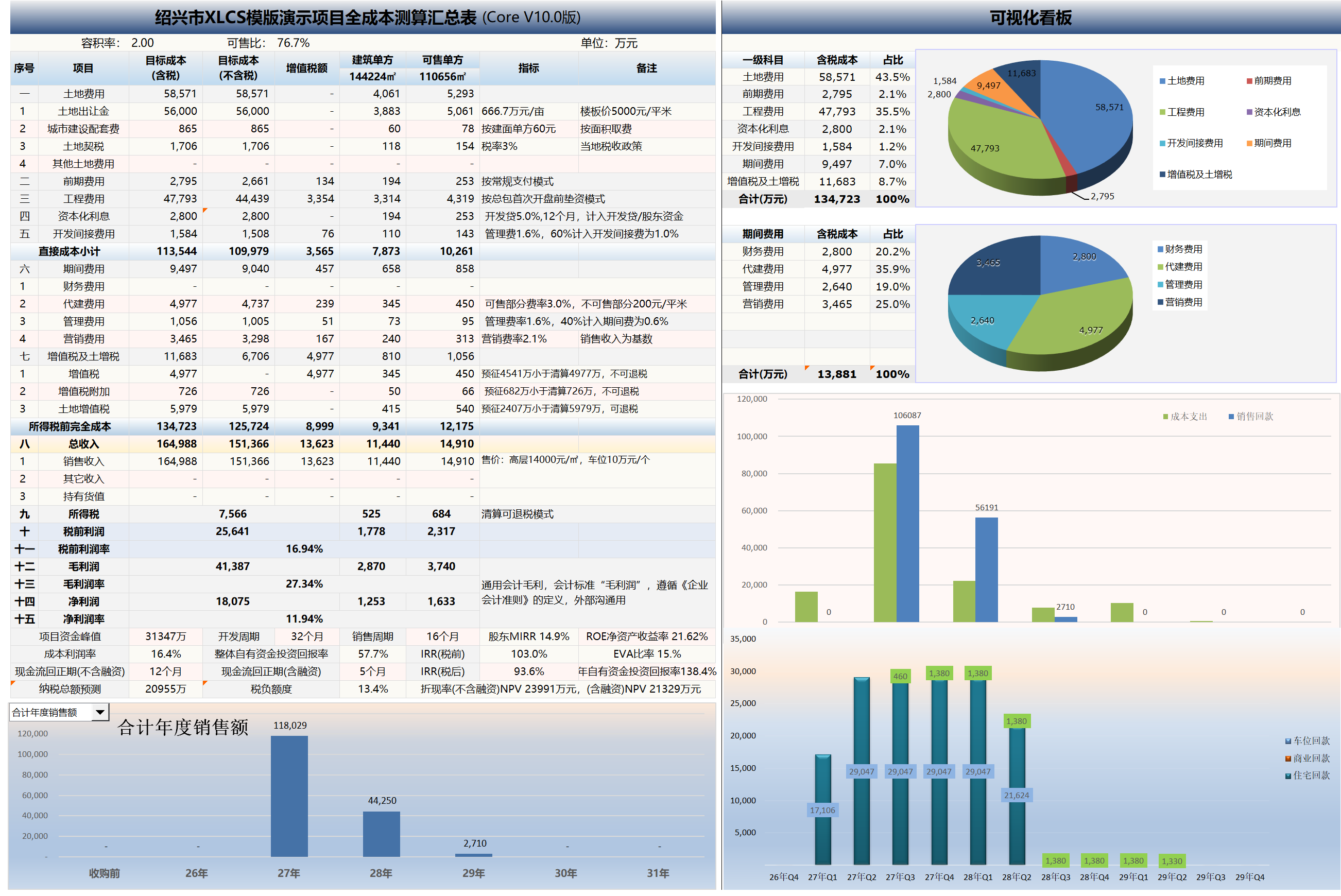
- Engineering cost statements
- Sales GDV statements
- Sales sell-through plans
- Collection schedules
- Financing plans
- Tax calculation sheets
- Restricted fund schedules
- Cash flow statements
- Operating metrics
- Sensitivity analysis tables
- Data validation sheets
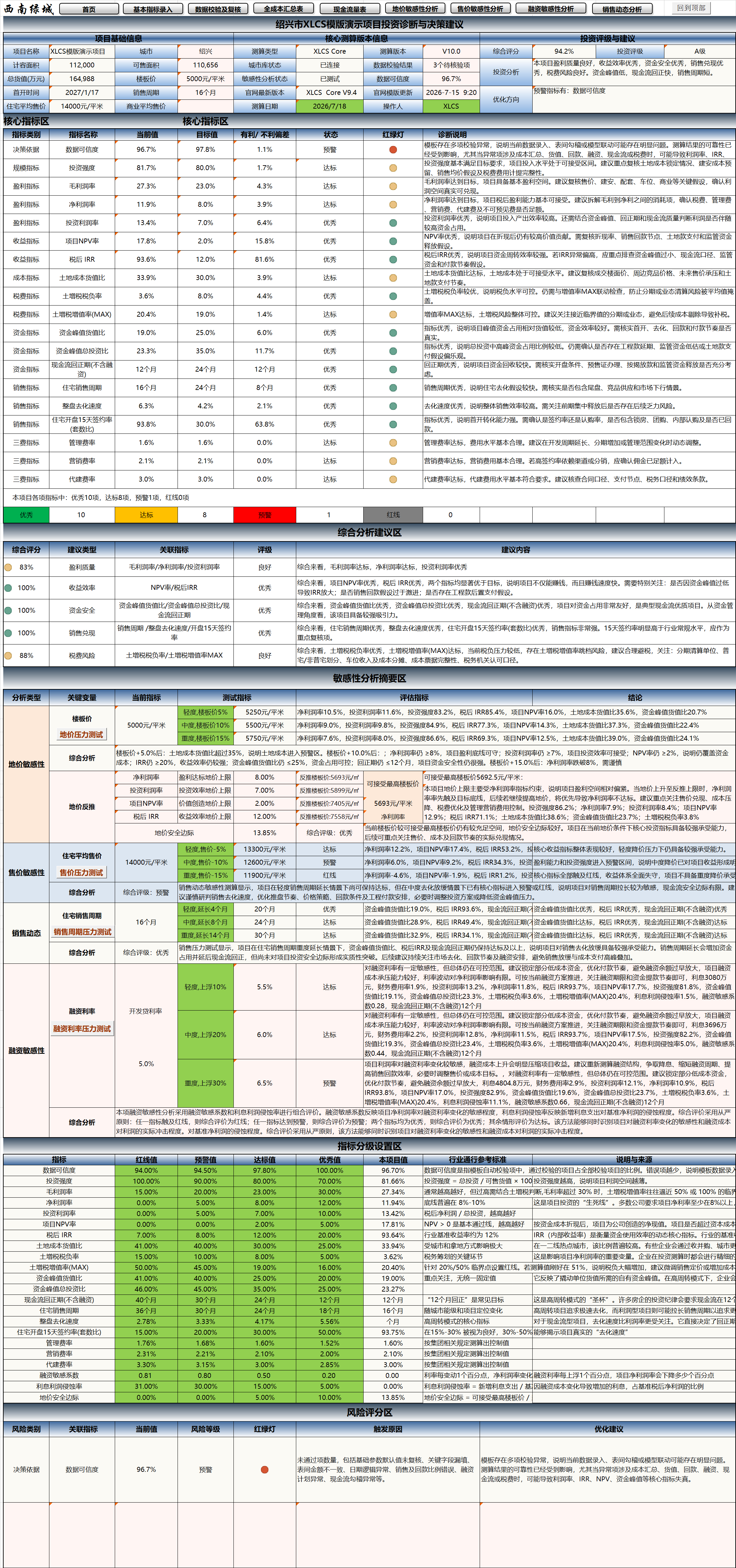
- Project investment diagnostics & decision recommendations
- Comprehensive scoring & investment ratings
- Core indicator traffic-light diagnostics
- Risk scoring & optimization recommendations
- PPT-ready summary sheets
Under normal circumstances, what would require several days or even weeks of collaboration across cost, sales, finance, and operations departments for full-cost dynamic estimation can be significantly shortened with XLCS. For standard projects, experienced users can produce a relatively complete estimation output within a short timeframe.
Starting from V10, the template introduces the “Project Investment Diagnostics & Decision Recommendations” module, which automatically generates comprehensive project scoring, investment ratings, core indicator diagnostics, risk identification, sensitivity analysis summaries, and optimization recommendations based on current estimation results—elevating the template from a traditional full-cost estimation tool to an investment diagnostics and decision-support tool.
The complete template suite contains over 90 worksheets, covering the full spectrum of real estate project static estimation, dynamic estimation, cash flow analysis, tax calculations, financing analysis, sensitivity analysis, investment diagnostics, and results reporting.
⚙️ Core Features
1. Automatic City Cloud Database Matching
After entering the city name, the template automatically connects to the cloud database, determines whether the city is included, and loads corresponding:
- City facility fees
- Tax parameters
- Planning requirements
- Green building policies
- City tier classification
- Related fee default values
If a city is not included, users may manually enter the relevant metrics.
2. Automatic Construction Schedule Generation
Based on city tier, project product type, rough/fitted delivery standards, highest floor count in the first-launch zone, and local pre-sale image milestone requirements, the template automatically selects a 5–12 month pre-sale construction schedule template, or users may choose a custom schedule template.
The system automatically generates:
- First-launch date
- Phase-based construction milestone schedules
- Master plan schedule
- Rough/fitted delivery milestones
- Standard schedule comparison data
3. Pre-Development & Construction Monthly Payment Plans
Based on phase-based construction milestone schedules, pre-development/construction cost sub-category ratios, payment milestones, and payment percentage templates, the system automatically generates monthly payment plans for up to 5 phases for both pre-development and construction costs, which flow into the cash flow statement.
The construction payment plan has been refactored with VBA modules, supporting:
- Cumulative milestone percentage handling
- Automatic merging of same-month milestones
- Automatic smoothing of cross-month milestone differences
- Multi-format date recognition
- Automatic summary row calculation
Compared to traditional complex formula approaches, the VBA logic provides more stable handling of cross-month milestones, same-month milestones, and multi-phase payment plans.
4. Automatic Selection & Validation of Construction Payment Ratios
Based on project area metrics, the template automatically determines project size classification and selects corresponding pre-development/construction payment ratios per Greentown standards.
If users manually modify payment ratios, the template automatically checks whether they comply with Greentown standards in the Data Validation & Review sheet and suggests recommended values.
5. Sales Cycle & First-Launch Indicator Validation
Based on city tier, the template imports Greentown standard sales cycles and first-launch indicators, and performs validation against different product types to determine whether project sales cycles, residential sales cycles, first-launch timing, and other metrics are reasonable.
6. Automatic Management & Marketing Fee Calculation
Based on project key information and Greentown standards, the template automatically generates recommended management and marketing fee rates and checks whether user-entered rates comply with recommended standards.
Marketing expenses can be automatically generated as monthly payment plans based on monthly collection values and marketing fee rates, and flow into the cash flow statement.
7. Sales Plans, Collection Plans & Sales Reports
Based on launch timing, product GDV, sales sell-through, collection assumptions, restricted funds, and other conditions, the template automatically generates:
- Annual sales plan reports
- Quarterly sales plan reports
- Monthly sales plan reports
- Collection plans
- PPT-ready sales summary sheets
- Total GDV & collection plan sheets
Related data automatically flows into the cash flow statement.
8. Automatic Financing Plan Generation
The template supports development loans, pre-financing, non-standard financing, and other financing structures. After users enter loan amounts, rates, terms, and interest payment modes, the system automatically generates monthly financing interest payment plans that flow into the cash flow statement.
Both development loans and pre-financing support up to 5 installment drawdowns and repayments. The system automatically calculates monthly interest based on each loan’s principal, drawdown month, repayment month, annual rate, and payment mode. Multiple interest payments in the same month are automatically aggregated.
9. Shareholder Fund Interest Calculation
Based on shareholder fund drawdown rates and shareholder fund return rates, the template automatically calculates shareholder fund occupancy and return interest, generating monthly plans that flow into the cash flow statement.
10. Management Expense Calculation
After selecting whether the project includes office rental, vehicle purchases, and project type, the template automatically calculates management fee control targets and monthly payment plans per Greentown management fee standards. For user-entered management fee rates, the template performs validation and provides reference recommendations.
11. Automatic Engineering Metric Configuration
Based on Greentown product type configuration standards, and after entering local prices for rebar, concrete, masonry, and other key materials along with prefabrication rates, the data automatically flows into the corresponding product type’s structural engineering cost detail sheets and structural cost calculation sheets.
From V9 onward, the template supports multiple configuration standards for the same product type. Based on product name, tier, and configuration standards, the system automatically identifies and generates corresponding engineering metrics.
For example, the same high-rise product type can be set to YUE J-Class, AN C-Class, or Select W-Class—the template automatically adapts the corresponding configuration standards, pre-development unit costs, and engineering unit costs.
12. Automatic Tax Calculation
After entering local tax information, the template automatically calculates:
- VAT
- Surtax
- Land appreciation tax (LVT)
- Corporate income tax
- Deed tax
- Related tax prepayment and liquidation data
Based on tax refund eligibility, refund ratios, non-standard residential classification criteria, deemed sales of held properties, and other conditions, the template automatically generates monthly tax payment plans that flow into the cash flow statement.
13. Held Property Economic Analysis
Based on preset held property operating templates, the system automatically generates held property economic analysis for investment return assessment.
14. Cash Flow Statements & Trend Charts
Based on monthly plans for construction, sales, financing, taxes, management fees, marketing fees, development management fees, and other items, the template automatically generates:
- Monthly cash flow statements
- Annual cash flow statements
- Quarterly cash flow statements
- Trend charts
- Peak funding
- Payback period
- NPV
- IRR
- Equity ROI
- And other metrics
15. Project Investment Diagnostics & Decision Recommendations
V10 introduces the Project Investment Diagnostics & Decision Recommendations module, which automatically generates comprehensive investment decision-oriented analysis based on current project estimation results.
This module primarily includes:
- Project baseline information
- Core estimation version information
- Comprehensive scoring
- Investment rating
- Investment analysis conclusions
- Optimization recommendations
- Core indicator diagnostics
- Comprehensive analysis and recommendations
- Sensitivity analysis summary
- Indicator grading configuration
- Risk scoring
The system automatically identifies and evaluates core project indicators, including:
- Data Credibility
- Investment Intensity
- Gross Profit Margin
- Net Profit Margin
- Return on Investment (ROI)
- Project NPV Rate
- After-Tax IRR
- Land Cost-to-GDV Ratio
- Land Appreciation Tax Burden Rate
- Land Appreciation Tax Appreciation Rate (MAX)
- Peak Funding-to-GDV Ratio
- Peak Funding-to-Total Investment Ratio
- Cash Flow Payback Period
- Residential Sales Cycle
- Overall Project Sell-Through Rate
- Residential 15-Day Post-Launch Contract Signing Rate
- Management Expense Ratio
- Marketing Expense Ratio
- Development Management Fee Ratio
Each indicator displays current value, target value, favorable/unfavorable variance, status, traffic light, and diagnostic description—helping users quickly determine whether indicators are in Excellent, Compliant, Warning, or Red-Line status.
This module also links land price sensitivity, selling price sensitivity, sales cycle stress testing, financing rate stress testing, and other results to form a sensitivity analysis summary, supporting assessment of project resilience under adverse scenarios.
16. Second-Hand Acquisition Project Estimation
The template includes extended content for second-hand acquisition projects, supporting entry of pre-acquisition expenditures and revenue from already-sold units, which automatically flows into the model and cash flow statement.
17. Excess Incentive & Co-Investment Calculation
The template includes excess incentive and co-investment calculation tables for internal incentive and co-investment return analysis.
18. Automatic Land Cost Allocation Across Multiple Plots
The template supports automatic land cost allocation across multiple plots. The system automatically aggregates and allocates land area and corresponding land costs for each product type across plots based on area data by plot, phase, and batch.
📊 Feature Summary
| Feature Category | Key Functions |
|---|---|
| Basic Setup | City identification, product configuration, schedule templates, automatic configuration standard matching |
| Cost Management | Construction payments, pre-development payments, construction costs, product cost allocation |
| Sales Management | Sales cycles, sell-through plans, marketing expenses, collection plans, sales dynamics analysis |
| Funds Management | Financing plans, cash flow statements, restricted funds, peak funding, payback period |
| Tax Management | VAT, LVT, corporate income tax, surtax, deed tax |
| Sensitivity Analysis | Land price sensitivity, selling price sensitivity, financing sensitivity, sales cycle stress testing, marketing fee dynamics |
| Investment Diagnostics | Comprehensive scoring, investment rating, core indicator traffic lights, risk scoring, optimization recommendations |
| Reporting Output | Annual reports, monthly reports, PPT reports, trend charts, investment diagnostic conclusions, results export |
🌐 Official Website & Support
| Type | Link |
|---|---|
| Official Website | http://fccs.cc |
| Official Website | http://fckcs.cn |
| Official Website | http://fckcs.com |
| Official Website | http://fdc.sd |
| Official Website | http://fccsz.com |
| Official Website | http://cskits.com |
| Support & Suggestions | http://xlcs.de/ |
| Email Contact | [email protected] |
📷 Template Preview
XLCS — Making full-cost estimation smarter