
XLCS Estimation Template – Comprehensive Feature Overview
XLCS Estimation Template – Comprehensive Feature Overview
📌 Quick Navigation
| Navigation | Link |
|---|---|
| ⚡️ Template Download | /categories/Template-Download/ |
| 📑 Version Matrix | /categories/Version-Matrix/ |
| 🚀 Quick Start Guide | /categories/Getting-Started/ |
| ❓ Changelog | /categories/Changelog/ |
| 🛠 Discussion & Help | https://xlcs.de/ |
📖 Template Overview
The XLCS Real Estate Project Full-Cost Estimation Template is developed by integrating best practices from full-cost estimation templates used by major developers such as Greentown, Sunac, Country Garden, Jinke, Zhongliang, Zontai, and others, while also incorporating Greentown’s product configuration standards, typical project assumptions, and practical investment estimation requirements.
With just key project parameters and location-specific inputs, the template automatically generates a complete set of outputs including:
- Engineering cost statements
- Sales GDV statements
- Sales sell-through plans
- Collection schedules
- Financing plans
- Tax calculation sheets
- Restricted fund schedules
- Cash flow statements
- Operating metrics
- Sensitivity analysis tables
- Data validation sheets
- Project investment diagnostics & decision recommendations
- Comprehensive scoring & investment ratings
- Core indicator traffic-light diagnostics
- Risk scoring & optimization recommendations
- PPT-ready summary sheets
Under normal circumstances, what would require several days or even weeks of collaboration across cost, sales, finance, and operations departments for full-cost dynamic estimation can be completed in significantly less time with XLCS. For standard projects, experienced users can produce a relatively complete estimation output within a short timeframe.
Starting from V10, the template introduces the “Project Investment Diagnostics & Decision Recommendations” module, which automatically generates comprehensive project scoring, investment ratings, core indicator diagnostics, risk identification, sensitivity analysis summaries, and optimization recommendations based on current estimation results—elevating the template from a traditional full-cost estimation tool to a comprehensive estimation system with investment diagnostics, risk warning, and decision support capabilities.
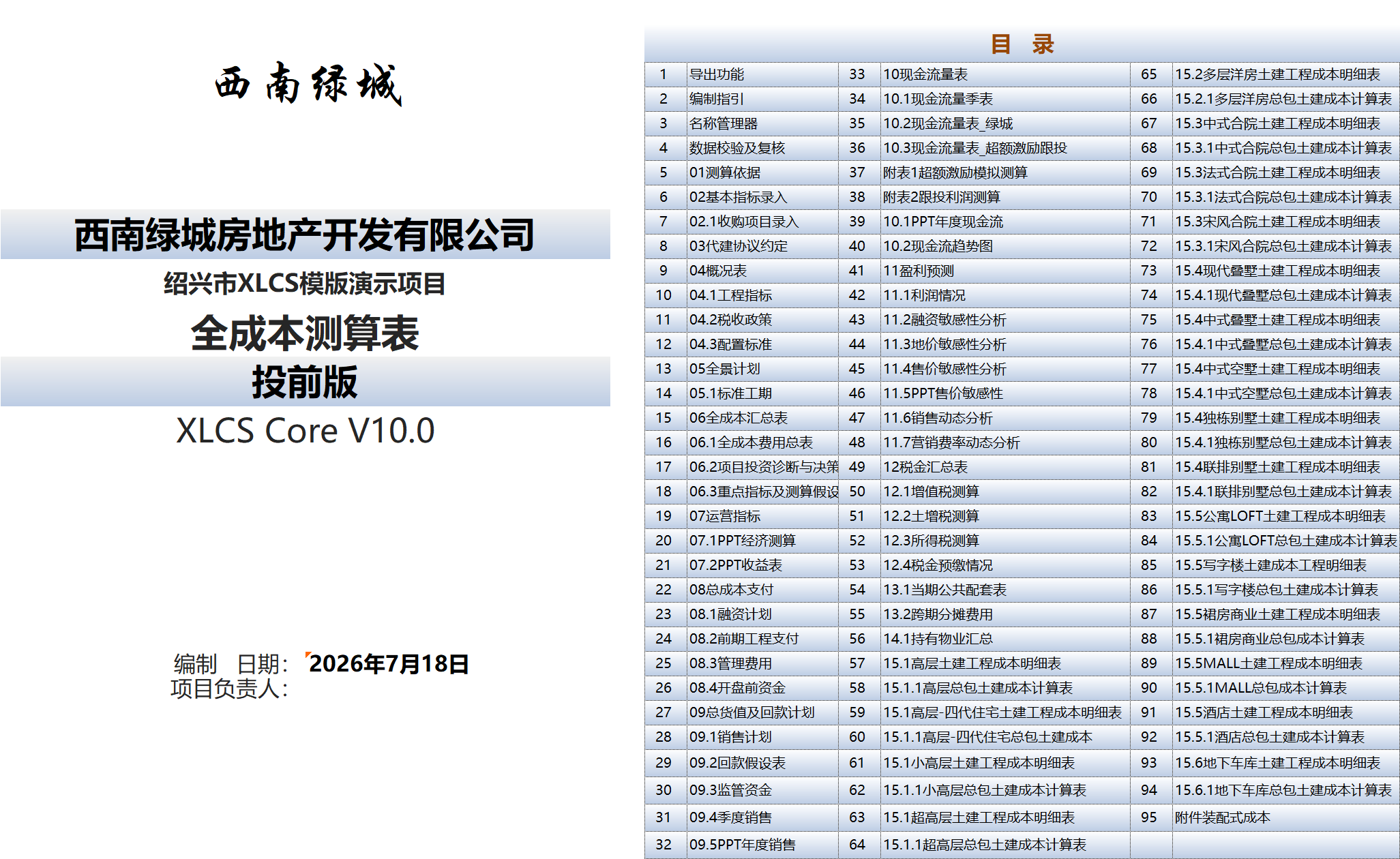
The complete template suite contains over 90 worksheets, covering the full spectrum of real estate project static estimation, dynamic estimation, cash flow analysis, tax calculations, financing analysis, sensitivity analysis, investment diagnostics, and results reporting.
⚙️ Feature Highlights
1. Project Investment Diagnostics & Decision Recommendations
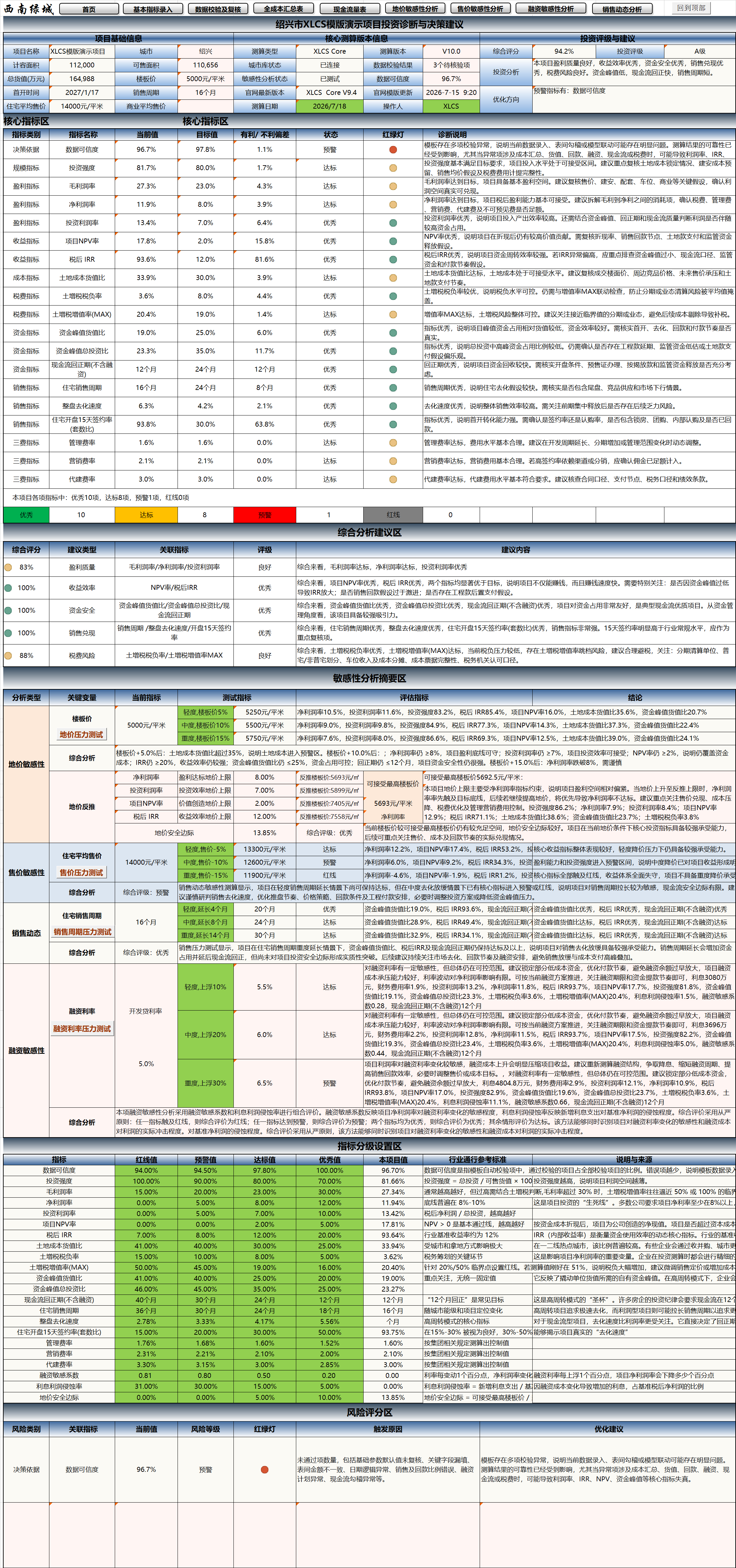
The “Project Investment Diagnostics & Decision Recommendations” module, new in V10, is one of the core signature features of XLCS Core V10.
Designed for project investment decision-making, investment committee reporting, post-investment review, and risk identification scenarios, this module consolidates key results scattered across full-cost, cash flow, operating metrics, tax calculations, sensitivity analysis, and data validation sheets into management-readable investment diagnostic conclusions.
Key features include:
- Project baseline information display
- Core estimation version information display
- Comprehensive scoring
- Investment rating
- Investment analysis conclusions
- Optimization recommendations
- Core indicator diagnostics
- Comprehensive analysis and recommendations
- Sensitivity analysis summary
- Indicator grading configuration
- Risk scoring
The system automatically evaluates critical dimensions including profitability quality, return efficiency, funding safety, sales realization, tax risk, financing sensitivity, and data credibility—helping users evolve from “reading spreadsheets” to “reading conclusions, risks, and recommendations.”
2. Core Indicator Traffic-Light Diagnostics
The V10 investment diagnostics module includes a core indicator dashboard that performs unified diagnostics on key project operating metrics, including:
- Data Credibility
- Investment Intensity
- Gross Profit Margin
- Net Profit Margin
- Return on Investment (ROI)
- Project NPV Rate
- After-Tax IRR
- Land Cost-to-GDV Ratio
- Land Appreciation Tax Burden Rate
- Land Appreciation Tax Appreciation Rate (MAX)
- Peak Funding-to-GDV Ratio
- Peak Funding-to-Total Investment Ratio
- Cash Flow Payback Period
- Residential Sales Cycle
- Overall Project Sell-Through Rate
- Residential 15-Day Post-Launch Contract Signing Rate
- Management Expense Ratio
- Marketing Expense Ratio
- Development Management Fee Ratio
- Financing Sensitivity Coefficient
- Interest Profit Erosion Rate
- Land Price Safety Margin
Each indicator displays:
- Current value
- Target value
- Favorable / unfavorable variance
- Status assessment
- Traffic-light indicator
- Diagnostic description
Through the traffic-light system, users can quickly determine whether each indicator is in Excellent, Compliant, Warning, or Red-Line status.
3. Comprehensive Analysis & Risk Scoring
V10 introduces a comprehensive analysis section and a risk scoring section that transform estimation results into structured management recommendations.
The comprehensive analysis section outputs conclusions across the following dimensions:
- Profitability Quality
- Return Efficiency
- Funding Safety
- Sales Realization
- Tax Risk
- Financing Sensitivity
- Data Credibility
The risk scoring section further displays:
- Risk category
- Associated indicators
- Current value
- Risk level
- Traffic-light status
- Triggering reasons
- Optimization recommendations
This functionality is suitable for preliminary investment assessment, project review meetings, rapid executive review, and post-investment review.
4. Sensitivity Analysis Summary & Stress Test Integration
V10 integrates sensitivity analysis results with the investment diagnostics module, automatically summarizing key stress test results for land price, selling price, sales cycle, and financing rates.
Linked analysis covers:
- Land price sensitivity
- Selling price sensitivity
- Sales cycle stress testing
- Financing rate stress testing
Through the sensitivity analysis summary, users can quickly assess project resilience under adverse scenarios:
- Rising land unit prices
- Declining selling prices
- Extended sales cycles
- Increasing financing rates
- Expanding peak funding
- Delayed payback periods
- Declining IRR / NPV
This feature helps users understand “under what conditions the project deteriorates, to what extent, and where the primary risks lie.”
5. Indicator Grading Configuration Section
V10 adds an indicator grading configuration section that establishes unified judgment criteria for key indicators used in investment diagnostics.
The grading section displays:
- Red-Line Value
- Warning Value
- Compliant Value
- Excellent Value
- Project Current Value
- Industry Benchmark Reference
- Description and Source
This section helps users understand the system’s judgment logic and facilitates future customization based on city tier, project type, and corporate investment standards.
6. Cloud Database
The template includes a built-in cloud database function that collects and organizes information on regulatory fees, tax parameters, green building policies, and city tiers for major cities across China, providing reference data for estimation.
Using an external linked cloud database enables real-time data updates.
The template automatically extracts corresponding city database information based on the entered city name and populates key estimation fields with default values. Users may also manually adjust values based on local real-time policies.
7. Intelligent Website Node Speed Testing & Cloud Link Repair
The template includes an intelligent speed testing system for XLCS official website cloud service nodes. On file open or manual button click, the system automatically tests access speeds across multiple XLCS official nodes, selects the fastest available node for local access, and updates the cloud database connection URL.
Supported features:
- Automatic detection of domestic core nodes
- One-click testing of all official nodes
- Display of node response times
- Automatic selection of the fastest node
- Update of
CloudDB_URL - Replacement of old cloud links in Name Manager
- Refresh of external links
- One-click repair of cloud link anomalies
When a domain is inaccessible or slow, users can click “One-Click Repair Cloud Link Anomaly” or “One-Click All-Node Speed Test” to automatically switch to a better node.
8. Product Configuration Standards & Cost Metrics
The template adopts Greentown’s new five-tier product configuration classification:
- Collection (T-Class)
- Premium (S-Class)
- Select (W-Class)
- YUE (J-Class)
- AN (C-Class)
Combined with product type, the system automatically matches corresponding configuration standards and cost limit databases.
If configuration standards or city tiers are raised, the template automatically adjusts related coefficients and unit cost benchmarks in Sheet 04.3 Configuration Standards, and updates calculations in the corresponding product’s structural/MEP cost detail sheets.
9. Automatic Detection of Duplicate Engineering Metrics & Multi-Tier Configuration Adaptation
From V9 onward, the template supports multiple configuration standards for the same product type. Based on product names and tiers entered in Sheet 04 Overview, the system automatically identifies duplicate entries where the “same product name has different configurations” and generates corresponding configuration columns in Sheet 04.3 Configuration Standards.
For duplicate products, the system also aggregates and sums parameters from the same group in columns T:AB of the structural detail sheet, and returns the calculated results to Sheet 04.1 Engineering Metrics.
This feature resolves the previous limitation where each product type could only have one set of engineering unit cost benchmarks, and is particularly suitable for multi-product, multi-tier, multi-phase projects.
10. One-Click Unit Area Fine-Tuning
Sheet 02 Basic Indicator Entry supports automatic unit area adjustment. After users enter total design area and unit counts, the system automatically adjusts individual unit areas to align the aggregated area with the total design area.
Supported rules include:
- When total design area is 0, automatically zero out corresponding unit counts
- When total design area is non-zero but unit counts are zero, automatically initialize with a mid-range unit
- Default initial area of 100㎡ for back-calculating unit counts
- For single-unit-type products, precise back-calculation based on “total design area ÷ unit count”
- For multi-unit-type products, even distribution of area differences across total unit counts
11. Construction Schedule Templates
The template includes multiple pre-sale construction schedule templates spanning 5 to 12 months to launch. The system can automatically select based on city tier, or users may manually select or customize.
The template automatically calculates the first-launch date and enters it into the schedule plan based on the highest floor count in the first-launch zone and local pre-sale image milestone requirements.
12. Construction Payment Templates
The template includes multiple construction payment templates:
- Monthly progress payments for standard projects
- Annual lump-sum progress payments
- Contractor funding advance before launch, normal monthly payments after launch
- Contractor funding advance until structural topping, normal monthly payments thereafter
After selecting the corresponding payment template, the system automatically recalculates the monthly construction payment schedule and enters it into the cash flow statement.
13. Pre-Development Payment Templates
The template includes multiple pre-development fee payment templates:
- Monthly progress payments for standard pre-development costs
- For challenging projects: discounted pre-development engineering costs (excluding regulatory fees and some design fees) before launch, normal payments after launch
Users can freely set different payment percentages for design fees, regulatory fees, and pre-development engineering costs.
14. Sales Collection Templates
Based on city-level purchase restrictions and structural-topping loan disbursement requirements, the template automatically selects different sales collection templates.
Users may also manually adjust collection milestones and ratios in the Collection Assumptions sheet. The system automatically generates the sales collection plan and enters it into the Total GDV & Collection Plan sheet.
15. Four-Mode Sales Sell-Through Generation
The sales sell-through module supports four modes:
- Default
- By sell-through rate
- By months
- By unit count
Unlike traditional templates that only support a single sell-through rhythm, XLCS allows each product to have its own sell-through mode. Residential and commercial products can be configured with different monthly sell-through unit counts, and the system automatically generates monthly sell-through rates based on each product’s launch timing, total units, and product type.
When selling by unit count, the system intelligently allocates monthly sales volumes among available products, automatically removing sold-out products from subsequent allocation—making the sales plan more realistic.
16. Sales Restricted Fund Templates
The restricted fund module supports multiple regulatory logic types:
- No restriction
- Period-end balance-based restriction
- Total restricted amount / milestone-based release
- Locally-calculated construction cost-based restricted amount
The system automatically generates monthly restricted fund release plans based on phase-based restriction milestones and release ratios, and enters them into the cash flow statement.
Special rules for parking/storage restricted funds:
- Release cannot precede the sale start date
- Cumulative release cannot exceed cumulative collections
This logic more accurately reflects the impact of restricted funds on project available funds, peak funding, and financing requirements.
17. Financing Interest Payment Templates
Both development loans and pre-financing support the following interest payment modes:
- Quarterly interest payments
- Semi-annual interest payments
- Annual interest payments
- Bullet repayment (principal and interest at maturity)
Each financing type supports up to 5 installment drawdowns and repayments. The system automatically generates monthly financing interest plans based on each loan’s principal, drawdown month, repayment month, annual rate, and payment mode. Multiple interest payments in the same month are automatically aggregated.
18. Non-Standard Financing Module
Non-standard financing refers to non-standardized funding beyond pre-financing and development loans to cover project cash flow gaps.
Based on monthly cash flow gaps, user-defined annual interest rates, and trigger thresholds, the template automatically calculates non-standard financing drawdown and repayment schedules and amounts. The default single loan term is 12 months, with mandatory early repayment when cash flow turns positive, and early repayment triggers when no funding gaps are detected in the next 6 months.
Repayment follows FIFO order. Users can choose whether non-standard financing enters the financing plan and cash flow statement.
19. Development Management Fee Payment Templates
After entering key management agreement terms and payment milestones, the template automatically calculates:
- Saleable property management fees
- Non-saleable property management fees
- Incentive fees
- Off-site property management fees
- Sales incentive management fees
And generates monthly payment schedules that enter the cash flow statement.
20. City Facility Fee Calculation Templates
After entering local regulatory fee indicators and calculation methods, the template can calculate city facility fees across multiple modes:
- By GFA-based calculation
- By total investment-based calculation
- Unified standard calculation
- Differentiated rates by product type / floor count
- Whether basement areas are included
- Whether government-mandated affordable housing pays facility fees
21. Management / Marketing Fee Calculation Templates
Based on project key information and Greentown standards, the template automatically generates recommended management and marketing fee rates. Users may manually override default rates, and the system automatically updates the full-cost estimation sheets.
22. Non-Standard Residential LVT Template
After entering local non-standard residential classification criteria, the template automatically distinguishes standard vs. non-standard residential properties based on FAR, unit area, selling price, and other criteria, and calculates LVT separately for each category.
23. Fitted Delivery Schedule Templates
When the template detects fitted units, it automatically enables fitted delivery / fitted handover options and adjusts the corresponding fitted construction schedule templates.
24. Prefabrication Rate Templates
Based on the project’s PC prefabrication rate requirements, the template automatically adds structural cost increments associated with different prefabrication rates in the engineering cost calculation sheets.
25. Pre-Sale Image Milestone Templates
Based on plot height restrictions in planning conditions, the template automatically calculates the highest floor count in the first-launch zone and, based on local pre-sale image milestone requirements, calculates the corresponding construction timeline and recommended first-launch date.
26. PPT-Ready Results Pages
The template includes multiple pre-configured results output pages that automatically extract key result data for presentation purposes, including:
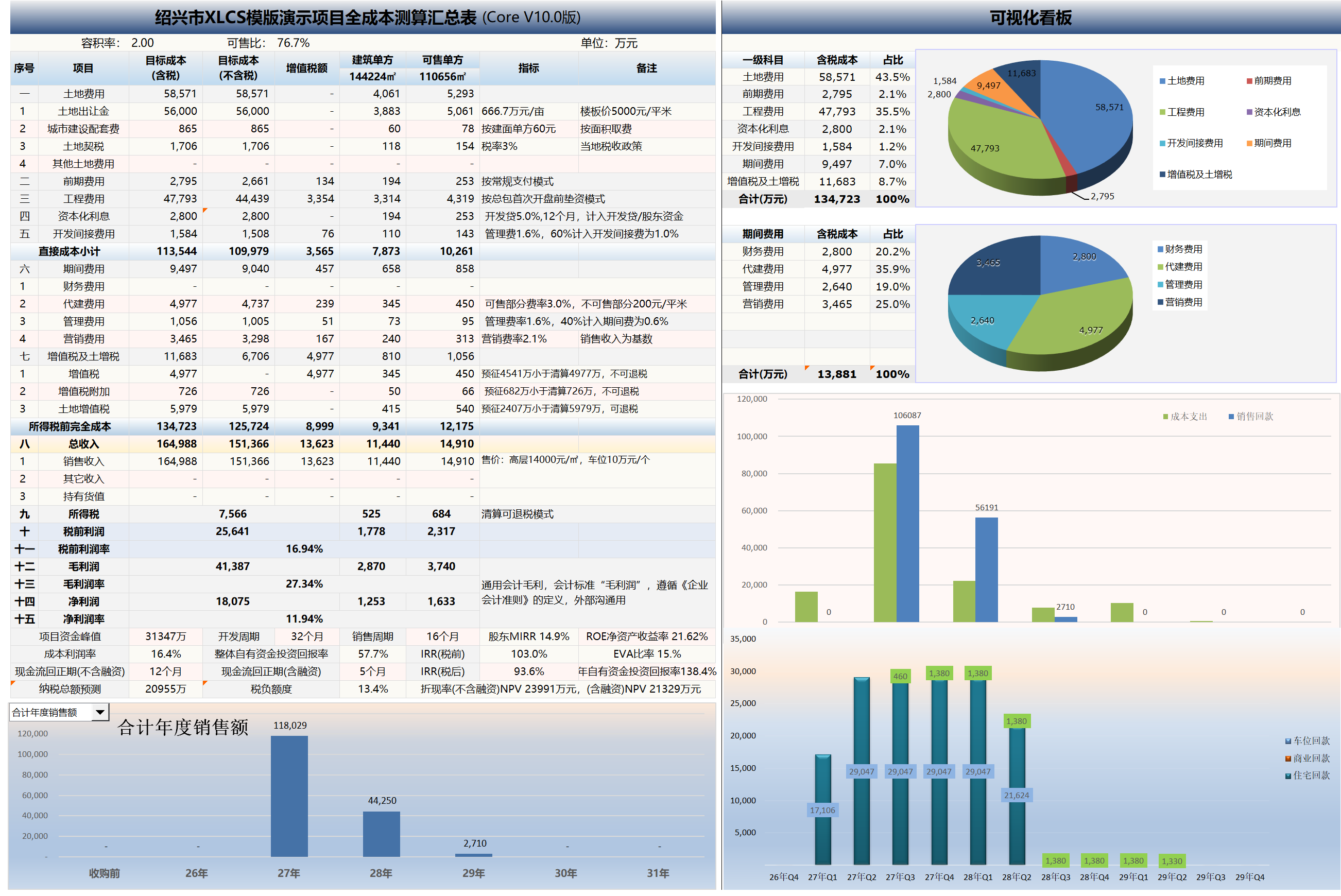
- Economic estimation tables
- Income statements
- Annual cash flow statements
- Annual sales tables
- Selling price sensitivity analysis tables
- Key indicator summary tables
27. Multi-Dimensional Sensitivity Analysis Reports
The template includes multiple sensitivity analysis tools:
- Selling price sensitivity analysis
- Land price sensitivity analysis
- Financing structure sensitivity analysis
- Sales dynamics analysis
- Marketing fee ratio dynamics analysis
These cover the primary sensitivity analysis needs in real estate project estimation—price, cost, financing, sales cadence, and marketing expenses.
In V10, sensitivity analysis results can further feed into the Project Investment Diagnostics & Decision Recommendations module to form a sensitivity analysis summary. The system links land price, selling price, sales cycle, and financing rate stress test results with comprehensive scoring, investment rating, and risk scoring—helping users assess project resilience under adverse scenarios.
28. Selling Price Sensitivity Analysis
Sheet 11.4 Selling Price Sensitivity Analysis supports custom benchmark selling prices with precise product-code matching to corresponding products in Sheet 02 Basic Indicator Entry.
Supports:
- Residential price adjustments
- Commercial price adjustments
- Separate writing of rough / fitted prices
- Automatic backup and restoration of original prices
- Batch generation of price scenario results
29. Land Price Sensitivity Analysis
Sheet 11.3 Land Price Sensitivity Analysis supports automatic generation of up to 50 land price scenarios based on starting land unit price, increment value, and run count.
This feature is suitable for:
- Land acquisition bid calculations
- Land cost tolerance analysis
- Auction bidding strategy simulation
- Comparison of profit margin, IRR, NPV, and peak funding under different land unit prices
The system automatically restores the original land unit price formula after execution.
In the V10 investment diagnostics module, land price sensitivity results can be further used to assess land price safety margins, helping users identify headroom for profit margins, IRR, NPV, and peak funding under current land cost conditions.
30. Financing Structure Sensitivity Analysis
Sheet 11.2 Financing Sensitivity Analysis supports variation analysis of development loan and pre-financing amounts, rates, and terms.
The system automatically modifies model input parameters, calls the financing interest calculation module to regenerate interest plans, and reads net profit, net margin, IRR, equity ROI, ROE, and other metrics.
31. Sales Dynamics Analysis
Sheet 11.6 Sales Dynamics Analysis analyzes the impact of the following variables on core financial metrics:
- Launch timing (advance or delay)
- Monthly sell-through rate changes
- Residential monthly sell-through unit changes
- Commercial monthly sell-through unit changes
- Sell-through period (months) changes
Output metrics include:
- Peak funding
- Peak timing
- IRR
- NPV
- Cash flow payback period
- Annual equity ROI
32. Marketing Fee Ratio Dynamics Analysis
Sheet 11.7 Marketing Fee Ratio Dynamics Analysis supports linked analysis of residential selling prices and marketing fee rates.
Users can configure multiple residential price points with corresponding marketing fee rates. The system automatically writes prices and rates into the model and reads:
- Project net profit
- Project net margin
- IRR (pre-tax)
- IRR (after-tax)
This is suitable for evaluating reasonable marketing investment at different price levels and the impact of increased marketing expenses on project returns.
33. Automatic Adaptation of Engineering Metrics from Major Developers
In addition to automatically selecting Greentown product line engineering cost limits, the template also adjusts for city tier differences based on cloud data and displays reference engineering metrics from developers such as Country Garden for comparison.
34. Data Validation & Review Functionality
The template automatically checks cross-sheet relationships and common errors, tracing data sources and providing root cause analysis and modification recommendations.
Validation includes:
- Workbook link errors
- Cross-sheet reference errors
- Abnormal sales cycles
- Rough/fitted price input anomalies
- Invalid plot names
- Area allocation anomalies
- Financing parameter anomalies
- Engineering metric reference anomalies
- Tax logic anomalies
The V10 investment diagnostics module references data validation results to form the “Data Credibility” assessment. If base data, formula links, sales cycles, price inputs, financing parameters, or tax logic contain anomalies, the comprehensive score, investment rating, and risk scoring may be affected. Therefore, it is recommended to complete data validation and review before viewing investment diagnostic conclusions.
35. VBA Automatic Workbook Error Checking
In the Data Validation & Review sheet, the template provides one-click VBA functionality to check workbook link errors, cross-sheet reference errors, and other common errors. Results are displayed in designated cells for quick issue identification.
36. Pre-Launch Funding Payment Plan
Based on the selected construction payment template, the template aggregates and schedules monthly payments and collections for land, pre-development, construction, period costs, and taxes.
Supports selection based on first-launch scenario:
- Phase 1
- Phase 1, Batch 1 (First Launch Zone)
Provides aggregated totals for pre-launch, Year 1, Year N, and other periods.
37. Dual Directory System: Home Page & Export Directory
The template includes two directory types:
| Directory Type | Worksheet | Purpose |
|---|---|---|
| Home Page Directory | Home | Quick navigation to worksheets |
| Export Directory | Export | Selection of worksheets for export |
The Home Page Directory is used for internal template navigation; the Export Directory is used for results file export.
38. One-Click Results File Export
To meet confidentiality and external reporting requirements, the template supports selective worksheet export.
During export, the system:
- Automatically copies user-selected worksheets
- Generates a standalone
.xlsxfile - Converts formulas to static values
- Preserves formatting, column widths, row heights, and page styles
- Removes macros and VBA code
- Does not affect the original template
Suitable for providing estimation results to clients, leadership, partners, and financial institutions.
- Supports export of the Project Investment Diagnostics & Decision Recommendations page
- Preserves static results including comprehensive scoring, investment rating, risk scoring, and optimization recommendations
39. One-Click Multi-Mode LVT Liquidation Value Generation
XLCS PRO supports one-click generation of LVT liquidation values across multiple modes: consolidated liquidation, by-plot liquidation, and by-phase liquidation. Users can configure different phase/plot combinations to view corresponding LVT liquidation values in real time, facilitating identification of optimal tax planning structures.
40. WPS/Excel Dual-Platform Compatibility & Global Task Lock
Since V8.2, the template’s core functionality has been fully compatible with both Excel and WPS.
Multiple core VBA modules incorporate a global task lock mechanism to prevent data conflicts from repeated button clicks or concurrent macro execution. Affected modules include:
- Sales sell-through plan
- Construction payment plan
- Restricted fund calculation
- Financing interest calculation
- Engineering metric auto-configuration
- File export
- Sensitivity analysis modules
VBA Automation Capabilities Overview
Starting from XLCS Core V9, significant core logic has been refactored with VBA modules. Compared to traditional complex formulas, VBA offers advantages in execution efficiency, complex logic handling, batch calculation, data recovery, cross-sheet integration, and WPS/Excel compatibility.
| Module | Worksheet | Primary Function |
|---|---|---|
| Sales Sell-Through | 02 Basic Indicator Entry / 09.1 Sales Plan | Generates monthly product sell-through plans |
| Construction Payment Plan | 08.2 Pre-Construction Payment | Generates monthly payment plans for Phases 1–5 |
| Restricted Fund | 09.3 Restricted Funds | Generates monthly restricted fund release plans |
| Financing Interest | 08.1 Financing Plan | Calculates monthly interest for development loans and pre-financing |
| Selling Price Sensitivity | 11.4 Selling Price Sensitivity Analysis | Analyzes impact of price changes on metrics |
| Land Price Sensitivity | 11.3 Land Price Sensitivity Analysis | Analyzes impact of land unit price changes on metrics |
| Financing Structure Sensitivity | 11.2 Financing Sensitivity Analysis | Analyzes changes in loan amount, rate, and term |
| Sales Dynamics | 11.6 Sales Dynamics Analysis | Analyzes impact of sales cadence changes |
| Marketing Fee Dynamics | 11.7 Marketing Fee Ratio Dynamics Analysis | Analyzes price-fee combinations |
| Engineering Metric Auto-Config | 04.1 Engineering Metrics / 04.3 Configuration Standards | Automatically configures engineering unit cost benchmarks |
| Unit Area Adjustment | 02 Basic Indicator Entry | Automatically calibrates unit areas |
| Website Node Speed Test | 02 Basic Indicator Entry | Automatically selects fastest cloud service node |
| Home Page Directory | Home | Automatically generates worksheet navigation |
| Export Function | Export | Selective worksheet export |
| Project Investment Diagnostics | Project Investment Diagnostics & Decision Recommendations | Generates comprehensive scoring, investment rating, core indicator diagnostics, risk scoring, and optimization recommendations |
| Sensitivity Analysis Summary | Project Investment Diagnostics & Decision Recommendations / Sensitivity Analysis Sheets | Consolidates land price, selling price, sales cycle, and financing rate stress test results |
| Risk Scoring | Project Investment Diagnostics & Decision Recommendations | Identifies data credibility, funding safety, sales realization, tax, and financing sensitivity risks |
| Indicator Grading Configuration | Project Investment Diagnostics & Decision Recommendations | Displays red-line, warning, compliant, and excellent values with industry benchmarks |
Through these VBA automation modules, XLCS is not merely a set of estimation spreadsheets, but a comprehensive real estate estimation system with automatic calculation, validation, analysis, diagnosis, export, and repair capabilities. With the addition of the Project Investment Diagnostics & Decision Recommendations module in V10, the template further incorporates investment rating, risk warning, and decision support capabilities.
🌐 Official Website & Support
| Type | Link |
|---|---|
| Official Website | http://fccs.cc |
| Official Website | http://fckcs.cn |
| Official Website | http://fckcs.com |
| Official Website | http://fdc.sd |
| Official Website | http://fccsz.com |
| Official Website | http://cskits.com |
| Support & Suggestions | http://xlcs.de/ |
| Email Contact | [email protected] |
📷 Template Preview
XLCS — Making full-cost estimation smarter