
XLCS Project Investment Diagnostics & Decision Recommendations Module Overview
XLCS Project Investment Diagnostics & Decision Recommendations Module Overview
📌 Quick Navigation
| Navigation | Link |
|---|---|
| ⚡️ Template Download | /categories/Template-Download/ |
| 📑 Version Matrix | /categories/Version-Matrix/ |
| 🚀 Quick Start Guide | /categories/Getting-Started/ |
| ❓ Changelog | /categories/Changelog/ |
| 🛠 Discussion & Help | https://xlcs.de/ |
I. Module Overview
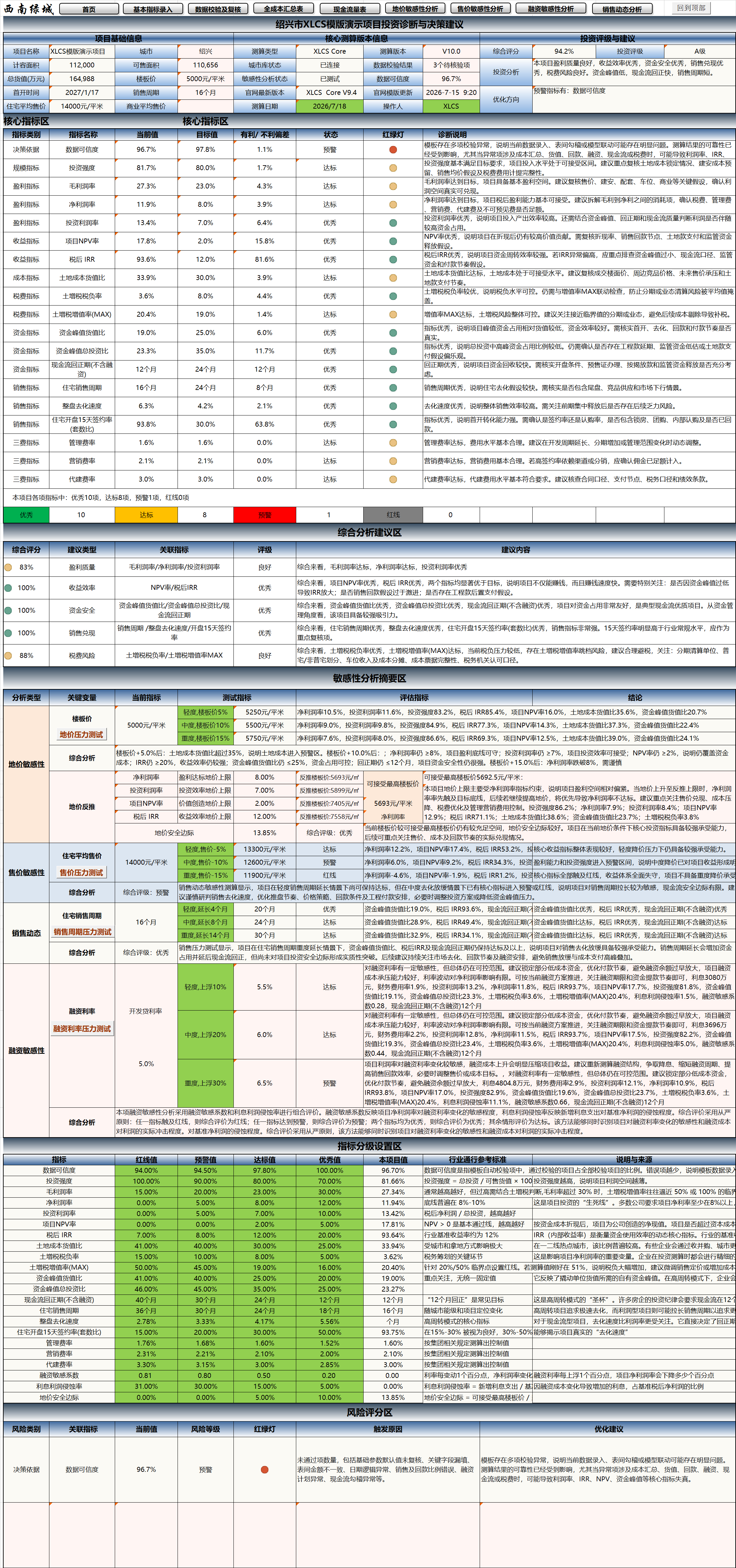
The “Project Investment Diagnostics & Decision Recommendations” module is a core new feature introduced in XLCS Core V10.
Built upon the project’s full-cost estimation results, this module automatically consolidates project baseline information, core operating metrics, profitability, funding safety, sales realization, tax risks, financing sensitivity, data credibility, and sensitivity analysis outputs, and further generates:
- Comprehensive project scoring
- Investment rating
- Investment analysis conclusions
- Core indicator traffic-light diagnostics
- Comprehensive analysis and recommendations
- Sensitivity analysis summary
- Indicator grading configuration
- Risk scoring
- Optimization recommendations
With this module, XLCS evolves beyond a mere “cost, profit, and cash flow” calculation spreadsheet into a project investment analysis tool with investment diagnostics, risk warning, and decision support capabilities.
In short:
Previously, it was about “calculating results.” Starting with V10, it now further “diagnoses projects, assesses risks, and provides recommendations.”
II. Applicable Scenarios
The “Project Investment Diagnostics & Decision Recommendations” module is suitable for the following scenarios:
- Preliminary investment assessment prior to land acquisition
- Auction bid price decision support
- Project feasibility study estimation
- Investment committee estimation reporting
- Project cash flow and funding safety review
- Diagnostics of project profit margin, IRR, and NPV indicators
- Stress testing on land price, selling price, financing, and sales cycle
- Project investment risk identification
- Comparative analysis of project optimization plans
- Rapid executive review of estimation results
- Post-investment review and indicator attribution analysis
For professionals in investment, cost, finance, marketing, operations, and management, this module helps users quickly extract conclusions from large volumes of estimation tables, reducing the cost of purely manual analysis.
III. Core Value of the Module
1. From “Viewing Data” to “Viewing Conclusions”
Traditional estimation templates typically output numerous spreadsheets—full costs, profit statements, cash flow, sales plans, tax calculations, and more.
However, for management or investment committees, the priority is to quickly determine:
- Is the overall project worth investing in?
- Do the return metrics meet the targets?
- Is the cash flow safe?
- Is there still room to absorb higher land costs?
- Is the sales cycle too long?
- Is the tax burden excessive?
- Is the data quality reliable?
- Which indicators have already triggered warnings?
- In which directions should optimization be pursued?
The V10 investment diagnostics module is designed specifically to address these questions.
2. From “Single-Indicator Judgment” to “Comprehensive Scoring”
A single indicator often cannot fully reflect project quality.
For example:
- High net profit margin, but excessively high peak funding;
- Good IRR, but an overly long sales cycle;
- Manageable land cost ratio, but high land appreciation tax burden;
- Acceptable total profit, but low data credibility;
- High selling price sensitivity—once prices drop, key metrics deteriorate significantly.
Therefore, the V10 module evaluates project quality across multiple dimensions, generating a comprehensive score and investment rating to help users more holistically assess the project’s investment value.
3. From “Reliance on Individual Experience” to “Systematic Diagnostics”
Previously, project risk assessment depended heavily on personal experience, with different individuals potentially reaching different conclusions.
The V10 module structures, standardizes, and makes traceable the diagnostic logic through indicator grading, traffic-light status, risk scoring, and trigger reason analysis, resulting in clearer and more intuitive diagnostic outcomes.
IV. Key Module Functions
1. Project Baseline Information Display
The top section of the module centrally displays project baseline information and core estimation version details, facilitating quick confirmation of the current diagnostic context.
Typically includes:
- Project name
- City
- FAR capacity area
- Saleable area
- Total GDV
- Land unit price
- First launch date
- Sales cycle
- Estimation version
- City database status
- Data validation status
- Data credibility
This section is useful for quickly verifying the project scope, ensuring consistency between diagnostic results and the actual estimation version.
2. Comprehensive Scoring & Investment Rating
Based on the project’s core indicator performance, the module automatically generates:
- Comprehensive project score
- Investment rating
- Investment analysis conclusions
- Optimization recommendations
The comprehensive score is not a simple readout of any single indicator, but rather a holistic consideration of profitability, return efficiency, funding safety, sales realization, tax risk, financing sensitivity, data credibility, and other factors.
The investment rating helps users quickly gauge overall project quality, for example:
| Rating Level | Meaning |
|---|---|
| Excellent | Most core indicators perform well, with strong investment appeal |
| Compliant | Core indicators generally meet investment requirements; further validation recommended |
| Warning | Some key indicators show pressure; optimization is needed |
| Cautious | Notable risks exist; prudent decision-making required |
| Red-Line | Critical indicators trigger severe risks; direct advancement is not recommended |
Specific rating results are subject to the template’s calculation logic and user-defined standards.
3. Core Indicator Traffic-Light Diagnostics
The core indicator diagnostic section is one of the most important components of this module.
The system conducts uniform diagnostics on key project indicators and displays status via traffic-light signals.
Primary Diagnostic Indicators Include:
- Data Credibility
- Investment Intensity
- Gross Profit Margin
- Net Profit Margin
- Return on Investment (ROI)
- Project NPV Rate
- After-Tax IRR
- Land Cost-to-GDV Ratio
- Land Appreciation Tax Burden Rate
- Land Appreciation Tax Appreciation Rate (MAX)
- Peak Funding-to-GDV Ratio
- Peak Funding-to-Total Investment Ratio
- Cash Flow Payback Period
- Residential Sales Cycle
- Overall Project Sell-Through Rate
- Residential 15-Day Post-Launch Contract Signing Rate
- Management Expense Ratio
- Marketing Expense Ratio
- Development Management Fee Ratio
- Financing Sensitivity Coefficient
- Interest Profit Erosion Rate
- Land Price Safety Margin
Each Indicator Typically Displays:
- Current value
- Target value
- Favorable / unfavorable variance
- Status assessment
- Traffic-light indicator
- Diagnostic description
Traffic-Light Legend:
| Status | Meaning |
|---|---|
| Green | Indicator performs well, meeting or exceeding targets |
| Yellow | Indicator shows some pressure, requiring attention |
| Orange | Indicator approaching risk zone; optimization recommended |
| Red | Indicator triggers red-line or severe risk; requires priority review |
Through traffic-light diagnostics, users can quickly identify the most critical issues requiring attention.
4. Comprehensive Analysis & Recommendations
The comprehensive analysis section further consolidates individual indicators into broader investment decision dimensions.
Common analytical dimensions include:
- Profitability Quality
- Return Efficiency
- Funding Safety
- Sales Realization
- Tax Risk
- Financing Sensitivity
- Data Credibility
The system automatically outputs scores, ratings, and recommendations for each dimension based on related indicators.
For example:
| Analytical Dimension | Potentially Related Indicators |
|---|---|
| Profitability Quality | Gross margin, net margin, ROI, land appreciation tax burden rate |
| Return Efficiency | IRR, NPV, cash flow payback period |
| Funding Safety | Peak funding, peak funding-to-GDV ratio, financing amount, restricted funds |
| Sales Realization | Sales cycle, sell-through rate, first-launch signing rate |
| Tax Risk | Land appreciation tax burden rate, appreciation rate, corporate income tax, non-deductible costs |
| Financing Sensitivity | Financing rate changes, interest erosion rate, reliance on non-standard financing |
| Data Credibility | Data validation results, formula links, abnormal inputs, model completeness |
This section is suitable for rapid executive review and can be directly extracted into investment committee presentation materials.
5. Sensitivity Analysis Summary
The V10 investment diagnostics module links sensitivity analysis results to form a Sensitivity Analysis Summary.
Key stress-testing scenarios include:
- Land price sensitivity
- Selling price sensitivity
- Sales cycle stress testing
- Financing rate stress testing
Questions It Helps Answer:
- If land unit price rises, can the project’s profit margin still meet targets?
- If selling price declines, how severely will IRR and NPV deteriorate?
- If the sales cycle extends, does the peak funding expand significantly?
- If financing rates increase, does interest noticeably erode profits?
- Does the current land price still have a safety margin?
- Does the project’s primary risk come from price, land cost, sales, or financing?
The sensitivity analysis summary helps users extend beyond a single baseline scenario to assess resilience under adverse conditions.
6. Indicator Grading Configuration
The indicator grading section displays the benchmark values used in diagnostic assessments.
Typically includes:
- Red-Line Value
- Warning Value
- Compliant Value
- Excellent Value
- Project Current Value
- Industry Benchmark Reference
- Description and Source
Through this section, users can clearly understand why the system assigned a particular status to an indicator.
For example:
| Indicator | Red-Line | Warning | Compliant | Excellent | Project Value |
|---|---|---|---|---|---|
| Net Profit Margin | Lower range | Low range | Target range | Excellent range | Auto-read |
| After-Tax IRR | Lower range | Low range | Target range | Excellent range | Auto-read |
| Cash Flow Payback Period | Long range | Extended range | Reasonable range | Favorable range | Auto-read |
| Land Cost-to-GDV Ratio | High range | Elevated range | Reasonable range | Favorable range | Auto-read |
Users may calibrate these criteria further based on internal investment standards, city tiers, project types, and operational strategies.
7. Risk Scoring
The risk scoring section provides structured identification of project risks.
Common risk categories include:
- Decision Basis Risk
- Data Credibility Risk
- Funding Safety Risk
- Sales Realization Risk
- Tax Risk
- Financing Sensitivity Risk
Each risk category typically displays:
- Risk category
- Associated indicators
- Current value
- Risk level
- Traffic-light status
- Triggering reasons
- Optimization recommendations
Example:
| Risk Category | Focus Areas |
|---|---|
| Data Credibility Risk | Completeness of base data, formula link integrity, abnormal key inputs |
| Funding Safety Risk | Peak funding level, payback period length, financing dependency |
| Sales Realization Risk | Sales cycle length, sell-through speed, first-launch signing rate |
| Tax Risk | Land appreciation tax burden, appreciation rate entering high tax bracket |
| Financing Sensitivity Risk | Impact of rate increases on profit, IRR, and cash flow |
| Decision Basis Risk | Adequacy of assumptions, significant uncertainty in key indicators |
The risk scoring section helps users quickly identify project weaknesses and formulate targeted optimization recommendations.
V. Recommended Workflow
To ensure more reliable diagnostic conclusions, the following workflow is recommended:
1 | Enter base data |
VI. Pre-Diagnostic Review Checklist
Before reviewing the “Project Investment Diagnostics & Decision Recommendations,” it is recommended to complete at least the following checks:
1. Base Data Review
- Is the project name, city, and land parcel name correct?
- Are the FAR capacity area, saleable area, and total GFA accurate?
- Are product types, product grade, and finishing standards properly entered?
- Are land cost, land unit price, and land payment milestones correct?
- Are phase, batch, and first-launch timelines reasonable?
2. Revenue & Sales Review
- Are product selling prices fully entered?
- Are the pricing bases (unfurnished / furnished) correctly specified?
- Is the sales sell-through model reasonable?
- Does the sales cycle align with project reality?
- Are the payment collection ratios and timelines reasonable?
- Does restricted fund configuration affect cash flow?
3. Costs & Taxes Review
- Have engineering metrics been updated?
- Does the configuration standard match the product grade?
- Are pre-development, construction, and supporting costs abnormal?
- Are VAT, land appreciation tax, and corporate income tax parameters correct?
- Are tax logic for non-standard residential, held properties, and ancillary properties accurate?
4. Financing & Cash Flow Review
- Are development loan, pre-financing, and non-standard financing parameters correct?
- Has financing interest been recalculated?
- Does peak funding align with expectations?
- Is the cash flow payback period reasonable?
- Are shareholder fund occupancy and return interest correct?
5. Data Validation Review
- Are there any error messages in the Data Validation & Review sheet?
- Are there cross-sheet reference errors?
- Are there workbook link anomalies?
- Are there missing critical inputs?
- Have formulas been accidentally deleted or overwritten?
- Are there any obviously unreasonable indicators?
The investment diagnostics module references data validation results to form the “Data Credibility” assessment.
If base data contains significant anomalies, the comprehensive score, investment rating, and risk scoring may also be affected.
VII. Typical Application Examples
1. Land Acquisition Estimation
During the land acquisition phase, users can complete the base estimation and then quickly use the diagnostics module to determine:
- Is the current land price acceptable?
- Do gross margin, net margin, and IRR meet targets?
- Is the land cost-to-GDV ratio too high?
- Is the land price safety margin sufficient?
- Should the bid price be lowered or the product plan optimized?
2. Investment Committee Reporting
For investment committee presentations, users can directly extract:
- Comprehensive project score
- Investment rating
- Core indicator traffic lights
- Key risk points
- Sensitivity analysis summary
- Investment conclusions
- Optimization recommendations
Compared to traditional presentations with extensive spreadsheets, the diagnostics page is more suitable for rapid executive review.
3. Sales Stress Testing
If the project has a long sales cycle or high sell-through pressure, focus on:
- Residential sales cycle
- Overall project sell-through rate
- 15-day post-launch signing rate
- Sales cycle stress test results
- Peak funding changes
- Cash flow payback period changes
This helps determine whether to adjust pricing, launch cadence, marketing investment, or financing arrangements.
4. Financing Structure Optimization
For projects with high peak funding or heavy financing dependency, focus on:
- Peak funding-to-GDV ratio
- Peak funding-to-total investment ratio
- Financing sensitivity coefficient
- Interest profit erosion rate
- Financing rate stress test results
- Impact of non-standard financing on cash flow
This helps determine whether the financing structure is reasonable.
5. Tax Risk Identification
For projects with high land appreciation tax pressure, focus on:
- Land appreciation tax burden rate
- Land appreciation tax appreciation rate (MAX)
- Standard / non-standard residential classification
- Deductible project amounts
- Impact of deemed sales of held properties
- Possibility of phase-based or plot-based liquidation
For complex multi-plot or multi-phase projects, XLCS PRO can further support multi-scenario land appreciation tax liquidation comparisons.
VIII. Reporting Recommendations
When presenting to investment committees or management, consider the following structure for diagnostic results:
Project Baseline
Project name, city, area, GDV, land cost, first-launch date, sales cycle.Core Financial Metrics
Total investment, sales revenue, net profit, net margin, IRR, NPV, peak funding, cash flow payback period.Comprehensive Score & Investment Rating
Display system-generated score, rating, and investment conclusions.Core Indicator Traffic Lights
Show status of profitability, funding, sales, tax, and other core indicators.Sensitivity Analysis Summary
Display impact of land price, selling price, sales cycle, and financing rate changes on the project.Risk Scoring
Show primary risk categories, risk levels, and trigger reasons.Optimization Recommendations
Provide recommendations on land price, pricing, product mix, cost control, sales cadence, financing structure, and tax planning.
IX. Important Usage Notes
Diagnostic conclusions depend on base estimation data.
If inputs are incomplete or formulas have been altered, diagnostic results may be inaccurate.Complete data validation first.
It is recommended to run the relevant checks in the Data Validation & Review sheet before reviewing diagnostics.Run relevant VBA functions first.
If sales sell-through, construction payment, restricted funds, financing interest, or sensitivity analysis results have not been updated, the diagnostics module may read outdated data.Sensitivity analysis results should be generated first.
To view the sensitivity analysis summary, run the corresponding land price, selling price, financing, and sales sensitivity modules first.Diagnostic results do not replace professional judgment.
The module’s scoring, ratings, and recommendations are based on built-in logic and current estimation results. Actual investment decisions should still incorporate market conditions, policy, legal, tax, financing, and corporate strategy considerations.Indicator grading can be adjusted to enterprise standards.
Different cities, project types, and companies may have different investment criteria. Users can customize indicator grading based on their own standards.
X. Module Preview
XI. Summary
The “Project Investment Diagnostics & Decision Recommendations” module is a major upgrade in XLCS Core V10.
It further integrates full-cost estimation, cash flow forecasting, operational metrics, tax calculations, sensitivity analysis, and data validation results into a structured diagnostic page tailored for investment decision-making.
This module helps users:
- Extract estimation conclusions more efficiently
- Assess project quality more intuitively
- Identify key risks earlier
- Present investment decisions more clearly
- Formulate more targeted optimization recommendations
For real estate project investment estimation, the V10 diagnostics module elevates XLCS from a “calculation tool” to an “investment diagnostics and decision-support tool.”
XLCS — Making full-cost estimation smarter