
XLCS Real Estate Project Full-Cost Calculation Template — Version Update History
XLCS Real Estate Project Full-Cost Calculation Template — Version Update History
📌 Quick Navigation
| Navigation | Link |
|---|---|
| ⚡️ Template Download | /categories/Template-Download/ |
| 📑 Version Matrix | /categories/Version-Matrix/ |
| 🚀 Quick Start Guide | /categories/Getting-Started/ |
| ❓ Changelog | /categories/Changelog/ |
| 🛠 Discussion & Help | https://xlcs.de/ |
📖 Product Description
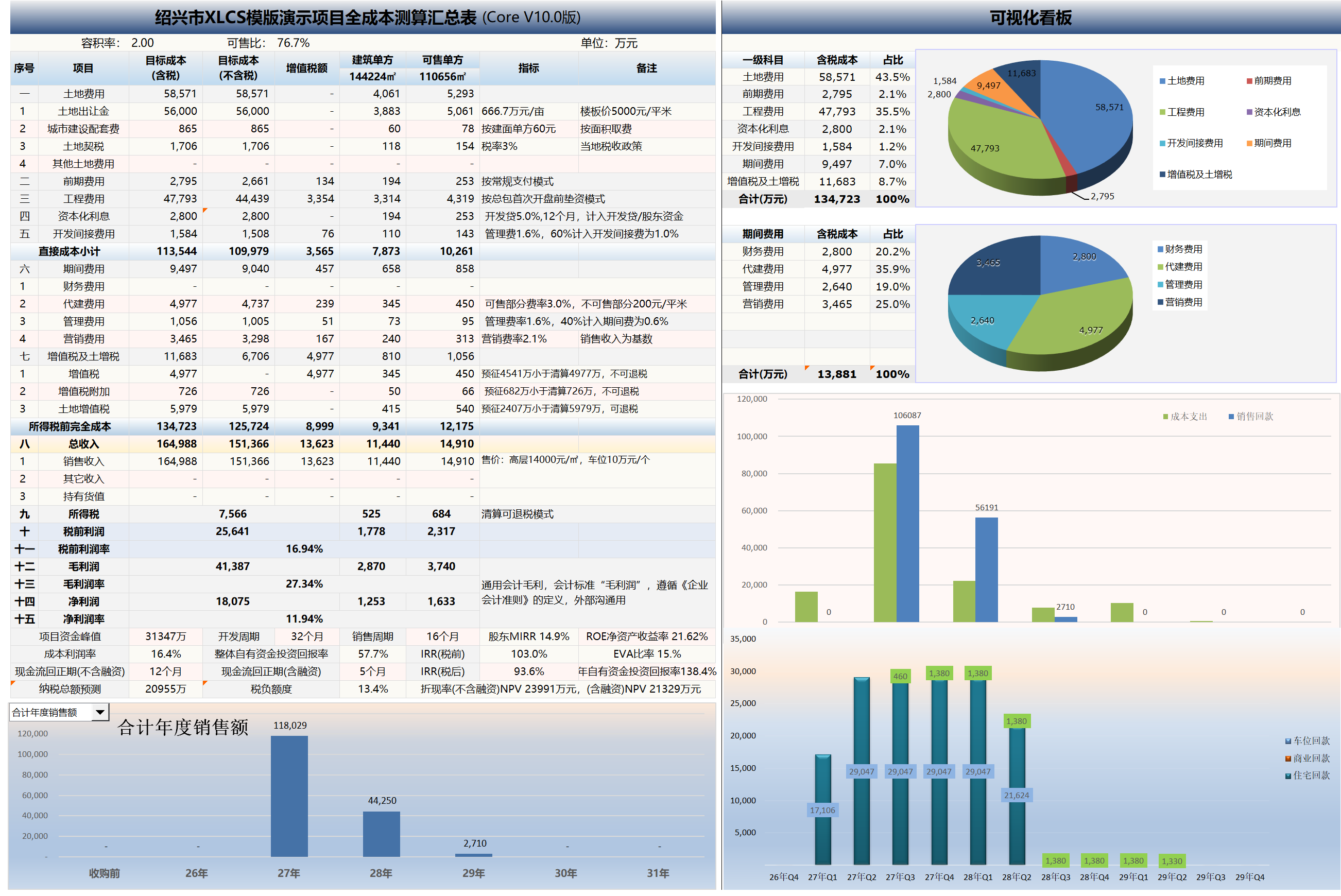
XLCS is a powerful and intelligent full-cost calculation tool for real estate projects, specifically designed for dynamic full-cost calculation, investment estimation, land acquisition analysis, cash flow analysis, tax calculation, and investment decision support for real estate development projects.
The template incorporates the strengths of calculation templates from multiple major developers (such as Greentown, Sunac, Country Garden, etc.) and has been continuously optimized for the actual needs of investment, cost, finance, marketing, and operations management, making it suitable for everyone from beginners to professionals.
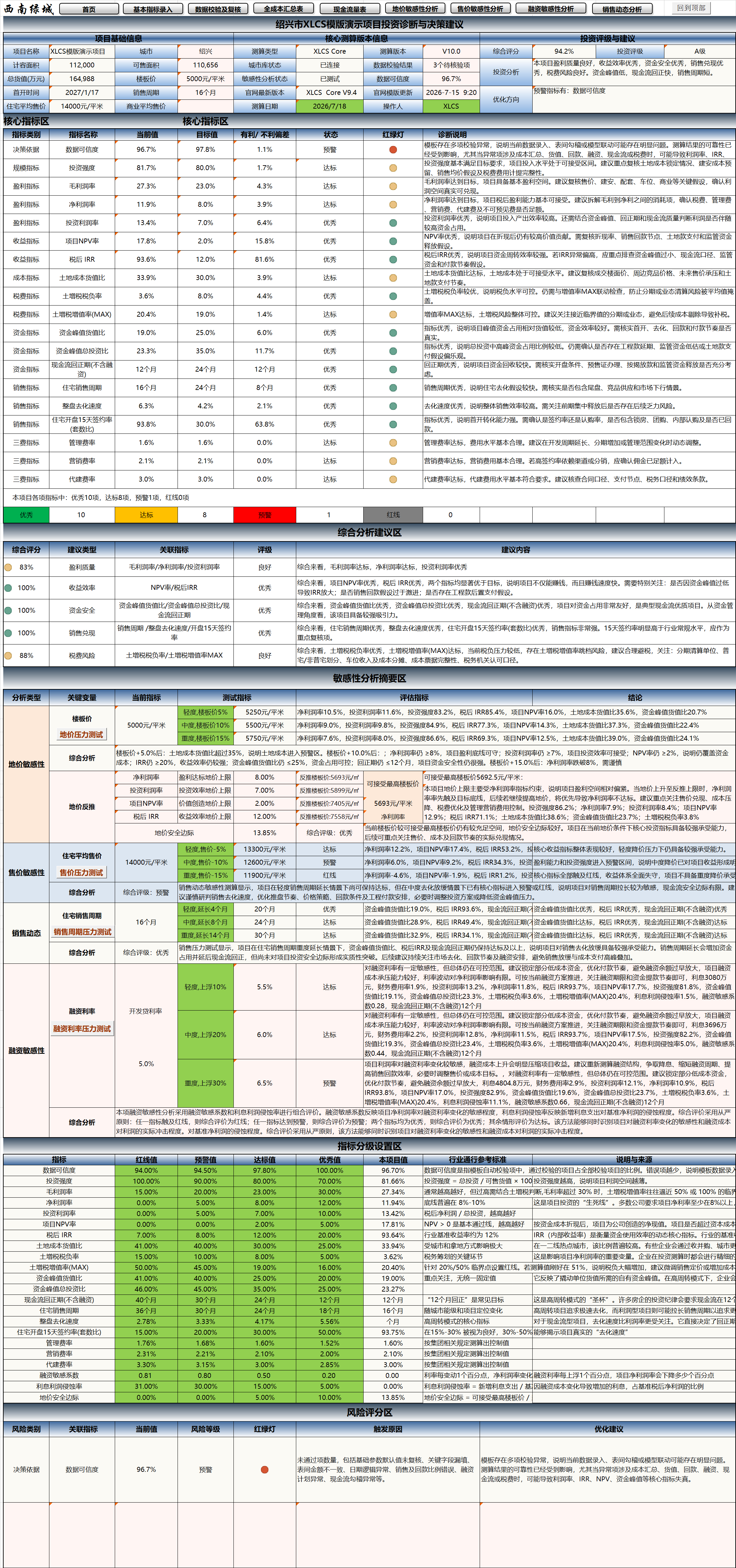
V10.0 introduces the重磅 new “Project Investment Diagnosis and Decision-Making Suggestions” module, which automatically generates comprehensive scores, investment ratings, core indicator diagnostics, traffic light status, risk scores, sensitivity analysis summaries, and optimization recommendations based on project calculation results. The template has evolved from a traditional “full-cost calculation tool” into a comprehensive calculation system with investment diagnosis, risk warning, and decision support capabilities.
Starting from V9.0, a major upgrade was made to the product type architecture, addressing the previous limitation where the same product type could not support multiple configuration standards (i.e., only one construction unit cost indicator per product type). After the upgrade, for example, high-rise products can simultaneously support multiple tiers such as Yueju (J-tier), Anju (C-tier), etc. The template automatically adapts corresponding configuration standards and preliminary/construction unit cost standards based on each product’s name and tier.
Starting from XLCS Core V8.2, to reduce version complexity and maintenance workload, separate EXCEL and WPS versions are no longer distinguished — full compatibility is achieved.
🆕 Current Latest Version Summary
| Product | Latest Version | Update Date | Core Updates |
|---|---|---|---|
| XLCS Core | V10.0 | 2026-07-18 | New Project Investment Diagnosis and Decision-Making Suggestions module, supporting comprehensive scoring, investment rating, core indicator diagnostics, risk scoring, and stress testing summary. |
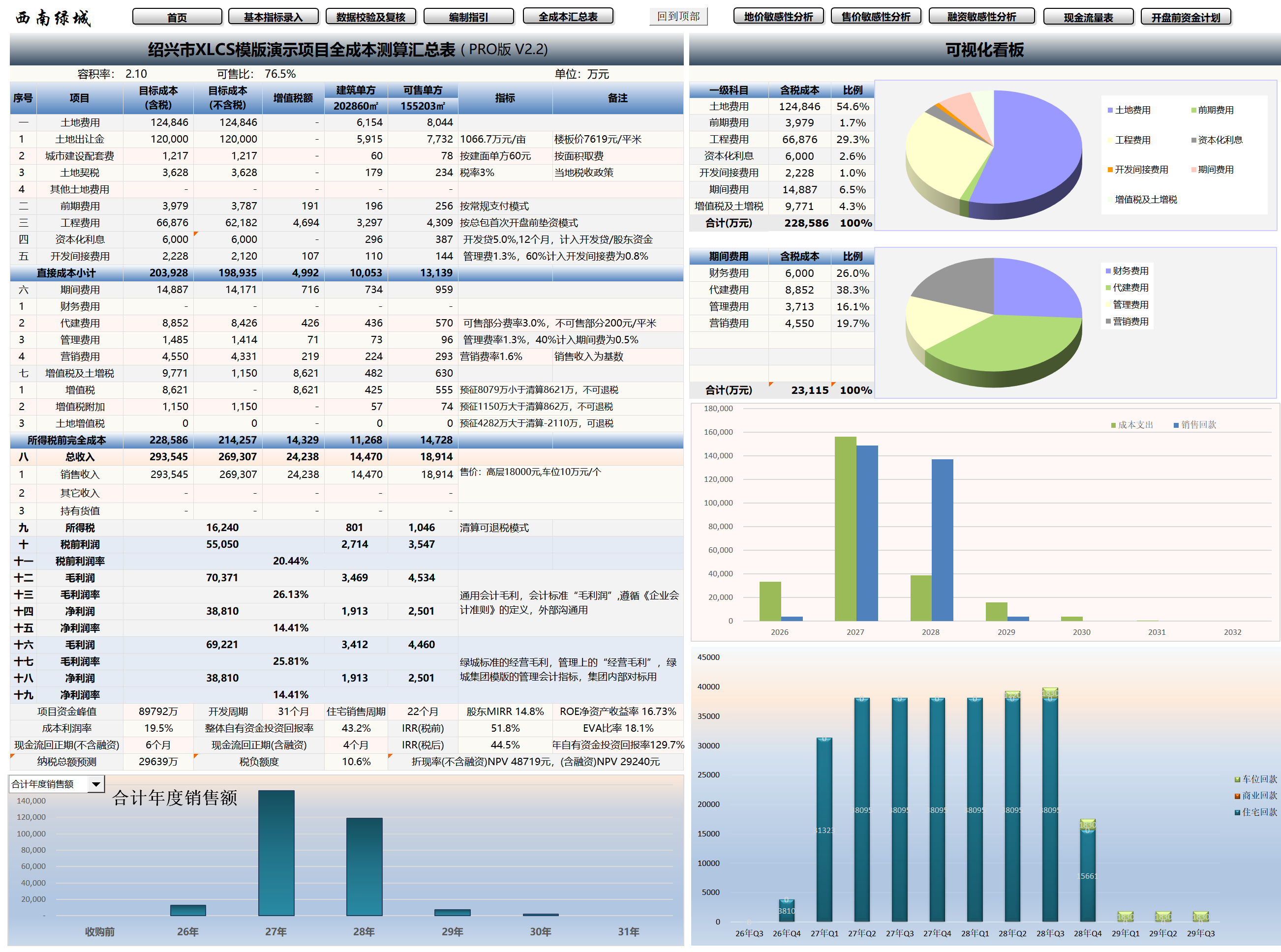
| XLCS PRO | V2.3 | 2026-06-04 | Optimized Thisworkbook, non-standard financing, official website node speed testing, city name logic, and feature entry points. |
| Simple-template | V2 | 2026-06-17 | Included in the latest XLCS package. |
| XLCS Lite | V2 | 2026-06-10 | Included in the latest XLCS package. |
📅 Version Update History
XLCS Core Version Update History
1. V1 Update 2022-11-01
2. V2 Update 2023-02-06
3. V3 Update 2023-03-19
4. V4 Update 2023-08-29
① Added one-click WORD report generation feature.
② Added “Pre-Opening Funding Plan” for projects with pre-opening funding difficulties, automatically calculating the minimum capital required before opening.
5. V5.1 Update 2024-01-12
① Added sheet “11.2 Front-End Financing Drawdown Sensitivity Analysis.”
② Added sheet “11.3 Land Price Sensitivity Analysis.”
③ Added sheet “11.4 Selling Price Sensitivity Analysis.”
6. V5.2 Update 2024-03-18
① Refined LAT template: parking spaces and storage rooms now calculate LAT based on corresponding product types.
7. V5.3 Update 2024-07-12
① Fixed multiple bugs.
8. V6.0 Update 2024-07-27
① Expanded acquisition-related content for second-hand projects, adding data entry for pre-acquisition capital expenditures and pre-sold unit revenue, automatically incorporated into model calculations.
② Added co-investment, incentive, and related tables.
9. V6.1 Update 2024-08-03
① Updated product types, adding stacked villas (Chinese, French), courtyard villas (Chinese, French), Chinese sky villas, Song-style courtyard villas, etc.
② Updated product configuration standards, from the traditional A-D four-tier system to a new five-tier system: Collection (T-tier), Premium (S-tier), Preferred (W-tier), Yueju (J-tier), Anju (C-tier). Established Greentown product configuration standards and cost databases. Default construction cost indicators are based on the new J-tier (Yueju) standard for lower construction costs; upgrading configuration tiers or city tiers automatically adjusts cost coefficients and unit prices in the Configuration Standards sheet and flows into corresponding product construction cost breakdowns.
③ Added multiple interest payment templates, supporting three modes: quarterly interest payment, annual interest payment, and bullet repayment at maturity, with one-click switching to automatically generate different interest payment cash flow patterns.
④ Optimized pre-opening funding table with full automatic data aggregation; users can select “Phase 1” or “Phase 1 Batch 1 (First Opening Zone)” mode based on project conditions to generate pre-opening payment cash flow.
10. V6.2 Update 2024-10-08
① Adjusted deemed sales value of held properties and related tax settings; adjusted LAT-related settings.
② Adjusted standard residential classification criteria settings; refined non-standard residential LAT template.
③ Adjusted other income/other expenditure related settings.
④ Adjusted sales plan module related settings.
11. V6.3 Update 2024-12-01
① Added prefabricated structure bonus area settings, with corresponding adjustments to FAR area formulas.
② Added automatic land cost allocation by plot for multi-plot projects — the template automatically aggregates land areas by product type per plot and calculates allocated land costs.
③ Fixed cash flow statement issues where liquidation timing/amounts were inaccurate under certain conditions.
④ Fixed area reference errors in the current-period public facility cost sheet.
⑤ Fixed issues in the full-cost summary table where preliminary costs/construction costs/municipal infrastructure fees for current-period public facilities were not broken down.
⑥ Fixed errors in the preliminary engineering payment sheet regarding pre-structural-topping construction payment schedules.
⑦ Fixed average selling price formula errors in the summary sheet.
⑧ Added townhouse villas and related calculation tables; fixed contingency fee formula errors.
⑨ Added plot-level preliminary/construction cost statistics in the summary sheet.
12. V6.4 Update 2025-02-15
① Fixed contingency fee calculation errors for finished products.
② Fixed cash flow errors where costs prior to the table’s start date were not included; added start date error detection in the validation sheet.
③ Fixed operational indicator sheet errors that referenced engineering and sales data under certain conditions.
④ Fixed potential errors in the preliminary engineering payment sheet when manually adjusting milestone payment ratios.
⑤ Fixed potential ambiguity in cumulative collection naming in the regulated fund sheet.
⑥ Adjusted project close-out timing to 12 months post-delivery, configurable in Sheet 02.
⑦ Added validation checks for land cost payment plan accuracy.
⑧ Added NPV indicator calculation to the cash flow statement and related data to the operational summary sheet.
⑨ Fixed net cash flow formula errors in the cash flow statement; fixed income tax allocation formula errors in the full-cost summary sheet.
⑩ Fixed IRR formula validation issues in the cash flow statement.
⑪ Enhanced regulated fund milestone settings with user-selectable key milestones and automatic timeline adaptation; added phased/plot-level regulated fund functionality for more accurate monthly dynamic data.
⑫ Added toggle for whether regulated funds affect cash flow collection data, allowing users to choose between dynamic monthly regulated funds or standard collection plans in Sheet 02.
⑬ Fixed monthly allocation errors for contingency fees in the preliminary engineering plan sheet.
⑭ Fixed VAT, VAT surcharge, and LAT allocation errors under specific phase conditions.
⑮ Fixed key milestone notation errors in the monthly sheet; added key milestones for five phases.
⑯ Improved reference accuracy for construction schedule, summary sheet, and panorama plan phase milestones.
⑰ Fixed multiple reference errors in the data validation and review sheet for sales cycle validation, collection assumptions, and management expense progress tracking; added additional validation items.
⑱ Added multiple helpful hints in the basic indicators entry sheet; added display of current cloud database URL and connection status.
⑲ Hid non-project preliminary cost indicators in the engineering indicators sheet, showing only automatically calculated project-specific preliminary costs to prevent misinterpretation.
13. V6.5 Update 2025-02-16
① Added VBA code for automatic workbook link error checking, cross-sheet reference error checking, and other common errors in the data validation and review sheet, with one-click execution (results displayed in cells C89, C91).
② Added one-click export directory generation to address confidentiality needs; users can select worksheets to export and generate a macro-free .xlsx file containing data only (formulas, macros, and VBA code removed). Usage: In the Export sheet, click “Generate Directory” then “One-Click Export.”
③ Added VBA code for automatic version number and update date checking against the official website, with prominent upgrade recommendations displayed in Sheet 02.
④ Added VBA code in the data validation and review sheet that automatically traces error sources back to origin, analyzes root causes, and provides modification recommendations (double-click error prompt cells for pop-up details).
⑤ Fixed product type area ratio display issues in the summary sheet.
⑥ Fixed multiple default date setting issues in the financing plan sheet; added interest rate input validation for all financing types in Sheet 02, requiring unused financing types to have zero interest rates to ensure data accuracy.
14. V7.0 Update 2025-02-26
① Automatic detection and connection to the fastest cloud server; if the default cloud database URL fails, network connection will be checked. Upon file opening, the system automatically tests all official servers and selects the fastest for your local access, connecting and updating cloud data. Network status and current server URL are displayed at the top of Sheet 02.
② Optimized worksheet validation and repair VBA code during file opening, with improved speed and robustness.
③ Optimized selling price sensitivity analysis VBA code, adding custom selling price functionality for quick on-page sensitivity analysis.
④ Added PPT-format sensitivity analysis sheets for presentation preparation.
⑤ Replaced homepage directory generation with VBA code, offering greater flexibility, stability, and automation compared to the GET.WORKBOOK macro function. Added one-click directory regeneration button on the homepage.
⑥ Added quick sales absorption template presets: default average absorption over sales period, custom monthly residential absorption units, custom absorption period (months). Users can switch between absorption modes with one click in Sheet 02, with VBA code automatically regenerating monthly absorption rates; individual products can also use different absorption modes.
⑦ Fixed issue where above-ground other non-FAR areas were not included in current-period public facility cost allocation.
⑧ Fixed formula issues for regular monthly preliminary costs in the preliminary engineering payment sheet.
⑨ Fully integrated XLCS Lite V1 — a lightweight version for beginners and trial users. For more advanced features, use XLCS Core. Many newcomers find Core overwhelming, so Lite is recommended as a starting point — requiring only basic economic indicators and key inputs (land cost, three-expense ratios, etc.) to produce identical reports to Core.
⑩ Optimized cloud database lookup logic after city entry: previously, county/district names not in the database would show “Not Found”; now the system automatically matches the parent city and outputs corresponding data, improving cloud data usability.
15. V7.1 Update 2025-03-03
① Completely rewrote engineering monthly payment plan using VBA, eliminating prior issues with complex formula-based milestone timing/proportion allocation. Auto-refresh on file open and every 3 minutes; manual update button also available in the preliminary engineering payment sheet.
② Optimized official website URL detection during file opening with three-tier detection: domestic core nodes, domestic edge nodes, international nodes. Only when core nodes are unreachable does the system fall back to lower tiers, ensuring server availability while significantly improving file opening speed.
③ Added Non-Standard Financing module for non-standardized financing beyond front-end financing and development loans, to address funding gaps. The module triggers based on monthly cash flow gaps, user-defined annual interest rates, and thresholds (trigger when cumulative net cash flow shortfall exceeds the threshold). Single loan term of 12 months; early repayment triggered when cash flow turns positive, following FIFO order. VBA code automatically calculates optimal drawdown/repayment timing and amounts, generating monthly interest. Users can choose whether to include in financing plan and cash flow, with one-click trial calculations and adjustable rates/thresholds.
④ Renamed front-end financing sensitivity analysis to Financing Method Sensitivity Analysis, with completely rewritten VBA code supporting custom financing amounts, rates, and terms for both development loans and front-end financing, providing investment analysis and forecasting.
⑤ Non-standard financing drawdown dates, repayment dates, and amounts are automatically populated in the financing plan sheet at L35:P44.
16. V7.2 Update 2025-03-07
① To meet WPS user demand, fully optimized for WPS features and JS code with the new XLCS Core V7.2 WPS Edition (also fully compatible with EXCEL); Office users may use XLCS Core V7.2 Excel Edition.
② Fixed product reading errors in the summary sheet; fixed land cost reading errors in the full-cost summary sheet.
17. V7.3 Update 2025-03-16
① Completely rewrote regulated fund monthly plan with VBA, fixing prior logic errors and ensuring normal cash flow data. One-click toggle in Sheet 02 for inclusion in cash flow.
② Added “One-Click Fix Cloud Link Anomalies” button at the top of the basic indicators entry and data validation sheets for users experiencing name manager reference errors due to network issues.
③ Fixed land cost reference errors in the LAT calculation sheet; fixed land cost allocation errors in the summary sheet, plus multiple minor bug fixes.
④ Refined non-sellable property development management fee calculations per management agreement.
⑤ Refined non-standard financing logic, adding mandatory zeroing of principal and interest for loans in the liquidation month.
18. V7.4 Update 2025-03-21
① Added automatic validation of key name manager names on file open and close to ensure cloud service functionality.
② Fixed management expense allocation errors in the VAT calculation sheet; fixed storage room preliminary engineering cost allocation errors in the LAT calculation sheet.
③ Fixed non-standard residential and non-residential LAT reduction logic.
④ Fixed profit margin allocation and phase profit allocation errors in the full-cost summary sheet.
⑤ Fixed missing storage room sales revenue in the regulated fund sheet.
⑥ Refined cross-phase cost allocation logic for various engineering costs.
⑦ Rewrote selling price sensitivity analysis code to directly modify prices at the data source, ensuring analytical accuracy.
⑧ Added a standard construction schedule template: 12-month pre-sale template.
19. V7.5 Update 2025-04-01
① Fixed development management fee calculation logic errors; added multiple custom settings for management fee calculation.
② Refined non-standard financing early repayment logic, adding a 6-month no-shortfall early repayment trigger when no funding gaps are projected for the next 6 months.
20. V7.6 Update 2025-05-02
① Expanded commercial property product inputs to 10, facilitating multi-commercial property project entry.
② Fixed land price sensitivity analysis bugs.
③ Refined land transfer fee cell settings for output VAT calculation in the VAT calculation sheet.
④ Fixed selling price reference bugs in the LAT sheet; optimized selling price sensitivity analysis logic.
⑤ Fixed deed tax calculation logic, adding other land costs as calculation base.
⑥ Fixed VAT and LAT calculation logic for built-for-transfer product types.
21. V8.0 Update 2025-06-27
① Optimized VBA code for city name cleanup.
② Optimized validation and review sheet settings.
③ Added payment months option after reaching funding advance milestones in Sheet 02, defaulting to one month after milestone.
④ Fixed construction schedule template definition range bugs.
22. V8.1 Update 2025-08-01
① Optimized regulated fund VBA code, increasing regulated milestones to 10 for more complex regulatory requirements. Regulatory tiers adjusted to: total pre-sale proceeds, construction cost standard, period-end fund balance, and none — adding locally measured construction cost-based regulation as a standard.
② Optimized standard construction schedule sheet, adding custom schedule settings for PC prefabricated structure standard floor cycle, non-prefabricated structure standard floor cycle, structure topping-out to rough-fit completion cycle, additional cycle for finished vs. rough-fit completion, rough-fit completion to rough-fit delivery, rough-fit completion to finished delivery, etc.
③ Added display of automatically detected official website server response time in Sheet 02.
④ Added two custom payment milestones in the progress payment milestone table of Sheet 08.2, with user-configurable milestone timing and payment ratios.
⑤ Fixed LAT calculation logic and formulas for government-mandated built-for-transfer properties.
⑥ Fixed bug where VAT amounts for preliminary and construction costs in the LAT and full-cost sheets did not account for invoice receipt rates and conversion rates, aligning with the VAT calculation sheet.
⑦ Optimized monthly progress payment allocation VBA code in the preliminary engineering payment sheet for faster, more accurate allocation.
23. V8.2 Update 2025-08-11
① Eliminated separate EXCEL and WPS versions to reduce complexity and maintenance burden; full compatibility starting from V8.2.
② Added custom land area allocation per product in the summary sheet, with error detection and prompts in the validation sheet.
③ Added time logic validation for the two custom payment milestones in Sheet 08.2, preventing later milestone payment ratios from being less than earlier ones.
④ Fixed VAT and deemed sales value calculation logic for held properties.
⑤ Added optional indicator for whether commercial ancillary properties are allocated parking spaces, with one-click toggle affecting parking count formulas.
⑥ Optimized VBA code monitoring key indicators that trigger automatic monthly progress payment recalculation to prevent excessive automatic recalculations.
⑦ Fixed formula errors in the pre-opening funding plan sheet.
⑧ Refined above-ground/below-ground FAR/non-FAR and GFA columns to accommodate the complexity of building areas, FAR areas, and bonus areas across various localities.
24. V8.3 Update 2025-09-01
① Refined profit-related cell logic in the 06 full-cost summary table, categorized into general accounting gross profit and Greentown-standard operating gross profit for clarity.
② Optimized sales absorption VBA code in Sheet 02 — monthly unit absorption logic better aligned with real-world practice, with separate monthly absorption units for residential and commercial products. Optimized parking absorption logic with default Greentown-standard monthly absorption rates.
③ Optimized financing sensitivity analysis VBA code for faster execution.
④ Optimized sales cycle and first opening validation formulas in the validation sheet for more intuitive results.
⑤ Optimized management expense standard calculation logic with multiple personalized inputs and output displays in Sheet 02.
⑥ Revised non-motorized parking unit calculation logic with separate ratio settings for residential, commercial, and ancillary uses.
⑦ Fixed product unit mix area verification formula errors.
⑧ Fixed secondary pop-up bug in VBA code for cell link error checking in the validation sheet.
25. V8.4 Update 2025-12-26
① Optimized key indicator cells in Sheet 02’s sales absorption plan to switch between green/gray based on absorption mode, indicating input availability.
② Fixed invoice receipt rate bugs in Sheet 12.2.
③ Optimized sellable property management fee calculation methods in Sheet 02, supporting two modes: percentage-based management fee or per-area unit fee.
④ Fixed city infrastructure fee calculation bugs where the system failed to auto-determine fee mode based on the selected city database.
⑤ Fixed row 3 quick external link URL in Sheet 02 to automatically fetch the locally fastest server URL.
⑥ Fixed formula errors in the “Summary Data” section of Sheet 09.1 sales plan.
26. V8.5 Update 2026-01-26
① Added out-of-red-line property management fee options in Sheet 02, plus sales incentive management fee options.
② Added 11.6 Sales Dynamics Analysis sheet for dynamic analysis of opening timing adjustments, absorption rate/monthly absorption units/absorption cycle changes on key economic indicators (peak funding, peak timing, cash flow payback period, annual return on self-owned capital, IRR, NPV, etc.).
③ Added 11.7 Marketing Expense Ratio Dynamics Analysis sheet for dynamic analysis of different marketing expense ratios corresponding to different residential selling prices and their impact on key economic indicators (net profit, net profit margin, IRR, etc.).
④ Optimized file opening VBA code for faster execution, changing to single-prompt display of detection results to reduce tedious operations.
⑤ Multiple display improvements: manually modified cells in Sheet 02 automatically highlight in blue; product type cells adapted in Sheets 04.1/04.3 automatically highlight in orange.
⑥ Added logic validation in the data validation and review sheet for correct rough-fit/finished selling price entry for corresponding products, with error prompts.
⑦ In Sheet 04.2 Tax Policy, the toggle for whether government-mandated built-for-transfer properties pay municipal infrastructure fees/land deed tax affects the full-cost summary table.
27. V9.0 Update 2026-03-21
① Major product type architecture upgrade, addressing the previous limitation where the same product could not support multiple configuration standards. After the upgrade, high-rise products can simultaneously support multiple tiers (e.g., Yueju J-tier, Anju C-tier, etc.), with the template automatically adapting configuration standards and preliminary/construction unit costs based on each product’s name and tier.
② Added illegal plot name detection and error prompts in the data validation sheet.
③ Refined sales cycle, residential sales cycle, and other indicator definitions and source consistency.
④ Fixed Sheet 02 version check bug; fixed product tier auto-selection bug when entering the first product.
⑤ Added quarterly cash flow statement.
⑥ Fixed configuration standards bug where missing townhouse products caused construction indicator errors.
⑦ Fixed bugs in the file export function code.
⑧ Optimized parking sales absorption formula in Sheet 02 and added error validation.
28. V9.1 Update 2026-04-08
① Optimized and rewrote multiple VBA code modules, fixing bugs and improving speed, including: unified financing loan interest calculation module, workbook external link check module, cross-sheet reference check module, Sheet 02 sales absorption module, sales dynamics analysis module, selling price sensitivity analysis module, land price sensitivity analysis module, template version/official website data update module, file export module, preliminary engineering payment plan module, regulated fund calculation module, and optimal network detection module.
② Added configuration for sellable above-ground ancillary properties.
29. V9.2 Update 2026-04-23
① Completely rewrote product type/indicator VBA code, fixed major bugs; upgrade recommended.
② Fixed multiple bugs in the civil works/general contractor cost breakdown sheets.
③ Fixed multiple bugs in the configuration standards sheet.
④ Fixed bug where above-ground non-FAR area did not count toward development management fees and municipal infrastructure fees.
⑤ Fixed non-standard financing module freeze bug.
30. V9.3 Update 2026-05-12
① Added hotel and MALL civil/general contractor cost breakdown sheets; added hotel and MALL configuration coefficients to the configuration standards sheet.
② Fixed product rough-fit/finished selling price validation bug in the data validation and review sheet (where held products were not considered).
③ Fixed preliminary/construction cost calculation bugs for products with below-ground FAR area.
④ Optimized unit mix verification and unit count statistics formulas in Sheet 02.
⑤ Optimized and improved VBA code for automatic homepage generation, directory generation, and worksheet export.
⑥ Added one-click unit mix area fine-tuning button in Sheet 02 — VBA code automatically adjusts individual unit areas based on input unit mix areas and total product design area.
⑦ Completely rewrote Thisworkbook and non-standard financing VBA code, fixing bugs and improving execution speed.
⑧ Completely rewrote official website node speed testing and city name validation VBA code, fixing bugs and adding one-click all-node speed testing and node switching shortcut buttons.
31. V9.4 Update 2026-06-15
① Integrated feature buttons with official website documentation, adding one-click access to official website pages and operation guides for related features within the template.
② Adapted and optimized code for compatibility with XLCS Template Upgrade Tool.
32. V10.0 Update 2026-07-18
① Added “Project Investment Diagnosis and Decision-Making Suggestions” module, enabling automatic diagnosis, comprehensive scoring, investment rating, and decision-making recommendations for project investment outcomes.
② Added project basic information and core calculation version display area, centrally displaying key information including project name, city, FAR area, sellable area, total GTV, land price per floor area, first opening date, sales cycle, calculation version, city database status, data validation results, data credibility, etc.
③ Added investment rating and recommendations area, automatically outputting comprehensive score, investment rating, investment analysis conclusions, and optimization directions for quick management review and investment committee presentations.
④ Added core indicators area, providing unified diagnosis of key indicators including data credibility, investment intensity, gross profit margin, net profit margin, return on investment, project NPV rate, after-tax IRR, land cost-to-GTV ratio, LAT burden rate, peak funding, cash flow payback period, residential sales cycle, overall sell-through velocity, 15-day post-opening contract signing rate, and three-expense ratios.
⑤ Core indicators area now displays current value, target value, favorable/unfavorable deviation, status, traffic light, and diagnostic explanation for intuitive judgment of whether each indicator is at excellent, compliant, warning, or red-line status.
⑥ Added comprehensive analysis and recommendations area, automatically generating comprehensive scores, correlated indicators, ratings, and recommendation content across dimensions including profitability quality, return efficiency, capital safety, sales realization, and tax risk.
⑦ Added sensitivity analysis summary area, linking land price sensitivity, selling price sensitivity, sales cycle stress testing, financing rate stress testing, etc., with the investment diagnosis module to assist in judging project resilience under adverse scenarios.
⑧ Added indicator tiered settings area, uniformly displaying red-line values, warning values, compliant values, excellent values, project values, industry benchmark reference standards, and source explanations for user understanding and future customization.
⑨ Added risk scoring area, identifying and warning on decision-making basis, data credibility, capital safety, sales realization, tax risk, financing sensitivity, etc., with automatic generation of trigger reasons and optimization recommendations.
⑩ Added land price safety margin and other investment judgment indicators to help users assess buffer space of core investment indicators under current land price conditions.
⑪ Optimized diagnostic conclusion presentation, making calculation outcomes more suitable for rapid review by investment, cost, finance, marketing, and management teams, enhancing the template’s evolution from “full-cost calculation tool” to “investment diagnosis and decision-making tool.”
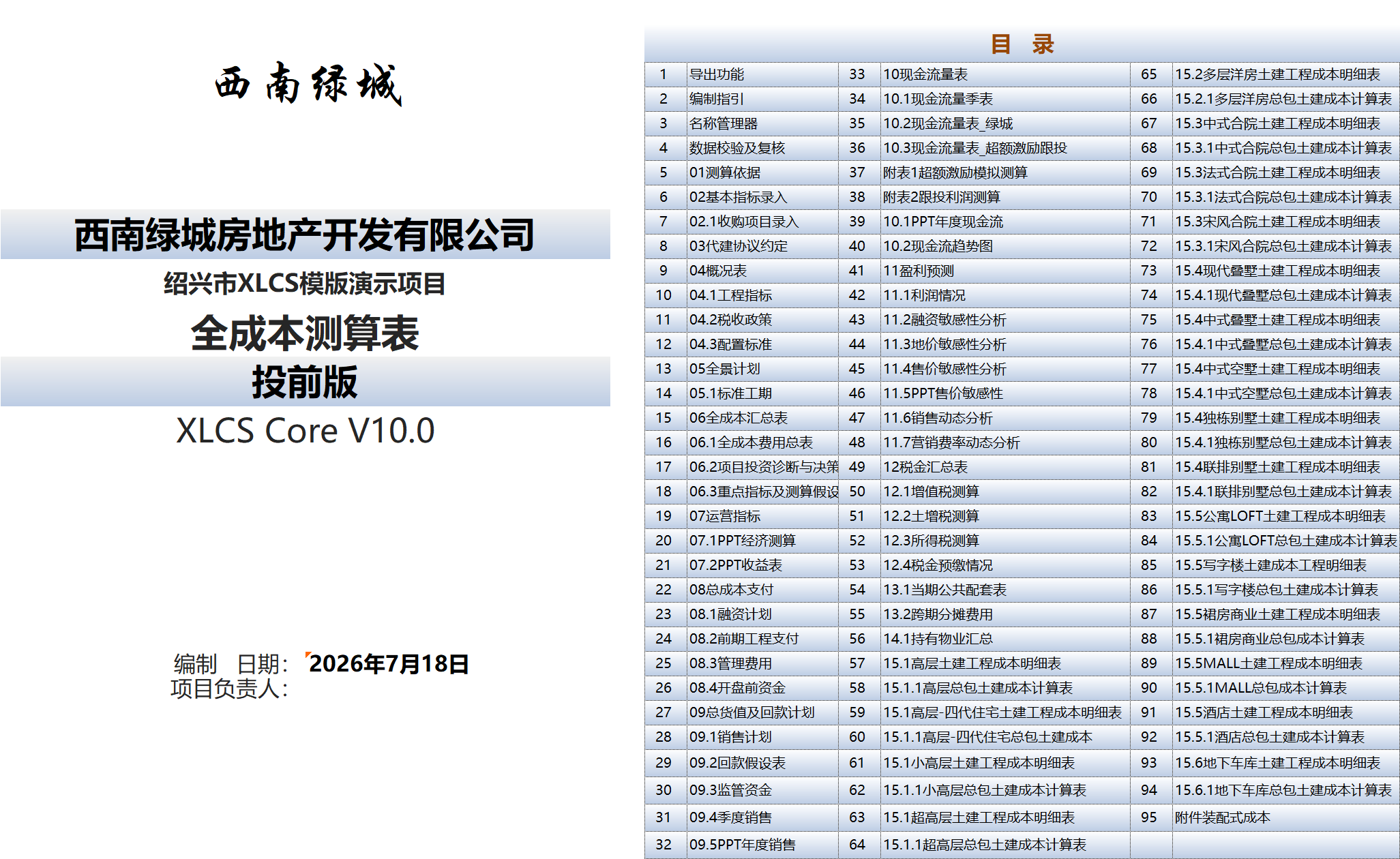
⑫ Improved V10 directory, function access points, and related deliverable display pages for easy navigation to core functions including investment diagnosis, sensitivity analysis, and risk scoring.
33. V10.1 Update 2026-07-24
① Added “Project Investment Assessment Report” export function, integrating automatic diagnosis, comprehensive scoring, investment rating, and decision-making recommendations from the investment diagnosis module, along with various data from the calculation template, to generate a consolidated PPT report.
XLCS PRO Version Update History
1. XLCS PRO V1.0 Update 2025-04-20
① XLCS PRO V1.0, with a completely new engine, designed for multi-plot, multi-phase LAT and VAT calculations.
② Added municipal infrastructure fee calculation with differentiated rates for air-raid shelter basements and non-air-raid shelter basements.
③ Added toggle for whether ancillary properties are allocated parking spaces.
④ Improved city database inclusion logic validation.
⑤ Fixed construction cost calculation logic bugs for finished products.
2. XLCS PRO V1.1 Update 2025-06-10
① XLCS PRO cumulative bug fixes and updates.
② Refined land transfer fee cell settings for output VAT calculation in the VAT calculation sheet.
③ Fixed commercial ancillary parking calculation bugs.
④ Fixed deed tax calculation logic, adding other land costs as calculation base.
⑤ Fixed VAT and LAT calculation logic for built-for-transfer product types.
⑥ Optimized VBA code for city name cleanup.
3. XLCS PRO V1.2 Update 2025-06-28
① Optimized validation and review sheet settings.
② Added payment months option after reaching funding advance milestones in Sheet 02, defaulting to one month after milestone.
③ Fixed selling price sensitivity analysis bugs.
④ Fixed construction schedule template definition range bugs.
4. XLCS PRO V1.3 Update 2025-08-01
① Optimized regulated fund VBA code, increasing regulated milestones to 12 for more complex regulatory requirements. Regulatory tiers adjusted to: total pre-sale proceeds, construction cost standard, period-end fund balance, and none.
② Optimized standard construction schedule sheet, adding custom schedule settings for PC prefabricated structure standard floor cycle, non-prefabricated structure standard floor cycle, structure topping-out to rough-fit completion cycle, additional cycle for finished vs. rough-fit completion, rough-fit completion to rough-fit delivery, rough-fit completion to finished delivery, etc.
③ Added display of automatically detected official website server response time in Sheet 02.
④ Added two custom payment milestones in the progress payment milestone table of Sheet 08.2.
⑤ Fixed LAT calculation logic and formulas for government-mandated built-for-transfer properties.
⑥ Fixed bug where VAT amounts for preliminary and construction costs in the LAT and full-cost sheets did not account for invoice receipt rates and conversion rates, aligning with VAT calculation sheet.
⑦ Optimized monthly progress payment allocation VBA code for faster, more accurate allocation.
⑧ Added time logic validation for the two custom payment milestones in Sheet 08.2.
⑨ Fixed VAT and deemed sales value calculation logic for held properties.
⑩ Optimized VBA code monitoring key indicators that trigger automatic monthly progress payment recalculation.
5. XLCS PRO V1.4 Update 2025-08-15
① Fixed formula errors in the pre-opening funding plan sheet.
② Refined profit-related cell logic in the 06 full-cost summary table, categorized into general accounting gross profit and Greentown-standard operating gross profit.
③ Optimized sales absorption VBA code in Sheet 02 — monthly unit absorption logic better aligned with real-world practice, with separate monthly absorption units for residential and commercial products.
④ Optimized financing sensitivity analysis VBA code for faster execution.
⑤ Optimized sales cycle and first opening validation formulas in the validation sheet.
⑥ Optimized management expense standard calculation logic with multiple personalized inputs and output displays.
⑦ Revised non-motorized parking unit calculation logic with separate ratio settings for residential, commercial, and ancillary uses.
⑧ Fixed product unit mix area verification formula errors.
⑨ Fixed secondary pop-up bug in VBA code for cell link error checking in the validation sheet.
6. XLCS PRO V1.5 Update 2025-12-25
① Fixed VBA code bug where city name changes failed to update.
② Fixed custom plot name bug in phase/plot LAT calculation sheet.
③ Fixed VAT component bug in the 06.1 full-cost expense sheet for construction costs.
④ Fixed construction cost value bug in the VAT calculation sheet.
⑤ Added out-of-red-line property management fee options in Sheet 02, plus sales incentive management fee options.
⑥ Added 11.6 Sales Dynamics Analysis sheet for dynamic analysis of opening timing adjustments, absorption rate/monthly absorption units/absorption cycle changes on key economic indicators (peak funding, peak timing, cash flow payback period, annual return on self-owned capital, IRR, NPV, etc.).
⑦ Added 11.7 Marketing Expense Ratio Dynamics Analysis sheet for dynamic analysis of different marketing expense ratios corresponding to different residential selling prices and their impact on key economic indicators (net profit, net profit margin, IRR, etc.).
⑧ Optimized file opening VBA code for faster execution, changing to single-prompt display of detection results.
⑨ Multiple display improvements: manually modified cells in Sheet 02 automatically highlight in blue; product type cells adapted in Sheets 04.1/04.3 automatically highlight in orange.
⑩ Fixed row 3 quick external link URL in Sheet 02 to automatically fetch the locally fastest server URL.
⑪ Added logic validation in the data validation and review sheet for correct rough-fit/finished selling price entry for corresponding products, with error prompts.
⑫ In Sheet 04.2 Tax Policy, the toggle for whether government-mandated built-for-transfer properties pay municipal infrastructure fees/land deed tax affects the full-cost summary table.
7. XLCS PRO V2.0 Update 2026-03-25
① Major product type architecture upgrade, addressing the previous limitation where the same product could not support multiple configuration standards.
② Added illegal plot name detection and error prompts in the data validation sheet.
③ Refined sales cycle, residential sales cycle, and other indicator definitions and source consistency.
④ Fixed Sheet 02 version check bug; fixed product tier auto-selection bug when entering the first product.
⑤ Added quarterly cash flow statement.
⑥ Fixed configuration standards bug where missing townhouse products caused construction indicator errors.
⑦ Fixed bugs in the file export function code.
⑧ Optimized parking sales absorption formula in Sheet 02 and added error validation.
8. XLCS PRO V2.1 Update 2026-04-08
① Optimized and rewrote multiple VBA code modules, fixing bugs and improving speed, including: unified financing loan interest calculation module, workbook external link check module, cross-sheet reference check module, Sheet 02 sales absorption module, sales dynamics analysis module, selling price sensitivity analysis module, land price sensitivity analysis module, template version/official website data update module, file export module, preliminary engineering payment plan module, regulated fund calculation module, and optimal network detection module.
9. XLCS PRO V2.2 Update 2026-04-23
① Completely rewrote product type/indicator VBA code, fixed major bugs; upgrade recommended.
② Fixed multiple bugs in the civil works/general contractor cost breakdown sheets.
③ Fixed multiple bugs in the configuration standards sheet.
④ Fixed bug where above-ground non-FAR area did not count toward development management fees and municipal infrastructure fees.
⑤ Fixed non-standard financing module freeze bug.
⑥ Optimized unit mix verification and unit count statistics formulas in Sheet 02.
⑦ Optimized and improved VBA code for automatic homepage generation, directory generation, and worksheet export.
10. XLCS PRO V2.3 Update 2026-06-04
① Completely rewrote Thisworkbook and non-standard financing VBA code, fixing bugs and improving execution speed.
② Added one-click unit mix area fine-tuning button in Sheet 02.
③ Completely rewrote official website node speed testing and city name validation VBA code, fixing bugs and adding one-click all-node speed testing and node switching shortcut buttons.
④ Integrated feature buttons with official website documentation, adding one-click access to official website pages and operation guides for related features within the template.
11. XLCS PRO V3.0 Update 2026-07-28
① Added “Project Investment Diagnosis and Decision-Making Suggestions” module, enabling automatic diagnosis, comprehensive scoring, investment rating, and decision-making recommendations for project investment outcomes.
② Added project basic information and core calculation version display area, centrally displaying key information including project name, city, FAR area, sellable area, total GTV, land price per floor area, first opening date, sales cycle, calculation version, city database status, data validation results, data credibility, etc.
③ Added investment rating and recommendations area, automatically outputting comprehensive score, investment rating, investment analysis conclusions, and optimization directions.
④ Added core indicators area, providing unified diagnosis of key indicators including data credibility, investment intensity, gross profit margin, net profit margin, return on investment, project NPV rate, after-tax IRR, land cost-to-GTV ratio, LAT burden rate, peak funding, cash flow payback period, residential sales cycle, overall sell-through velocity, 15-day post-opening contract signing rate, and three-expense ratios.
⑤ Core indicators area now displays current value, target value, favorable/unfavorable deviation, status, traffic light, and diagnostic explanation.
⑥ Added comprehensive analysis and recommendations area, automatically generating comprehensive scores, correlated indicators, ratings, and recommendation content.
⑦ Added sensitivity analysis summary area, linking land price sensitivity, selling price sensitivity, sales cycle stress testing, financing rate stress testing, etc., with the investment diagnosis module.
⑧ Added indicator tiered settings area, uniformly displaying red-line values, warning values, compliant values, excellent values, project values, industry benchmark reference standards, and source explanations.
⑨ Added risk scoring area, identifying and warning on decision-making basis, data credibility, capital safety, sales realization, tax risk, financing sensitivity, etc., with automatic generation of trigger reasons and optimization recommendations.
⑩ Added land price safety margin and other investment judgment indicators.
⑪ Optimized diagnostic conclusion presentation for rapid review by management and investment committees.
⑫ Improved V3 directory, function access points, and related deliverable display pages.
⑬ Rewrote all sensitivity analysis VBA modules and added stress testing code sections.
⑭ Added “Project Investment Assessment Report” export function.
XLCS Simple-Template Version Update History
1. V1 Update 2026-10-01
Included in XLCS6 package.
V6 download link:
Choose any download link, enter Access Password, and click the Download button in the upper right corner (refresh if the button does not appear).
2. V2 Update 2026-06-17
Included in the latest XLCS package.
XLCS Lite Version Update History
XLCS Lite V1 Update 2025-06-10
Included in XLCS7 package.
V7 download link:
Choose any download link, enter Access Password, and click the Download button in the upper right corner (refresh if the button does not appear).
XLCS Lite V2 Update 2026-06-10
Included in the latest XLCS package.
📁 Template Directory
Latest Full Compressed Package Directory for “XLCS Real Estate Project Full-Cost Calculation Template”
| No. | File Name |
|---|---|
| 1 | XLCS Full-Cost Calculation Template_Core V10.xlsm |
| 2 | XLCS PRO V3 Full-Cost Calculation Template_Multi-Plot.xlsm (dedicated for multi-plot use) |
| 3 | Single-Page Simple Calculation Template simple-template.xlsm |
| 4 | XLCS Lite-to-Core V1 Full-Cost Calculation Starter Edition |
| 5 | XLCS Template Upgrade Tool V1.xlsm |
| 6 | XLCS Real Estate Project Full-Cost Calculation Template User Manual.docx |
| 7 | XLCS Real Estate Project Full-Cost Calculation Template Quick Start.txt |
| 8 | Version Update Notes.txt |
| 9 | City Database User Guide.txt |
| 10 | Version Selection Guide.txt |
| 11 | wps.vba.rar (Required VBA plugin for WPS official free personal edition) |
📥 Latest Template Download Links
Choose any download link, enter Access Password, and click the Download button in the upper right corner (refresh if the button does not appear).
| Type | Link |
|---|---|
| Primary Download Link | http://fccs.cc/xiazaigengxin/120.html |
| Backup Download Link | http://fccsz.com/xiazaigengxin/120.html |
| Backup Download Link | http://cskits.com/posts/e79f33ad.html |
🌐 Official Website & Support
| Type | Link |
|---|---|
| Official Website | http://fccs.cc |
| Official Website | http://fckcs.cn |
| Official Website | http://fckcs.com |
| Official Website | http://fdc.sd |
| Official Website | http://fccsz.com |
| Official Website | http://cskits.com |
| Support & Suggestions | http://xlcs.de/ |
| Email Contact | [email protected] |
⚠️ Important Notes
Before refreshing the template file, ensure you have a stable internet connection; otherwise, full template functionality may not be available and calculation results may have errors!
The V10 “Project Investment Diagnosis and Decision-Making Suggestions” module is automatically generated based on current entered data, data validation results, and calculation outcomes. It is recommended to complete basic data entry, cloud database refresh, and data validation before use.
Before running VBA functions such as sensitivity analysis, investment diagnosis, and one-click export, it is recommended to save your file and wait for the status bar to show completion to avoid data conflicts from repeated clicks.
📷 Template Previews
XLCS — Making Full-Cost Calculation Smarter