XLCS Core Edition V10 Update
XLCS Real Estate Project Full-Cost Estimation Template – Core Edition (XLCS Core) V10 Update
📌 Quick Navigation
| Navigation | Link |
|---|---|
| ⚡️ Template Download | /categories/Template-Download/ |
| 📑 Version Matrix | /categories/Version-Matrix/ |
| 🚀 Quick Start Guide | /categories/Getting-Started/ |
| ❓ Changelog | /categories/Changelog/ |
| 🛠 Discussion & Help | https://xlcs.de/ |
📖 Product Description
XLCS Core Edition (XLCS Core V10) is officially released!
Building upon the core functionalities of XLCS Core V9—including product type architecture, automated estimation capabilities, cash flow forecasting, sensitivity analysis, financing calculations, and cost configuration standards—this V10 release introduces a major new feature: the “Project Investment Diagnostics & Decision Recommendations“ module.
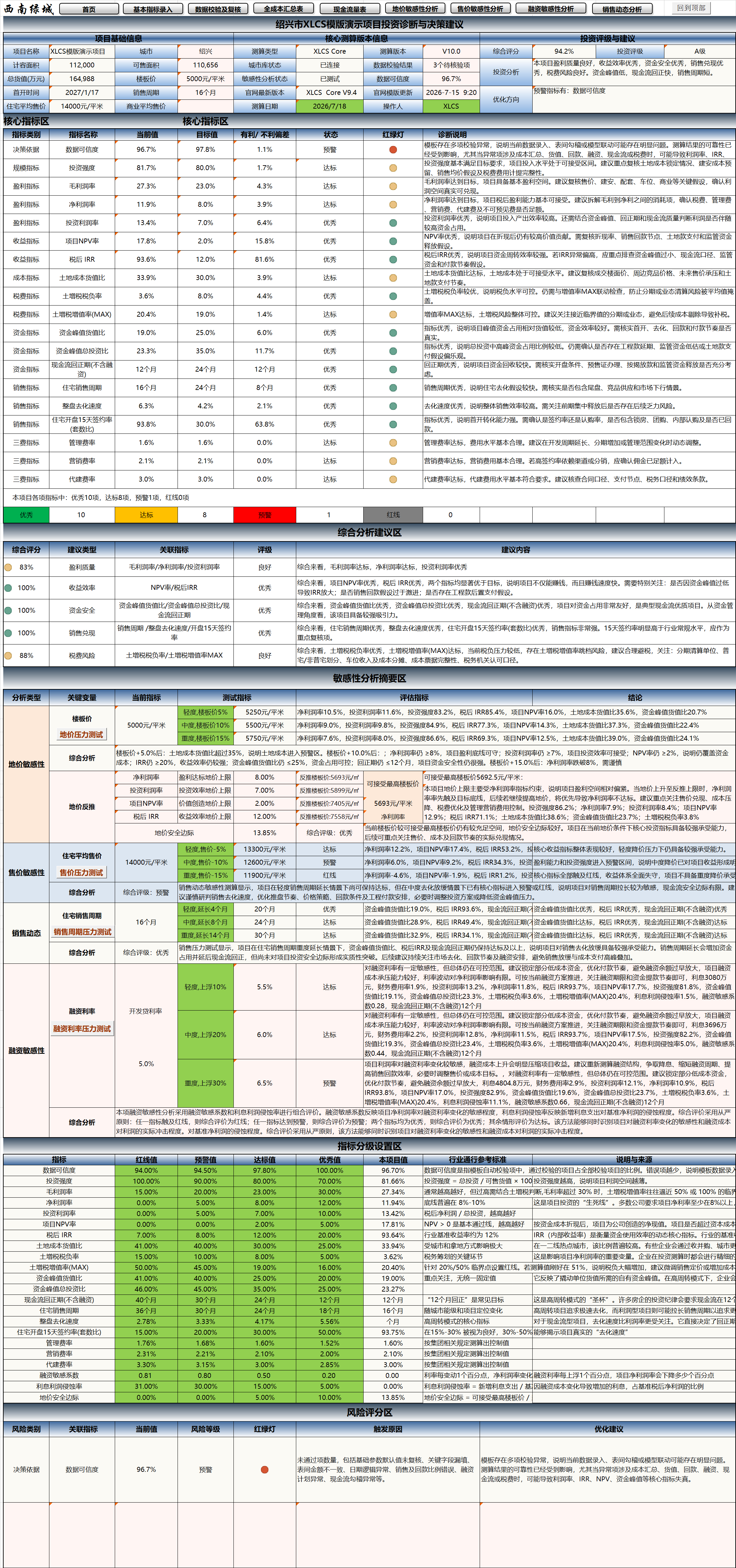
Designed for project investment decision-making scenarios, this module provides an integrated output covering project baseline information, core estimation results, indicator compliance status, risk identification, comprehensive scoring, and optimization recommendations. This enables the template not only to “calculate costs” but also to “diagnose projects, assess risks, and provide recommendations.”
Core upgrade direction of V10:
Evolves from a full-cost estimation tool into a project investment analysis tool capable of investment rating, risk warning, diagnostic analysis, and decision recommendation.
Starting from XLCS Core V8.2, to reduce version complexity and lower maintenance effort, we no longer distinguish between EXCEL and WPS versions—full compatibility is now provided.
🆕 V10 Core New Feature: Project Investment Diagnostics & Decision Recommendations
1. Automated Generation of Project Investment Diagnostic Results
The new investment diagnostics module in V10 automatically generates a complete investment analysis report based on the project’s underlying estimation data, including:
- Comprehensive project scoring
- Investment rating
- Core indicator compliance status
- Risk level identification
- Optimization recommendations
- Comprehensive analytical conclusions
The template automatically consolidates key project metrics—covering operations, profitability, funding, sales, and taxes—and produces readable conclusions tailored for decision-makers.
2. Comprehensive Upgrade of the Core Indicator Dashboard
A new Core Indicator Dashboard has been added to conduct item-by-item diagnostics on key project indicators, supporting:
- Automatic comparison of current values, target values, and variances
- Status identification: Compliant / Non-Compliant / Warning / Red-Line
- Traffic-light status indicators
- Auto-generated diagnostic descriptions for each indicator
Key indicators covered include:
- Data Credibility
- Investment Intensity
- Gross Profit Margin
- Net Profit Margin
- Return on Investment (ROI)
- Project NPV Rate
- After-Tax IRR
- Land Cost-to-GDV Ratio
- Land Appreciation Tax Burden Rate
- Land Appreciation Tax Appreciation Rate (MAX)
- Peak Funding-to-GDV Ratio
- Peak Funding-to-Total Investment Ratio
- Cash Flow Payback Period
- Residential Sales Cycle
- Overall Project Sell-Through Rate
- Residential 15-Day Post-Launch Contract Signing Rate
- Management Expense Ratio
- Marketing Expense Ratio
- Development Management Fee Ratio
- Financing Sensitivity Coefficient
- Interest Profit Erosion Rate
- Land Price Safety Margin
3. Comprehensive Analysis & Recommendation Section
A new Comprehensive Analysis & Recommendation Section provides an integrated assessment across multiple dimensions including investment, profitability, funding safety, sales realization, and tax risk, featuring:
- Comprehensive score display
- Recommendation type classification
- Associated indicator explanations
- Rating result presentation
- Auto-generated recommendation content
This section transforms discrete indicators into structured conclusions, helping users quickly grasp the project’s overall performance.
4. Indicator Grading Configuration Section
V10 introduces an Indicator Grading Configuration Section that uniformly displays for each indicator:
- Red-Line Value
- Warning Value
- Compliant Value
- Excellent Value
- Project Current Value
- Industry Benchmark Reference
- Description and Source
This enables users to understand the rationale behind each indicator’s evaluation and facilitates future extensibility based on project type, city tier, and management style.
5. Risk Scoring Section
A new Risk Scoring Section provides itemized risk diagnostics, supporting:
- Decision basis risk identification
- Funding safety risk identification
- Sales realization risk identification
- Tax risk identification
- Financing sensitivity risk identification
For each risk category, the system outputs:
- Current value
- Risk level
- Traffic-light status
- Triggering reasons
- Optimization recommendations
This elevates the template from mere “result presentation” to proactive “risk warning.”
6. Sensitivity Analysis & Investment Diagnostics Integration
V10 deeply integrates sensitivity analysis results with the investment diagnostics module, covering:
- Land price sensitivity
- Selling price sensitivity
- Sales cycle stress testing
- Financing rate sensitivity
Through stress testing, the system automatically assesses how the project performs under various adverse scenarios across:
- Gross profit margin changes
- Net profit margin changes
- ROI changes
- IRR changes
- NPV changes
- Peak funding changes
- Payback period changes
This makes it clear at a glance “under what conditions the project deteriorates, to what extent, and which metrics are hit first.”
7. Diagnostic Output Optimized for Management Decision-Making
V10’s output has been further refined from a traditional spreadsheet style to a structured presentation better suited for reporting and decision-making, emphasizing:
- Conclusion-first approach
- Clear risk communication
- Actionable recommendations
- Traceable indicator interpretations
- Diagnostic results that are report-ready, reviewable, and archivable
📅 Version Update History
XLCS Core V10 Update Log
1. V10.0 Update – 2026-07-18
① Added the “Project Investment Diagnostics & Decision Recommendations” module, enabling automated diagnostic output, comprehensive scoring, investment rating, and decision recommendations.
② Added a project baseline information and core estimation version display area, centrally showcasing key details such as project name, city, floor area ratio (FAR) capacity, saleable area, total GDV, land unit price, first launch date, sales cycle, estimation version, city database status, data validation results, and data credibility.
③ Added an investment rating and recommendation section that automatically outputs comprehensive scores, investment ratings, investment analysis conclusions, and optimization directions, facilitating rapid executive review and investment committee reporting.
④ Added a core indicator dashboard that performs unified diagnostics on key metrics including data credibility, investment intensity, gross margin, net margin, ROI, project NPV rate, after-tax IRR, land cost-to-GDV ratio, land appreciation tax burden rate, peak funding, cash flow payback period, residential sales cycle, overall project sell-through rate, 15-day post-launch signing rate, and the three major expense ratios.
⑤ The core indicator dashboard now displays current values, target values, favorable/unfavorable variances, status, traffic lights, and diagnostic descriptions, allowing for intuitive identification of whether each indicator is in Excellent, Compliant, Warning, or Red-Line status.
⑥ Added a comprehensive analysis and recommendation section that automatically generates integrated scores, associated indicators, ratings, and recommendations across dimensions such as profitability quality, return efficiency, funding safety, sales realization, and tax risk.
⑦ Added a sensitivity analysis summary area that links land price sensitivity, selling price sensitivity, sales cycle stress testing, and financing rate stress testing results with the investment diagnostics module, supporting assessment of project resilience under adverse scenarios.
⑧ Added an indicator grading configuration section that uniformly displays red-line values, warning values, compliant values, excellent values, current project values, industry benchmark references, and source descriptions, enabling users to understand the evaluation logic and facilitate future custom adjustments.
⑨ Added a risk scoring section that performs itemized identification and early warning for decision basis, data credibility, funding safety, sales realization, tax risk, and financing sensitivity, automatically generating trigger reasons and optimization recommendations.
⑩ Added investment judgment metrics such as land price safety margin to help users assess the headroom of core investment indicators under current land cost conditions.
⑪ Optimized the diagnostic conclusion presentation to make estimation outputs more accessible for rapid review by investment, cost, finance, marketing, and management teams, enhancing the template’s evolution from a “full-cost estimation tool” to an “investment diagnostic and decision-making tool.”
⑫ Refined the V10 version directory, feature entry points, and related output display pages to facilitate quick access to core functions such as investment diagnostics, sensitivity analysis, and risk scoring.
2. V10.1 Update (2026-07-24)
① Added the “Project Investment Assessment Report” export feature, which integrates the automated diagnostics, comprehensive scoring, investment rating, and decision-making recommendations from the “Project Investment Diagnosis and Decision-Making Suggestions” module, along with various data from the calculation template, to generate a consolidated PPT report.
📥 Latest Template Download Links
Select any download link below and click to enter the access password. Once the download page opens, click the Download button in the upper-right corner (refresh the page if the button does not appear).
📊 Data Services
| Item | Description |
|---|---|
| Latest Template File Update Time | |
| City Database Update Time | The cloud city database uses online updates via cloud connection; offline download is not available. |
📁 Template Directory
Complete Archive Contents – XLCS Real Estate Project Full-Cost Estimation Template (Latest Version)
| No. | File Name |
|---|---|
| 1 | XLCS Full-Cost Estimation Template_Core V10.xlsm |
| 2 | XLCS PRO V3 Full-Cost Estimation Template_Multi-Plot.xlsm (for multi-plot projects) |
| 3 | Single-Page Simple Estimation Template simple-template.xlsm |
| 4 | XLCS Lite-to-Core V1 Full-Cost Estimation Starter Edition |
| 5 | XLCS Template Upgrade Tool V1.xlsm |
| 6 | XLCS Real Estate Project Full-Cost Estimation Template User Manual.docx |
| 7 | XLCS Real Estate Project Full-Cost Estimation Template Quick Start.txt |
| 8 | Version Update Notes.txt |
| 9 | City Database User Guide.txt |
| 10 | Edition Selection Guide.txt |
| 11 | wps.vba.rar (Required VBA plugin for WPS free personal edition) |
🌐 Official Website & Support
| Type | Link |
|---|---|
| Official Website | http://fccs.cc |
| Official Website | http://fckcs.cn |
| Official Website | http://fckcs.com |
| Official Website | http://fdc.sd |
| Official Website | http://fccsz.com |
| Official Website | http://cskits.com |
| Support & Suggestions | http://xlcs.de/ |
| Email Contact | [email protected] |
⚠️ Important Notes
Ensure a stable network connection before refreshing the template file; otherwise, full functionality may not be available, and estimation results may be inaccurate.
The newly added “Project Investment Diagnostics & Decision Recommendations” module in V10 is automatically generated based on current input data, data validation results, and estimation outputs. It is recommended to complete data entry, cloud database refresh, and data validation/review before use.
Before running VBA features such as sensitivity analysis, investment diagnostics, and one-click export, it is advisable to save the file first and wait for the status bar completion prompt to avoid repeated clicks that may cause data conflicts.
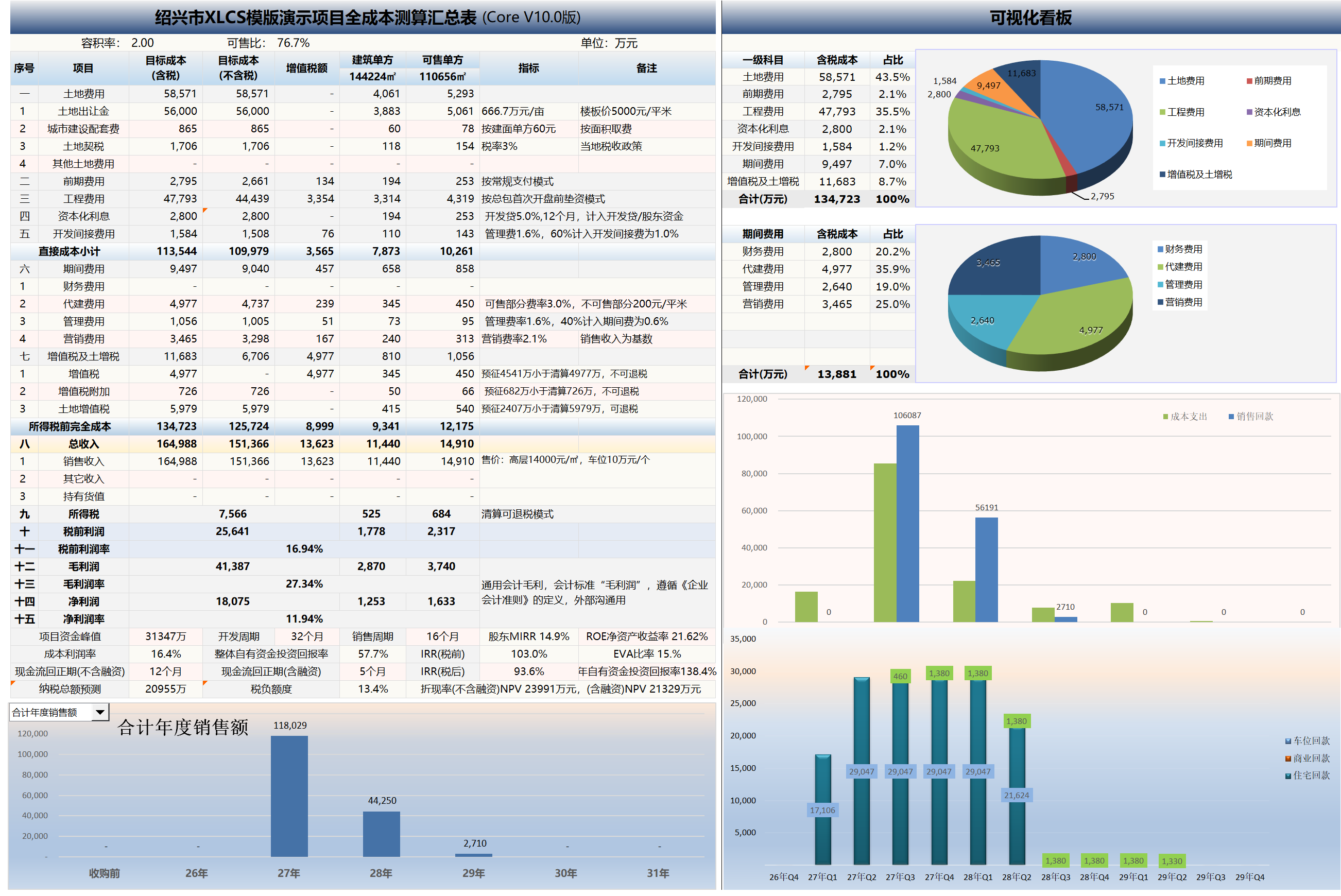
📷 Template Preview
XLCS — Making full-cost estimation smarter