
XLCS Real Estate Project Full-Cost Calculation Template – Multi-Plot Enhanced Edition (XLCS PRO V3)
XLCS Real Estate Project Full-Cost Calculation Template – Multi-Plot Enhanced Edition (XLCS PRO V3)
📌 Quick Navigation
| Navigation | Link |
|---|---|
| ⚡️ Template Download | /categories/Template-Download/ |
| 📑 Version Matrix | /categories/Version-Matrix/ |
| 🚀 Quick Start Guide | /categories/Getting-Started/ |
| ❓ Changelog | /categories/Changelog/ |
| 🛠 Discussion & Help | https://xlcs.de/ |
📖 Product Description
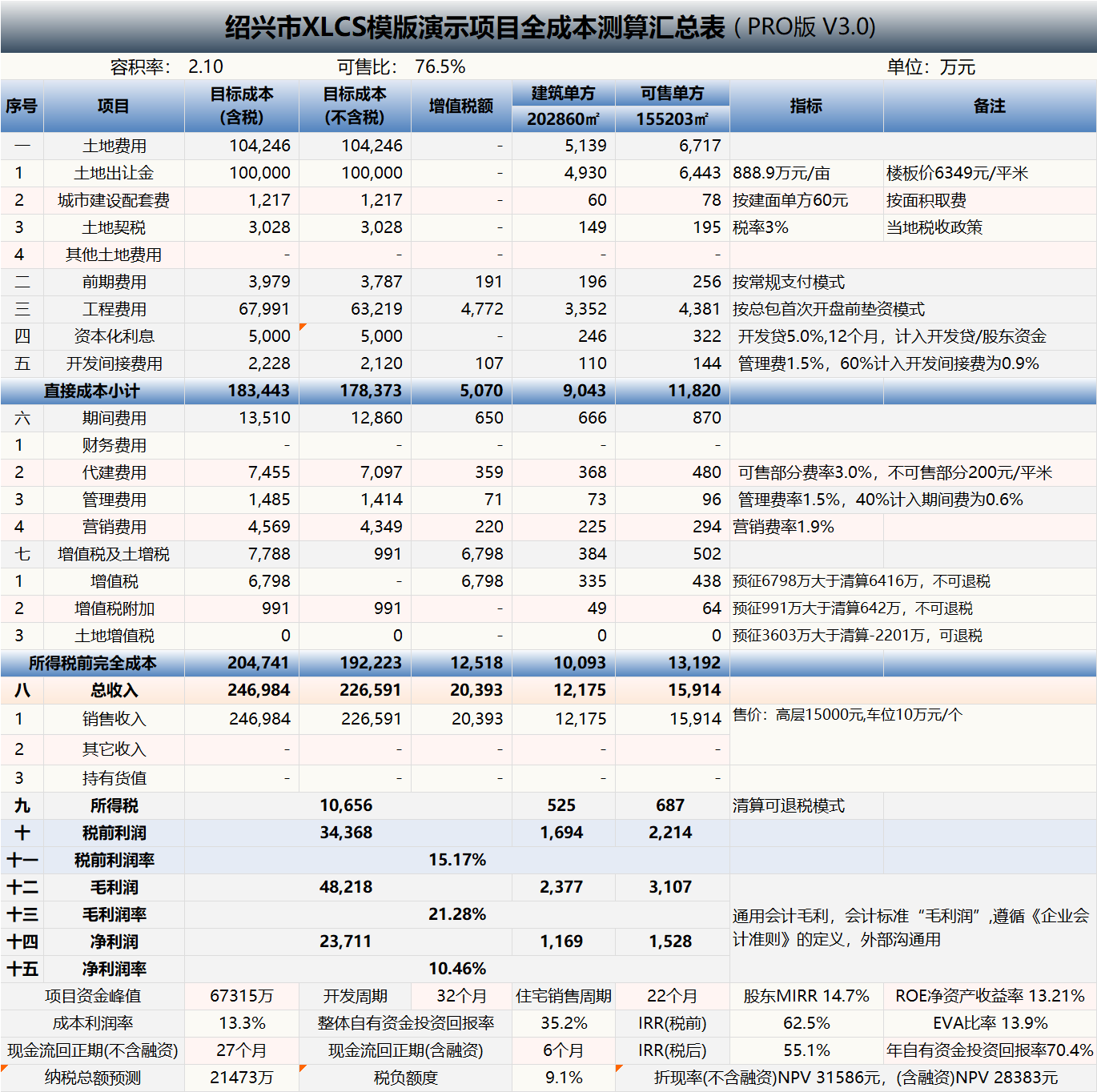
XLCS Multi-Plot Enhanced Edition (XLCS PRO V3) is designed for projects with multiple plots, multiple phases, and complex tax planning. Its core feature is the one-click generation of land appreciation tax (LAT) liquidation values under multiple modes, including overall liquidation, plot-by-plot liquidation, and phase-by-phase liquidation. Based on the selected liquidation mode, the results are automatically fed into the cash flow statement and full-cost summary table.
V3.0 Major Upgrade: XLCS PRO V3 has been comprehensively upgraded from a “full-cost calculation tool” to an “investment diagnosis and decision-making tool,” featuring 12+ core new functions including the Project Investment Diagnosis and Decision-Making Suggestions module, the Core Indicators Traffic Light Diagnosis System, Sensitivity Analysis Stress Testing, and One-Click Export of Assessment Reports, making the calculation results more suitable for rapid review by investment, cost, finance, marketing, and management teams, as well as for investment committee decision-making presentations.
V2.1 Upgrade introduced a major upgrade to the product type architecture, addressing the previous limitation where the same product type could not be configured with multiple standards (i.e., only one construction unit cost indicator per product type per project). After the upgrade, within the same project, for example, high-rise products can simultaneously support different tiers such as Yueju (J-tier), Anju (C-tier), etc. The template automatically adapts the corresponding configuration standards and preliminary/construction unit cost standards based on the product type and tier selected.
Compatibility Note: Since Core V8.2, the PRO version also achieves dual-platform compatibility with Excel / WPS, with no separate platform versions required.
🎯 Template Introduction
The XLCS Real Estate Project Full-Cost Calculation Template is developed based on the project expansion characteristics of Southwest Greentown, drawing on the strengths and features of full-cost calculation templates from major developers such as Greentown, Sunac, Country Garden, Jinke, Zhongliang, Zhangtai, and others. It integrates Greentown’s product-type configuration standards and preset conditions of typical projects.
Simply input the project’s key and location-specific parameters, and the template automatically outputs a full suite of construction, sales, financing, tax, cash flow, and operational tables. What would normally take cost professionals several days with coordination from engineering/sales/finance departments for dynamic full-cost calculations of real estate projects can be significantly shortened with XLCS. The full template contains over 90 worksheets, covering all static/dynamic calculation and analysis charts for real estate project estimation.
Core Difference Between PRO and Core Editions: The PRO edition is specifically designed for multi-plot, multi-phase projects, supporting one-click generation of land appreciation tax liquidation values under multiple modes and complex allocation logic, making it particularly suitable for tax liquidation unit planning at the front end of development.
✨ V3 New Core Features (Investment Diagnosis & Decision-Making Upgrade)
🧭 Module 1: Project Investment Diagnosis and Decision-Making Suggestions
| Function Module | Description |
|---|---|
| Project Information Display Area | Centralized display of key project information including project name, city, floor area ratio (FAR) area, sellable area, total GTV (Gross Transaction Value), land price per floor area, first opening date, sales cycle, calculation version, city database status, data validation results, data credibility, etc. |
| Investment Rating & Recommendations Area | Automatically outputs comprehensive score, investment rating, investment analysis conclusions, and optimization directions, facilitating quick review by management and investment committee decision-making presentations. |
| Core Indicators Diagnosis Area | Unified diagnosis of key indicators including data credibility, investment intensity, gross profit margin, net profit margin, return on investment, project NPV rate, after-tax IRR, land cost-to-GTV ratio, LAT burden rate, peak funding, cash flow payback period, residential sales cycle, overall sell-through velocity, 15-day post-opening contract signing rate, and three-expense ratios. |
| Traffic Light Status Display | Each indicator simultaneously displays current value, target value, favorable/unfavorable deviation, status, traffic light, and diagnostic explanation, allowing intuitive judgment of whether each indicator is at excellent, compliant, warning, or red-line status. |
| Comprehensive Analysis & Recommendations Area | Automatically generates comprehensive scores, correlated indicators, ratings, and recommendation content across dimensions such as profitability quality, return efficiency, capital safety, sales realization, and tax risk. |
| Indicator Tiered Settings Area | Unified display of red-line values, warning values, compliant values, excellent values, project values, industry benchmark reference standards, and source explanations, facilitating user understanding of indicator judgment logic and future custom adjustments. |
| Risk Scoring Area | Identifies and issues warnings on decision-making basis, data credibility, capital safety, sales realization, tax risk, financing sensitivity, etc., and automatically generates trigger reasons and optimization recommendations. |
| Land Price Safety Margin | Newly added land price safety margin and other investment judgment indicators to help users assess the buffer space of core project investment indicators under current land price conditions. |
📊 Module 2: Sensitivity Analysis Stress Testing Upgrade
| Function Module | Description |
|---|---|
| Sensitivity Analysis Summary Area | Links results from land price sensitivity, selling price sensitivity, sales cycle stress testing, financing rate stress testing, etc., with the investment diagnosis module to assist in judging the project’s resilience under adverse scenarios. |
| VBA Stress Testing Module | Comprehensive rewrite of all sensitivity analysis VBA modules, with newly added stress testing code sections, supporting quantitative assessment of project resilience under extreme scenarios. |
📄 Module 3: Output Upgrade
| Function Module | Description |
|---|---|
| One-Click Export Assessment Report | New “Project Investment Assessment Report” export function, integrating automatic diagnosis, comprehensive scoring, investment rating, and decision-making recommendations from the investment diagnosis and decision-making suggestions module, along with various data from the calculation template, to generate a consolidated PPT report. |
✨ Core Feature: One-Click Generation of Land Appreciation Tax Liquidation Values Under Multiple Modes
| Liquidation Mode | Description |
|---|---|
| Overall Liquidation | Unified LAT liquidation across all plots and phases |
| Plot-by-Plot Liquidation | LAT calculation performed separately for each plot |
| Phase-by-Phase Liquidation | LAT calculation performed separately for each phase |
Key Advantages:
- Based on the selected LAT liquidation mode, liquidation results automatically flow into the cash flow statement and full-cost summary table
- By setting different phase combinations for multi-plot, multi-phase projects, users can view corresponding phase/plot LAT liquidation values in real time, quickly identifying optimal phase-based tax planning combinations
- This feature is particularly suitable for tax liquidation unit planning at the front end of development. However, in practice, users must ensure that phase combinations comply with national and local tax policies and are acceptable to the competent tax authorities.
🎨 Template Features
| Feature Category | Description |
|---|---|
| Investment Diagnosis & Decision-Making | V3 new Project Investment Diagnosis and Decision-Making Suggestions module, automatically outputting comprehensive score, investment rating, traffic light diagnosis, risk score, and optimization recommendations, achieving a comprehensive upgrade from “calculation tool” to “decision-making tool.” |
| Stress Testing Analysis | V3 comprehensive rewrite of sensitivity analysis VBA modules, with new stress testing code, supporting multi-dimensional stress scenario diagnosis linked to land price, selling price, sales cycle, financing rate, etc. |
| One-Click Report Export | V3 new One-Click Export “Project Investment Assessment Report” function, integrating diagnostic results and calculation data to automatically generate PPT presentation deliverables. |
| Multi-Plot, Multi-Phase Support | Supports complex project structures with up to 5 plots, each with up to 5 phases, and each phase with up to 20 batches, with automatic cross-phase and cross-plot cost allocation. |
| Multi-Mode LAT Liquidation | Supports three liquidation modes: overall, plot-by-plot, and phase-by-phase, with one-click generation of liquidation values and automatic feed into cash flow. |
| Multi-Tier Product Configuration | Since V2.1, supports multiple configuration standards for the same product type (e.g., high-rise can simultaneously support J/C/W/S/T tiers), with automatic adaptation of construction indicators. |
| Cloud Database Auto-Matching | Automatically connects to the cloud database upon city name entry, loading default values for municipal infrastructure fees, tax parameters, planning requirements, green building policies, etc. |
| Automated Construction Schedule Generation | Automatically selects a 5–12 month pre-sale construction schedule template based on city tier, product type, maximum floor count of the first opening zone, and pre-sale image milestone requirements. |
| Automated Construction Payment Allocation | VBA module supports node ratios processed on a cumulative basis, automatic consolidation of same-month nodes, and automatic even distribution of cross-month node differences. |
| Four Sales Absorption Modes | Supports four modes: default, by absorption rate, by months, and by unit count. Each product can be independently configured, with separate monthly absorption unit counts for residential and commercial products. |
| Multi-Dimensional Sensitivity Analysis | Supports sensitivity analysis across selling price, land price, financing methods, sales dynamics, marketing expense ratios, etc., with one-click scenario comparison generation. |
| Data Validation & Review | Automatically checks cross-sheet relationships, link errors, sales cycle anomalies, selling price input anomalies, tax logic anomalies, etc., and provides modification recommendations. |
| One-Click Export of Deliverables | Select worksheets to export, automatically generating standalone .xlsx deliverables without formulas or macros, suitable for external reporting. |
⚙️ Major Functions Overview
| Function Module | Description |
|---|---|
| Project Investment Diagnosis | V3 new: automatic diagnosis, comprehensive scoring, investment rating, traffic light status, risk scoring, land price safety margin, and optimization recommendations. |
| Sensitivity Stress Testing | V3 new: comprehensive rewrite of VBA modules with new stress testing code, linked with investment diagnosis module to display resilience under adverse scenarios. |
| One-Click Export Assessment Report | V3 new: integrates diagnostic results and calculation data to automatically generate PPT presentation deliverables. |
| Land Cost Calculation | Supports automatic allocation of land costs across multiple plots, with automatic calculation of allocated land costs based on each product’s site area. |
| Construction & Engineering Costs | Automatically generates construction costs based on product type, configuration tier, and city tier, with support for prefabrication rate cost increments. |
| Sales & Collection Plan | Automatically generates monthly/quarterly/annual sales plans and collection plans, with support for regulated fund release by milestone. |
| Financing Plan | Supports development loans, front-end financing, and non-standard financing, each with up to 5 drawdown tranches, with automatic monthly interest calculation. |
| Tax Calculation | Automatically generates VAT, surcharges, LAT (distinguishing standard/non-standard residential), corporate income tax, and deed tax calculation tables. |
| Cash Flow Analysis | Automatically generates monthly/quarterly/annual cash flow statements and trend charts, outputting peak funding, payback period, IRR, NPV, and other indicators. |
| Held-for-Investment Property Calculation | Automatically generates economic calculations for held properties based on preset operating templates. |
| Acquisition Projects | Supports entry of pre-acquisition capital expenditures and pre-sold unit revenue, automatically incorporated into model calculations. |
| Development Management Fee Calculation | Automatically calculates management fees, incentive fees, and sales incentive management fees for sellable/non-sellable properties based on the management agreement. |
| Excess Incentive & Co-Investment | Built-in excess incentive and co-investment calculation tables for internal project company incentive analysis. |
📅 Version Update History
XLCS PRO V3.0 Update (2026-07-28)
① Added the “Project Investment Diagnosis and Decision-Making Suggestions” module, enabling automatic diagnosis, comprehensive scoring, investment rating, and decision-making recommendations for project investment outcomes.
② Added project basic information and core calculation version display area, centrally displaying key information including project name, city, FAR area, sellable area, total GTV, land price per floor area, first opening date, sales cycle, calculation version, city database status, data validation results, data credibility, etc.
③ Added investment rating and recommendations area, automatically outputting comprehensive score, investment rating, investment analysis conclusions, and optimization directions for quick management review and investment committee presentations.
④ Added core indicators area, providing unified diagnosis of key indicators including data credibility, investment intensity, gross profit margin, net profit margin, return on investment, project NPV rate, after-tax IRR, land cost-to-GTV ratio, LAT burden rate, peak funding, cash flow payback period, residential sales cycle, overall sell-through velocity, 15-day post-opening contract signing rate, and three-expense ratios.
⑤ Core indicators area now displays current value, target value, favorable/unfavorable deviation, status, traffic light, and diagnostic explanation, enabling intuitive judgment of whether indicators are at excellent, compliant, warning, or red-line status.
⑥ Added comprehensive analysis and recommendations area, automatically generating comprehensive scores, correlated indicators, ratings, and recommendation content across dimensions including profitability quality, return efficiency, capital safety, sales realization, and tax risk.
⑦ Added sensitivity analysis summary area, linking land price sensitivity, selling price sensitivity, sales cycle stress testing, financing rate stress testing, etc., with the investment diagnosis module to assist in judging the project’s resilience under adverse scenarios.
⑧ Added indicator tiered settings area, uniformly displaying red-line values, warning values, compliant values, excellent values, project values, industry benchmark reference standards, and source explanations for user understanding and future customization.
⑨ Added risk scoring area, identifying and warning on decision-making basis, data credibility, capital safety, sales realization, tax risk, financing sensitivity, etc., with automatic generation of trigger reasons and optimization recommendations.
⑩ Added land price safety margin and other investment judgment indicators to help users assess buffer space of core investment indicators under current land price conditions.
⑪ Optimized the presentation of diagnostic conclusions, making calculation outcomes more suitable for rapid review by investment, cost, finance, marketing, and management teams, enhancing the template’s upgrade from “full-cost calculation tool” to “investment diagnosis and decision-making tool.”
⑫ Improved V3 version directory, function access points, and related deliverable display pages for easy navigation to core functions including investment diagnosis, sensitivity analysis, and risk scoring.
⑬ Rewrote all sensitivity analysis VBA modules and added stress testing code sections.
⑭ Added the “Project Investment Assessment Report” export function, integrating automatic diagnosis, comprehensive scoring, investment rating, and decision-making recommendations from the “Project Investment Diagnosis and Decision-Making Suggestions” module, along with various data from the calculation template, to generate a consolidated PPT report.
XLCS PRO V2.3 Update (2026-06-04)
① Completely rewrote Thisworkbook and non-standard financing related VBA code, fixed bugs, and improved execution speed.
② Added one-click unit mix area fine-tuning button in Sheet 02: VBA code automatically adjusts individual unit areas based on input total product design area to ensure aggregated values are consistent.
③ Completely rewrote VBA code for official website node speed testing and city name validation, fixed bugs, and added one-click all-node speed testing and node switching shortcut buttons.
④ Integrated feature buttons with official website documentation, adding one-click access to official website pages and operation guides for related features within the template.
XLCS PRO V2.2 Update (2026-04-23)
① Completely rewrote VBA code related to product types/indicators, fixed major bugs; upgrade recommended.
② Fixed multiple bugs in the civil works/general contractor cost breakdown tables.
③ Fixed multiple bugs in the configuration standards table.
④ Fixed bug where above-ground non-FAR area was not counted in development management fees and municipal infrastructure fees.
⑤ Fixed non-standard financing module freeze bug.
⑥ Optimized formulas for unit mix verification and unit count statistics in Sheet 02.
⑦ Optimized and improved VBA code for automatic homepage generation, automatic directory generation, and worksheet export.
XLCS PRO V2.1 Update (2026-04-08)
① Optimized and rewrote multiple VBA code modules, fixed bugs, and improved execution speed, including: unified financing loan interest calculation module, workbook external link check module, cross-sheet reference check module, sales absorption module, sales dynamics analysis module, selling price/land price sensitivity analysis module, version/official website data update module, file export module, preliminary engineering payment plan module, regulated fund calculation module, and optimal network detection module.
XLCS PRO V2.0 Update (2026-03-25)
① Major structural upgrade to product type architecture: addressed the previous limitation where the same product could not support multiple configuration standards, with automatic adaptation of construction indicators based on product name and tier.
② Added illegal plot name detection and error prompts in the data review and validation sheet.
③ Refined indicator definitions and source consistency for sales cycle, residential sales cycle, etc.
④ Fixed Sheet 02 version check bug and product tier auto-selection bug.
⑤ Added quarterly cash flow statement.
⑥ Fixed configuration standards bug where missing townhouse products caused construction indicator errors.
⑦ Fixed bugs in the file export function code.
⑧ Optimized the ratio formula for parking sales absorption plans in Sheet 02 and added error validation.
XLCS PRO V1.5 Update (2025-12-25)
① Fixed VBA code bug where city name changes failed to update.
② Fixed custom plot name bug in phase/plot LAT calculation sheet.
③ Fixed VAT component bug in the 06.1 full-cost expense sheet for construction costs.
④ Fixed construction cost value bug in the VAT calculation sheet.
⑤ Added out-of-red-line property development management fee options in Sheet 02, and added sales incentive development management fee options.
⑥ Added 11.6 Sales Dynamics Analysis sheet: dynamic analysis of the impact of changes in opening timing, absorption rate/monthly absorption units/absorption cycle on peak funding, peak timing, cash flow payback period, annual return on self-owned capital, IRR, NPV, etc.
⑦ Added 11.7 Marketing Expense Ratio Dynamics Analysis sheet: dynamic analysis of the impact of different marketing expense ratios corresponding to different residential selling prices on net profit, net profit margin, IRR, etc.
⑧ Optimized file opening VBA code, improved execution speed, and changed to single-prompt display of detection results.
⑨ Multiple display detail improvements: cells manually modified by users in Sheet 02 automatically highlighted in blue; product type cells adapted in Sheets 04.1/04.3 automatically highlighted in orange.
⑩ Fixed row 3 quick external link URL in Sheet 02 to automatically fetch the locally fastest server URL.
⑪ Added logic validation in the data review and validation sheet for correct entry of corresponding selling prices for rough-fit/finished products.
⑫ In 04.2 Tax Policy, the toggle for government-mandated built-for-transfer properties regarding municipal infrastructure fees/land deed tax affects the full-cost summary table.
XLCS PRO V1.4 Update (2025-08-15)
① Fixed formula errors in the pre-opening funding plan sheet.
② Refined profit-related cell logic in the 06 full-cost summary table, categorized into general accounting gross profit and Greentown-standard operating gross profit.
③ Optimized VBA code in Sheet 02 for sales absorption plans, with monthly unit absorption logic better aligned with practice, separately configuring monthly absorption units for residential and commercial products.
④ Optimized financing sensitivity analysis VBA code for faster execution.
⑤ Optimized formulas in the validation sheet related to sales cycle and first opening verification.
⑥ Optimized management expense standard calculation logic, with multiple personalized input options and output displays in Sheet 02.
⑦ Revised non-motorized parking unit calculation logic, with separate ratio settings for residential, commercial, and ancillary uses.
⑧ Fixed product unit mix area verification formula errors.
⑨ Fixed secondary pop-up bug in the VBA code for cell link error checking in the validation sheet.
XLCS PRO V1.3 Update (2025-08-01)
① Optimized VBA code for the regulated fund sheet, increasing regulated milestones to 12 to accommodate more complex regulatory requirements. Regulatory tiers adjusted to: total pre-sale proceeds, construction cost standard, period-end fund balance, and none.
② Optimized standard construction schedule sheet, adding custom schedule settings for PC prefabricated structure standard floor cycle, non-prefabricated structure standard floor cycle, structure topping-out to rough-fit completion cycle, and additional cycle for finished vs. rough-fit completion.
③ Sheet 02 now displays automatically detected and connected official website server response time.
④ Added two custom payment milestones in the progress payment milestone table within the 08.2 preliminary engineering payment sheet.
⑤ Fixed LAT calculation logic related to government-mandated built-for-transfer properties in the LAT calculation sheet.
⑥ Fixed bug in the LAT and full-cost expense sheets where VAT amounts for preliminary and construction costs did not account for invoice receipt rates and conversion rates.
⑦ Optimized VBA code for monthly progress payment allocation in the preliminary engineering payment sheet.
⑧ Added time logic validation for custom payment milestones to prevent later milestone payment ratios from being less than earlier milestone ratios.
⑨ Fixed calculation logic for VAT and deemed sales GTV when held properties exist.
⑩ Optimized VBA code monitoring key indicators that trigger automatic recalculation of monthly progress payments to avoid frequent automatic recalculations.
XLCS PRO V1.2 Update (2025-06-28)
① Optimized validation and review sheet settings.
② Sheet 02 added option for payment months after reaching the advance funding milestone, defaulting to one month after reaching the milestone.
③ Fixed selling price sensitivity analysis bugs.
④ Fixed construction schedule template definition range bugs.
XLCS PRO V1.1 Update (2025-06-10)
① XLCS PRO cumulative bug fixes and updates.
② Refined cell settings in the VAT calculation sheet for land transfer fees eligible for input into output VAT calculation.
③ Fixed commercial ancillary parking calculation bugs.
④ Fixed deed tax calculation logic, adding other land costs as calculation base.
⑤ Fixed VAT and LAT calculation logic for built-for-transfer product types.
⑥ Optimized VBA code for city name cleanup.
XLCS PRO V1.0 Update (2025-04-20)
① XLCS PRO V1.0 release, with a completely new core engine, designed for multi-plot, multi-phase LAT and VAT calculations.
② Added municipal infrastructure fee calculation with differentiated rates for air-raid shelter basements and non-air-raid shelter basements.
③ Added toggle for whether ancillary properties are allocated parking spaces, allowing users to independently choose planning conditions for parking allocation to ancillary properties.
④ Improved city database inclusion logic validation.
⑤ Fixed construction cost calculation logic bugs for finished products.
📊 Data Services
| Item | Description |
|---|---|
| Latest Template File Update Date | |
| City Database File Update Date | Cloud city database uses online updates with cloud connectivity; download not available at this time. |
📥 Latest Version Download Links
Choose any download link, enter the Access Password, and click the Download button in the upper right corner of the download page (refresh if the button does not appear).
| Type | Link |
|---|---|
| Primary Download Link | http://fccs.cc/xiazaigengxin/120.html |
| Backup Download Link | http://fccsz.com/xiazaigengxin/120.html |
| Backup Download Link | http://cskits.com/posts/e79f33ad.html |
📁 Template Directory
Latest Full Compressed Package Directory for “XLCS Real Estate Project Full-Cost Calculation Template”
| No. | File Name |
|---|---|
| 1 | XLCS Full-Cost Calculation Template_Core V10.xlsm |
| 2 | XLCS PRO V3 Full-Cost Calculation Template_Multi-Plot.xlsm (dedicated for multi-plot use) |
| 3 | Single-Page Simple Calculation Template simple-template.xlsm |
| 4 | XLCS Lite-to-Core V1 Full-Cost Calculation Starter Edition |
| 5 | XLCS Template Upgrade Tool V1.xlsm |
| 6 | XLCS Real Estate Project Full-Cost Calculation Template User Manual.docx |
| 7 | XLCS Real Estate Project Full-Cost Calculation Template Quick Start.txt |
| 8 | Version Update Notes.txt |
| 9 | City Database User Guide.txt |
| 10 | Version Selection Guide.txt |
| 11 | wps.vba.rar (Required VBA plugin for WPS official free personal edition) |
🌐 Official Website & Support
| Type | Link |
|---|---|
| Official Website | http://fccs.cc |
| Official Website | http://fckcs.cn |
| Official Website | http://fckcs.com |
| Official Website | http://fdc.sd |
| Official Website | http://fccsz.com |
| Official Website | http://cskits.com |
| Support & Suggestions | http://xlcs.de/ |
| Email Contact | [email protected] |
⚠️ Important Notes
Before refreshing the template file, updating the cloud database, or repairing cloud connections, ensure you have a stable internet connection; otherwise, city database data may fail to update, affecting calculation results!
Before running VBA functions (such as sensitivity analysis, stress testing, LAT liquidation mode switching, one-click report export), it is recommended to save your file first and wait for the status bar to show completion to avoid data conflicts from repeated clicks.
PRO Edition Special Reminder: When conducting phase-based tax planning comparisons, ensure that the phase combinations you set comply with national and local tax policies and are acceptable to the competent tax authorities.
📷 Template Previews
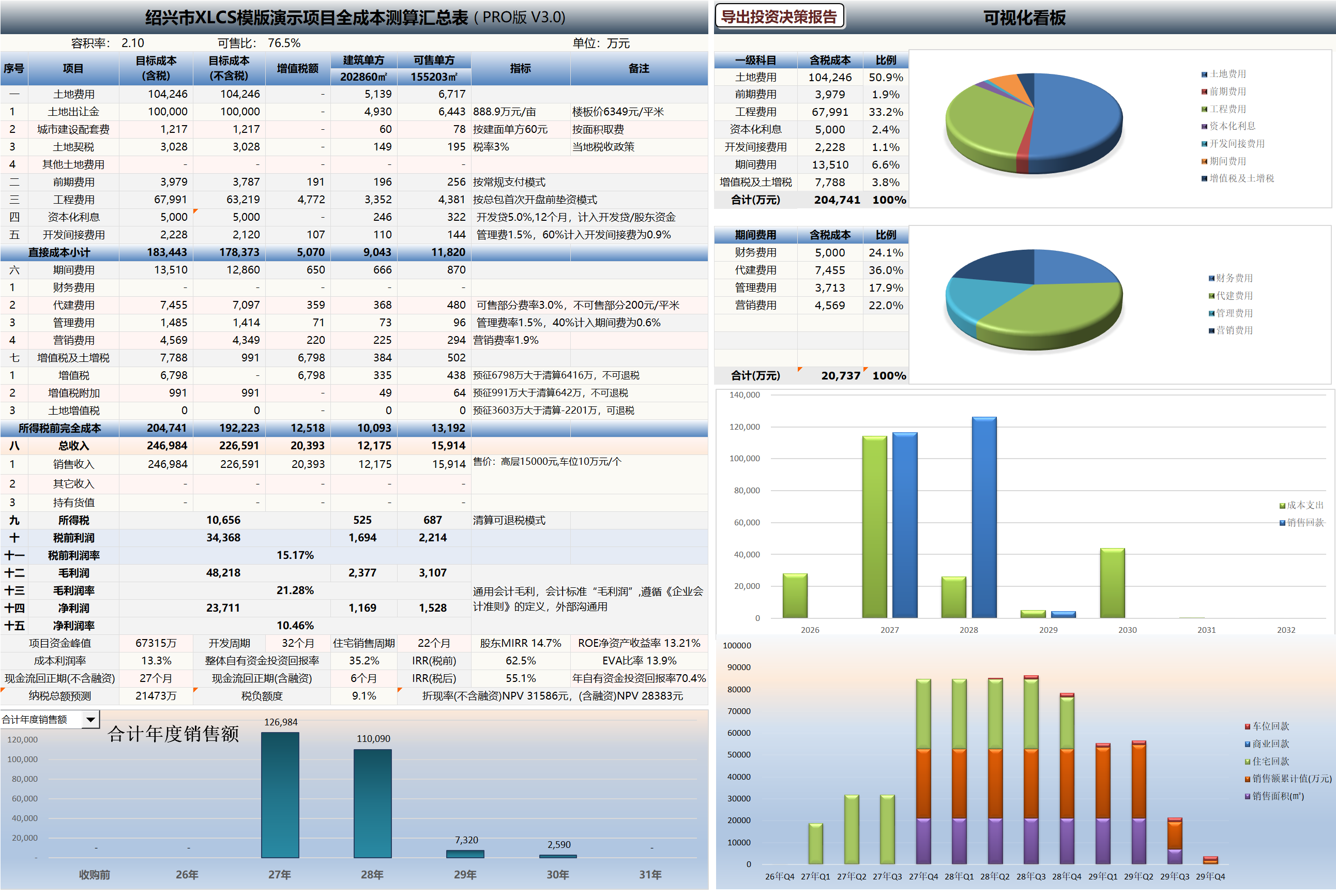
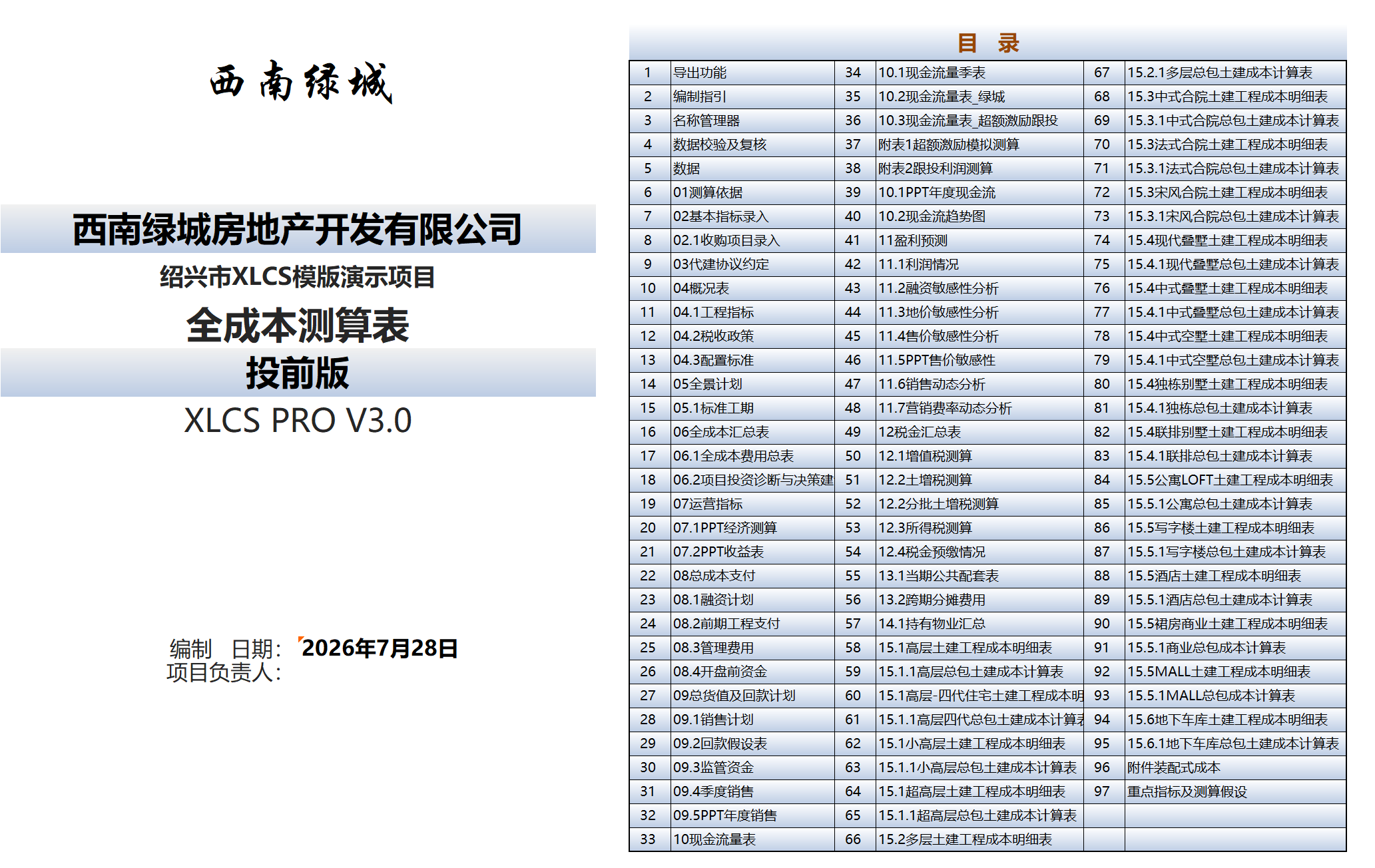
XLCS — Making Full-Cost Calculation Smarter