
XLCS Real Estate Full Cost Calculation Template - Non-Standard Financing Module Introduction
XLCS Real Estate Project Full-Cost Calculation Template — Non-Standard Financing Module Introduction
The Non-Standard Financing Module is a core component of the XLCS full-cost calculation template, specifically designed to handle non-standardized financing needs in real estate development and similar projects. The module automatically calculates financing requirements, dynamically manages the loan pool, intelligently handles early repayments and maturing loan rollovers, providing full-lifecycle automated support for project fund management.
Through multiple iterations of optimization, it has now reached production-ready status, delivering exceptional performance and high stability.
📌 Core Features at a Glance
| Feature | Description |
|---|---|
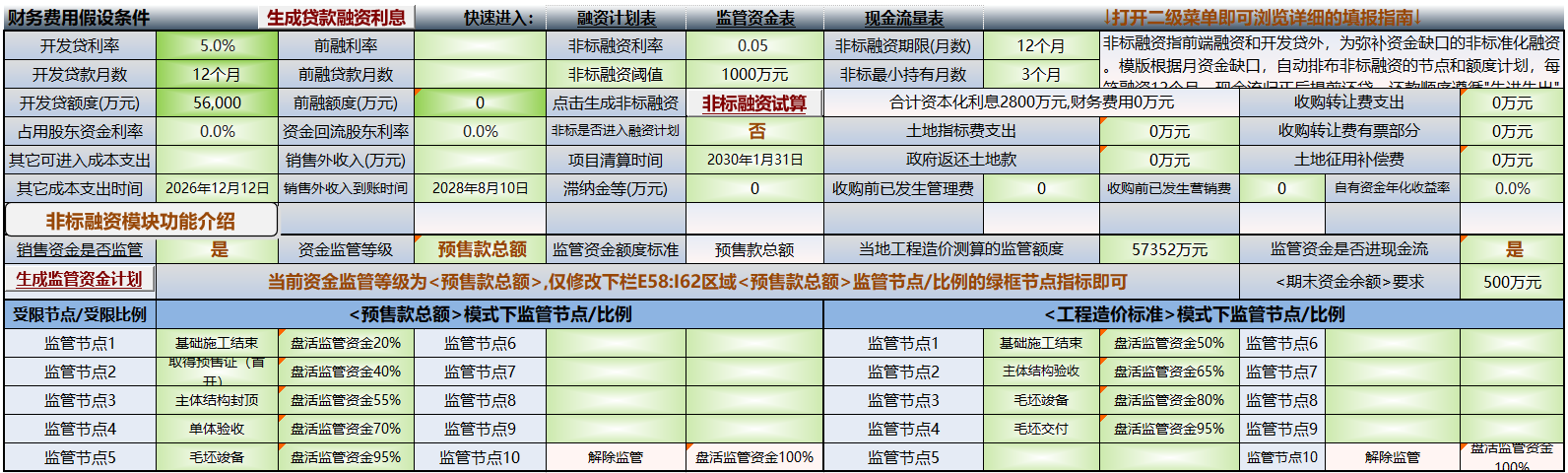
| Intelligent Financing Trigger | Automatically monitors cash flow gaps and dynamically calculates financing needs |
| Dynamic Repayment Mechanism | Real-time calculation of repayable amounts with intelligent early repayment |
| Minimum Holding Period Protection | Early repayment only allowed after loans reach the minimum holding period |
| Automatic Maturity Rollover | Automatically repays maturing loans and initiates rollover when balance is negative |
| Liquidation Month Concentrated Repayment | One-time full repayment of all outstanding principal in a specified month |
| Dual-Environment Compatibility | Perfectly compatible with MS Office / WPS office software |
⚙️ Parameter Setup Guide
Required Parameters
| Parameter Location | Format Requirement | Example Value | Description |
|---|---|---|---|
Cell R1 |
Decimal percentage | 0.08 | Annual interest rate 8% |
Cell V1 |
Integer | 12 | Loan term (months) |
Cell X1 |
Integer | 3 | Minimum holding period (months) |
Cell T1 |
Numeric value (10,000 RMB) | 5000 | Financing trigger threshold |
Optional Configuration (Name Manager)
| Name | Purpose | Default Value |
|---|---|---|
| LandCost | Financing total cap | 80,000 (10,000 RMB) |
| LiquidationMonth | Mandatory liquidation month | 0 (disabled) |
🚀 Operation Workflow
Step 1: Data Preparation
Ensure the 10 Cash Flow Statement worksheet exists, with cash flow data continuously entered starting from cell G21.
Step 2: Parameter Configuration
Enter parameters directly in the corresponding worksheet cells:
- R1: Annual interest rate (e.g., 0.08 for 8%)
- V1: Loan term (months)
- X1: Minimum holding period (months)
- T1: Financing trigger threshold (10,000 RMB)
Step 3: Execute Calculation
Click the “One-Click Generate Non-Standard Financing” button or run the macro CalculateNonStandardLoan, and observe the real-time progress in the status bar.
Step 4: Review Results
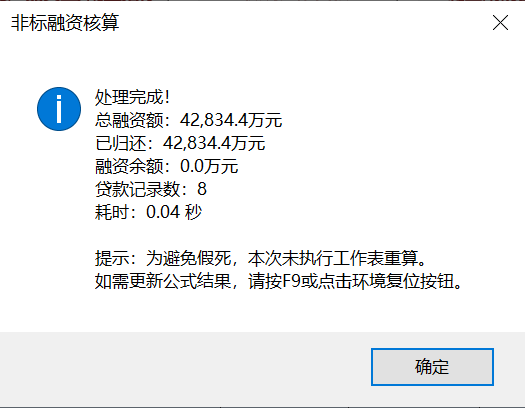
Upon completion, a summary dialog box will appear displaying:
- Total financing amount
- Total repaid amount
- Remaining financing balance
- Number of loan records
📊 Output Results
| Output Location | Data Content | Sign Convention |
|---|---|---|
| Row 31 | New financing amount | Positive = cash inflow |
| Row 32 | Principal repayment | Negative = cash outflow |
| Row 33 | Interest payment | Negative = cash outflow |
🔍 Detailed Functionality
1. Intelligent Financing Trigger
Automatically triggers a loan when the cumulative cash balance is negative and the absolute value exceeds the threshold T1.
Loan Amount Calculation:
Loan Amount = Absolute value of current funding gap × 1.2 (20% buffer for safety), but capped at LandCost − Current Loan Balance (available credit line).
2. Three-Tier Repayment Mechanism
| Repayment Type | Trigger Condition | Description |
|---|---|---|
| Normal Maturity Repayment | Loan maturity date | One-time full repayment of remaining principal |
| Early Repayment | Positive monthly balance and minimum holding period satisfied | System calculates “safe repayment amount” and repays early on a FIFO basis |
| Liquidation Month Mandatory Repayment | Reaches specified liquidation month | One-time full repayment of all outstanding principal, regardless of minimum holding period |
💡 Forward-Looking Logic: The module looks ahead at cash flows for the next 6 months and calculates the Safe Repayment Amount = Current Balance + Minimum Cumulative Shortfall over the Next 6 Months. Early repayment is only executed within this amount when the Safe Repayment Amount > 0, ensuring that “repaying today won’t leave you short tomorrow.”
3. Automatic Maturity Rollover
When a loan matures and its principal is repaid, if the monthly cash balance remains negative, the module automatically initiates a rollover:
- Rollover amount = Absolute value of funding gap after maturity repayment × 1.2
- Rollover term matches the original loan term
- Not subject to the regular financing trigger threshold T1
- If a rollover occurs in a given month, no additional regular new loan will be triggered (prevents duplicate financing)
- All rollovers cease after the liquidation month
4. Minimum Holding Period Protection
After a loan is issued, early repayment is not allowed within X1 months (normal maturity repayment is not restricted). This ensures financing stability and prevents frequent short-term fund churn.
📅 Version Evolution
| Version | Key Improvements |
|---|---|
| v11.x | Linear traversal algorithm with lazy skip of cleared loans; microsecond-level processing speed |
| v10.x | Revised early repayment logic with real-time forward-looking judgment |
| v9.x | Moved maturity processing before early repayment to ensure maturing loans are definitely repaid |
| v8.x | Environment recovery optimization to prevent full workbook recalculation freezes |
Current Version: v11.1 Production-Ready
🔧 Debugging Tips
In the Immediate Window (Ctrl+G), you can access:
- Detailed loan issuance/repayment records
- Liquidation event trigger logs
- Funding gap analysis data
- Active status of each loan
💡 Frequently Asked Questions
Q: Why does the module sometimes not make early repayments even when cash is sufficient?
A: There may be two reasons: ① The minimum holding period has not been reached; ② The system intelligently determines that a funding gap will occur within the next 6 months and decides to hold off on repayment.
Q: What is the difference between the liquidation month and normal maturity?
A: Normal maturity only repays a specific loan; the liquidation month repays all outstanding loan principal at once, without term or holding period restrictions.
Q: How many loans can be managed simultaneously?
A: The loan pool has an initial capacity of 64 loans and can be dynamically expanded, fully meeting project requirements.
Q: Does it work properly in WPS?
A: Fully compatible. The module automatically detects the WPS environment and adjusts runtime parameters accordingly.
⚠️ Important Notes
- Interest rates must be entered in decimal format (8% → 0.08)
- If “LandCost” is not set, the default cap is 800 million RMB
- Setting Liquidation Month to 0 disables this feature
- It is recommended to back up your data before the first run
- The loan pool has an initial capacity of 64 loans and can be dynamically expanded
📞 Technical Support
Official Website:
Support & Suggestions: http://xlcs.de/
Email Contact: [email protected]
📷 Module Display

XLCS — Making Full-Cost Calculation Smarter